Einführung
This manual provides essential information for the setup, operation, and maintenance of your Humanscale eFloat Go Desk. The eFloat Go is an electric height-adjustable table designed to promote active working by allowing seamless transitions between sitting and standing positions.
It features innovative anti-collision technology, quiet motors, and a programmable hand switch for personalized height settings.
Sicherheitshinweise
Please read all safety instructions before assembly and operation. Failure to do so may result in injury or damage to the product.
- Die maximale Tragfähigkeit dieses Schreibtisches beträgt 250 PfundDiese Grenze darf nicht überschritten werden.
- Ensure all cables are properly managed to prevent tripping hazards or entanglement during height adjustments.
- Keep hands and objects clear of moving parts during operation to avoid pinching or crushing.
- The desk is equipped with anti-collision technology, but always exercise caution.
- Assembly requires careful attention to instructions. It is recommended that at least one person is available for assembly.
Aufstellen
The Humanscale eFloat Go Desk is designed for quick assembly, typically taking under 5 minutes. Follow the detailed assembly instructions provided in the packaging. Ensure all components are present before beginning.
Auspacken und Inspektion
- Öffnen Sie die Verpackung vorsichtig und entnehmen Sie alle Komponenten.
- Verify that all parts listed in the assembly guide are included and undamaged.
- Legen Sie die Bauteile auf eine weiche, saubere Unterlage, um Kratzer während der Montage zu vermeiden.
Montageschritte
- Attach the desk legs to the tabletop using the provided hardware. Ensure all screws are tightened securely.
- Connect the motor cables according to the diagram in the assembly guide.
- Mount the programmable hand switch to the underside of the desk in a convenient location.
- Stecken Sie das Netzkabel in eine geerdete Steckdose.
- Perform an initial test run to ensure smooth operation.

Figure 1: Desk Dimensions. This image illustrates the overall dimensions of the eFloat Go Desk, including its depth, width, and height, which are crucial for planning your workspace.
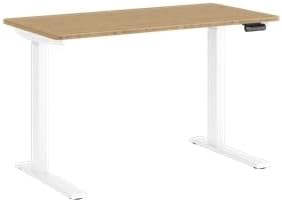
Figure 2: Assembled Desk. This image shows the fully assembled Humanscale eFloat Go Desk, highlighting its white base and bamboo top, ready for use in an office or home environment.
Bedienungsanleitung
The eFloat Go Desk features an intuitive programmable hand switch for easy height adjustments.
Grundlegende Bedienung
- Um den Schreibtisch anzuheben, drücken und halten Sie die Taste Pfeil nach oben Taste.
- Um den Schreibtisch abzusenken, drücken und halten Sie die Taste Pfeil runter Taste.
- Lassen Sie den Knopf in der gewünschten Höhe los.
Programming Height Presets
The hand switch allows you to save up to three preferred height settings.
- Adjust the desk to your desired height for the first preset.
- Drücken Sie die 'M' Taste (Speicher). Im Display erscheint „S-“.
- Within 3 seconds, press the desired preset number button ('1', '2', oder '3'Auf dem Display wird „S-1“, „S-2“ oder „S-3“ angezeigt, um die Einstellung zu bestätigen.
- Repeat for other desired height presets.
Voreinstellungen abrufen
To move the desk to a saved height, simply press the corresponding preset number button ('1', '2', oder '3'Der Schreibtisch passt sich automatisch der gespeicherten Position an.

Abbildung 3: Bedienfeld. Diese Abbildung bietet eine detaillierte Ansicht. view of the desk's control panel, showing the buttons for height adjustment and memory presets.
Wartung
Regular maintenance ensures the longevity and optimal performance of your eFloat Go Desk.
- Reinigung: Wipe the desk surfaces with a dry cloth or a damp Tuch. Vermeiden Sie Scheuermittel oder aggressive Chemikalien, die die Oberfläche beschädigen könnten.
- Kabelmanagement: Überprüfen und ordnen Sie die Kabel regelmäßig, um ein Verheddern oder eine Behinderung der Bewegung des Schreibtisches zu vermeiden.
- Überprüfung der Befestigungselemente: Every few months, inspect all screws and fasteners to ensure they remain tight. Retighten if necessary.
- Motorpflege: The desk's motors are designed for quiet operation and require no special lubrication. If you notice unusual noises, refer to the troubleshooting section.
Fehlerbehebung
If you encounter issues with your eFloat Go Desk, refer to the following common problems and solutions.
| Problem | Mögliche Ursache | Lösung |
|---|---|---|
| Der Schreibtisch bewegt sich nicht. | Power cord unplugged; circuit breaker tripped; motor overload. | Check power connection. Reset circuit breaker. Unplug for 30 minutes, then retry. |
| Der Schreibtisch wackelt ungleichmäßig oder macht ungewöhnliche Geräusche. | Loose fasteners; obstruction; uneven weight distribution. | Check and tighten all fasteners. Remove any obstructions. Redistribute weight evenly on the tabletop. |
| Die Höhenvoreinstellungen funktionieren nicht. | Presets not properly saved; power interruption. | Reprogram the height presets following the "Programming Height Presets" section. |
| Die Antikollisionsfunktion wird zu oft ausgelöst. | Sensitive setting; minor obstruction. | Ensure no objects are near the desk's path. Consult Humanscale support for sensitivity adjustment if needed. |
If the problem persists after attempting these solutions, please contact Humanscale customer support.
Technische Daten
Key technical specifications for the Humanscale eFloat Go Desk:
- Modellnummer: FTR2448BM_FG1224DW
- Produktabmessungen (T x B x H): 23"T x 46"B x 26.5"H
- Obere Größe: 23" Depth x 46" Width
- Farbe: White on Bamboo
- Grundmaterial: Metall
- Obermaterial: Bambus
- Besonderheit: Electric Height-Adjustable
- Artikelgewicht: 150 Pfund
- Maximale Gewicht Empfehlung: 250 Pfund
- Erforderliche Montage: Ja
Garantieinformationen
The Humanscale eFloat Go Desk is backed by a comprehensive warranty to ensure your peace of mind.
- Garantiezeit: 10-Year, 24/7 Humanscale Warranty.
- Diese Garantie deckt Material- und Verarbeitungsfehler bei normalem Gebrauch ab.
- For full warranty terms and conditions, please refer to the warranty card included with your product or visit the official Humanscale webWebsite.
Kundenservice
For further assistance, technical support, or warranty claims, please contact Humanscale customer service.
- Humanscale Official WebWebsite: www.humanscale.com
- Refer to the product packaging or the Humanscale webAuf dieser Website finden Sie spezifische Telefonnummern oder E-Mail-Adressen für Ihre Region.


