Einführung
Thank you for choosing the Havit Gaming Mouse MS955. This optical gaming mouse features a USB interface, adjustable DPI settings, and RGB backlighting, designed to enhance your gaming experience. This manual provides essential information for setting up, operating, and maintaining your mouse.
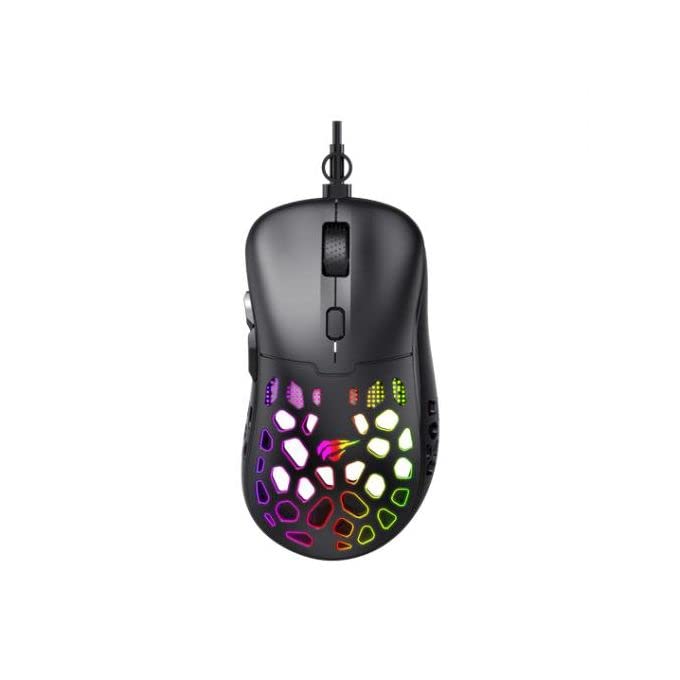
Bild: Draufsicht view of the Havit Gaming Mouse MS955, showcasing its ergonomic design and vibrant RGB lighting through the honeycomb shell.
Aufstellen
- Maus auspacken: Carefully remove the Havit Gaming Mouse MS955 from its packaging.
- Mit Computer verbinden: Locate an available USB port on your computer. Insert the USB connector of the mouse into the USB port.
- Treiberinstallation: Die Maus ist sofort einsatzbereit (Plug-and-Play). Ihr Betriebssystem (Windows XP, Windows 7, Linux usw.) erkennt und installiert die benötigten Treiber automatisch. Für die grundlegende Funktionalität ist in der Regel keine zusätzliche Softwareinstallation erforderlich.
- Testfunktionalität: Sobald die Verbindung hergestellt ist, bewegen Sie die Maus und klicken Sie auf die Schaltflächen, um sicherzustellen, dass sie ordnungsgemäß funktioniert.
Bedienungsanleitung
The Havit Gaming Mouse MS955 features 6 programmable buttons and adjustable DPI settings for precise control.

Abbildung: Seite view of the Havit Gaming Mouse MS955, highlighting the left-side buttons and scroll wheel.
- Linksklick-Taste: Primary button for selection and interaction.
- Rechtsklick-Schaltfläche: Secondary button for context menus and alternative actions.
- Scrollrad: Wird zum Durchblättern von Dokumenten verwendet und web Seiten. Es fungiert auch als anklickbarer mittlerer Button.
- DPI-Einstelltaste: Located behind the scroll wheel. Press this button to cycle through different DPI sensitivity levels (800-1200-2400-3200 DPI). Each press changes the sensitivity, allowing you to adapt to various gaming or work scenarios.
- Seitentasten: Two buttons are located on the left side of the mouse. These are typically used for 'forward' and 'backward' navigation in web Browser oder können für Aktionen im Spiel programmiert werden.
RGB-Beleuchtung
The Havit Gaming Mouse MS955 features an integrated RGB backlight system. The lighting effects are typically automatic and may change with DPI settings or cycle through various colors. There are no dedicated buttons for controlling the RGB lighting directly on the mouse.
Wartung
- Reinigung: To clean the mouse, disconnect it from your computer. Use a soft, dry cloth to wipe the surface. For stubborn dirt, a slightly damp cloth can be used, ensuring no liquid enters the mouse. Do not use harsh chemicals or abrasive cleaners.
- Lagerung: Bewahren Sie die Maus in einer sauberen, trockenen Umgebung fern von extremen Temperaturen und direkter Sonneneinstrahlung auf.
- Kabelpflege: Um Beschädigungen zu vermeiden, sollte das USB-Kabel nicht übermäßig gebogen oder verdreht werden.
Fehlerbehebung
- Maus reagiert nicht:
- Stellen Sie sicher, dass das USB-Kabel fest an einen funktionierenden USB-Anschluss Ihres Computers angeschlossen ist.
- Versuchen Sie, die Maus an einen anderen USB-Anschluss anzuschließen.
- Starten Sie Ihren Computer neu.
- DPI ändert sich nicht:
- Press the DPI button firmly. Ensure you are pressing the correct button.
- The mouse cycles through fixed DPI settings; there is no visual indicator other than cursor speed change.
- RGB-Lichter funktionieren nicht:
- Verify the mouse is properly connected to your computer.
- The RGB lighting is automatic; if the mouse is functioning otherwise, the lighting should also be active.
Technische Daten
| Besonderheit | Detail |
|---|---|
| Marke | Havit |
| Modell | MS955 |
| Schnittstellentyp | USB |
| Maße | 115.2 x 63 x 37.6 mm |
| Anzahl der Schlüssel | 6 |
| Chipsatz | NST5311 |
| DPI Resolution | 800-1200-2400-3200 DPI |
| Betriebslautstärketage | 5V |
| Lebensdauer des Schlüssels | 3,000,000 Klicks |
| Kabellänge | 1.5 m |
| Bewegungserkennung | Optisch |
| Handausrichtung | Rechts |
| Empfohlene Verwendung | Spiele |
| Betriebssysteme | Linux, Windows 7, Windows XP |
| Farbe | Schwarz |
Garantie und Support
For warranty information or technical support, please refer to the documentation included with your purchase or visit the official Havit webBewahren Sie Ihren Kaufbeleg für Garantieansprüche auf.


