1. Einleitung
Thank you for choosing the SPC Magnes 3 WiFi Surveillance Camera. This manual provides essential information for the proper installation, operation, and maintenance of your device. Please read this manual thoroughly before using the product to ensure optimal performance and safety.
The SPC Magnes 3 is a versatile security camera designed for both indoor and outdoor use, featuring a long-lasting rechargeable battery, high-definition video, night vision, motion detection, and two-way audio communication.
2. Produktüberschreitungview
The SPC Magnes 3 camera is designed for ease of use and robust performance. Below are key components and features.
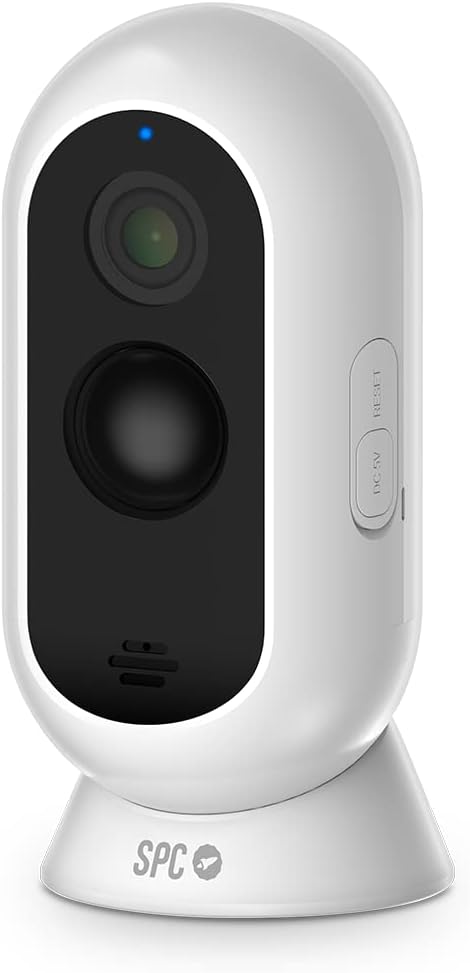
Abbildung 2.1: Front view of the SPC Magnes 3 camera, showing the lens, infrared sensors, and microphone. A blue indicator light is visible at the top.

Abbildung 2.2: Zurück view of the SPC Magnes 3 camera, highlighting the speaker grille and the DC 5V charging port, along with the reset button.

Abbildung 2.3: The SPC Magnes 3 camera positioned next to a smartphone, illustrating the live view and control options available through the SPC IoT mobile application.

Abbildung 2.4: The SPC Magnes 3 camera being attached to its magnetic wall mount, demonstrating the ease of installation and removal.
Enthaltene Komponenten:
- SPC Magnes 3 Camera
- Wandhalterung
- Magnethalter
- Kurzanleitung
- USB-Kabel
3. Einrichtung
3.1 Aufladen der Kamera
Before initial use, fully charge the SPC Magnes 3 camera. Connect the provided USB cable to the DC 5V port on the camera and plug the other end into a compatible USB power adapter (not included). The indicator light will show charging status.
3.2 Installing the SPC IoT App
- Laden Sie die SPC IoT application from the Google Play Store (for Android) or the Apple App Store (for iOS).
- Installieren Sie die Anwendung auf Ihrem Smartphone oder Tablet.
- Öffnen Sie die App und erstellen Sie ein Konto oder melden Sie sich an, falls Sie bereits eines haben.
3.3 Koppeln der Kamera mit der App
- Stellen Sie sicher, dass Ihre Kamera aufgeladen und eingeschaltet ist.
- In the SPC IoT app, tap on 'Add Device' or the '+' icon.
- Select 'Security Camera' or the appropriate device type.
- Follow the on-screen instructions to connect the camera to your 2.4GHz Wi-Fi network. You may need to scan a QR code displayed on your phone with the camera lens.
- Sobald die Verbindung hergestellt ist, erscheint die Kamera in der Geräteliste der App.
3.4 Montage der Kamera
The SPC Magnes 3 can be placed on a flat surface using its magnetic base or mounted to a wall or ceiling.
- Platzierung der Tischplatte: Simply place the camera on any stable, flat surface. The magnetic base provides stability.
- Wand-/Deckenmontage:
- Choose a suitable location, ensuring good Wi-Fi signal strength.
- Use the provided wall mount as a template to mark drill holes.
- Bohren Sie Löcher und setzen Sie bei Bedarf Dübel ein.
- Secure the wall mount to the surface using screws.
- Attach the camera to the magnetic holder on the wall mount. Adjust the camera angle as needed.
The camera is IP65 waterproof, making it suitable for outdoor installation where it may be exposed to rain.
4. Bedienung
4.1 Live View
Open the SPC IoT app and select your SPC Magnes 3 camera from the device list to access the live video feed. You can view Echtzeit footage von überall mit Internetverbindung.
4.2 Zwei-Wege-Audio
Die Kamera verfügt über ein eingebautes Mikrofon und einen Lautsprecher für die Zwei-Wege-Audiokommunikation. Im Live-Modus view, tap the microphone icon to speak through the camera and the speaker icon to listen to audio from the camera's location.
4.3 Bewegungserkennung und Benachrichtigungen
The SPC Magnes 3 is equipped with motion detection. When motion is detected, the camera will automatically record and send an instant notification to your smartphone via the SPC IoT app. You can adjust motion sensitivity settings within the app.
4.4 Nachtsicht
The camera automatically switches to infrared (IR) night vision in low-light conditions, providing clear black-and-white video up to 10 meters away. This ensures continuous monitoring even in complete darkness.
4.5 Aufzeichnung und Speicherung
The camera supports local storage via a microSD card (not included) for continuous recording or event-triggered recordings. Cloud storage options may also be available through the SPC IoT app (subscription may be required).
5. Wartung
5.1 Batteriemanagement
The 9600 mAh rechargeable battery provides up to 3 months of operation, depending on usage frequency and Wi-Fi signal quality. When the battery level is low, the app will notify you. To recharge, detach the camera from its mount and connect it to a USB power source using the provided cable.
5.2 Reinigung
To maintain optimal image quality, regularly clean the camera lens with a soft, dry, lint-free cloth. Do not use harsh chemicals or abrasive materials.
5.3 Firmware-Updates
Periodically check the SPC IoT app for available firmware updates. Keeping your camera's firmware updated ensures the latest features, security enhancements, and bug fixes.
6. Fehlerbehebung
| Problem | Mögliche Ursache | Lösung |
|---|---|---|
| Kamera stellt keine Verbindung zum WLAN her | Falsches WLAN-Passwort; Kamera zu weit vom Router entfernt; Nur 5-GHz-WLAN verfügbar. | Passwort überprüfen; Kamera näher an den Router heranrücken; Sicherstellen, dass Sie mit einem 2.4-GHz-WLAN-Netzwerk verbunden sind. |
| Schlechte Bildqualität | Dirty lens; Insufficient lighting; Poor Wi-Fi signal. | Clean the lens; Ensure adequate lighting or rely on night vision; Improve Wi-Fi signal. |
| Der Akku entlädt sich schnell | Frequent motion detection events; Weak Wi-Fi signal; Continuous live view. | Adjust motion sensitivity; Improve Wi-Fi signal; Minimize continuous live viewing. |
| Keine Benachrichtigungen bei Bewegungserkennung | Motion detection disabled; App notifications blocked; Incorrect sensitivity. | Enable motion detection in app; Check phone notification settings; Adjust sensitivity. |
| Zwei-Wege-Audio funktioniert nicht | Mikrofon/Lautsprecher in der App stummgeschaltet; Lautstärke zu niedrig. | Unmute microphone/speaker in app; Increase volume. |
7. Spezifikationen
| Modellnummer | Nr. 6309B |
| Hersteller | SPC |
| Abmessungen (L x B x H) | 50 x 50 x 28 cm |
| Gewicht | 225 Gramm |
| Farbe | Weiß |
| Material | Plastik |
| Stromquelle | Batteriebetrieben (1 Lithium-Ionen-Batterie erforderlich) |
| Batteriekapazität | 9600 mAh |
| Besondere Merkmale | Night vision, IP65 Waterproof, Rechargeable battery, Motion detection, Two-way audio |
| Fachgebiet View | 130° |
| Nachtsichtbereich | Bis zu 10 Meter |
| Installationsmethode | Screw-in (Wall Mount) / Table Mount |
| Ursprungsland | China |
8. Garantie und Support
For warranty information and technical support, please refer to the official SPC webBesuchen Sie die Website oder kontaktieren Sie den Kundenservice. Bewahren Sie Ihren Kaufbeleg als Kaufnachweis für Garantieansprüche auf.
Informationen zur Verfügbarkeit von Ersatzteilen sind derzeit nicht verfügbar.


