1. Einleitung
The MAONO MaonoCaster AME2C Pro is a comprehensive podcast equipment bundle designed for high-quality audio recording and streaming. This manual provides detailed instructions for setting up, operating, and maintaining your equipment to ensure optimal performance across various platforms including PC, smartphones, and tablets.

Figure 1: MAONO MaonoCaster AME2C Pro Podcast Equipment Bundle Overview
2. Packungsinhalt
Bitte überprüfen Sie, ob alle unten aufgeführten Artikel in Ihrem Paket enthalten sind:
- 1x Audio Interface (MaonoCaster AME2C Pro)
- 1x XLR Dynamic Microphone
- 1x Galgenarm
- 1x Table Clamp
- 1x XLR Microphone Cable
- 1x USB A-C Charging Cable
- 2x 3.5mm TRRS Audio Cables
- 1x Benutzerhandbuch
3. Installationsanleitung
Follow these steps to set up your MAONO MaonoCaster AME2C Pro for optimal performance.
3.1 Connecting the Microphone and Boom Arm
- Befestigen Sie die Tischklamp to your desk or desired surface.
- Insert the boom arm into the table clamp und sichern Sie es.
- Mount the XLR dynamic microphone onto the boom arm.
- Connect the XLR microphone cable from the microphone to the MIC1 or MIC2 input on the audio interface.

Figure 2: Connecting the XLR Dynamic Microphone
3.2 Powering On and Connecting to Devices
- Connect the USB A-C charging cable from the audio interface's USB-C port to your computer or a power adapter.
- Press the ON/OFF button on the audio interface to power it on.
- For computer/tablet connection: Use the USB-C cable to connect the audio interface to your computer or tablet.
- For smartphone connection (for recording/streaming): Use the two 3.5mm TRRS audio cables to connect your smartphone to the LIVE-OUTPUT1/2 jacks on the audio interface.
- For studio monitor connection: Connect your studio monitor to the MONITOR SPK output.
- For external audio input: Use the AUX-IN jack to connect a smartphone or other devices for background music or accompaniment.
- For instruments: Connect your guitar, bass, or other instruments to the INST input.

Abbildung 3: Anschlüsse auf der Rückseite
3.3 Erstkonfiguration
Ensure your operating system (Windows, macOS, Android/iOS) recognizes the audio interface as an input/output device. Adjust system audio settings as needed.
Video 1: MAONOCASTER E2 Pro Usage Guide - This video provides a comprehensive guide on how to set up and use the MaonoCaster E2 Pro, including various connections and initial configurations.
4. Bedienungsanleitung
The MaonoCaster AME2C Pro offers a wide range of controls for fine-tuning your audio.
4.1 Microphone and Instrument Controls
- Mikrofonverstärkungseinstellung: The AME2C Pro features 3-level mic gain adjustment, supporting ultra-low noise gain up to 60dB for high-end dynamic microphones.
- 48V Phantomspeisung: Activate 48V phantom power for condenser microphones.
- Instrumenteneingang: Adjust gain and volume for connected guitars, basses, or other instruments.
- Toneinstellung: Utilize the Low, Mid, and High knobs to modify the tonal characteristics of your audio.
- Pitch Changer: Use the Pitch knob to alter the pitch of your voice.
- Automatische Abstimmung: Engage the 12-step auto-tune feature for vocal correction.

Figure 4: Fine-tuning Audio Controls (Low, Mid, High, Pitch, Auto-Tune)
4.2 Sound Pads and Effects
- Customized Sound Pads: The mixer allows for 11 customizable sound pads. 3 pads support up to 60s of audio with one-key looping, and 8 pads support 20s of audio. Adjust the volume of each pad independently.
- Audio hochladen: Upload your favorite audio clips to the sound pads via smartphone, PC, microphone, or Bluetooth.
- Reverb-Modi: Choose from six adjustable reverb modes.
- DENOISE Function: Activate the DENOISE function to reduce background noise for clearer sound.
- Pro-Funktionen: Utilize sidechain, music-only, and loopback switches for advanced audio control.

Figure 5: Sound Pad Interface and Reverb Controls
Video 2: How to upload Customized sound pads? - This video demonstrates the process of uploading custom audio to the sound pads on your MaonoCaster AME2C Pro.
4.3 Bluetooth-Konnektivität
The audio interface supports Bluetooth for responsive, low-latency wireless audio input from compatible devices.
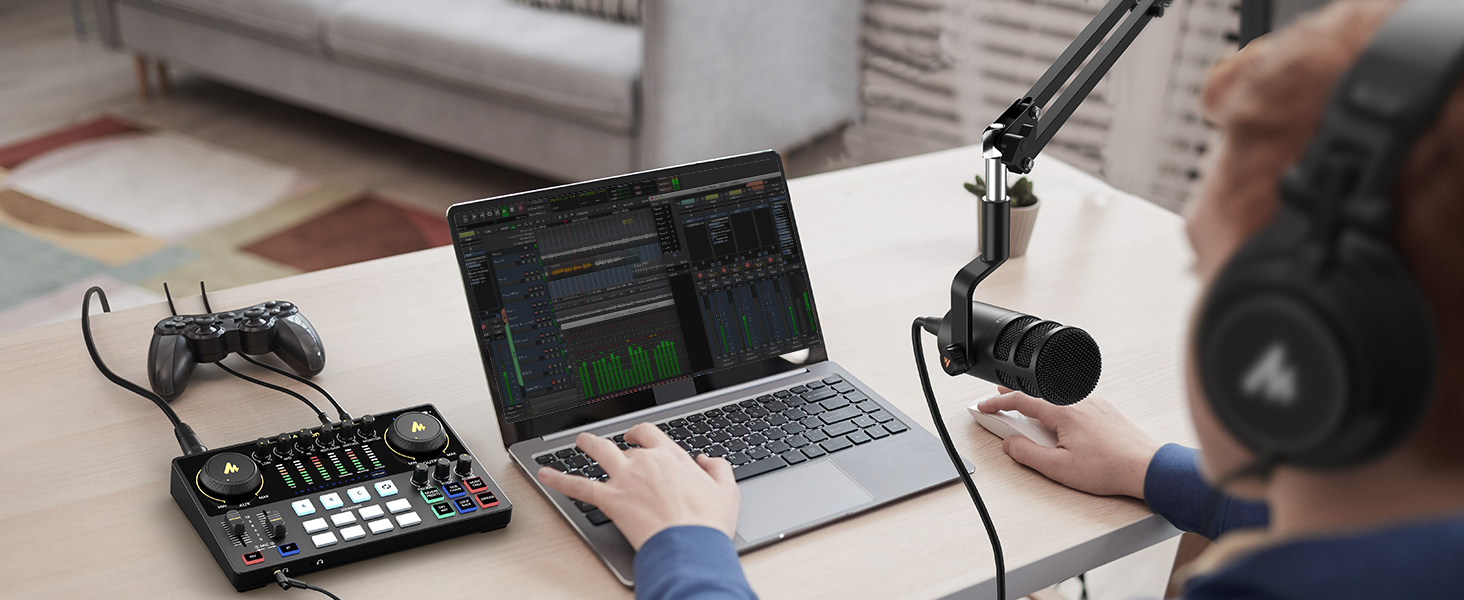
Figure 6: Bluetooth Connectivity for Wireless Audio
5. Microphone Details
The included XLR dynamic microphone is designed for clear sound recording.
- Design: Features a built-in dynamic core and inner double-layer pop filter.
- Geräuschisolierung: Advanced noise isolation technology provides better attenuation of plosives.
- Frequenzgang: Delivers well-balanced reproduction across a wide frequency response range of 60-14kHz.

Figure 7: MAONO XLR Dynamic Microphone
6. Konnektivität und Kompatibilität
The MaonoCaster AME2C Pro is designed for versatile connectivity and broad compatibility.
- Eingabe-/Ausgabeanschlüsse: USB-C, LIVE-OUTPUT1/2, MONITOR SPK, AUX-IN, MIC1/2 (XLR), INST (6.35mm).
- Kompatible Geräte: PC, smartphones, tablets, cameras, guitar, XLR condenser microphone, dynamic microphone, headphones.
- Betriebssysteme: Windows, macOS, Android/iOS.
- Unterstützte Software: OBS, DISCORD, ZOOM, AUDACITY, AU, YouTube, TikTok, Facebook.

Figure 8: Live Streaming Setup Example
7. Spezifikationen
| Besonderheit | Spezifikation |
|---|---|
| Artikelgewicht | 2.07 Kilogramm (4.55 Pfund) |
| Technische Daten | 9.64"T x 6.18"B x 2.16"H |
| Anzahl der Kanäle | 10 |
| Stromquelle | Kabelgebundene Elektrik |
| Bandtage | 5 Volt |
| Wastage | 20 Mikrowatt |
| Akku-Typ | 1 Lithium-Polymer-Batterien erforderlich (im Lieferumfang enthalten) |
| Hardware-Plattform | Android/iOS |
| Betriebssystem | Windows, macOS |
| Konnektivitätstechnologie | USB, Bluetooth |
| Steckertyp | 1/4-Inch Straight, XLR to XLR |
| Kompatible Geräte | Computer, Smartphone, Tablet, Camera, Guitar, XLR condenser microphone, Dynamic microphone, Headphone |
| Unterstützte Software | OBS, DISCORD, ZOOM, AUDACITY, AU, YouTube, TikTok, Facebook |
8. Fehlerbehebung
If you encounter issues with your MaonoCaster AME2C Pro, please refer to the following common solutions:
- Microphone Not Detected (Windows 11): Ensure the microphone is correctly identified in your sound settings. Sometimes, it may be mislabeled (e.g., as headphones). Access Advanced Sound Settings to enable and select the microphone as the input device.
- Keine Tonausgabe: Check all cable connections (microphone, headphones, speakers, device outputs). Verify volume levels on the audio interface and your connected device.
- Phantomspeisung: If using a condenser microphone, ensure 48V phantom power is activated on the audio interface.
- Hintergrundgeräusche: Activate the DENOISE function on the audio interface. Ensure all cables are securely connected and not damaged.
- Sound Pad Issues: If sound pads are not recording or playing correctly, ensure sufficient recording time is available for the pad type (60s for 3 pads, 20s for 8 pads). Check volume levels for individual sound pads.
9. Garantie und Support
MAONO is committed to providing excellent customer service and product support.
- 365 Tage Umtausch: Enjoy a 365-day replacement policy for eligible products.
- Lifetime Tech Support: Benefit from lifetime technical support for your product.
- 7/24H Customer Support: Access customer support services 24 hours a day, 7 days a week.


