1. Einleitung
The AVARRO 0E-HDMIMX4 is a high-performance 4x4 HDMI matrix switcher designed to route any of four HDMI input sources to any of four HDMI output displays. It supports 4K Ultra HD resolutions, HDCP 2.2, and advanced features like Smart EDID Management and a built-in 4K-1080P downscaler. This manual provides detailed instructions for installation, operation, and troubleshooting to ensure optimal performance of your device.
2. Sicherheitshinweise
- Lesen Sie alle Anweisungen sorgfältig durch, bevor Sie das Gerät in Betrieb nehmen.
- Do not expose this unit to rain, moisture, or excessive humidity.
- Do not place any objects filled with liquids on the unit.
- Belüftungsöffnungen nicht blockieren.
- Verwenden Sie nur das mitgelieferte Netzteil.
- Führen Sie keine Reparaturen am Gerät selbst durch. Überlassen Sie alle Wartungsarbeiten qualifiziertem Fachpersonal.
- Stellen Sie sicher, dass alle angeschlossenen Geräte ordnungsgemäß geerdet sind.
3. Packungsinhalt
Vor der Installation prüfen Sie bitte, ob alle Komponenten vorhanden sind:
- AVARRO 0E-HDMIMX4 HDMI Switcher Unit
- IR-Fernbedienung
- DC 12V Netzteil
- Benutzerhandbuch (dieses Dokument)
- Mounting Brackets (if applicable, not explicitly mentioned but common for such devices)
4. Produktüberschreitungview
4.1 Frontplatte

Bild: Vorderseite view of the AVARRO 0E-HDMIMX4 HDMI Switcher, showing the IR receiver and output selector buttons.
- IR Empfänger: Empfängt Signale von der Infrarot-Fernbedienung.
- Output Selectors (1-4): Buttons to select the input source for each corresponding HDMI output. Each output has its own set of source selection buttons (1, 2, 3, 4).
- LED-Anzeigen: Indicate the currently selected input for each output.
4.2 Rückseite
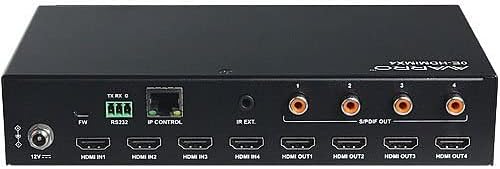
Bild: Rückseite view of the AVARRO 0E-HDMIMX4 HDMI Switcher, displaying all input/output ports and control interfaces.
- DC 12 V IN: Stromeingangsanschluss.
- FW (Micro USB): Micro-USB port for firmware upgrades.
- RS232: Serial port for control via RS232 commands.
- IP CONTROL (RJ45): Ethernet port for network control and Web UI-Zugriff.
- IR-EXT: Port for connecting an external IR receiver.
- HDMI-Eingang (1-4): HDMI input ports for connecting source devices (e.g., Blu-ray player, game console).
- HDMI OUT (1-4): HDMI output ports for connecting display devices (e.g., TV, projector).
- S/PDIF OUT (1-4): Digital audio output ports for each HDMI output, supporting PCM 2.0/5.1, Dolby Digital, and DTS up to 5.1 Channel.
5. Einrichtung und Verbindung
- Alle Geräte ausschalten: Before making any connections, ensure all source devices, displays, and the switcher are powered off.
- HDMI-Quellen anschließen: Connect your HDMI source devices (e.g., media players, gaming consoles) to the HDMI IN 1-4 ports on the switcher using high-quality HDMI cables.
- HDMI-Displays anschließen: Connect your HDMI display devices (e.g., TVs, projectors) to the HDMI OUT 1-4 ports on the switcher using high-quality HDMI cables.
- Audioausgänge anschließen (optional): If desired, connect external audio systems to the S/PDIF OUT ports for digital audio extraction.
- Netzwerk verbinden (optional): For IP control and Web UI access, connect an Ethernet cable from your network router/switch to the IP CONTROL (RJ45) port.
- Strom anschließen: Connect the provided DC 12V power adapter to the DC 12V IN port on the switcher, then plug the adapter into a power outlet.
- Geräte einschalten: Power on the switcher, then your display devices, and finally your source devices.
Notiz: For optimal performance with 4K content, use certified High-Speed HDMI cables.
6. Bedienungsanleitung
6.1 Bedienelemente an der Vorderseite
To switch an input source for a specific output:
- Locate the "SELECTOR" buttons for the desired OUTPUT (1-4).
- Press the corresponding "SOURCE" button (1, 2, 3, or 4) below the "SELECTOR" button to route the desired input to that output. The LED indicator will illuminate to show the active input.
6.2 IR-Fernbedienung
The included IR remote control allows for convenient switching from a distance. Point the remote towards the IR receiver on the front panel of the switcher.
- Input Buttons (1-4): Wählt die Eingangsquelle aus.
- Output Buttons (A-D or 1-4): Selects the output to control.
- Matrix-Umschaltung: Typically, you would press an Output button, then an Input button to route that input to the selected output. Refer to the remote's specific layout for exact button functions.
6.3 Web UI-Steuerung
Der Web UI provides a graphical interface for advanced control and configuration.
- Ensure the switcher is connected to your network via the IP CONTROL port.
- Obtain the IP address of the switcher (refer to network settings or device documentation for default IP or discovery method).
- Öffnen Sie ein web Browser auf einem Computer, der mit demselben Netzwerk verbunden ist.
- Enter the switcher's IP address into the browser's address bar.
- Log in using the default credentials (if prompted, refer to device documentation for default username/password).
- Verwenden Sie die Web UI to manage input/output routing, EDID settings, and other advanced features.
6.4 RS232-Steuerung
The RS232 port allows for integration with control systems using serial commands. Refer to the detailed RS232 command set documentation (usually available from the manufacturer's website) for specific protocols and commands.
7. Smart EDID Management
The 0E-HDMIMX4 features Smart EDID Management to ensure compatibility between source devices and displays. EDID (Extended Display Identification Data) communicates display capabilities to the source. The switcher can automatically manage EDID or allow manual configuration via the Web UI to optimize video and audio formats for connected devices.
8. Firmware-Upgrade
Firmware updates can improve performance, add new features, or resolve issues. The 0E-HDMIMX4 supports firmware upgrading via both the Micro-USB port and the Web UI
- Micro-USB: Connect a computer to the FW (Micro USB) port and use the manufacturer's provided upgrade tool.
- Web Benutzeroberfläche: Zugriff auf die Web UI and navigate to the firmware upgrade section.
Always download the latest firmware and instructions from the official AVARRO website before attempting an upgrade.
9. Spezifikationen
| Besonderheit | Detail |
|---|---|
| Modell | 0E-HDMIMX4 |
| Eingänge | 4 x HDMI-IN |
| Ausgaben | 4 x HDMI OUT, 4 x S/PDIF OUT (Digital) |
| Steueranschlüsse | 1 x RS232, 1 x IP CONTROL (RJ45), 1 x FW (Micro USB) |
| HDMI-Konformität | 4K Ultra HD, HDCP 2.2 compliant |
| Unterstützung für Videoauflösung | VESA: 800x600 to 1920x1200; SMPTE: 720x576P to 4096x2160 |
| HDR-Unterstützung | HDR 10, HLG, DOLBY VISION up to 4K60 444 |
| Downscaler | Built-in 4K-1080P downscaler |
| Maximale Datenrate | 18 Gbit/s |
| Maximaler Pixeltakt | 600 MHz |
| Audioformate (HDMI) | PCM 2.0/5.1/7.1, Dolby TrueHD, Dolby Atmos, DTS HD Master Audio, DTS:X |
| Audio Formats (S/PDIF) | PCM 2.0/5.1, Dolby Digital, DTS up to 5.1 Channel |
| ESD-Schutz | ±8 kV (Luftspaltentladung) / ±4 kV (Kontaktentladung) |
| Überspannungsschutz | Bandtage: ±1 Kv |
| Stromversorgung | Gleichstrom 12 V, 2 A |
| Stromverbrauch (max) | 10.8 W |
| Geräteabmessungen (L x B x H) | 8.46" x 4.73" x 1.65" (21.49 cm x 12.01 cm x 4.19 cm) |
| Produktgewicht | 1.19 kg |
10. Fehlerbehebung
Sollten Sie auf Probleme stoßen, beachten Sie bitte die folgenden häufigen Probleme und Lösungen:
- Keine Video-/Audioausgabe:
- Stellen Sie sicher, dass alle HDMI-Kabel fest angeschlossen sind.
- Vergewissern Sie sich, dass das Netzteil korrekt angeschlossen und das Gerät eingeschaltet ist.
- Check that the correct input source is selected for the desired output.
- Testen Sie es mit verschiedenen HDMI-Kabeln.
- Bypass the switcher to confirm source and display functionality.
- Check EDID settings, especially with mixed resolution displays.
- Zeitweises Signal/Flackern:
- Use high-quality, certified HDMI cables, especially for longer runs or 4K content.
- Ensure cables are not excessively bent or damaged.
- Check for potential electromagnetic interference from other devices.
- Fernbedienung funktioniert nicht:
- Ensure there are no obstructions between the remote and the switcher's IR receiver.
- Ersetzen Sie die Batterien der Fernbedienung.
- Verify the remote is pointed directly at the IR receiver.
- Web UI/IP Control Issues:
- Confirm the Ethernet cable is properly connected.
- Verify the switcher's IP address and ensure your computer is on the same network subnet.
- Check firewall settings on your computer or network.
11. Wartung
- Reinigung: Reinigen Sie die Außenseite des Geräts mit einem weichen, trockenen Tuch. Verwenden Sie keine flüssigen Reiniger oder Sprays.
- Belüftung: Um eine Überhitzung zu vermeiden, stellen Sie sicher, dass die Lüftungsöffnungen frei und nicht verstopft sind.
- Lagerung: If storing the unit for an extended period, disconnect power and store in a cool, dry place.
12. Garantie und Support
AVARRO products are designed for reliability and performance. For specific warranty information, please refer to the warranty card included with your product or visit the official AVARRO website. For technical support, product registration, or to download the latest drivers and firmware, please visit www.avarrus.com or contact AVARRO customer service.