1. Einführung und Endeview
Das Schwarzeview BV5200Pro is a rugged smartphone designed for durability and performance in challenging environments. It features advanced protection against water, dust, and drops, combined with a powerful processor and versatile camera system. This manual provides essential information for setting up, operating, and maintaining your device.

Bild: Das Schwarzeview BV5200Pro is built to withstand harsh conditions, meeting MIL-STD-810H military standards for drop resistance, IP68 for water immersion up to 1.5 meters for 30 minutes, and IP69K for protection against high-pressure, high-temperature water jets and 360° dust ingress.
2. Geräteeinrichtung
2.1 Installation der SIM-Karte und des Speichers
The BV5200Pro supports dual 4G LTE SIM cards and a TF (microSD) card for expanded storage. It features three dedicated card slots.
- Suchen Sie den SIM-Karten-Einschub an der Seite des Telefons.
- Verwenden Sie das mitgelieferte SIM-Auswurfwerkzeug, um das Fach zu öffnen.
- Carefully place your Nano-SIM cards and/or TF card into the designated slots. Ensure the gold contacts face downwards.
- Drücken Sie die Ablage vorsichtig wieder in das Telefon hinein, bis sie bündig mit dem Gerätegehäuse abschließt.

Image: The phone features three card slots, allowing for two 4G LTE SIM cards and one TF card for memory expansion up to 1TB simultaneously.
2.2 Erstes Einschalten und Grundeinstellungen
To power on your device, press and hold the power button located on the side until the Blackview logo appears. Follow the on-screen prompts to complete the initial setup, including selecting your language, connecting to a Wi-Fi network, and setting up your Google account.
3. Bedienung Ihres Geräts
3.1 Anzeige und Benutzeroberfläche
The BV5200Pro features a 6.1-inch HD+ display with a resolution of 720x1560 pixels and 500 nits brightness, ensuring clear visuals even in bright conditions. It runs on Android 12 with Doke OS 3.0, offering an intuitive and customizable user experience.

Image: The 6.1-inch HD+ display provides a wide view and immersive experience with 720x1560 resolution, 83% screen-to-body ratio, and 500 cd/m² brightness.
3.2 Leistung und Speicherung
Powered by the MediaTek Helio G35 Octa-Core processor, the phone offers smooth performance for daily tasks and entertainment. It comes with 4GB of RAM, expandable to 7GB (with 3GB virtual RAM), and 64GB of internal storage, which can be further expanded up to 1TB using a TF card.

Image: Visual representation of the MediaTek Helio G35 processor, 7GB RAM (4GB physical + 3GB virtual), and 64GB ROM, with 1TB TF card expandability.
3.3 Akku und Aufladen
The device is equipped with a 5180mAh battery, providing extended usage times: up to 642 hours standby, 26.5 hours calling, 20 hours music playback, and 8.8 hours video playback. It supports 10W fast charging and OTG reverse charging, allowing you to use your phone as a power bank for other devices.

Bild: Überview of the 5180mAh battery, showing usage durations for various activities and the OTG reverse charging capability.
3.4 Kamerafunktionen
The BV5200Pro features a 13MP Sony IMX258 rear camera and an 8MP Samsung5K4H7 front camera. It utilizes ArcSoft technology for enhanced photography, offering various modes:
- 360° Panorama Capture: For wide scenic shots.
- Nachtmodus: Improves low-light photography.
- Verbessertes HDR: Balances exposure in high-contrast scenes.
- Portraitmodus: Creates a bokeh effect for professional-looking portraits.
- Aufhelllicht fürs Gesicht: Enhances selfies in dim lighting.
- Beauty-Modus: Optimizes facial features for flattering photos.
The camera also boasts a 0.1s ultra-fast PDAF for quick and accurate focusing.

Image: Details of the 8MP front camera and 13MP+2MP+2MP rear camera with ArcSoft technology for enhanced photo quality.

Bild: Examples of various camera modes available on the BV5200Pro, including Beauty Mode, Night Mode, Portrait Mode, and Pro Mode.
3.5 Sicherheits- und Komfortmerkmale
The phone includes several features for security and user convenience:
- NFC: Für kontaktloses Bezahlen und schnelle Datenübertragung.
- Gesichtserkennung: Secure and convenient facial recognition for unlocking.
- Handschuhmodus: Ermöglicht die Bedienung des Touchscreens auch mit Handschuhen.
- Benutzerdefinierte Funktionstaste: A programmable button for quick access to 5 essential functions or your favorite apps.
3.6 Navigation and Toolkit
Integrated GPS, GLONASS, Beidou, and Galileo systems provide accurate positioning. The device also comes with a useful toolkit of professional apps, including Compass, Gradienter, Barometer, Protractor, SoundMeter, and FM radio.

Abbildung: Eine umfassende view of the phone's utility features, including the customizable shortcut button, Face Unlock, 3 card slots, Glove Mode, NFC, advanced GPS, and a suite of toolkit applications.
4. Wartung und Langlebigkeit
Das Schwarzeview BV5200Pro is engineered for extreme durability, making it suitable for rugged use. To ensure its longevity, follow these guidelines:
- Wasserdicht (IP68): The phone can withstand immersion in water up to 1.5 meters deep for 30 minutes. Ensure all port covers are securely closed before exposure to water.
- Staubdicht (IP69K): It offers 360° protection against dust and can resist high-pressure, high-temperature water jets.
- Dropproof (MIL-STD-810H): Certified to military standard MIL-STD-810H, the phone is drop-resistant from heights up to 1.5 meters.
- Reinigung: Verwenden Sie ein weiches,amp Reinigen Sie das Gerät mit einem Tuch. Vermeiden Sie aggressive Chemikalien oder scheuernde Materialien.
- Temperatur: Operate the phone within its specified temperature range to prevent damage to the battery and internal components.
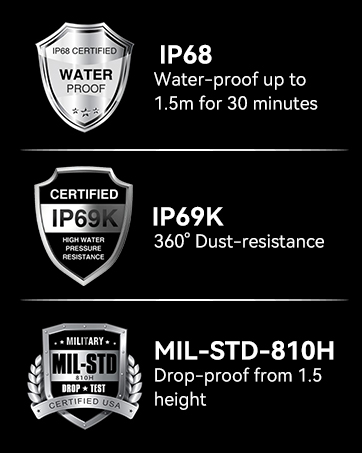
Bild: Das Schwarzeview BV5200Pro submerged in water, illustrating its IP68 waterproof rating.
5. Fehlerbehebung
5.1 Netzwerkkompatibilität
Das Schwarzeview BV5200Pro is compatible with GSM network carriers such as T-Mobile, BTC, MetroPCS, H2O, Movistar, Telcel, Tigo, Claro, Vivacom, Ultra Mobile, Lycamobile, Tello Mobile, Bell Wireless, Rogers Wireless, Chatr, Luck Mobile, Virgin Mobile, Telus, Fido, FIZZ, and Shaw Mobile.
Wichtig: This phone is NICHT compatible with AT&T and Cricket Wireless SIM cards.

Image: A visual guide to the supported 2G, 3G, and 4G network bands and compatible US carriers for the Blackview BV5200Pro.
5.2 Häufige Probleme
- Gerät lässt sich nicht einschalten: Stellen Sie sicher, dass der Akku geladen ist. Schließen Sie das Telefon an das Ladegerät an und warten Sie einige Minuten, bevor Sie versuchen, es erneut einzuschalten.
- Schlechter Signalempfang: Check your SIM card installation. If the issue persists, contact your network provider.
- Apps stürzen ab: Löschen Sie den Cache der problematischen App oder installieren Sie sie neu. Stellen Sie sicher, dass Ihre Systemsoftware auf dem neuesten Stand ist.
- Touchscreen reagiert nicht: Starten Sie das Gerät neu. Stellen Sie im Falle der Verwendung des Handschuhmodus sicher, dass dieser korrekt aktiviert ist.
6. Spezifikationen
| Besonderheit | Spezifikation |
|---|---|
| Modellname | BV5200Pro |
| Betriebssystem | Android 12.0 |
| Prozessor | MediaTek Helio G35 Octa-Core |
| RAM | 4 GB (erweiterbar auf 7 GB) |
| Interner Speicher | 64 GB |
| Erweiterbarer Speicher | Bis zu 1 TB über TF-Karte |
| Bildschirmgröße | 6.1 Zoll HD+ |
| Auflösung | 720 x 1560 |
| Rückfahrkamera | 13MP Sony IMX258 |
| Frontkamera | 8MP Samsung5K4H7 |
| Batteriekapazität | 5180 mAh |
| Laden | 10-W-Schnellladung, OTG-Reverse-Charging |
| Haltbarkeitsbewertungen | IP68 Waterproof, IP69K Dustproof, MIL-STD-810H Dropproof |
| Konnektivität | Dual 4G LTE, Wi-Fi (802.11 a/b/g/n/ac), Bluetooth 5.0, NFC |
| Navigation | GPS, GLONASS, Beidou, Galileo |
| Maße | 161.8 x 77.86 x 13.65 mm |
| Gewicht | 268g |
7. Garantie und Support
Schwarzview offers a 2-year warranty on all Blackview cell phones purchased from authorized retailers. This includes a 24-month free repair warranty and lifetime technician support. For any issues or inquiries, please contact Blackview Kundendienst.

Abbildung: Informationen zu Schwarzview's two-year warranty support, emphasizing strict quality control and dedicated customer service.
8. Produktvideo beendetview
Video: Ein Beamter überview des Schwarzenview BV5200Pro Rugged Cell Phone, highlighting its key features and durability.


