1. Einleitung
Welcome to the BOSGAME H77 Mini PC user manual. This guide provides essential information for setting up, operating, maintaining, and troubleshooting your new mini PC. Please read this manual thoroughly to ensure proper usage and to maximize the performance and longevity of your device.
2. Produktüberschreitungview
The BOSGAME H77 is a compact yet powerful mini PC designed for a wide range of applications, from daily productivity to light gaming. It features an AMD Ryzen 7 7735HS processor, 32GB DDR5 RAM, and a 512GB NVMe M.2 SSD, offering high performance in a small form factor.

Figure 2.1: Powerful Performance. This image illustrates the core specifications of the BOSGAME H77 Mini PC, emphasizing its AMD Ryzen 7 7735HS processor with 8 cores, 16 threads, a clock speed range of 3.2 to 4.75GHz, and a Thermal Design Power (TDP) of 35W. A benchmark comparison for Cinebench R23 (Multi-Core) is also shown, positioning the 7735HS favorably against other Ryzen models.

Figure 2.2: Speedy Response. This image highlights the gaming capabilities of the BOSGAME H77 Mini PC, powered by AMD Radeon 680M integrated graphics. It displays estimated frames per second (FPS) for popular games such as League of Legends (148.0 FPS), Fortnite (132.0 FPS), CS:GO (135.0 FPS), Grand Theft Auto (98.0 FPS), and DOTA 2 (178.0 FPS), indicating smooth performance. The image also notes the system's 32GB DDR5 RAM, 512GB SSD, and support for up to 2TB HDD.

Figure 2.3: Triple Screen Display Support. This image demonstrates the BOSGAME H77 Mini PC's ability to support up to three displays simultaneously. It features two HDMI 2.0 ports and one Type-C (USB4.0) port, allowing for a versatile multi-monitor setup suitable for daily tasks, work, and entertainment. Key features like Wi-Fi 6, Bluetooth 5.2, cooling fan with heat sink, and 4K 60Hz support are also highlighted.
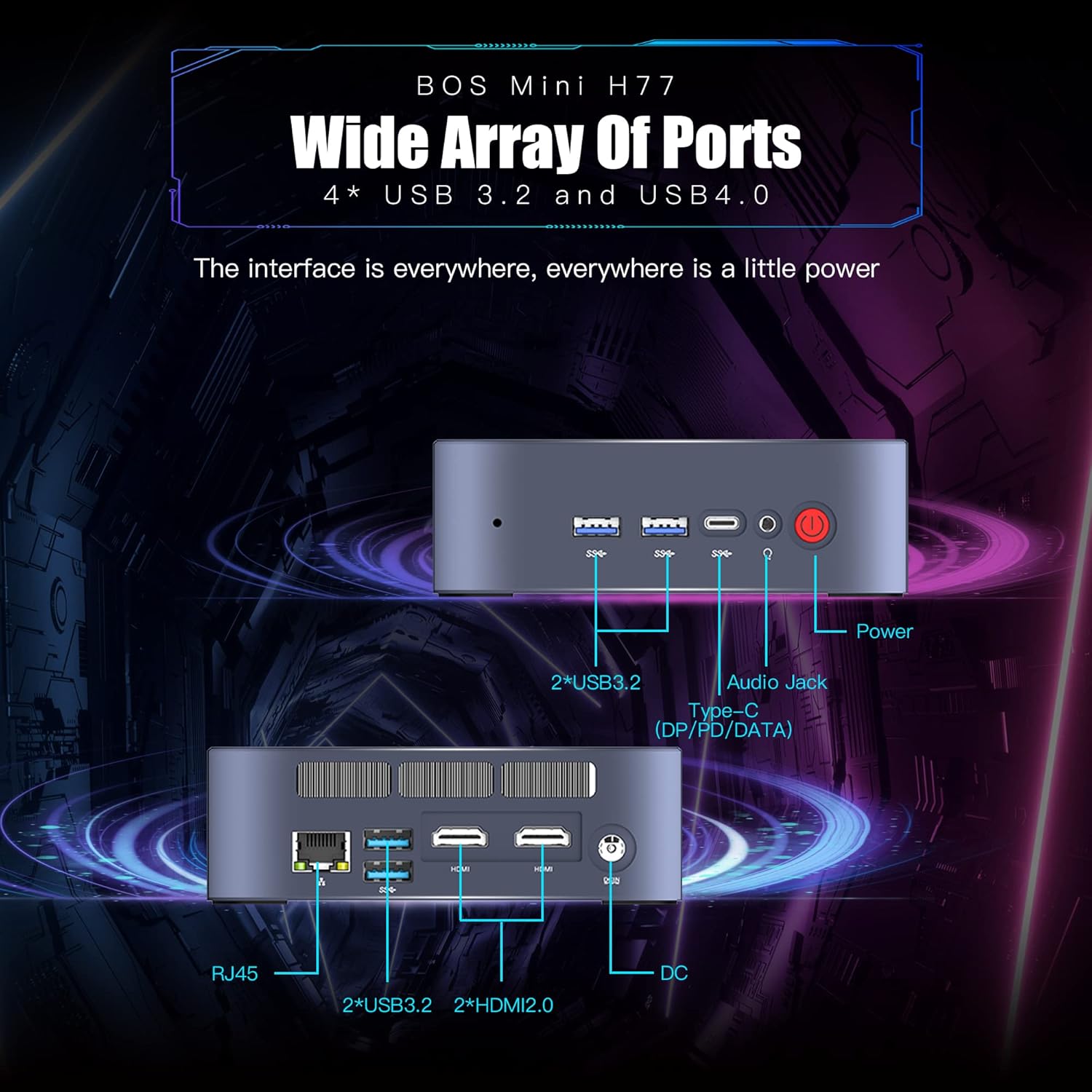
Figure 2.4: Wide Array of Ports. Dieses Bild liefert eine detaillierte Ansicht. view of the BOSGAME H77 Mini PC's connectivity options. The front panel includes two USB 3.2 ports, one USB4.0 Type-C port (supporting DP/PD/DATA), an audio jack, and the power button. The rear panel features an RJ45 Ethernet port, two additional USB 3.2 ports, two HDMI 2.0 ports, and the DC power input. This comprehensive selection of ports ensures broad compatibility with various peripherals and displays.

Abbildung 2.5: Kompaktes Design. This image emphasizes the compact and space-saving design of the BOSGAME H77 Mini PC. With a 0.6L body and dimensions of 126mm (length), 112mm (width), and 40.8mm (height), its honeycomb design is both aesthetically pleasing and functional, allowing it to fit into various environments without occupying much space.
3. Installationsanleitung
3.1 Packungsinhalt
Bevor Sie fortfahren, vergewissern Sie sich, dass alle Artikel im Paket vorhanden sind:
- BOSGAME H77 Mini-PC
- Netzteil
- HDMI-Kabel
- Benutzerhandbuch (dieses Dokument)
3.2 Anschließen von Peripheriegeräten
- Display anschließen: Use the provided HDMI cable to connect your monitor to one of the HDMI ports on the rear of the Mini PC. For triple display, connect additional monitors using the second HDMI port and the USB4.0 Type-C port (requires a compatible adapter, not included).
- Tastatur und Maus anschließen: Plug your USB keyboard and mouse into any available USB 3.2 ports on the front or rear of the Mini PC.
- Strom anschließen: Schließen Sie das Netzteil an den DC-Eingangsanschluss auf der Rückseite des Mini-PCs an und stecken Sie das Netzteil anschließend in eine Steckdose.
- Netzwerkverbindung (optional): For a wired connection, plug an Ethernet cable into the RJ45 port on the rear. For wireless, ensure Wi-Fi is enabled during initial setup or via Windows settings.
3.3 Erster Startvorgang
- Drücken Sie den Netzschalter an der Vorderseite des Mini-PCs. Die Betriebsanzeigeleuchte leuchtet auf.
- Follow the on-screen instructions to complete the Windows 11 Pro setup. This typically involves selecting your region, language, creating a user account, and connecting to a network.
4. Bedienungsanleitung
4.1 Ein-/Ausschalten
- Einschalten: Drücken Sie einmal die Einschalttaste.
- Abschalten: Click the Windows Start button, then select Power > Shut down. Do not unplug the power adapter directly without proper shutdown to prevent data loss.
- Neustart: Klicken Sie auf die Windows-Startschaltfläche und wählen Sie dann Ein/Aus > Neu starten.
4.2 Netzwerkverbindungen
- W-lan: To connect to a wireless network, click the Wi-Fi icon in the taskbar, select your desired network, and enter the password. The device supports Wi-Fi 6 for fast wireless speeds.
- Ethernet: If an Ethernet cable is connected, the system will automatically detect and connect to the wired network.
- Bluetooth: To connect Bluetooth devices (e.g., headphones, speakers), go to Windows Settings > Bluetooth & devices, and pair your device. The Mini PC supports Bluetooth 5.2.
4.3 Verwenden von USB-Anschlüssen
The BOSGAME H77 features multiple USB 3.2 ports and a versatile USB4.0 Type-C port. These ports can be used for connecting external storage, peripherals, or for data transfer.
- USB 3.2: Bietet Hochgeschwindigkeits-Datenübertragung für kompatible Geräte.
- USB4.0 Typ-C: This port supports DisplayPort (DP) for video output, Power Delivery (PD) for charging compatible devices, and high-speed data transfer.
4.4 Dreifach-Display-Konfiguration
To utilize the triple display feature:
- Connect your primary monitor to one HDMI port.
- Schließen Sie Ihren zweiten Monitor an den anderen HDMI-Anschluss an.
- Connect your third monitor to the USB4.0 Type-C port using a compatible USB-C to DisplayPort or USB-C to HDMI adapter (sold separately).
- Once connected, right-click on the desktop, select "Display settings," and configure your displays (extend, duplicate, etc.) as needed.
5. Wartung
5.1 Cleaning the Mini PC
Regular cleaning helps maintain optimal performance and extends the lifespan of your device.
- Exterieur: Verwenden Sie ein weiches, trockenes, fusselfreies Tuch, um die Außenflächen abzuwischen. Bei hartnäckigen Flecken leicht andrücken.ampBefeuchten Sie das Tuch mit Wasser. Vermeiden Sie aggressive Chemikalien.
- Belüftung: Reinigen Sie die Lüftungsgitter regelmäßig mit Druckluft, um Staub zu entfernen und so einen ordnungsgemäßen Luftstrom zu gewährleisten und eine Überhitzung zu vermeiden.
5.2 Softwareaktualisierungen
Keep your Windows 11 Pro operating system and drivers updated to ensure security, stability, and performance.
- Windows-Updates: Gehen Sie zu Windows-Einstellungen > Windows Update und prüfen Sie, ob Updates verfügbar sind.
- Treiber-Updates: Besuchen Sie die offizielle BOSGAME-Website. website for the latest drivers for your H77 Mini PC.
5.3 Speicherverwaltung
The 512GB NVMe M.2 SSD provides fast storage. To maintain performance:
- Regelmäßig unnötige Dateien löschen files und Anwendungen.
- Utilize Windows Disk Cleanup tool to free up space.
- Erwägen Sie externe Speicherlösungen für große Datenmengen. files if the internal SSD becomes full.
6. Fehlerbehebung
Dieser Abschnitt behandelt häufig auftretende Probleme, die bei Ihrem BOSGAME H77 Mini-PC auftreten können.
6.1 Kein Strom
- Stellen Sie sicher, dass das Netzteil sowohl mit dem Mini-PC als auch mit einer funktionierenden Steckdose fest verbunden ist.
- Überprüfen Sie die Funktionsfähigkeit der Steckdose, indem Sie ein anderes Gerät anschließen.
- Prüfen Sie das Netzteil auf sichtbare Beschädigungen.
6.2 Keine Anzeige
- Confirm the HDMI cable (or USB-C display cable) is securely connected to both the Mini PC and the monitor.
- Ensure the monitor is powered on and set to the correct input source (HDMI 1, HDMI 2, DisplayPort, etc.).
- Versuchen Sie, den Mini-PC an einen anderen Monitor oder Fernseher anzuschließen, um Monitorprobleme auszuschließen.
6.3 Probleme mit der Netzwerkverbindung
- W-lan: Check if Wi-Fi is enabled in Windows settings. Restart your router/modem. Ensure you are within range of your Wi-Fi network.
- Ethernet: Verify the Ethernet cable is properly connected. Check your router/modem for internet access.
6.4 Systemverlangsamung oder Einfrieren
- Schließen Sie unnötige Anwendungen, die im Hintergrund laufen.
- Überprüfen Sie im Task-Manager (Strg+Umschalt+Esc) Prozesse, die viel CPU-, RAM- oder Festplattenleistung verbrauchen.
- Ensure your system is up-to-date with the latest Windows and driver updates.
- Perform a disk cleanup and check for malware.
Sollten Sie auf Probleme stoßen, die hier nicht behandelt werden, konsultieren Sie bitte den Supportbereich für weitere Hilfe.
7. Spezifikationen
| Besonderheit | Spezifikation |
|---|---|
| Marke | BOSGAME |
| Modellnummer | H77 |
| Betriebssystem | Windows 11 Pro |
| CPU Modell | AMD Ryzen 7 7735HS (8 Cores, 16 Threads) |
| CPU-Geschwindigkeit | Up to 4.75 GHz (Base 3.2 GHz) |
| Grafik-Coprozessor | Integrierte AMD Radeon 680M-Grafikkarte |
| Größe des installierten RAM-Speichers | 32 GB DDR5 SDRAM |
| Verfügbare Speichersteckplätze | 2 |
| Festplattenbeschreibung | 512 GB NVMe M.2 SSD |
| Videoausgangsschnittstelle | 2x HDMI, 1x USB4.0 Type-C (DP support) |
| Maximale Bildschirmauflösung | 3840 x 2160 Pixel (4K) |
| Anzahl USB-Anschlüsse | 4x USB 3.2, 1x USB4.0 Type-C |
| Konnektivitätstechnologie | Ethernet, HDMI, LAN, Wi-Fi |
| Drahtlose Kompatibilität | Wi-Fi 6 (802.11ax), Bluetooth 5.2 |
| Kühlmethode | Luft |
| Farbe | Schwarz |
| Zusätzliche Merkmale | Speicherkartenlesegerät |
8. Garantie und Support
Your BOSGAME H77 Mini PC comes with a standard manufacturer's warranty. Please refer to the warranty card included in your package for specific terms and conditions, including warranty duration and coverage details.
For technical support, troubleshooting assistance, or warranty claims, please visit the official BOSGAME webBesuchen Sie die Website oder kontaktieren Sie den Kundendienst. Halten Sie Ihren Kaufbeleg und die Seriennummer des Produkts bereit, wenn Sie Unterstützung benötigen.


