1. Einleitung
This manual provides essential instructions for the safe and efficient operation of your Motorola Six-Pocket Multi-Unit Charger. This charger is designed to simultaneously charge up to six compatible Motorola radios or batteries, ensuring your communication devices are always ready for use. Please read this manual thoroughly before using the charger.
2. Sicherheitshinweise
Always observe the following safety precautions to prevent injury or damage to the charger or connected devices:
- Use only the power supply provided with the charger.
- Setzen Sie das Ladegerät weder Regen noch Feuchtigkeit aus.
- Betreiben Sie das Ladegerät nicht, wenn es in irgendeiner Weise beschädigt ist.
- Sorgen Sie während des Betriebs für ausreichende Belüftung rund um das Ladegerät.
- Versuchen Sie nicht, das Ladegerät zu zerlegen oder zu modifizieren.
- Außerhalb der Reichweite von Kindern aufbewahren.
3. Packungsinhalt
Überprüfen Sie, ob Ihr Paket die folgenden Artikel enthält:
- Motorola Six-Pocket Multi-Unit Charger (PMLN7101A / PMLN7101 / PMLN8569)
- US/NA Power Supply
4. Einrichtung
- Place the multi-unit charger on a flat, stable surface in a well-ventilated area.
- Connect the provided US/NA power supply to the charger's power input port.
- Plug the power supply into a standard electrical outlet. The charger is now ready for use.
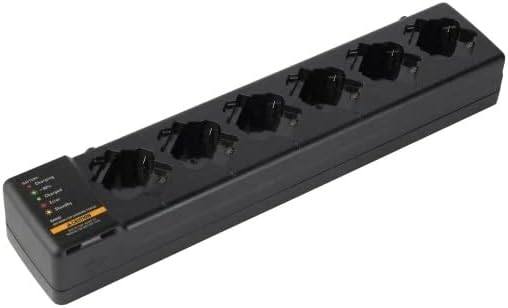
Abbildung 4.1: Eine Draufsicht view of the Motorola Six-Pocket Multi-Unit Charger, showing six charging pockets and an indicator panel on the left side.
5. Bedienungsanleitung
The charger is designed for use with compatible Motorola radios and batteries, including models SL300, TLK100, SL500, SL500E, and SLN1000.
5.1 Charging Radios or Batteries
- Stellen Sie sicher, dass das Ladegerät eingeschaltet ist.
- Insert a compatible radio or battery into one of the six charging pockets. Ensure it is seated correctly.
- Observe the LED indicator for the corresponding pocket to determine the charging status.
5.2 Status der LED-Anzeige
Each charging pocket features an LED indicator to provide real-time status:
- Rot (durchgehend): Der Akku wird geladen.
- Grün (durchgehend): Der Akku ist vollständig geladen.
- Amber (Solid): Battery is charging to 90% capacity.
- Rot (blinkend): Error condition (e.g., battery fault, temperature issue). Remove the battery and reinsert. If the error persists, refer to the Troubleshooting section.
- Kein Licht: Standby mode or no battery/radio inserted.
The indicator panel on the left side of the charger provides a legend for these LED statuses.
6. Wartung
Um eine optimale Leistung und Langlebigkeit Ihres Ladegeräts zu gewährleisten:
- Halten Sie das Ladegerät sauber und frei von Staub und Schmutz. Verwenden Sie zum Reinigen ein weiches, trockenes Tuch.
- Verwenden Sie keine aggressiven Chemikalien oder Scheuermittel.
- Bewahren Sie das Ladegerät an einem kühlen, trockenen Ort auf, wenn Sie es nicht verwenden.
- Überprüfen Sie das Netzkabel regelmäßig auf Anzeichen von Beschädigungen.
7. Fehlerbehebung
| Problem | Mögliche Ursache | Lösung |
|---|---|---|
| Das Ladegerät lässt sich nicht einschalten. | No power to the outlet; power supply not connected; faulty power supply. | Check outlet with another device; ensure power supply is securely connected; try a different power supply if available. |
| LED indicator flashing red. | Battery fault; incorrect battery type; temperature outside operating range. | Remove and reinsert the battery; ensure battery is compatible; move charger to a room temperature environment. |
| Akku lädt nicht. | Battery not properly seated; dirty contacts; faulty battery. | Ensure battery is fully inserted; clean battery and charger contacts; try a different battery. |
8. Spezifikationen
| Besonderheit | Detail |
|---|---|
| Modellnummern | PMLN7101A, PMLN7101, PMLN8569 |
| Marke | Motorola-Lösungen |
| Technische Daten | 3 x 4 x 15 Zoll (7.62 x 10.16 x 38.1 cm) |
| Artikelgewicht | 3.29 Pfund (1.49 kg) |
| Farbe | Schwarz |
| Eingangslautstärketage | 240 Volt |
| Ausgangsvolumentage | 7.4 Volt |
| Kompatible Funkgeräte | SL300, TLK100, SL500, SL500E, SLN1000 |
9. Garantie und Support
Specific warranty information for this product was not provided in the available data. For detailed warranty terms and conditions, please refer to the documentation included with your purchase or visit the official Motorola Solutions website. For technical support or service inquiries, please contact Motorola Solutions customer service.


