Einführung
This manual provides instructions for the proper setup, operation, and maintenance of your Motorola Talkabout T460 Two Way Radio. Please read this manual thoroughly before using your device to ensure optimal performance and safety.
The Motorola Talkabout T460 is designed for reliable communication with features such as IP54 weatherproof rating, 22 channels, 121 privacy codes, and various power options.
Packungsinhalt
The Motorola Talkabout T460 8-Pack includes the following items:
- 8 Motorola T460 2-Way Radios
- 8 NiMH Rechargeable Battery Packs
- 4 Micro USB Wall Charging Cables
- 8 Gürtelclips
- 4 Benutzerhandbücher
Aufstellen
1. Einlegen der Batterie
Your T460 radio can be powered by either the included NiMH rechargeable battery pack or three AA alkaline batteries (not included).
- Stellen Sie sicher, dass das Radio ausgeschaltet ist.
- Suchen Sie die Abdeckung des Batteriefachs auf der Rückseite des Radios.
- Drücken Sie auf den Riegel und schieben Sie die Abdeckung ab.
- Insert the NiMH battery pack or three AA batteries, observing the polarity markings (+/-).
- Bringen Sie die Abdeckung des Batteriefachs wieder an und achten Sie darauf, dass sie hörbar einrastet.
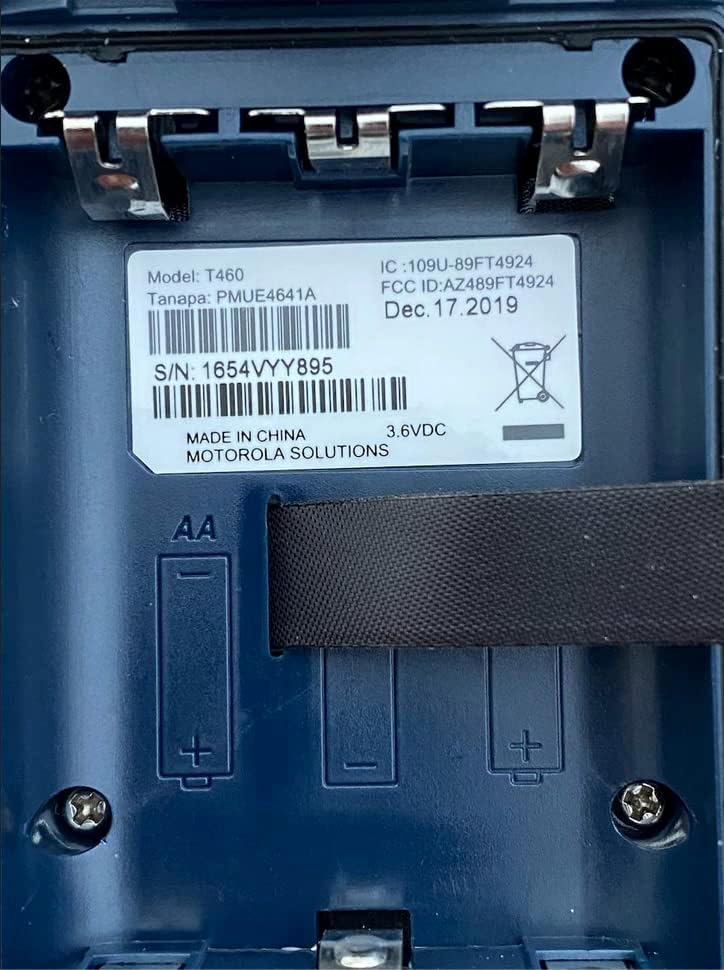
Abbildung 1: Battery compartment of the Motorola T460 radio, showing the label with model information and slots for AA batteries.
2. Charging the NiMH Battery Pack
The included NiMH battery packs can be charged using the micro-USB wall charging cables. Charging can be done via a standard wall outlet, a vehicle adapter, or a computer USB port.
- Connect the micro-USB cable to the charging port on the radio.
- Connect the other end of the cable to a power source (wall adapter, vehicle adapter, or computer).
- Die Batterieanzeige im Radiodisplay zeigt den Ladestatus an.
- Eine vollständige Aufladung dauert in der Regel mehrere Stunden.
3. Anbringen des Gürtelclips
To attach the belt clip, align the clip with the grooves on the back of the radio and slide it downwards until it locks into place.
Bedienungsanleitung
1. Ein-/Ausschalten
To turn the radio on or off, rotate the On/Off/Volume knob clockwise or counter-clockwise until you hear a click.
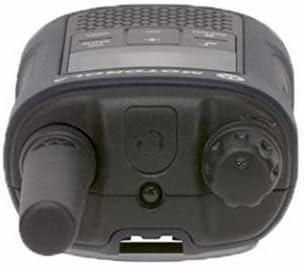
Abbildung 2: Spitze view of the Motorola T460 radio, highlighting the On/Off/Volume knob on the right side.
2. Lautstärke anpassen
Rotate the On/Off/Volume knob to adjust the listening volume.
3. Kanalauswahl
Your T460 radio has 22 channels. Use the Speisekarte und die Hoch/Runter Tasten, um einen Kanal auszuwählen.
4. Datenschutzbestimmungen
The radio supports 121 privacy codes per channel, totaling 2,662 combinations. This helps reduce interference from other users. To set a privacy code, enter the menu and navigate to the privacy code setting for the selected channel.
5. Senden und Empfangen
- Zum Senden: Press and hold the Push-to-Talk (PTT) button located on the side of the radio. Speak clearly into the microphone. Release the PTT button to listen.
- Zum Empfangen: Ensure the PTT button is not pressed. The radio will automatically receive transmissions on the selected channel and privacy code.

Abbildung 3: Unten view of the Motorola T460 radio, displaying the 'Talkabout' branding. The PTT button is on the side, not visible in this view.
6. PTT Power Boost
The PTT power boost feature allows you to temporarily increase the transmitter power output to extend transmission range when needed. This feature also helps conserve battery life when maximum range is not required.
7. iVOX/VOX (Hands-Free Communication)
The iVOX/VOX feature enables hands-free communication by detecting your voice and automatically transmitting. This is useful when your hands are occupied. Refer to the radio's on-screen menu for activation and sensitivity settings.
8. VibraCall™ Alert
Activate the VibraCall feature for silent alerts in situations where an audible ring tone might be disruptive.
9. Ruftöne
Customize your radio's call tone by selecting from the available options in the menu settings.
10. Weather Alert and NOAA Weather Radio
The T460 can receive real-time weather conditions and alerts. Turn on the weather channel or enable weather alerts to stay informed. Note: NOAA radio service availability may vary by region. Consult your local weather office for details.
11. Emergency Alert Button
In an emergency, press the dedicated emergency alert button. The radio will transmit an alert siren followed by spoken or incidental sounds, signaling distress to other radios within range.
12. Eingebaute LED-Taschenlampe
Activate the integrated LED flashlight for illumination during low-light conditions or emergencies.
Wartung
1. Batteriepflege
- Always use genuine Motorola NiMH battery packs or recommended AA alkaline batteries.
- Charge NiMH batteries fully before first use.
- Do not overcharge or leave batteries discharged for extended periods.
- Remove batteries if the radio will not be used for a long time.
2. Reinigung
Wischen Sie die Außenseite des Radios mit einem weichen, fusselfreien Tuch ab.amp cloth. Do not use harsh chemicals or abrasive cleaners. Ensure the charging port cover is securely closed to maintain the IP54 weatherproof rating.
3. Wetterfestmachung
The T460 radio has an IP54 weatherproof rating, meaning it is protected against dust and splashing water from any direction. While it can withstand rain and snow, it is not designed for submersion. Ensure all port covers are sealed to maintain water resistance.
Fehlerbehebung
| Problem | Mögliche Lösung |
|---|---|
| Das Radio lässt sich nicht einschalten. |
|
| Senden und Empfangen nicht möglich. |
|
| Schlechte Audioqualität. |
|
| Die Akkulaufzeit ist kurz. |
|
Technische Daten
| Modell | T460 |
| Kanäle | 22 FRS-Kanäle |
| Datenschutzcodes | 121 (CTCSS/DCS) |
| Wetterbeständigkeit | IP54 Wetter |
| Akku-Typ | NiMH Rechargeable Pack (included) or 3 AA Alkaline Batteries (not included) |
| Akkulaufzeit (ca.) | Up to 10 hours (NiMH), Up to 26 hours (AA) |
| Bandtage | 9 Volt |
| Anzeigetyp | LED |
| Besondere Merkmale | Weather Alert, Emergency Alert, iVOX/VOX, VibraCall, LED Flashlight, PTT Power Boost |
| Artikelgewicht (8er-Packung) | 5.52 Pfund |
| Verpackungsabmessungen (8er-Packung) | 10.63 x 9.96 x 9.84 Zoll |
Garantieinformationen
The Motorola Talkabout T460 Two Way Radio comes with a 1 Jahr Herstellergarantie Diese Garantie gilt ab Kaufdatum und deckt Material- und Verarbeitungsfehler bei normalem Gebrauch ab. Bitte bewahren Sie Ihren Kaufbeleg für Garantieansprüche auf.
For full warranty terms and conditions, please refer to the separate warranty document included with your product or visit the official Motorola Solutions webWebsite.
Unterstützung
For technical assistance, troubleshooting beyond this manual, or to inquire about replacement parts, please contact Motorola Solutions customer support.
- Online-Hilfe: Visit the official Motorola Solutions webWebsite mit häufig gestellten Fragen und Support-Ressourcen.
- Telefonische Betreuung: Beachten Sie die Kontaktinformationen, die auf Ihrer Produktverpackung oder auf der offiziellen Website angegeben sind. webWebsite.


