1. Einleitung
Vielen Dank für Ihren Einkauf.asing the SOAR XL ShockBox BTH6 Wireless Bluetooth Speaker. This speaker is designed to provide high-quality audio with versatile connectivity options, including Bluetooth 5.0, AM/FM radio, USB, and Aux inputs. Its portable and shockproof design, combined with dynamic multicolor LED lights, makes it suitable for various environments. Please read this manual carefully to ensure proper use and maintenance of your device.
2. Produktüberschreitungview
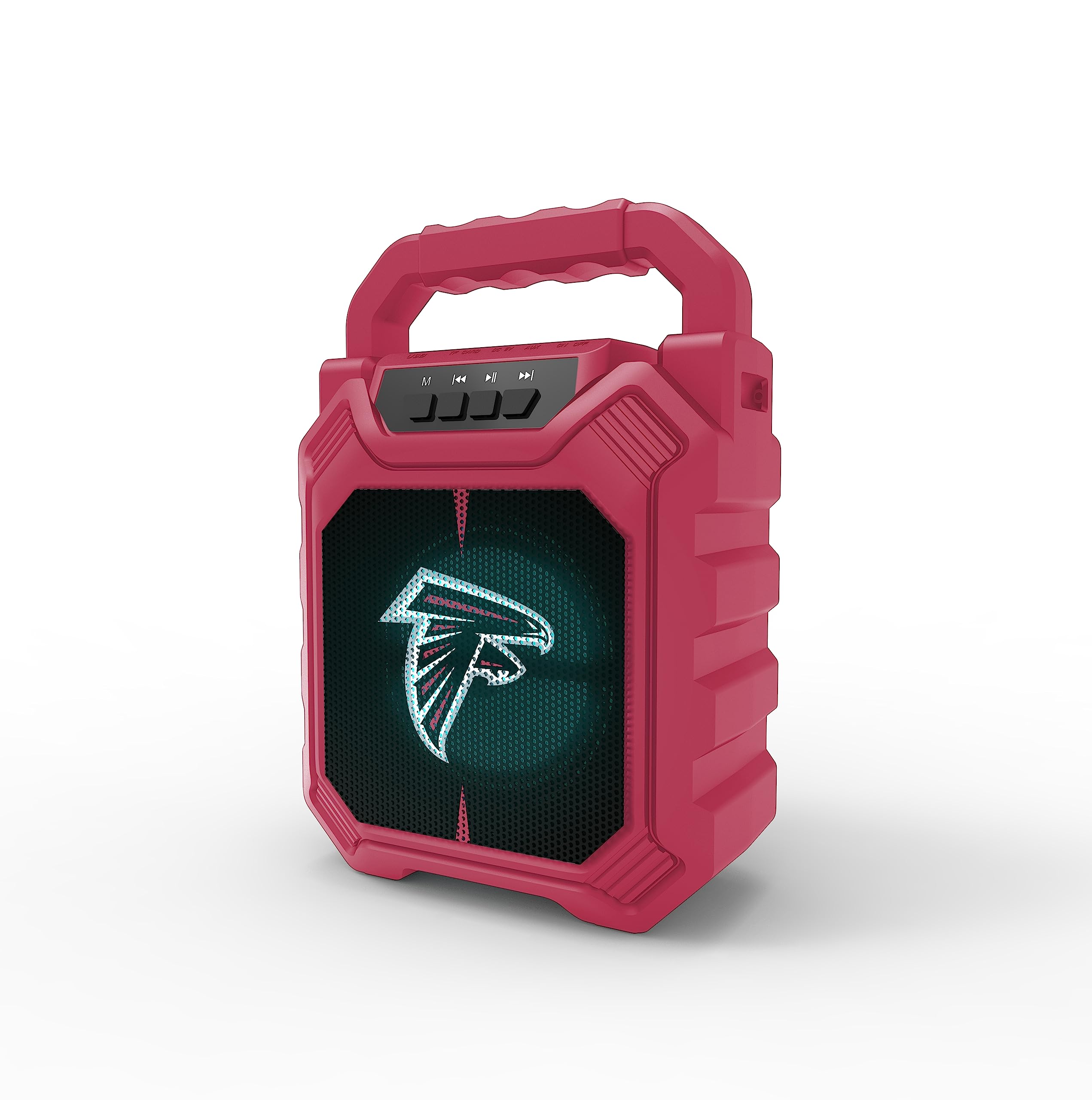
Bild 1: Vorderseite view of the SOAR XL ShockBox BTH6 Wireless Bluetooth Speaker, featuring the Atlanta Falcons logo.
Hauptmerkmale:
- Bluetooth 5.0-Konnektivität: For seamless wireless audio streaming.
- Mehrere Audioeingänge: Supports AM/FM radio, USB, and Aux connections.
- Tragbares Design: Features a convenient top handle and shockproof construction.
- Lange Akkulaufzeit: Provides over 5 hours of playback on a single charge.
- Dynamische LED-Leuchten: Multicolor LED lights pulse with the music.
- Echtes drahtloses Stereo (TWS): Connect two speakers for enhanced stereo sound.
3. Bedienelemente und Anschlüsse

Image 2: Top panel of the speaker, illustrating the control buttons and various input ports.
Tastenfunktionen:
- Netzschalter: Press and hold to turn the speaker ON/OFF. Short press to switch modes (Bluetooth, FM, USB, Aux).
- 'M'-Taste (Modus): Short press to cycle through input modes (Bluetooth, FM Radio, USB, Aux).
- Vorheriger Titel / Lautstärke verringern: Short press for previous track (in Bluetooth/USB mode). Press and hold to decrease volume.
- Wiedergabe-/Pause-Taste: Short press to play or pause audio. In FM mode, short press to auto-scan and save stations.
- Nächster Titel / Lautstärke erhöhen: Short press for next track (in Bluetooth/USB mode). Press and hold to increase volume.
Eingangsanschlüsse:
- Micro-USB-Ladeanschluss: Zum Aufladen des Lautsprechers.
- USB-Anschluss: Zum Abspielen von Audiodateien von einem USB-Stick.
- Aux-Eingangsbuchse (3.5 mm): Zum Anschluss externer Audiogeräte über ein Aux-Kabel.
- MicroSD-Kartensteckplatz: Zum Abspielen von Audiodateien von einer MicroSD-Karte.
4. Einrichtung und Bedienung
4.1 Aufladen des Lautsprechers
- Connect the provided micro-USB cable to the charging port on the speaker.
- Verbinden Sie das andere Ende des Kabels mit einem USB-Netzteil (nicht im Lieferumfang enthalten) oder einem USB-Anschluss Ihres Computers.
- Die Ladeanzeige leuchtet auf. Sobald der Akku vollständig geladen ist, kann die Farbe der Anzeige wechseln oder sie erlöschen.
- A full charge provides over 5 hours of playback time.
4.2 Ein-/Ausschalten
- To turn ON, press and hold the Power button until you hear an audible prompt.
- To turn OFF, press and hold the Power button again until the speaker powers down.
4.3 Bluetooth-Kopplung
- Schalten Sie den Lautsprecher ein. Er wechselt automatisch in den Bluetooth-Kopplungsmodus, was durch eine blinkende LED-Leuchte und einen akustischen Signalton angezeigt wird.
- Aktivieren Sie auf Ihrem Gerät (Smartphone, Tablet usw.) Bluetooth und suchen Sie nach verfügbaren Geräten.
- Select "SOAR BTH6" from the list of devices.
- Sobald die Kopplung hergestellt ist, gibt der Lautsprecher eine akustische Bestätigung aus, und die LED-Leuchte hört auf zu blinken.
- Der Lautsprecher verbindet sich beim Einschalten automatisch wieder mit dem zuletzt gekoppelten Gerät, sofern sich das Gerät in Reichweite befindet und Bluetooth aktiviert ist.
4.4 FM-Radiobetrieb
- Turn on the speaker and press the 'M' (Mode) button until you enter FM Radio mode.
- Zum automatischen Suchen und Speichern verfügbarer FM-Sender drücken Sie kurz die Wiedergabe-/Pause-Taste. Der Lautsprecher sucht und speichert die Sender automatisch.
- Use the Previous Track and Next Track buttons to navigate between saved stations.
4.5 USB and Aux Input
- USB Eingang: Stecken Sie einen USB-Stick in den USB-Anschluss. Der Lautsprecher schaltet automatisch in den USB-Modus und beginnt mit der Audiowiedergabe. files.
- AUX-Eingang: Connect an external audio device (e.g., MP3 player) to the Aux-in port using a 3.5mm audio cable. Press the 'M' button to switch to Aux mode.
4.6 LED-Beleuchtungsmodi

Image 3: The speaker displaying its dynamic LED lights in a vibrant setting.
The speaker features dynamic multicolor LED lights that pulse to the rhythm of the music. These lights activate automatically when the speaker is in use. There are no user-adjustable modes for the LED lights; they are designed to enhance the audio experience visually.
4.7 True Wireless Stereo (TWS) Kopplung

Image 4: Two SOAR XL ShockBox BTH6 speakers paired together for True Wireless Stereo (TWS) sound.
Um einen breiteren Klang zu erzielentage, you can pair two SOAR XL ShockBox BTH6 speakers together using the TWS function:
- Ensure both speakers are turned OFF.
- Turn ON both speakers. They will enter Bluetooth pairing mode.
- On one of the speakers (this will be your primary speaker), double-press the 'M' (Mode) button. The speakers will attempt to connect to each other.
- Once successfully paired, you will hear an audible confirmation. The LED lights on both speakers will synchronize.
- Verbinden Sie nun Ihr Gerät über Bluetooth mit dem Hauptlautsprecher, wie in Abschnitt 4.3 beschrieben. Der Ton wird über beide Lautsprecher in Stereo wiedergegeben.
5. Wartung
- Reinigung: Reinigen Sie die Außenseite des Lautsprechers mit einem weichen, trockenen Tuch. Verwenden Sie keine Scheuermittel oder Lösungsmittel.
- Lagerung: Bewahren Sie den Lautsprecher an einem kühlen, trockenen Ort fern von direkter Sonneneinstrahlung und extremen Temperaturen auf.
- Batteriepflege: Um die Akkulaufzeit zu verlängern, laden Sie den Lautsprecher regelmäßig auf, auch wenn Sie ihn nicht häufig benutzen. Vermeiden Sie es, den Akku über längere Zeiträume vollständig zu entladen.
- Wasserbeständigkeit: While designed to be durable, avoid submerging the speaker in water.
6. Fehlerbehebung
| Problem | Mögliche Lösung |
|---|---|
| Der Lautsprecher lässt sich nicht einschalten. | Ensure the battery is charged. Connect the speaker to a power source using the micro-USB cable. |
| Kopplung via Bluetooth nicht möglich. | Make sure the speaker is in Bluetooth mode and within range (approx. 10 meters). Turn off and on your device's Bluetooth. Forget "SOAR BTH6" from your device's Bluetooth list and try pairing again. |
| Kein Ton oder geringe Lautstärke. | Überprüfen Sie die Lautstärke sowohl am Lautsprecher als auch an Ihrem angeschlossenen Gerät. Stellen Sie sicher, dass der richtige Eingangsmodus ausgewählt ist. |
| Der FM-Radioempfang ist schlecht. | Adjust the speaker's position. Ensure you are in an area with good signal strength. |
| TWS-Kopplung fehlgeschlagen. | Ensure both speakers are fully charged and not connected to any other Bluetooth devices. Follow the TWS pairing steps carefully. |
7. Spezifikationen
| Besonderheit | Detail |
|---|---|
| Modellnummer | BTH6 (Variant: NFL-BTH6-DLPH) |
| Bluetooth-Version | 5.0 |
| Audioeingänge | Bluetooth, AM/FM Radio, USB, Aux-in, MicroSD |
| Spielzeit | Über 5 Stunden (pro Ladung) |
| Ladeanschluss | Micro-USB |
| Hersteller | Prime Brands Group Inc |
| Datum der ersten Verfügbarkeit | 6. September 2023 |
8. Offizielles Produktvideo
Video 1: Ein offizielles Produktvideoasing the features and dynamic LED lights of the SOAR BTH6 Wireless Bluetooth Speaker.
9. Garantie und Support
For warranty information and customer support, please refer to the documentation included with your product or contact the manufacturer, Prime Brands Group Inc., directly. Details regarding specific warranty periods and support procedures are typically provided at the point of purchase or on the manufacturer's official webWebsite.


