1. Einleitung
This manual provides comprehensive instructions for the Maxcom Fit FW55 Aurum Pro Smartwatch. It covers essential information regarding product setup, operation, maintenance, and troubleshooting to ensure optimal performance and user experience. Please read this manual carefully before using your device.
2. Packungsinhalt
Bitte überprüfen Sie, ob alle unten aufgeführten Artikel in Ihrer Produktverpackung enthalten sind:
- Maxcom Fit FW55 Aurum Pro Smartwatch
- Ladekabel
- Benutzerhandbuch (dieses Dokument)
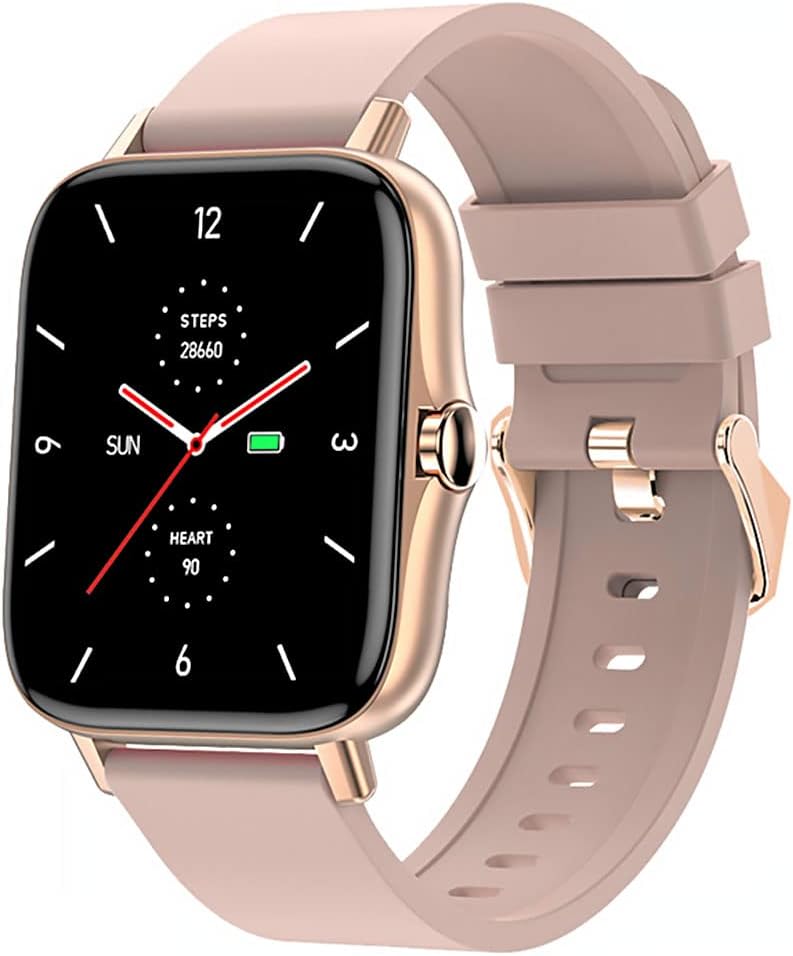
Image 1: Maxcom Fit FW55 Aurum Pro Smartwatch with a pink silicone band. The watch face displays steps, heart rate, and time.
3. Einrichtung
3.1. Aufladen der Smartwatch
Before initial use, fully charge your Maxcom Fit FW55 Aurum Pro Smartwatch. Connect the provided charging cable to the charging port on the back of the smartwatch and plug the other end into a standard USB power adapter (not included) or a computer's USB port. The watch display will indicate charging status.
- Stellen Sie sicher, dass die Ladekontakte sauber und korrekt mit den Ladekontakten der Uhr ausgerichtet sind.
- Eine vollständige Aufladung dauert in der Regel etwa 2 Stunden.
3.2. Koppeln mit Ihrem Smartphone
To unlock the full functionality of your smartwatch, you need to pair it with your smartphone via Bluetooth.
- Laden Sie die App herunter: Suchen nach the official Maxcom Fit application in your smartphone's app store (iOS App Store or Google Play Store) and install it.
- Bluetooth aktivieren: Stellen Sie sicher, dass Bluetooth auf Ihrem Smartphone aktiviert ist.
- Öffnen Sie die App: Launch the Maxcom Fit application on your smartphone.
- Gerät hinzufügen: Follow the in-app instructions to add a new device. Select "FW55 Aurum Pro" from the list of available devices.
- Kopplung bestätigen: A pairing request may appear on both your smartphone and the smartwatch. Confirm the pairing on both devices.
Once successfully paired, the smartwatch will synchronize data with your phone, and you can customize settings through the app.
4. Bedienung der Smartwatch
4.1. Ein-/Ausschalten
- Einschalten: Press and hold the side button for a few seconds until the Maxcom logo appears.
- Ausschalten: From the watch face, swipe down to access quick settings, or navigate to the 'Settings' menu. Select 'Power Off' and confirm. Alternatively, press and hold the side button and select 'Power Off'.
4.2. Grundlegende Navigation
- Touch-Screen: The FW55 Aurum Pro features a 1.7-inch touch screen for intuitive interaction.
- Nach oben/unten wischen: Scroll through notifications, menus, or quick settings.
- Nach links/rechts wischen: Access different widgets or main functions (e.g., heart rate, activity data).
- Klopfen: Wählen Sie ein Element aus oder bestätigen Sie eine Aktion.
- Seitentaste: Press to return to the watch face or wake the screen. A long press may access power options.
4.3. Hauptmerkmale
The Maxcom Fit FW55 Aurum Pro Smartwatch offers a range of features to support your daily activities and health monitoring:
- Aktivitätsverfolgung: Erfasst Schritte, zurückgelegte Strecke und Kalorienverbrauch.
- Herzfrequenz-Überwachung: Liefert Herzfrequenzdaten in Echtzeit.
- Schlafüberwachung: Erfasst Schlafmuster und Schlafqualität.
- Benachrichtigungen: Receives alerts for calls, messages, and app notifications from your paired smartphone.
- Geographisches Positionierungs System: Integriertes GPS für präzise Aufzeichnung von Outdoor-Aktivitäten.
- Anpassbare Zifferblätter: Personalisiere dein Zifferblatt über die zugehörige App.

Image 2: Maxcom Fit FW55 Aurum Pro Smartwatch featuring a gold metal mesh band. The watch face displays digital time, steps, and heart rate.
5. Wartung
Proper care and maintenance will extend the lifespan of your smartwatch.
- Reinigung: Regularly wipe the watch screen and body with a soft, dry, lint-free cloth. For stubborn dirt, slightly dampBefeuchten Sie das Tuch mit Wasser. Vermeiden Sie die Verwendung von scharfen Chemikalien oder scheuernden Materialien.
- Riemenpflege: Clean the watch strap according to its material. Silicone straps can be washed with mild soap and water. Metal straps may require specific cleaning agents.
- Vermeiden Sie extreme Bedingungen: Do not expose the smartwatch to extreme temperatures, direct sunlight for prolonged periods, or corrosive liquids.
- Wasserbeständigkeit: While the watch may have some water resistance, it is not suitable for diving or high-pressure water activities. Refer to the product specifications for detailed water resistance ratings.
6. Fehlerbehebung
If you encounter issues with your Maxcom Fit FW55 Aurum Pro Smartwatch, try the following solutions:
- Uhr schaltet sich nicht ein: Stellen Sie sicher, dass die Uhr vollständig aufgeladen ist. Schließen Sie sie für mindestens 30 Minuten an das Ladegerät an.
- Kopplung mit Smartphone nicht möglich:
- Stellen Sie sicher, dass Bluetooth auf Ihrem Telefon und Ihrer Uhr aktiviert ist.
- Stellen Sie sicher, dass sich die Uhr in Bluetooth-Reichweite Ihres Telefons befindet.
- Starten Sie sowohl Ihr Smartphone als auch Ihre Smartwatch neu.
- Versuchen Sie, das Gerät über die App zu entkoppeln und anschließend erneut zu koppeln.
- Ungenaue Daten (Schritte, Herzfrequenz):
- Achten Sie darauf, dass die Uhr eng am Handgelenk sitzt, etwa eine Fingerbreite oberhalb des Handgelenkknochens.
- Reinigen Sie den Sensor auf der Rückseite der Uhr.
- Aktualisieren Sie die Begleit-App auf die neueste Version.
- Benachrichtigungen nicht erhalten:
- Check notification settings in the Maxcom Fit app.
- Stellen Sie sicher, dass die App über die erforderlichen Benachrichtigungsberechtigungen auf Ihrem Telefon verfügt.
- Vergewissern Sie sich, dass die Uhr erfolgreich mit Ihrem Telefon gekoppelt und verbunden wurde.
If problems persist, consult the Maxcom support webWebsite oder wenden Sie sich an den Kundendienst.
7. Spezifikationen
Below are the technical specifications for the Maxcom Fit FW55 Aurum Pro Smartwatch:
| Besonderheit | Detail |
|---|---|
| Marke | Maxcom |
| Modellnummer | FW55 Aurum Pro |
| Bildschirmgröße | 1.7 Zoll |
| Konnektivitätstechnologie | Bluetooth |
| Drahtloser Kommunikationsstandard | Bluetooth |
| Kompatible Geräte | Smartphone |
| GPS | Integriertes GPS |
| Form | Quadrat |
| Zielgruppe | Adult Unisex |
| Im Lieferumfang enthaltene Komponenten | Ladegerät |

Bild 3: Vorderseite view of the Maxcom Fit FW55 Aurum Pro Smartwatch with a pink silicone band, highlighting the square display.
8. Garantie und Support
Informationen zur Garantie und zum Kundendienst finden Sie in der Ihrer Bestellung beiliegenden Dokumentation oder auf der offiziellen Maxcom-Website. webBewahren Sie Ihren Kaufbeleg für Garantieansprüche auf.
For technical assistance or further inquiries, please contact Maxcom customer service through their official channels.


