1. Produktüberschreitungview
The VCELINK Tool-Free RJ45 Connector is designed for quick and easy termination of CAT6 and CAT5E Ethernet cables. Its innovative tool-less design eliminates the need for a crimping tool, making installation straightforward for both DIY enthusiasts and professionals. Featuring gold-plated contacts, these modular plugs ensure high-speed and reliable data transmission, supporting speeds up to 1Gbps. The robust nut-type strain relief boot provides a secure connection, resistant to stretching, and its compact size allows for side-by-side installation in various networking environments.
2. Lieferumfang
- 24 x VCELINK Tool-Free RJ45 Connectors
3. Hauptmerkmale
- Einfache Installation: Tool-free design for quick and effortless connection without a crimping tool. Disassembly and reassembly are simple for error correction.
- Hochgeschwindigkeitsübertragung: Specifically designed for CAT6/CAT5E Ethernet cables (23-26AWG, Wire OD 0.4-1.2mm). Gold-plated contacts ensure reliable signal transmission up to 1Gbps.
- Stabile Verbindung: Nut-type strain relief boot supports network cables with 6.0-7.6mm cable jacket OD, providing a secure and stretch-resistant connection.
- Breite Anwendung: Small size allows for side-by-side plugging, ideal for switches, routers, and PCs.

Image: The tool-free design simplifies the connection process, eliminating the need for specialized crimping tools.

Image: Internal components highlighting the gold-plated contacts for superior signal transmission and the robust strain relief boot.

Image: The compact design allows multiple connectors to be installed closely together, optimizing space in network setups.
4. Einrichtungs- und Installationsanleitung
Follow these steps to properly install the VCELINK Tool-Free RJ45 Connector onto your Ethernet cable:
Video: Official installation guide for VCELINK Tool-Free RJ45 Connectors, demonstrating each step of the termination process.
- Setzen Sie den Stiefel ein: Schieben Sie die Zugentlastungshülse mit Mutter auf das Ethernet-Kabel.
- Strip the Cable Sheath: Carefully strip approximately 2cm (0.79 inches) of the outer cable sheath to expose the twisted pairs.
- Drähte ordnen und begradigen: Untwist the exposed wire pairs and straighten each individual wire.
- Follow Color Code and Thread: Based on your desired wiring standard (T568A or T568B), arrange the wires according to the color code diagram provided on the load bar. Thread each wire into its corresponding slot on the load bar. Ensure the wires are fully seated.
- Überschüssige Drähte abschneiden: Use a wire cutter to trim the excess wires flush with the load bar. The top and bottom rows of wires may need to be cut to varying lengths to ensure a clean termination.
- Ausrichten und drücken: Richten Sie die Laststange am Hauptverbindergehäuse aus und achten Sie darauf, dass die Nuten übereinstimmen. Drücken Sie die beiden Teile fest zusammen, bis sie einrasten.
- Schließen Sie die Abdeckung: Securely close the clear cover over the terminated wires.
- Festziehen der Mutter: Twist the nut-type strain relief boot to tighten it onto the connector body, providing strain relief and securing the cable.
- Vollständig: The connector is now installed.
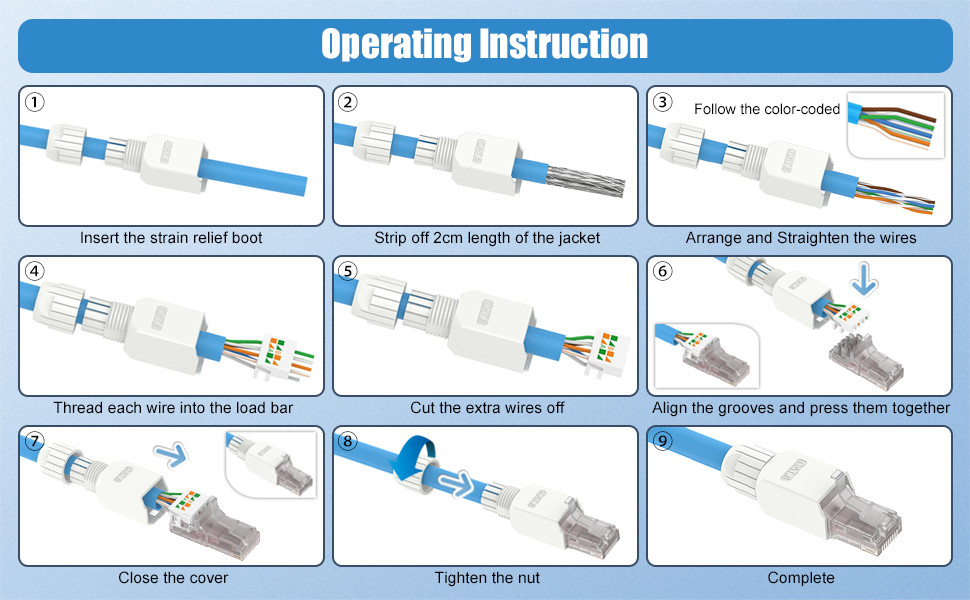
Image: Step-by-step visual instructions for the installation process of the tool-free RJ45 connector.
5. Bedienungsanleitung
Once the VCELINK Tool-Free RJ45 Connector is successfully installed on your Ethernet cable, it functions as a standard RJ45 plug. Simply insert the terminated cable into any compatible RJ45 port on devices such as modems, personal computers, printers, routers, or servers. Ensure a firm connection is made to establish network communication.
6. Wartung
To ensure optimal performance and longevity of your VCELINK RJ45 connectors:
- Halten Sie die Anschlüsse sauber und frei von Staub und Schmutz.
- Avoid excessive bending or pulling on the cable near the connector to prevent damage to the internal wires or the connector itself.
- Store unused connectors in a dry, cool environment.
7. Fehlerbehebung
If you experience issues with your connection after installing the connector:
- Kein Signal oder zeitweise Verbindungsabbruch:
- Use a cable tester (e.g., VCELINK GJ468 Network Cable Tester) to verify the integrity of the connection. The video demonstrates this process.
- Check the wire arrangement on the load bar against the T568A or T568B color code. Ensure all wires are correctly seated and making contact.
- If the connection is not successful, the tool-free design allows for easy disassembly and reinstallation. Carefully open the connector, re-arrange and re-trim the wires if necessary, and reassemble.
- Langsame Geschwindigkeit:
- Ensure your Ethernet cable is rated for CAT6 or CAT5E and is in good condition.
- Verify that all network devices (router, switch, computer) support the desired speed (e.g., 1Gbps).
- Check for any kinks or damage along the length of the Ethernet cable.
8. Spezifikationen
| Technische Daten | 2.06 x 0.57 x 0.52 Zoll |
| Artikelmodellnummer | KJ22-C6-24P-US |
| Hersteller | VCELINK |
| Steckertyp | Ethernet (RJ45) |
| Kabeltyp | Ethernet (CAT6/CAT5E) |
| Kompatible Geräte | Modem, PC, Drucker, Router, Server |
| Besonderheit | Data Transfer, High Speed, Lightweight |
9. Garantie und Support
Customer experience is our top priority. If you have any issues or suggestions regarding your VCELINK Tool-Free RJ45 Connectors, please do not hesitate to contact us directly. Our support team is available to assist you.


