Einführung
This manual provides essential information for the safe and efficient operation of your Energenie EG-UPS-PS1000-01 1000VA Pure Sine Wave Uninterruptible Power Supply (UPS). Please read this manual thoroughly before installation and use, and retain it for future reference. This UPS is designed to provide reliable backup power and protection for your electronic devices.
Sicherheitshinweise
Beachten Sie die folgenden Sicherheitsvorkehrungen, um Verletzungen und Schäden an der USV oder angeschlossenen Geräten zu vermeiden:
- Öffnen Sie das UPS-Gehäuse nicht.asing. Im Inneren befinden sich keine vom Benutzer wartbaren Teile. Alle Wartungsarbeiten dürfen nur von qualifiziertem Fachpersonal durchgeführt werden.
- Do not connect appliances that could overload the UPS, such as laser printers or heaters.
- Ensure the UPS is placed in a well-ventilated area, away from direct sunlight, heat sources, and moisture.
- Schließen Sie die USV nur an eine geerdete Wechselstromsteckdose an.
- Im Brandfall einen Pulverlöscher verwenden. Wasser kann einen Stromschlag verursachen.
- Disconnect the UPS from the AC power outlet before cleaning. Use a dry cloth only.
Packungsinhalt
Überprüfen Sie, ob alle Artikel im Paket vorhanden sind:
- Energenie EG-UPS-PS1000-01 UPS Unit
- Benutzerhandbuch (dieses Dokument)
- USB-Kommunikationskabel
- Netzkabel
Produkt überview
The Energenie EG-UPS-PS1000-01 is a 1000VA pure sine wave UPS featuring an LCD display and USB connectivity. It provides stable power to connected devices during outages and protects against power fluctuations.
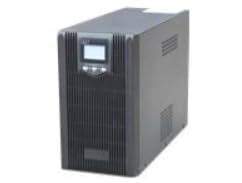
Abbildung 1: Front view of the Energenie EG-UPS-PS1000-01 UPS. This image displays the main unit, highlighting its compact design and the integrated LCD screen on the front panel. The unit is black, with visible ventilation slots and power outlets on the rear (not fully visible in this angle).
Vorderseite
- LCD Anzeige: Shows real-time status, battery level, load, input/output voltage, and operational modes.
- Netzschalter: Dient zum Ein- und Ausschalten der USV.
- Funktionstasten: For navigating the LCD menu and adjusting settings.
Rückseite
- AC-Eingang: Verbindet die USV mit der Hauptstromversorgung.
- Ausgangsbuchsen: Bietet Notstromversorgung und Überspannungsschutz für angeschlossene Geräte.
- USB-Anschluss: For communication with a computer to monitor UPS status and manage shutdowns.
- Leistungsschalter: Rücksetzbarer Überlastschutz.
Aufstellen
- Auspacken: Nehmen Sie das UPS-Gerät vorsichtig aus der Verpackung. Prüfen Sie es auf Transportschäden.
- Platzierung: Position the UPS on a flat, stable surface in a clean, dry, and well-ventilated indoor environment. Ensure adequate clearance around the unit for airflow. Avoid placing it near windows or in direct sunlight.
- Erstladung der Batterie: Connect the UPS to a standard grounded AC outlet using the provided power cord. Allow the unit to charge for at least 8 hours before connecting any devices to ensure optimal battery performance. The UPS will charge even if it is turned off.
- Anschließen von Geräten:
- Plug your computer, monitor, and other critical equipment into the UPS output sockets.
- Do not connect surge protectors or power strips to the UPS output sockets.
- Ensure the total power consumption of connected devices does not exceed the UPS's capacity (1000VA).
- USB-Kommunikation (optional): Connect the USB cable from the UPS to your computer's USB port. Install the monitoring software (if provided or downloaded from the manufacturer's website) to enable advanced power management features and automatic shutdown.
Betrieb der USV
Ein-/Ausschalten
- Zum Einschalten: Press and hold the Power button for approximately 3 seconds until you hear a beep and the LCD display illuminates.
- Ausschalten: Press and hold the Power button for approximately 3 seconds until you hear a beep and the LCD display turns off.
Informationen zur LCD-Anzeige
The LCD display provides real-time status updates. Use the function buttons to cycle through different information screens, which may include:
- Eingangslautstärketage
- Ausgangsvolumentage
- Akkuladestand
- Load Level (percentage of capacity used)
- Operating Mode (e.g., AC mode, Battery mode)
- Estimated Backup Time (under current load)
USB Communication and Software
The USB port allows the UPS to communicate with a connected computer. With the appropriate software installed, you can:
- Monitor UPS status, battery health, and power conditions.
- Configure automatic shutdown of the computer during extended power outages to prevent data loss.
- Schedule UPS self-tests.
Refer to the software's documentation for detailed installation and usage instructions. The software is typically available for download from the Energenie support webWebsite.
Wartung
- Batteriepflege: To maximize battery life, ensure the UPS is connected to AC power at all times. If the UPS is stored for an extended period, recharge the battery every 3 months for at least 8 hours.
- Reinigung: Disconnect the UPS from the AC power outlet and all connected devices before cleaning. Use a soft, dry cloth to wipe the exterior. Do not use liquid or aerosol cleaners.
- Belüftung: Um eine Überhitzung zu vermeiden, sollten Sie regelmäßig prüfen, ob die Lüftungsöffnungen frei von Staub und Verstopfungen sind.
Fehlerbehebung
Sollten Sie Probleme mit Ihrer USV haben, beachten Sie bitte die folgenden häufig auftretenden Probleme und Lösungen:
| Problem | Mögliche Ursache | Lösung |
|---|---|---|
| Die USV schaltet sich nicht ein. | Batterie nicht angeschlossen oder entladen. | Ensure the UPS is plugged into a live AC outlet and allow it to charge for several hours. |
| UPS beeps continuously in AC mode. | Überlastungszustand. | Disconnect non-essential equipment. Reduce the total load to within the UPS's capacity. |
| Die USV schaltet häufig in den Batteriebetrieb. | Unstable input power or sensitivity setting. | Check the AC power source. If the issue persists, consult the software manual for sensitivity adjustments (if available). |
| No power output from sockets. | Leistungsschalter ausgelöst. | Check and reset the circuit breaker on the rear panel. Reduce the load if it was an overload. |
Technische Daten
| Besonderheit | Detail |
|---|---|
| Marke | Energenie |
| Modellnummer | EG-UPS-PS1000-01 |
| Kapazität | 1000VA |
| Wellenform | Rein Sinus |
| Anzeige | LCD |
| Konnektivität | USB |
| Farbe | Schwarz |
| Batteriezusammensetzung | Versiegelte Blei-Säure |
| Technische Daten | 45 cm (Breite) x 25 cm (Länge) x 34 cm (Höhe) |
| Bandtage | 12 Volts (internal battery voltage, not output) |
| Artikelgewicht | 12.6 Kilogramm |
Garantie und Support
Energenie products are designed for reliability and performance. For information regarding warranty coverage, technical support, or service, please refer to the warranty card included with your product or visit the official Energenie webBitte versuchen Sie nicht, das Gerät selbst zu reparieren, da dies zum Erlöschen der Garantie führen kann.
Die neuesten Treiber und Software finden Sie hier: Energenie Support WebWebsite


