1. Produktüberschreitungview
The Sudio F2 is a portable Bluetooth speaker designed for high-quality audio playback in various environments. It features Bluetooth 5.3 connectivity, an AUX input, IPX7 waterproof rating, and a unique broadcast function allowing connection of up to 100 speakers.

Front view of the Sudio F2 Portable Bluetooth Speaker.
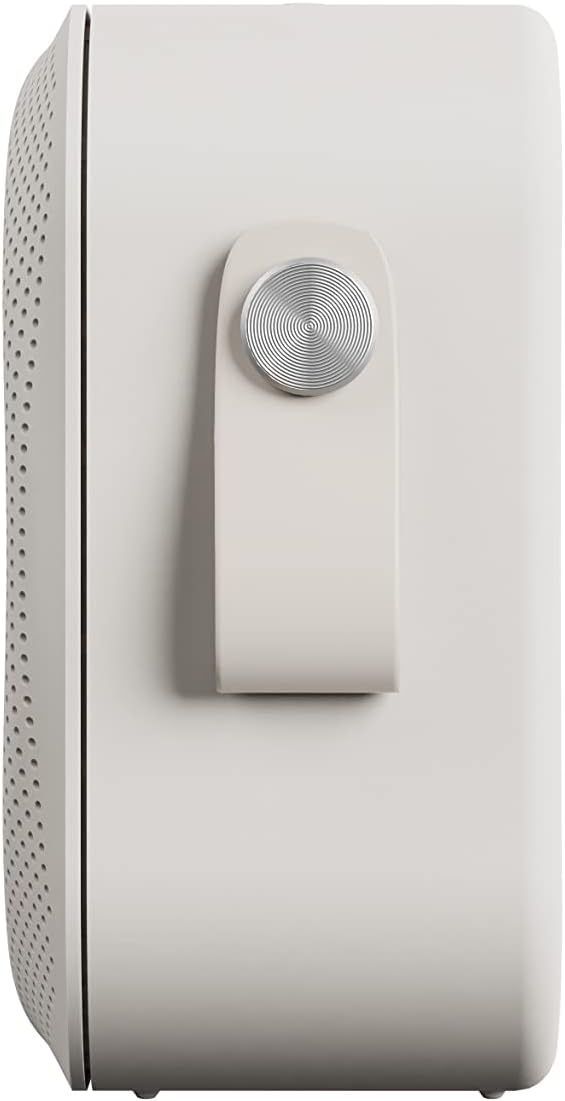
Seite view of the Sudio F2 speaker, highlighting the integrated silicone strap for portability.
2. Packungsinhalt
Stellen Sie sicher, dass alle Artikel im Paket vorhanden sind:
- Studio F2 Tragbarer Bluetooth-Lautsprecher
- Type-C USB-cable for charging
- Bedienungsanleitung (dieses Dokument)
3. Einrichten und Laden
3.1 Erstgebühr
Before first use, fully charge your Sudio F2 speaker. Connect the provided Type-C USB cable to the charging port on the speaker and to a compatible USB power adapter (not included). A full charge takes approximately 4 hours and provides up to 15 hours of playtime.
3.2 Ein-/Ausschalten
- Zum Einschalten: Halten Sie den Netzschalter gedrückt, bis die Kontrollleuchte aufleuchtet.
- Zum Ausschalten: Halten Sie den Netzschalter gedrückt, bis die Kontrollleuchte erlischt.

Seite view of the Sudio F2 speaker, showing the power button location.
4. Bedienungsanleitung
4.1 Bluetooth-Kopplung
- Ensure the Sudio F2 speaker is powered on and in pairing mode (indicator light will flash).
- Aktivieren Sie auf Ihrem Gerät (Smartphone, Tablet usw.) Bluetooth und suchen Sie nach verfügbaren Geräten.
- Select "Sudio F2" from the list.
- Once connected, the indicator light will become solid, and you will hear an audible confirmation.
The speaker uses Bluetooth 5.3 technology and has a connection range of up to 10 meters.
4.2 AUX-Eingang
To connect a device via AUX, insert a 3.5mm audio cable (not included) into the AUX input port on the Sudio F2 speaker and the other end into your audio source. The speaker will automatically switch to AUX mode.

The Sudio F2 speaker featuring its AUX input port for wired connections.
4.3 Broadcast Function (Multi-Speaker Pairing)
The Sudio F2 allows you to link up to 100 speakers simultaneously for a larger sound experience. This feature is activated using the broadcast function button.
- Connect your primary Sudio F2 speaker to your device via Bluetooth.
- Power on all other Sudio F2 speakers you wish to connect.
- On the primary speaker, press the broadcast function button (refer to the speaker diagram for location).
- The primary speaker will begin searching for other F2 speakers.
- Once connected, all linked speakers will play audio synchronously.

Multiple Sudio F2 speakers demonstrating the broadcast function for synchronized audio playback.

The Sudio F2 speaker connected to a turntable via AUX, illustrating its compatibility with various audio sources.
4.4 Bedienelemente
The Sudio F2 features touch controls for playback and volume adjustments. Specific functions include:
- Abspielen/Pause: Single tap the main control button.
- Lautstärke erhöhen/verringern: Swipe or tap dedicated volume areas (refer to product diagram for exact locations).
- Nächster / Vorheriger Track: Double tap or triple tap the main control button (functionality may vary, refer to quick start guide for details).
5. Wasserbeständigkeit (IPX7)
The Sudio F2 speaker has an IPX7 waterproof rating, meaning it can be submerged in water up to 1 meter for 30 minutes. This makes it suitable for use in showers, by pools, or in rainy conditions. Ensure all ports are securely closed before exposing the speaker to water.

The Sudio F2 speaker, highlighting its IPX7 waterproof capability, suitable for wet environments.

A Sudio F2 speaker in a shower setting, demonstrating its waterproof design.
6. Wartung
6.1 Reinigung
To clean your Sudio F2 speaker, use a soft, damp cloth. Avoid using harsh chemicals or abrasive materials, as these can damage the speaker's finish or waterproof seals. Ensure the speaker is dry before charging.
6.2 Speicherung
Bewahren Sie den Lautsprecher an einem kühlen, trockenen Ort ohne direkte Sonneneinstrahlung und extreme Temperaturen auf. Laden Sie den Akku bei längerer Lagerung regelmäßig auf, um seine Leistungsfähigkeit zu erhalten.
7. Fehlerbehebung
7.1 Kein Strom
- Ensure the speaker is fully charged. Connect it to a power source using the provided Type-C USB cable.
- Prüfen Sie, ob Ladekabel und Netzteil ordnungsgemäß funktionieren.
7.2 Kopplung über Bluetooth nicht möglich
- Stellen Sie sicher, dass sich der Lautsprecher im Kopplungsmodus befindet (Kontrollleuchte blinkt).
- Stellen Sie sicher, dass Bluetooth auf Ihrem Gerät aktiviert ist und sich dieses innerhalb von 10 Metern vom Lautsprecher befindet.
- Try forgetting the "Sudio F2" device from your device's Bluetooth settings and re-pairing.
- Starten Sie sowohl den Lautsprecher als auch Ihr Gerät neu.
7.3 Kein Ton
- Überprüfen Sie die Lautstärke sowohl am Lautsprecher als auch an Ihrem angeschlossenen Gerät.
- Ensure the speaker is correctly paired via Bluetooth or connected via AUX.
- If using AUX, verify the cable is fully inserted and functional.
7.4 Broadcast Function Not Working
- Ensure all speakers are Sudio F2 models.
- Verify that the primary speaker is successfully connected to your device via Bluetooth.
- Make sure all speakers are powered on and within close proximity to each other.
8. Spezifikationen
| Besonderheit | Spezifikation |
|---|---|
| Modellname | Studio F2 |
| Modellnummer | SD-1802 |
| Konnektivitätstechnologie | Bluetooth 5.3 |
| Drahtlose Reichweite | 10 Meter |
| Audioeingang | AUX 3.5 mm |
| Wasserbeständigkeit | IPX7 (wasserdicht) |
| Spielzeit | Bis zu 15 Stunden |
| Ladezeit | 4 Stunden |
| Batteriekapazität | 2200 mAh |
| Maximale Lautsprecherausgangsleistung | 20 Watt |
| Frequenzgang | 35 Hz - 18 kHz |
| Artikelgewicht | 410 Gramm (14.5 Unzen) |
| Technische Daten | 2.16"T x 4.16"B x 4.17"H |
| Kontrollmethode | Berühren |
| Im Lieferumfang enthaltene Komponenten | Type-C USB-cable for charging |
9. Garantie und Support
9.1 Garantieinformationen
The Sudio F2 Portable Bluetooth Speaker comes with a limited warranty. Please refer to the official Sudio website or your purchase documentation for specific terms and conditions regarding warranty coverage.
9.2 Kundendienst
For further assistance, technical support, or warranty claims, please contact Sudio customer service. You can find contact information and additional resources on the official Sudio webWebsite: Visit the Sudio Store on Amazon
10. Produktvideo
Official Sudio F2 product video, showcasing the speaker's design and features in various settings.


