Einführung
The Coby Encore True Wireless Bluetooth Speaker (Model CSTW502BKRD) is designed to provide high-fidelity audio with the convenience of wireless connectivity. This speaker features a vintage-inspired design, making it a suitable addition to various home décors. It supports Bluetooth 5.3 for stable connections and offers True Wireless Stereo (TWS) functionality for pairing with a second speaker. An auxiliary input is also available for wired connections.
Zu den Hauptmerkmalen gehören:
- Wireless Hi-Fi Audio for the Home: High-definition sound with Bluetooth connectivity.
- True Wireless Pairing: Automatically links multiple speakers for stereo sound.
- Elegant Design: Red speaker cover and stabilizer legs complement home furnishings.
- AUX Input: Allows wired connection for non-Bluetooth devices.
- Up to 7 Hours Wireless Play Time: Rechargeable lithium-ion battery for extended use.
- Bluetooth 5.3: Ensures fast pairing and uninterrupted audio streaming.

Bild: Vorderseite view of the Coby Encore speaker, highlighting its True Wireless Connectivity feature.
Installationshandbuch
1. Auspacken und Packungsinhalt
Nehmen Sie alle Komponenten vorsichtig aus der Verpackung. Stellen Sie sicher, dass folgende Teile vorhanden sind:
- Coby Encore True Wireless Bluetooth Speaker
- USB-Ladekabel
- Benutzerhandbuch (dieses Dokument)
2. Laden Sie den Lautsprecher auf
Before initial use, fully charge the speaker. Connect the supplied USB charging cable to the Micro USB Port on the back of the speaker and the other end to a USB power adapter (not included) or a computer's USB port.

Abbildung: Seite view of the Coby Encore speaker, indicating its rechargeable battery and up to 7 hours of playtime.
- The LED Signal light will illuminate during charging.
- Eine vollständige Aufladung dauert in der Regel etwa 3-4 Stunden.
- Once fully charged, the LED indicator may change color or turn off, depending on the model.
3. Ein-/Ausschalten
Locate the ON/OFF button on the back panel of the speaker.
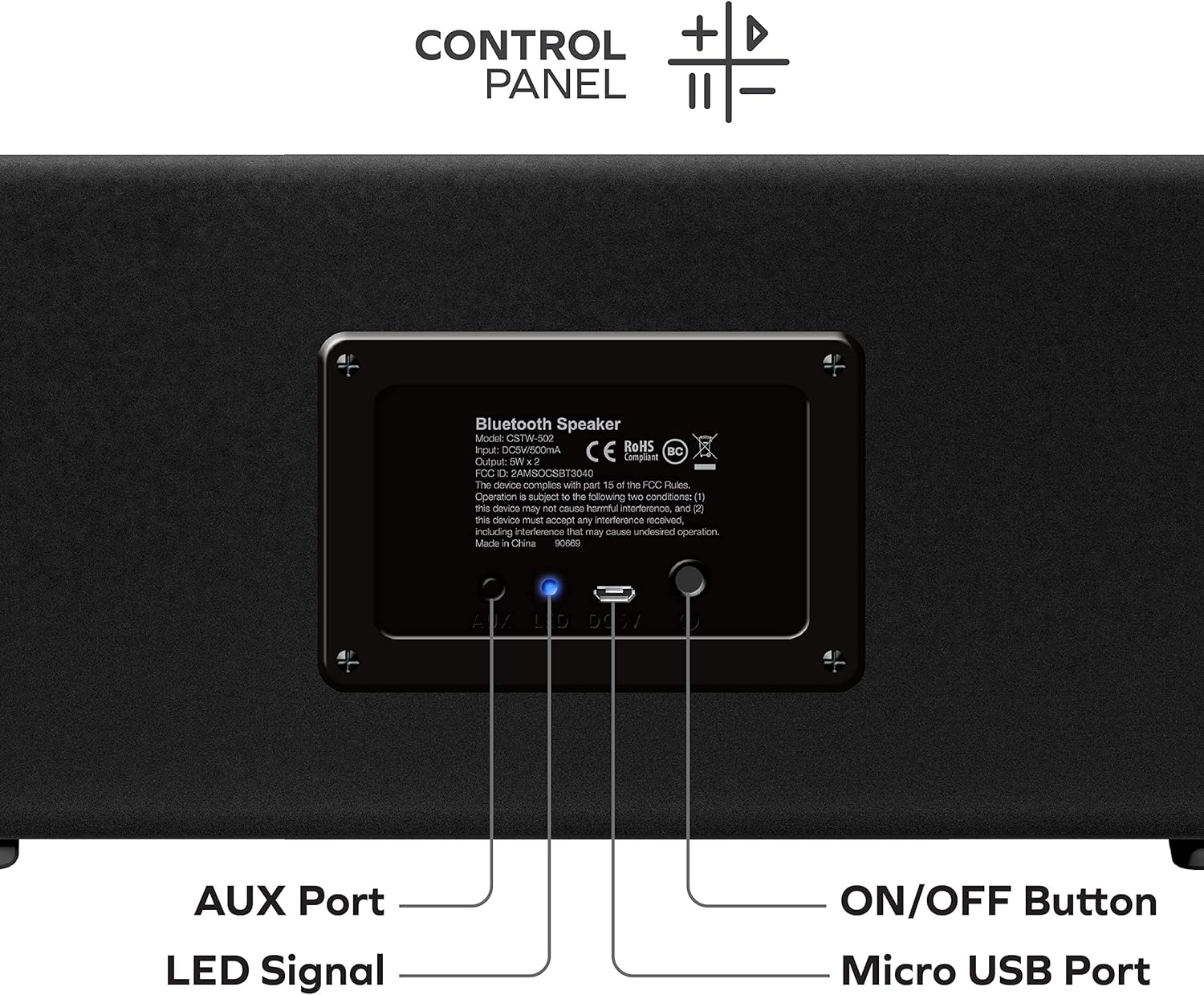
Bild: Rückseite view of the Coby Encore speaker, detailing the AUX Port, LED Signal, Micro USB Port, and ON/OFF Button.
- To power on: Press and hold the ON/OFF button for a few seconds until you hear an audible prompt or see the LED Signal light illuminate.
- To power off: Press and hold the ON/OFF button again for a few seconds until you hear an audible prompt or the LED Signal light turns off.
4. Bluetooth-Kopplung
After powering on, the speaker will automatically enter Bluetooth pairing mode. The LED Signal light will typically flash to indicate it is ready to pair.
- Aktivieren Sie Bluetooth auf Ihrem Smartphone, Tablet oder einem anderen Audiogerät.
- Suchen nach verfügbare Bluetooth-Geräte.
- Select "Coby Encore" from the list of devices.
- Once paired, the speaker will emit an audible confirmation, and the LED Signal light will become solid.
5. True Wireless Stereo (TWS)-Kopplung (optional)
To achieve a stereo sound experience, you can pair two Coby Encore speakers together.
- Ensure both Coby Encore speakers are powered on and not connected to any other Bluetooth device.
- On one of the speakers (this will be the primary speaker), press and hold the TWS pairing button (refer to the control panel diagram if available, otherwise assume a dedicated button or a long press on a specific control). The speaker will enter TWS pairing mode.
- The two speakers will automatically search for and connect to each other. An audible tone will confirm successful TWS pairing.
- Once TWS paired, connect your audio device to the primary speaker via Bluetooth as described in step 4. Both speakers will now play audio in stereo.
6. AUX-Eingangsanschluss
Für Geräte ohne Bluetooth verwenden Sie den AUX-Eingang.
- Connect a 3.5mm audio cable (not included) from your audio device's headphone jack to the AUX Port on the back of the speaker.
- The speaker should automatically switch to AUX mode. If not, you may need to press a mode button (refer to control panel).
Bedienungsanleitung
The Coby Encore speaker features integrated controls for convenient audio management.
Bedienfeldfunktionen
While the exact layout may vary, typical controls include:
- Lauter/Nächster Titel: Kurz drücken für Lautstärke erhöhen, lang drücken für nächsten Titel.
- Lautstärke verringern/vorheriger Titel: Kurzes Drücken verringert die Lautstärke, langes Drücken springt zum vorherigen Titel.
- Abspielen/Pause: Drücken, um Audio abzuspielen oder anzuhalten.
- Modus-Taste: (If present) Press to switch between Bluetooth and AUX input modes.
Note: For precise control functions, refer to the detailed control panel diagram on the product packaging or a dedicated section in the full manual.
Bluetooth-Betrieb
Once paired with your device, audio will stream wirelessly to the speaker. You can control playback and volume either from your connected device or using the speaker's integrated controls.
AUX-Eingangsbetrieb
When connected via the AUX port, the speaker will play audio from the wired source. Volume can be adjusted on both the speaker and the connected device. Playback controls (play/pause, track skip) typically function only on the connected device when using AUX input.
Wartung
Reinigung
- Wischen Sie die Außenseite des Lautsprechers mit einem weichen, trockenen Tuch ab.
- Verwenden Sie keine Scheuermittel, Wachse oder Lösungsmittel, da diese die Oberfläche beschädigen können.
- Vermeiden Sie, dass Feuchtigkeit in die Öffnungen eindringt.
Batteriepflege
- To prolong battery life, fully charge the speaker before its first use.
- Avoid exposing the speaker to extreme temperatures (hot or cold), as this can affect battery performance.
- Wenn Sie den Lautsprecher über einen längeren Zeitraum lagern, laden Sie ihn alle paar Monate auf etwa 50 % auf.
Lagerung
Store the speaker in a cool, dry place away from direct sunlight and excessive dust when not in use.
Fehlerbehebung
If you encounter issues with your Coby Encore speaker, refer to the following common problems and solutions:
| Problem | Mögliche Ursache | Lösung |
|---|---|---|
| Der Lautsprecher lässt sich nicht einschalten. | Schwache Batterie. | Laden Sie den Lautsprecher mit dem mitgelieferten USB-Kabel vollständig auf. |
| Kein Ton. | Lautstärke zu niedrig; Gerät nicht angeschlossen; falscher Eingangsmodus. | Increase volume on both speaker and connected device. Ensure Bluetooth is paired or AUX cable is properly connected. Check input mode. |
| Das Bluetooth-Gerät lässt sich nicht koppeln. | Speaker not in pairing mode; device too far; interference; previously paired to another device. | Ensure speaker is in pairing mode (flashing LED). Move device closer. Turn off other Bluetooth devices. Forget "Coby Encore" on your device and try pairing again. |
| Die Kopplung von True Wireless Stereo (TWS) schlägt fehl. | Die Lautsprecher stehen zu weit auseinander; ein Lautsprecher ist bereits mit einem Gerät gekoppelt. | Stellen Sie sicher, dass sich beide Lautsprecher nahe beieinander befinden und nicht mit anderen Bluetooth-Geräten verbunden sind, bevor Sie die TWS-Kopplung starten. |
| Schlechte Tonqualität. | Low battery; device too far; interference. | Charge the speaker. Move the connected device closer to the speaker. Avoid obstacles between the speaker and the device. |
Produktspezifikationen
| Modellname | Encore TWS Speaker |
| Artikelmodellnummer | CSTW502BKRD |
| Marke | Coby |
| Lautsprechertyp | Soundbar |
| Konnektivitätstechnologie | Aux-Anschluss, Bluetooth, USB |
| Drahtlose Kommunikationstechnologie | Bluetooth 5.3 |
| Maximale Lautsprecherausgangsleistung | 5 Watts (per speaker, 2 x 5W drivers mentioned in description) |
| Stromquelle | Batteriebetrieben (1 Lithium-Ionen-Akku im Lieferumfang enthalten) |
| Spielzeit | Bis zu 7 Stunden |
| Technische Daten | 4.5"T x 12.15"B x 5"H |
| Artikelgewicht | 3.1 Pfund |
| Im Lieferumfang enthaltene Komponenten | USB-Ladekabel |
| UPC | 083832609917 |

Image: The Coby Encore speaker with its dimensions clearly marked.
Garantieinformationen
The Coby Encore True Wireless Bluetooth Speaker is covered by a 90-tägige Herstellergarantie from the date of purchase. This warranty covers defects in materials and workmanship under normal use. It does not cover damage caused by misuse, accident, unauthorized modification, or external causes such as drops or liquid damage.
Please retain your proof of purchase for warranty claims. For detailed warranty terms and conditions, refer to the documentation included with your product or contact customer support.
Kundenservice
For further assistance, technical support, or warranty inquiries, please contact Coby customer service. Contact information can typically be found on the official Coby webauf der Website oder auf der Produktverpackung.
Bevor Sie den Support kontaktieren, stellen Sie bitte sicher, dass Sie Folgendes haben:
- Read this user manual thoroughly.
- Attempted the troubleshooting steps provided.
- Your product model number (CSTW502BKRD) and proof of purchase readily available.


