Einführung
The bopmen Star10 Wireless Bluetooth Karaoke Microphone is a versatile 4-in-1 device designed for singing, acting as a portable handheld microphone, speaker, and featuring an integrated disco light. It offers high-resolution audio quality and extensive compatibility, making it suitable for various entertainment settings including car travel, home parties, and general use for adults and children.

Image: The Star10 Wireless Bluetooth Karaoke Microphone in Rose Gold, showcasing its sleek design and integrated disco ball.
Sicherheitshinweise
- Setzen Sie das Gerät keinen extremen Temperaturen oder Feuchtigkeit aus.
- Lassen Sie das Gerät nicht fallen und setzen Sie es keinen starken Stößen aus.
- Um Erstickungsgefahr durch Kleinteile zu vermeiden, bewahren Sie das Produkt außerhalb der Reichweite von Kleinkindern auf.
- Use only the provided USB C-A cable for charging.
- Versuchen Sie nicht, das Gerät zu zerlegen oder zu modifizieren.
- Reinigen Sie das Gerät mit einem weichen, trockenen Tuch. Vermeiden Sie die Verwendung von scharfen Chemikalien oder Scheuermitteln.
Packungsinhalt
Bitte kreuzen Sie das Kästchen für die folgenden Elemente an:
- 1 x Karaoke microphone (Star10)
- 1 x USB C-A charging cable
- 1 x Benutzerhandbuch
Produkt überview
Familiarize yourself with the main controls and ports of your Star10 microphone.

Image: Detailed diagram illustrating the main control panel and bottom ports of the Star10 microphone, including Microphone Volume, On/Off/Play/Pause, Reverb On/Off, Volume Up/Down, Next/Previous Song, Tone Mode, Disco Light Control, USB Port, 3.5mm Earphone Jack, and TF Card slot.
Hauptsteuerung:
- Microphone Volume / Accompaniment Mode On/Off: Adjusts microphone volume or toggles accompaniment.
- On/Off, Play/Pause: Powers the device on/off and controls music playback.
- Reverb On/Off / Bluetooth & TF Card Mode: Toggles reverb effect and switches between input modes.
- Lautstärke erhöhen/verringern: Regelt die Gesamtlautstärke der Lautsprecher.
- Vorheriges/Nächstes Lied: Navigiert durch die Musiktitel.
- Tonmodus: Durchläuft verschiedene Stimmeffekte.
- Disco Light Control / Twins Pairing: Controls the disco light and initiates Twins Mode pairing.
Anschlüsse unten:
- Kontrollleuchte: Zeigt den Gerätestatus an (z. B. Ladevorgang, verbunden).
- 3.5 mm Earphone Jack / Re-Set button inside: For private listening or resetting the device.
- USB-Anschluss: Zum Aufladen des Mikrofons.
- TF-Karten-Slot: For playing music directly from a micro TF card (up to 32GB, not included).
Aufstellen
Aufladen des Mikrofons:
- Connect the provided USB C-A cable to the USB port on the bottom of the microphone.
- Verbinden Sie das andere Ende des Kabels mit einem kompatiblen USB-Netzteil (nicht im Lieferumfang enthalten) oder einem USB-Anschluss Ihres Computers.
- The indicator light will show charging status. A full charge provides up to 10 hours of use (minimum 5 hours).
Ein-/Ausschalten:
- Halten Sie die Ein/Aus/Wiedergabe/Pause button for a few seconds to power on the microphone. You will hear an audible prompt.
- To power off, press and hold the same button until you hear the power-off prompt.
Bedienungsanleitung
Bluetooth Verbindung:
The Star10 microphone uses Bluetooth 5.2 for seamless connection to your devices.
- Schalten Sie das Mikrofon ein. Es wechselt automatisch in den Bluetooth-Kopplungsmodus.
- Öffnen Sie auf Ihrem Smartphone, Tablet oder einem anderen Bluetooth-fähigen Gerät die Bluetooth-Einstellungen.
- Suchen nach "STAR 10" in the list of available devices and select it to pair.
- Once connected, you will hear a confirmation prompt. You can now play music from your device through the microphone's speaker and sing along.

Image: The Star10 microphone demonstrating its wide compatibility, connecting wirelessly to smartphones, tablets, and laptops via Bluetooth.
TF-Kartenmodus:
Play music directly from a micro TF card.
- Insert a micro TF card (up to 32GB, not included) with your music files into the TF Card slot on the bottom of the microphone.
- The microphone will automatically switch to TF Card mode. If not, press the Reverb On/Off / Bluetooth & TF Card Mode button to cycle modes.
- Verwenden Sie die Vorheriges / Nächstes Lied Tasten zum Navigieren durch die Titel und Abspielen/Pause zur Wiedergabesteuerung.
Disco Light Control:
Enhance your karaoke experience with the built-in disco light.
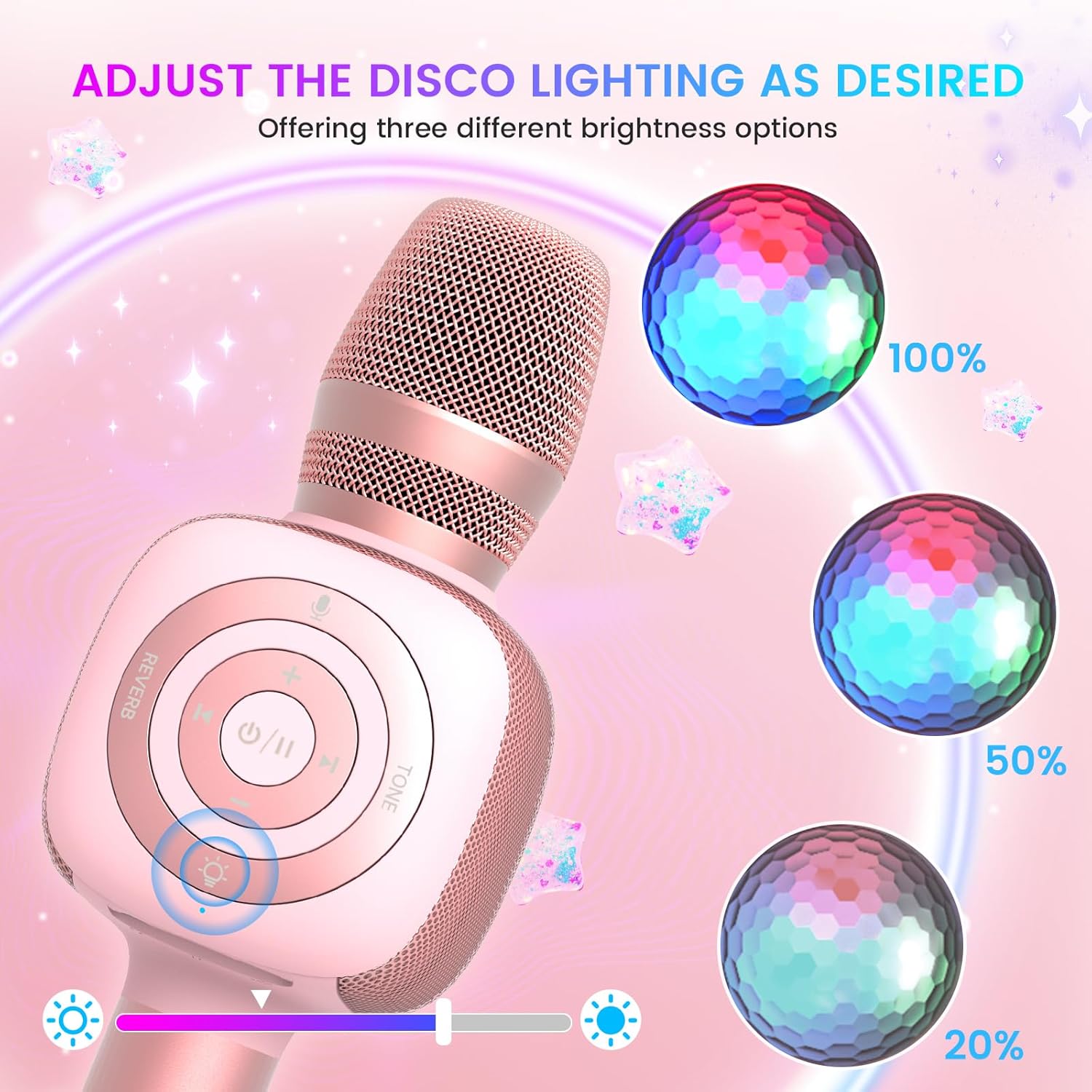
Image: The Star10 microphone's disco light feature, illustrating three adjustable brightness levels (100%, 50%, 20%) to suit different ambiance needs.
- Drücken Sie die Disco Light Control button (light bulb icon) to cycle through three RGB color modes and brightness levels.
- Press again to turn the disco light off.
Tone Modes (Magic Mode):
Experiment with different voice effects for added fun.

Image: The Star10 microphone's "Magic Mode" feature, depicting icons for Male Voice, Female Voice, Cartoon Voice, and Monster Sound effects.
- Drücken Sie die Tonmodus button to cycle through various voice effects such as Male Voice, Female Voice, Cartoon Voice, and Monster Sound.
- Continue pressing to return to the original tone.
Twins Mode (Duet Mode):
Pair two Star10 microphones for a duet experience.

Image: Two individuals enjoying a duet, each holding a Star10 microphone, illustrating the "Twins Mode" functionality for shared singing experiences.
- Ensure both Star10 microphones are powered on.
- On one microphone, press and hold the Disco Light Control button for 2 seconds until a prompt tone "LINK CONNECTED" is heard. This microphone is now in Twins Mode pairing.
- On your cellphone/device, perform Bluetooth pairing selection and choose either of the two microphones. Both microphones will now be connected and output audio.
- To exit Twins Mode, press and hold the Disco Light Control button on the paired microphone for 2 seconds.
Wartung
- Reinigung: Wipe the microphone with a soft, dry cloth. Do not use liquid cleaners or aerosols.
- Lagerung: Bewahren Sie das Mikrofon an einem kühlen, trockenen Ort fern von direkter Sonneneinstrahlung und extremen Temperaturen auf.
- Batteriepflege: For optimal battery life, charge the microphone regularly, even if not in frequent use. Avoid fully discharging the battery for extended periods.
Fehlerbehebung
| Problem | Mögliche Ursache | Lösung |
|---|---|---|
| Das Mikrofon lässt sich nicht einschalten. | Niedriger Batteriestand; Ein-/Ausschalter nicht lange genug gedrückt gehalten. | Charge the microphone fully; Press and hold the power button for 3-5 seconds. |
| Verbindung via Bluetooth nicht möglich. | Microphone not in pairing mode; Device Bluetooth off; Interference. | Ensure microphone is on and in pairing mode; Enable Bluetooth on your device; Move closer to the microphone; Restart both devices. |
| Aus dem Lautsprecher kommt kein Ton. | Volume too low; Device volume too low; Incorrect mode. | Increase microphone volume; Increase device volume; Ensure correct mode (Bluetooth/TF Card). |
| Voice effects not working. | Falscher Tastendruck. | Press the 'Tone Mode' button repeatedly to cycle through effects. |
| Discolicht funktioniert nicht. | Light turned off. | Press the 'Disco Light Control' button to turn on/cycle modes. |
Technische Daten
- Modell: STAR 10
- Marke: böhmen
- Mikrofon-Formfaktor: Handgerät
- Konnektivitätstechnologie: Bluetooth 5.2
- Energiequelle: Batteriebetrieben (2 Lithium-Ionen-Batterien im Lieferumfang enthalten)
- Akkulaufzeit: Up to 10 hours (minimum 5 hours)
- Produktabmessungen: 18.7 x 16.54 x 12.2 Zoll
- Artikelgewicht: 1.19 Pfund (540 Gramm)
- Signal-Rausch-Verhältnis: 52 dB
- Frequenzgang: 10 KHz
- Kompatible Geräte: Personal Computer, Smartphone, Karaoke Machine
- Besonderheit: Mute Function, Disco Light, Voice Changer, Twins Mode
- Farbe: Roségold
- Empfohlene Verwendung: Innen/Außen
Garantie und Support
Your bopmen Star10 Karaoke Microphone comes with a standard manufacturer's warranty. For detailed warranty information, please refer to the warranty card included in your package or visit the official bopmen webWebsite.
If you encounter any issues or have questions regarding your product, please do not hesitate to contact our professional customer service team. We are committed to providing support and assistance within 24 hours to ensure your satisfaction.
Kontaktinformationen: Please refer to the contact details provided in your product packaging or on the official bopmen support page for the most up-to-date information.


