Einführung
The BOYA BY-DM500 is a high-quality dynamic broadcasting microphone designed for professional audio capture. Its robust metal construction and advanced features make it ideal for a variety of applications, including podcasting, streaming, gaming, voice-overs, and music recording. This manual provides detailed instructions for setting up, operating, and maintaining your BY-DM500 microphone to ensure optimal performance.
Lieferumfang
- BY-DM500 Dynamic Broadcasting Microphone
- Schaumstoff-Windschutz
- Bedienungsanleitung
Note: XLR cable, microphone stand, and audio interface/mixer are not included and must be purchased separately.

Image: The BOYA BY-DM500 microphone with its included foam windscreen, showcasing sein elegantes schwarzes Design.
Hauptmerkmale
- Impressive Broadcast-Sound Quality: Features a cardioid polar pattern and a built-in dynamic capsule for warm, smooth, clean, and natural vocals and music. Wide frequency response of 20Hz~20KHz.
- Double Layer Noise Reduction: Built-in dynamic core and inner double layer pop filter for excellent attenuation of plosives. The attached thickened windshield further reduces environmental/mechanical noise and breathiness.
- Professioneller XLR-Anschluss: Utilizes an XLR interface for superior sound quality retention and expansion. Connects to mixers for gain control and improved overall sound. (XLR cable not included)
- Rugged Metal Design: Professional and sturdy full-body metal construction ensures stable and excellent sound quality. Flexible swivel bracket and locking knob allow for desired pick-up angles. Compatible with arm stands with 3/8" or 5/8" threads.
- Entry-Level Home Studio Ready: Captures every detail of your voice with smoothness and depth, making recordings clearer and more natural. Widely applicable for broadcasting, dubbing, singing, live streaming, and gaming. No phantom power or driver required.
Aufstellen
1. Montage des Mikrofons
The BY-DM500 features a flexible swivel bracket with a locking knob for easy positioning. It is designed to be mounted on a microphone stand or boom arm. The microphone's mounting point supports both 3/8" and 5/8" threads, offering versatility for various setups.

Image: The BOYA BY-DM500 microphone securely mounted on a desktop stand, ready for use.

Bild: Eine Nahaufnahme view highlighting the microphone's combo threaded hole, compatible with both 5/8" and 3/8" mounts.
2. Anschluss an ein Audiogerät
The BY-DM500 uses a standard XLR connection for audio output. Connect one end of an XLR cable (not included) to the microphone's XLR port and the other end to your audio interface, mixer, or compatible device.

Bild: Eine detaillierte view of the XLR output port on the BOYA BY-DM500 microphone.
For connecting to a computer or laptop, an audio interface or mixer with an XLR input is required. The microphone does not require phantom power or additional drivers.

Image: A visual guide illustrating the connection path from the BY-DM500 microphone to an audio interface or mixer, and then to a computer or laptop.
Bedienungsanleitung
Mikrofonplatzierung
The BY-DM500 features a cardioid polar pattern, meaning it primarily picks up sound from the front and rejects sound from the sides and rear. For optimal sound quality, ensure you speak directly into the top of the microphone. This directional pickup pattern helps to minimize background noise and focus on your voice.
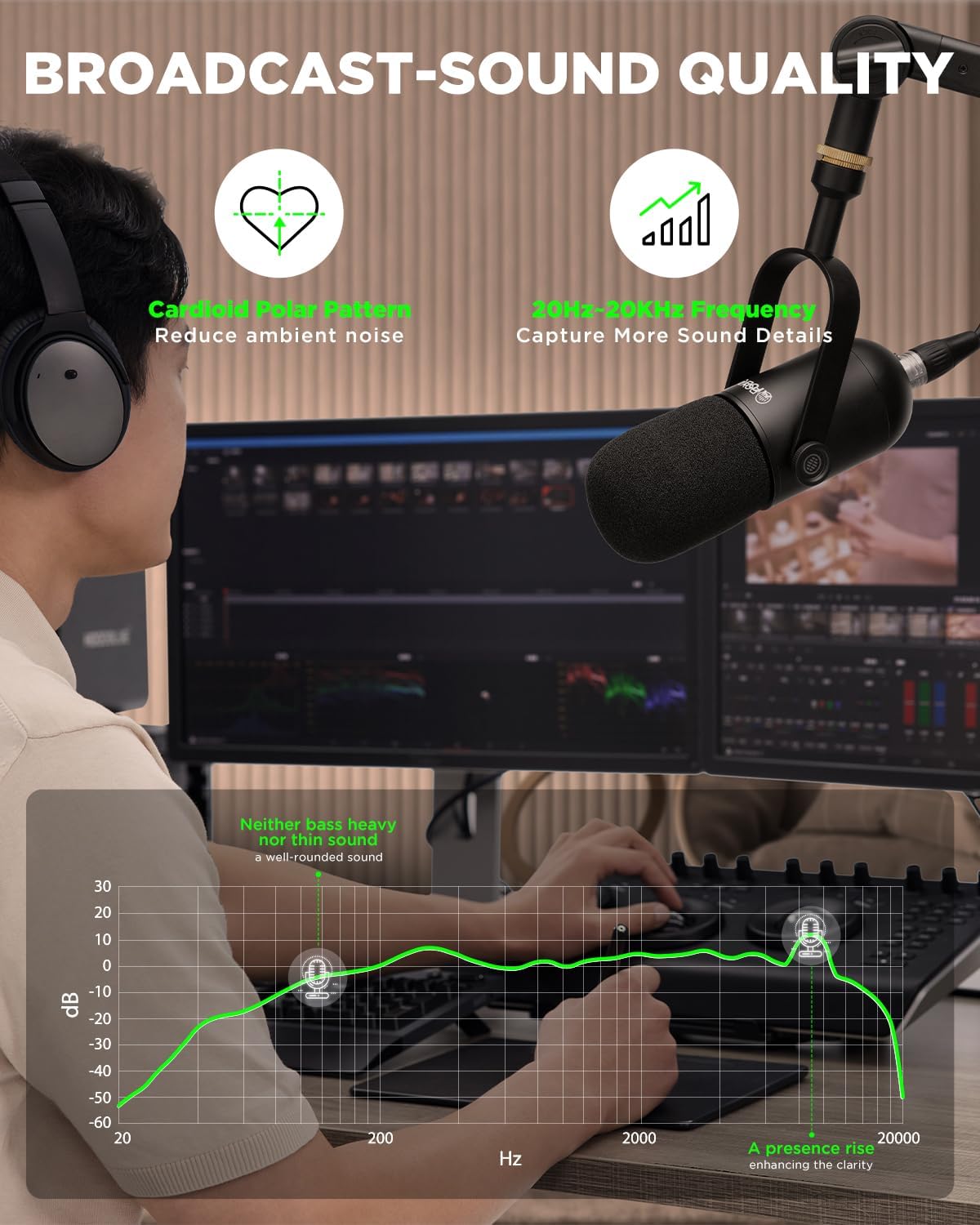
Image: A diagram illustrating the cardioid pickup pattern of the microphone, emphasizing sound capture from the front.
Verwendung der Windschutzscheibe
The included foam windscreen helps to attenuate plosives (harsh "p" and "b" sounds) and reduce breath noise. For best results, ensure the windscreen is properly fitted over the microphone capsule, especially when speaking or singing in close proximity.
Video: Demonstration of the BY-DM500's windscreen effectiveness in blocking plosives. The video shows a user speaking into the microphone with and without the windscreen, highlighting the reduction in harsh sounds.
Anwendungen
The BY-DM500 is versatile and suitable for:
- Podcasting & Broadcasting: Delivers clear, professional-grade vocals.
- Streaming & Gaming: Ensures your voice is heard clearly by your audience.
- Voice-Over & Music Recording: Captures nuances for studio-quality audio.
Video: Eine Demonstrationsshowasing the BY-DM500's performance for music and vocal recordings, highlighting its clear and rich sound capture.
Wartung
- Reinigung: Reinigen Sie das Mikrofongehäuse mit einem weichen, trockenen Tuch. Vermeiden Sie die Verwendung von scharfen Chemikalien oder Scheuermitteln.
- Windschutzscheibenpflege: Die Schaumstoff-Windschutzscheibe kann bei Verschmutzung vorsichtig mit milder Seife und Wasser von Hand gewaschen werden. Vor dem Wiederanbringen vollständig an der Luft trocknen lassen.
- Lagerung: When not in use, store the microphone in its original packaging or a protective case to prevent dust and damage.
- Handhabung: While robust, avoid dropping the microphone or subjecting it to strong impacts, as this can damage internal components.
Fehlerbehebung
| Problem | Mögliche Ursache | Lösung |
|---|---|---|
| Keine Tonausgabe | Incorrect connection; Audio interface/mixer not powered on; Input gain too low. | Ensure XLR cable is securely connected. Verify audio interface/mixer is powered and input gain is set appropriately. Check computer audio settings. |
| Muffled or Distorted Sound | Incorrect microphone placement; Input gain too high (clipping); Damaged windscreen. | Speak directly into the top of the microphone. Reduce input gain on your audio device. Replace or clean the windscreen. |
| Übermäßige Hintergrundgeräusche | Microphone picking up ambient sounds; Improper gain staging. | Ensure microphone is pointed away from noise sources. Adjust gain to optimal levels. Use the windscreen to reduce breath noise. |
| Plosives (harsh "p" and "b" sounds) | Lack of windscreen or improper use; Speaking too close to the microphone. | Ensure windscreen is properly fitted. Maintain a slight distance from the microphone. |
Technische Daten
| Spezifikation | Wert |
|---|---|
| Richtcharakteristik | Unidirektional (Niere) |
| Frequenzbereich | 20 Hz bis 20 kHz |
| Audio Empfindlichkeit | 57 dB |
| Signal-Rausch-Verhältnis | 60 dB |
| Steckertyp | XLR |
| Material | Metall |
| Artikelgewicht | 8.8 Unzen (250 Gramm) |
| Maße | 11.02 x 4.92 x 3.35 Zoll (Verpackung) |
| Empfohlene Verwendung | Streaming/Podcasting/Gaming |
Garantie und Support
BOYA provides a 2-year warranty for the BY-DM500 microphone. For any questions or support needs, please feel free to contact BOYA Support. Lifetime customer consultation service is also available.
Weitere Informationen finden Sie auf der offiziellen BOYA Store auf Amazon.


