1. Einleitung
This manual provides comprehensive instructions for the setup, operation, and maintenance of your TVIP S-Box v.710 4K UHD IP-Receiver. Please read this manual thoroughly before using the device to ensure proper functionality and to prevent damage.
2. Packungsinhalt
Bitte überprüfen Sie, ob alle unten aufgeführten Artikel in Ihrem Paket enthalten sind:
- 1x TVIP S-Box v.710 4K UHD Android 11 IP-Receiver (Black)
- 1x Fernbedienung
- 1x HDMI-Kabel
- 1x Netzteil
- 2x AAA-Batterien
- 1x Benutzerhandbuch (dieses Dokument)
3. Produktüberschreitungview
The TVIP S-Box v.710 is a compact 4K UHD IP-Receiver designed for high-quality media streaming. It operates on Android 11 and supports various media formats and protocols.
3.1 Gerätemerkmale
- Android 11.0-Betriebssystem
- 4K Ultra HD Resolution support
- HDR-Unterstützung (High Dynamic Range).
- 1GB RAM & 8GB Flash Storage
- MicroSD-Slot for expandable storage
- HDMI 2.1-Ausgang
- Ethernet (10/100 Mbit/s) connectivity
- USB 2.0-Anschluss
3.2 Geräteaufbau und Anschlüsse
Familiarize yourself with the physical layout and connection ports of your TVIP S-Box v.710.

Abbildung 1: Vorderseite view of the TVIP S-Box v.710. This image shows the compact black receiver with the 'TVIP' logo on the front.

Abbildung 2: Seite view of the TVIP S-Box v.710, highlighting the USB 2.0 port, MicroSD card slot, IR receiver port, and AV output port.

Abbildung 3: Spitze view of the TVIP S-Box v.710, showing its sleek, minimalist design.
3.3-Fernbedienung
The included remote control allows for easy navigation and control of your TVIP S-Box v.710.
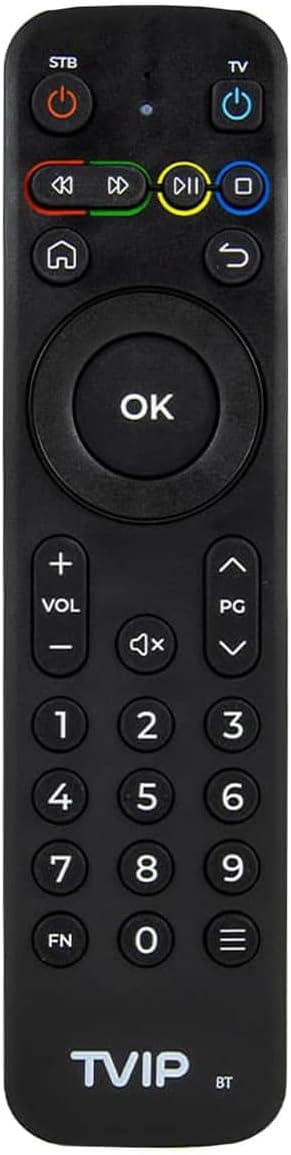
Abbildung 4: The TVIP S-Box v.710 remote control, featuring power buttons for STB and TV, navigation keys, number pad, volume controls, and media playback buttons.
4. Einrichtung
Follow these steps to set up your TVIP S-Box v.710.
4.1 Anschluss an Ihren Fernseher
- Connect one end of the provided HDMI cable to the HDMI 2.1 port on the TVIP S-Box v.710.
- Verbinden Sie das andere Ende des HDMI-Kabels mit einem freien HDMI-Eingang Ihres Fernsehers. Notieren Sie sich die Nummer des HDMI-Eingangs (z. B. HDMI 1, HDMI 2).
4.2 Verbindung zum Netzwerk herstellen
- For a stable connection, use an Ethernet cable. Connect one end of an Ethernet cable to the Ethernet (LAN) port on the TVIP S-Box v.710.
- Verbinden Sie das andere Ende des Ethernet-Kabels mit einem verfügbaren LAN-Port Ihres Routers oder Netzwerk-Switches.
4.3 Stromanschluss
- Insert the small end of the power adapter into the DC port on the TVIP S-Box v.710.
- Plug the power adapter into a wall outlet. The device should power on automatically or enter standby mode.
4.4 Ersteinrichtungsassistent
- Turn on your television and select the correct HDMI input source using your TV remote.
- The TVIP S-Box v.710 will display a boot screen, followed by an initial setup wizard.
- Follow the on-screen prompts to configure language, display settings, and network settings.
5. Bedienungsanleitung
This section covers basic operation of your TVIP S-Box v.710.
5.1 Navigation auf der Benutzeroberfläche
Use the included remote control to navigate the Android 11 interface:
- Verwenden Sie die Richtungspfeiltasten to move between menu items.
- Drücken Sie die OK Schaltfläche zum Auswählen eines Elements oder zum Bestätigen einer Aktion.
- Drücken Sie die Zurück button (curved arrow) to return to the previous screen.
- Drücken Sie die Heim button (house icon) to return to the main home screen.
5.2 Medienwiedergabe
The TVIP S-Box v.710 supports various media applications and services. To play 4K or HDR content, ensure you have compatible media files and a 4K/HDR compatible television.
5.3 Using USB and MicroSD Storage
You can connect external storage devices to your TVIP S-Box v.710:
- USB Laufwerk: Insert a USB flash drive or external hard drive into the USB 2.0 port. The device will typically detect it automatically, and you can access its contents via a file Manager-Anwendung.
- MicroSD-Karte: Insert a MicroSD card into the MicroSD slot. Ensure it is inserted correctly. Access its contents using a file Manager-Anwendung.
6. Wartung
Durch sachgemäße Wartung wird die Langlebigkeit und optimale Leistung Ihres Geräts sichergestellt.
6.1 Reinigung
- Trennen Sie das Gerät vor der Reinigung vom Stromnetz.
- Wischen Sie die Außenseite des Geräts mit einem weichen, trockenen Tuch ab.
- Verwenden Sie keine flüssigen Reinigungsmittel, Aerosole oder Scheuermittel, da diese die Oberfläche oder interne Bauteile beschädigen können.
6.2 Softwareaktualisierungen
Periodically check for software updates to ensure your device has the latest features and security enhancements. Updates are typically managed through the device's settings menu under 'About device' or 'System updates'.
7. Fehlerbehebung
If you encounter issues with your TVIP S-Box v.710, refer to the following common problems and solutions.
7.1 Kein Strom
- Stellen Sie sicher, dass das Netzteil sowohl mit dem Gerät als auch mit einer funktionierenden Steckdose fest verbunden ist.
- Versuchen Sie, den Adapter an eine andere Steckdose anzuschließen.
7.2 No Picture on TV
- Verify that the HDMI cable is securely connected to both the TVIP S-Box v.710 and your television.
- Ensure your television is set to the correct HDMI input source.
- Versuchen Sie es mit einem anderen HDMI-Kabel oder einem anderen HDMI-Anschluss an Ihrem Fernseher.
7.3 Fernbedienung reagiert nicht
- Ensure the AAA batteries in the remote control are correctly inserted and not depleted. Replace them if necessary.
- Point the remote directly at the front of the TVIP S-Box v.710, ensuring no obstructions.
7.4 Netzwerkverbindungsprobleme
- Check that the Ethernet cable is securely connected to both the device and your router.
- Restart your router and the TVIP S-Box v.710.
- Verify your network settings in the device's system settings.
7.5 4K/HDR Playback Problems
- Ensure your television supports 4K UHD and HDR content.
- Verify that the media content you are trying to play is indeed 4K or HDR.
- Check your TV's settings to ensure HDR or enhanced HDMI input is enabled for the connected port.
8. Spezifikationen
Detailed technical specifications for the TVIP S-Box v.710.
| Auflösung | 4K HDR (3840x2160) |
| Prozessor | Amlogic S905W2 (Quad Core 1.8 GHz) |
| Betriebssystem | Android 11 |
| RAM | 1GB DDR |
| Flash-Speicher | 8 GB eMMC |
| Ethernet | 10/100M RJ45 Network Port |
| Video-Decoder | AV1, H.265(10bit), VP9, H.264, MPEG4 ASP, Xvid, MPEG2, MJPEG 2160p 60fps |
| Audio-Decoder | MPEG/MP3/MPA, AAC, WMA, OGG, WAV, FLAC, APE |
| Unterstützte Protokolle | UDP, RTP, HTTP, HLS, MPEG-DASH, RTSP, SMB, NFS, DLNA |
| Untertitel | DVBSUB, VOBSUB, Teletext, SSA/ASS, SubRip, MOV_TEXT, WebVTT |
| Konnektivität | 1x HDMI 2.1, 1x USB 2.0, 1x MicroSD-Slot, 1x Ethernet (10/100 Mbit/s), 1x AV-Port, 1x DC-Port, 1x IR-Port |
| Abmessungen (BxHxT) | 67 x 67 x 15 mm |
| Gewicht | 70 g |
| Betriebstemperatur | 1 °C - 40 °C |
| Luftfeuchtigkeit | 5 % - 93 % |
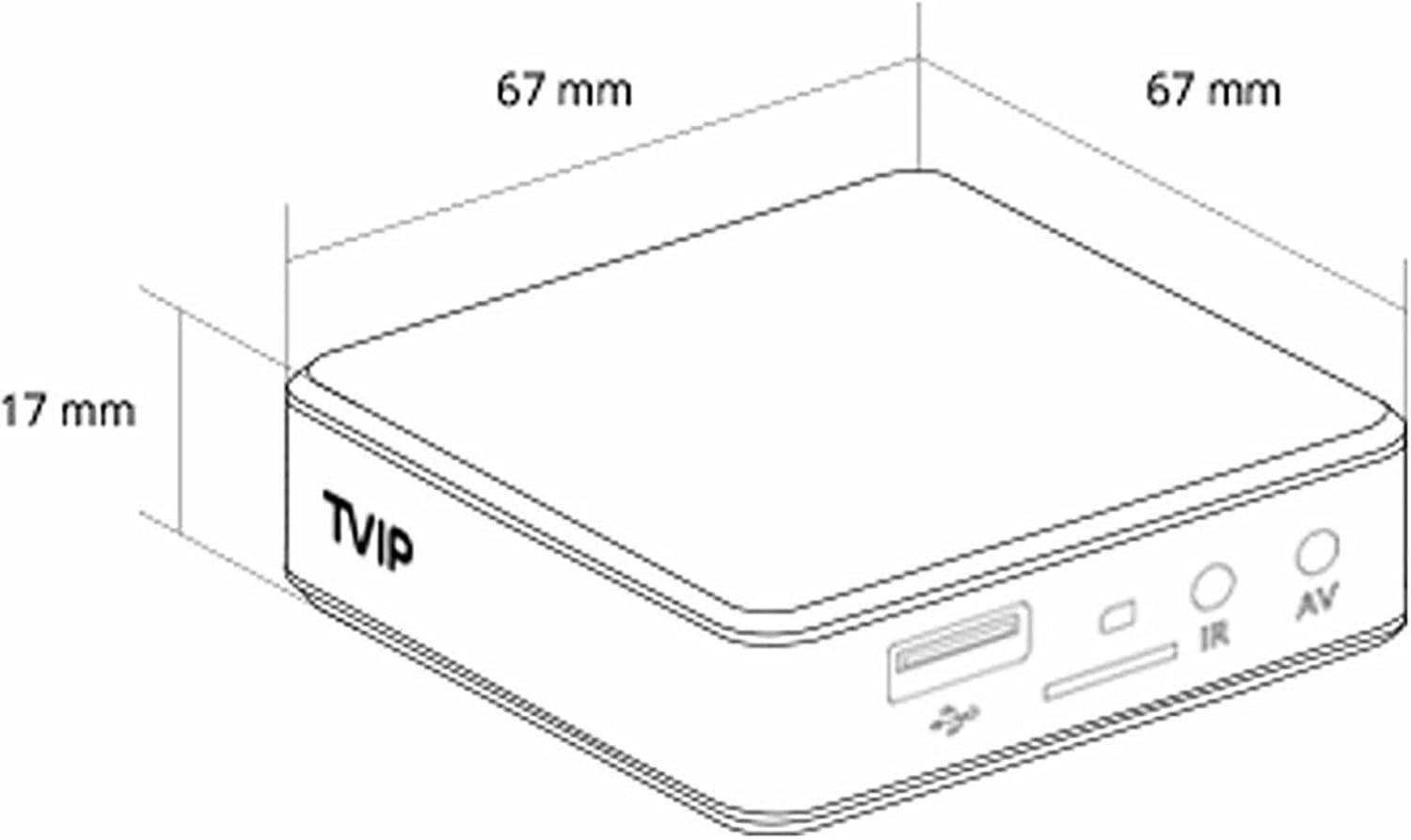
Abbildung 5: Diagram illustrating the dimensions of the TVIP S-Box v.710 (67mm x 67mm x 17mm).
9. Sicherheitshinweise
Bitte beachten Sie folgende Sicherheitsvorkehrungen:
- Setzen Sie das Gerät weder Wasser noch Feuchtigkeit aus.
- Vermeiden Sie, das Gerät in der Nähe von Wärmequellen oder in direktem Sonnenlicht aufzustellen.
- Versuchen Sie nicht, das Gerät selbst zu öffnen oder zu reparieren. Überlassen Sie alle Wartungsarbeiten qualifiziertem Fachpersonal.
- Verwenden Sie nur das mitgelieferte Netzteil.
- Bewahren Sie das Gerät und das Zubehör außerhalb der Reichweite von Kindern auf.
10. Garantie und Support
Your TVIP S-Box v.710 comes with a standard manufacturer's warranty. For warranty claims or technical support, please contact your retailer or the official TVIP support channels. Keep your proof of purchase for warranty purposes.


