1. Einleitung
This manual provides detailed instructions for the setup, operation, and maintenance of your Creative Sound Blaster Katana SE Multi-Channel Gaming Soundbar. Designed for an immersive audio experience, this soundbar features 180W peak power, a bi-amplified 4-driver design, Super X-Fi technology, and customizable RGB lighting. Please read this manual thoroughly before using your device to ensure optimal performance and safety.

Figure 1: Creative Sound Blaster Katana SE Gaming Soundbar
2. Wichtige Sicherheitshinweise
- Lesen Sie diese Anweisungen.
- Bewahren Sie diese Anleitung auf.
- Beachten Sie alle Warnungen.
- Befolgen Sie alle Anweisungen.
- Verwenden Sie dieses Gerät nicht in der Nähe von Wasser.
- Nur mit trockenem Tuch reinigen.
- Die Lüftungsöffnungen dürfen nicht blockiert werden. Die Installation muss gemäß den Anweisungen des Herstellers erfolgen.
- Installieren Sie das Gerät nicht in der Nähe von Wärmequellen wie Heizkörpern, Heizregistern, Öfen oder anderen Geräten (einschließlich ampKonverter (Lüfter), die Wärme erzeugen.
- Schützen Sie das Netzkabel vor Beschädigungen oder Beschädigungen durch Fußgänger, insbesondere an den Steckern, Steckdosen und an der Stelle, an der es aus dem Gerät austritt.
- Verwenden Sie nur vom Hersteller angegebene Zusatzgeräte/Zubehör.
- Trennen Sie das Gerät bei Gewitter oder längerer Nichtbenutzung vom Stromnetz.
3. Packungsinhalt
Überprüfen Sie, ob alle Artikel in Ihrem Paket vorhanden sind:
- Creative Sound Blaster Katana SE Soundbar
- Subwoofer (wired)
- Fernbedienung
- Netzteil
- USB-C-Kabel
- Optisches Kabel
4. Produktüberschreitungview
The Sound Blaster Katana SE is an all-in-one soundbar designed for powerful and immersive audio. It features a sleek design with integrated controls and a front-facing display.
4.1. Soundbar Components
- Bedienelemente auf der Oberseite: Power, Volume Up/Down, Source, Mode, SXFI.
- Frontdisplay: Shows current source (USB, AUX, OPTICAL, BT, TV), volume level, and selected sound mode.
- Front Headphone Jack: For connecting headphones directly.
- Eingebautes Mikrofon: Für die Sprachkommunikation.
- RGB Lighting Strip: Customizable lighting effects located at the bottom of the soundbar.
- Treiber: Bi-amplified 4-driver design for clear and precise audio.

Abbildung 2: Vorderseite view of the Sound Blaster Katana SE with RGB lighting
4.2. Anschlüsse auf der Rückseite
The rear panel provides various ports for connecting to your devices:
- HDMI Out (ARC): For connecting to a TV with Audio Return Channel support.
- SXFI Out: Dedicated port for Super X-Fi enabled headphones.
- USB-Audioeingang: For digital audio connection to PC/Mac.
- Aux-Eingang: 3.5-mm-Analog-Audioeingang.
- Optischer Eingang: Digitaler optischer Audioeingang.
- Sub Out: For connecting the wired subwoofer.
- Leistungsaufnahme: Für das Netzteil.

Figure 3: Rear panel with HDMI ARC, SXFI Out, USB Audio In, Aux In, Optical In, Sub Out, and Power Input.
4.3. Subwoofer
The included wired subwoofer enhances bass response for a more dynamic audio experience.

Abbildung 4: Intern view showing the soundbar's bi-amplified drivers and the subwoofer's design.
5. Einrichtung
Follow these steps to set up your Sound Blaster Katana SE:
- Platzierung: Place the soundbar on a stable surface below your TV or monitor. Position the subwoofer on the floor near the soundbar for optimal bass.
- Subwoofer anschließen: Connect the wired subwoofer cable to the 'Sub Out' port on the soundbar's rear panel.
- Strom anschließen: Schließen Sie das Netzteil an den Stromeingang der Soundbar an und stecken Sie es dann in eine Wandsteckdose.
- Audioquelle anschließen: Choose your preferred audio connection method (HDMI ARC, Optical, USB, Aux, or Bluetooth) and connect the appropriate cable.
Video 1: Official product video demonstrating the Sound Blaster Katana SE's features and connectivity options.
6. Konnektivitätsoptionen
The Sound Blaster Katana SE offers a wide range of connectivity to suit various devices:
- HDMI Out (ARC): Schließen Sie das Gerät an den HDMI-ARC-Anschluss Ihres Fernsehers an, um eine hohe Audioqualität und Steuerungsmöglichkeiten zu gewährleisten.
- USB-Audioeingang: Ideal for connecting to PCs, Macs, or gaming consoles that support USB audio.
- Aux-Eingang: Verwenden Sie ein 3.5-mm-Audiokabel, um Geräte mit analogem Audioausgang anzuschließen.
- Optischer Eingang: For digital audio connection from TVs, game consoles, or other media players.
- Bluetooth 5.0: Pair wirelessly with your mobile devices, tablets, or computers for convenient audio streaming.
- SXFI Out: Connect Super X-Fi certified headphones for a personalized holographic audio experience.

Figure 5: Soundbar showcasing versatile connectivity with gaming consoles and mobile devices.
7. Bedienungsanleitung
7.1. Ein-/Ausschalten
Press the Power button on the soundbar's top panel or the remote control to turn the device on or off.
7.2. Lautstärkeregelung
Use the Volume Up (+) and Volume Down (-) buttons on the soundbar or remote to adjust the audio level. The current volume will be displayed on the front panel.
7.3. Quellenauswahl
Press the 'Source' button on the soundbar or remote to cycle through available input sources (HDMI ARC, USB, Aux, Optical, Bluetooth).
7.4. Klangmodi
The soundbar features optimized sound modes for different content types. Press the 'Mode' button on the soundbar or remote to switch between:
- Musik: Optimiert für die Musikwiedergabe.
- Filme: Optimiert für Kino-Audio.
- Spielen: Tailored for immersive gaming soundscapes.
- Effects Off: Neutral audio profile.
7.5. Verwendung der Fernbedienung
The included remote control provides full functionality for the soundbar, including power, volume, source, mode, SXFI, RGB lighting, and custom buttons.
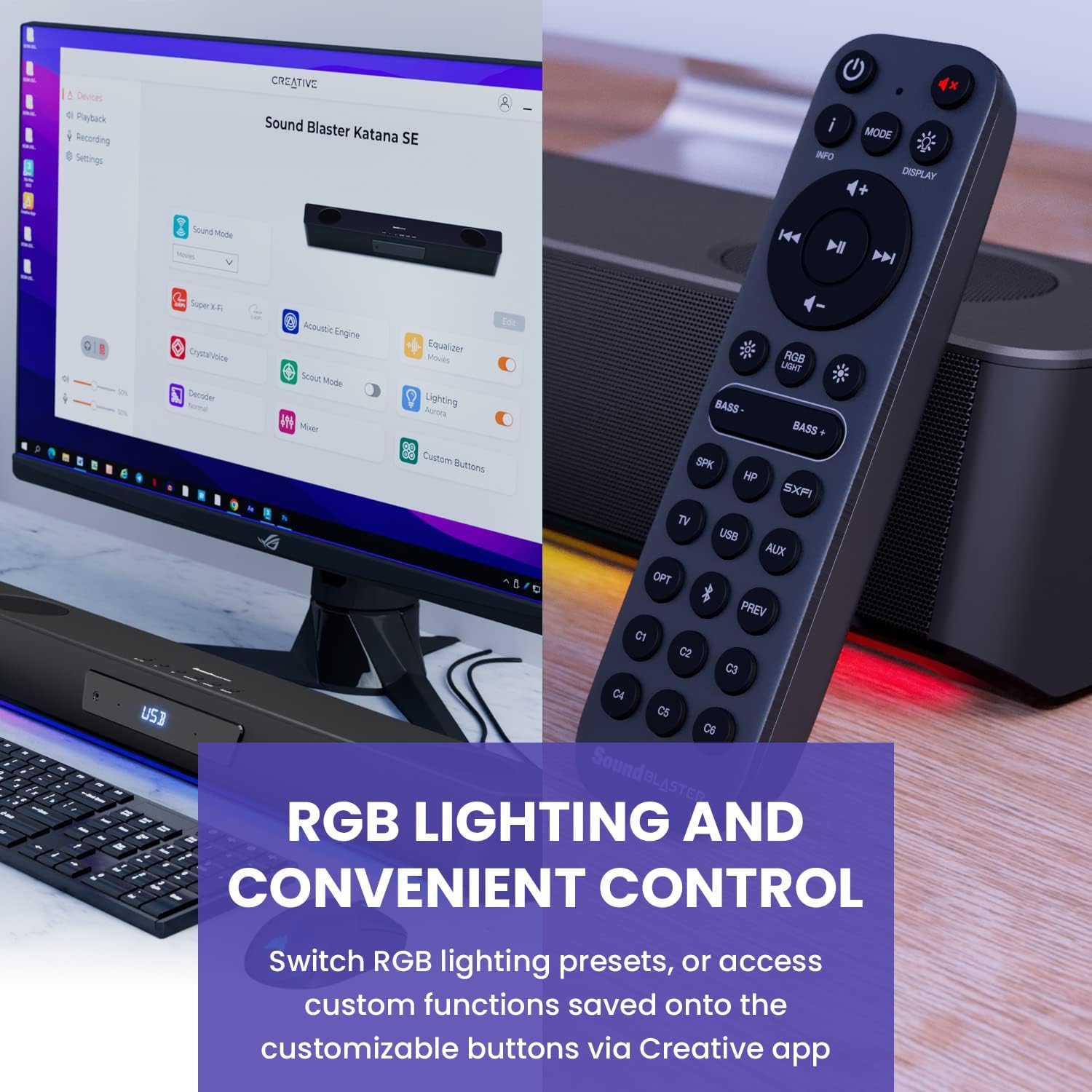
Figure 6: Remote control for the Sound Blaster Katana SE.
7.6. Creative App Customization
For advanced customization, download the Creative app on your PC or Mac. The app allows you to:
- Tune Audio Performance: Adjust EQ settings and activate Sound Blaster processing technologies.
- RGB-Beleuchtung anpassen: Select from various RGB presets or create your own custom lighting effects.
- Map Custom Functions: Assign specific commands to the six customizable buttons on the remote control.

Figure 7: Creative app interface showing sound mode, Super X-Fi, Acoustic Engine, Equalizer, CrystalVoice, Scout Mode, Lighting, Decoder, Mixer, and Custom Buttons.
8. Super X-Fi Technology
Super X-Fi technology personalizes your headphone audio experience for optimized and realistic listening. It recreates the soundstage of a multi-speaker system in your headphones.
- SXFI Battle Mode: Verschaffen Sie sich einen Wettbewerbsvorteiltage in FPS games by accurately pinpointing enemy locations through enhanced audio cues.

Figure 8: Super X-Fi and SXFI Battle Mode for enhanced gaming audio.
9. Eingebautes Mikrofon
The Sound Blaster Katana SE includes a built-in beamforming microphone, allowing you to participate in calls or in-game voice chat directly through the soundbar.
10. RGB-Beleuchtung
The integrated RGB lighting strip can be customized to match your setup or mood. Use the remote control to cycle through presets or the Creative app for advanced color and effect adjustments.
11. Wartung
To ensure the longevity and performance of your Sound Blaster Katana SE:
- Halten Sie das Gerät sauber, indem Sie es mit einem weichen, trockenen Tuch abwischen.
- Vermeiden Sie die Verwendung von flüssigen Reinigungsmitteln oder Aerosolen.
- Stellen Sie sicher, dass die Lüftungsöffnungen nicht blockiert sind.
- Setzen Sie das Gerät keinen extremen Temperaturen oder Feuchtigkeit aus.
12. Fehlerbehebung
Sollten Sie Probleme mit Ihrer Soundbar haben, beachten Sie bitte die folgenden gängigen Lösungsansätze:
- Kein Ton: Check all cable connections (power, audio source, subwoofer). Ensure the correct input source is selected on the soundbar. Verify the volume is not muted or too low.
- Verzerrter Klang: Try reducing the volume. Check audio cable integrity. Ensure the audio source is providing a clean signal.
- Probleme mit der Bluetooth-Konnektivität: Ensure the soundbar is in Bluetooth pairing mode. Delete the soundbar from your device's Bluetooth list and re-pair. Move closer to the soundbar to reduce interference.
- Fernbedienung funktioniert nicht: Check battery levels and replace if necessary. Ensure there are no obstructions between the remote and the soundbar.
- RGB-Lichter funktionieren nicht: Check settings in the Creative app. Ensure RGB lighting is enabled via the remote or app.
13. Spezifikationen
| Besonderheit | Spezifikation |
|---|---|
| Modellname | 51MF8415AA000 27585486 |
| Lautsprechertyp | Soundbar |
| Montagetyp | Tischhalterung |
| Besonderheit | Bass Boost, Built In Microphone, Radio, Stereo Pairing, USB Port |
| Empfohlene Verwendung für das Produkt | For Gaming Consoles, For Computers |
| Kompatible Geräte | Desktop-PC, Laptop, MP3-Player, Projektor, Smartphone, Tablet, Fernseher |
| Einheitenanzahl | 1.0 Anzahl |
| Surround Sound-Kanalkonfiguration | 5.1 |
| Farbe | 180W Peak Power with Bluetooth 5.0 |
| Im Lieferumfang enthaltene Komponenten | Fernbedienung |
| Technische Daten | 25.6"T x 4.3"B x 3.1"H |
| Artikelgewicht | 5.9 Pfund |
| Ist wasserdicht | FALSCH |
| Garantietyp | Beschränkt |
| Anzahl der Artikel | 1 |
| Kontrollmethode | Fernbedienung |
| Drahtlose Kommunikationstechnologie | Bluetooth |
| Lautsprechergröße | 1 Zoll |
| Stromquelle | Kabelgebundene Elektrik |
| Hochtönerdurchmesser | 1 Zoll |
| Wasserbeständigkeit | Nicht wasserfest |
| Kundenpakettyp | FFP |
| Audiotreibertyp | Dynamischer Treiber |
| Subwoofer-Konnektivitätstechnologie | Kabellos |
| Anzahl der Leistungsstufen | 1 |
| Spezifische Verwendungen für das Produkt | Gaming Consoles, Computers |
| UPC | 054651195639 |
| Hersteller | Kreativlabore |
| Form | Quader |
| Artikelgewicht | 5.9 Pfund |
| ASIN | B0C5DFMB93 |
| Artikelmodellnummer | MF8415 |
| Datum der ersten Verfügbarkeit | 16. Mai 2023 |
| Marke | Kreativ |
| Maximale Lautsprecherausgangsleistung | 100 Watt |
| Frequenzgang | 20000 Hz |
| Konnektivitätstechnologie | Bluetooth |
| Audioausgabemodus | Surround, Stereo |
14. Garantie und Support
Your Creative Sound Blaster Katana SE comes with a Limited Warranty. For detailed warranty information, product registration, technical support, and customer service, please visit the official Creative webSiehe die Website oder die in Ihrer Verpackung enthaltene Garantiekarte.


