1. Einleitung
Welcome to the Titan Evoke Smart Watch user manual. This guide provides essential information for setting up, operating, maintaining, and troubleshooting your new smart watch. The Titan Evoke combines advanced technology with elegant design, featuring a vibrant AMOLED display, Bluetooth calling, and comprehensive health tracking capabilities.
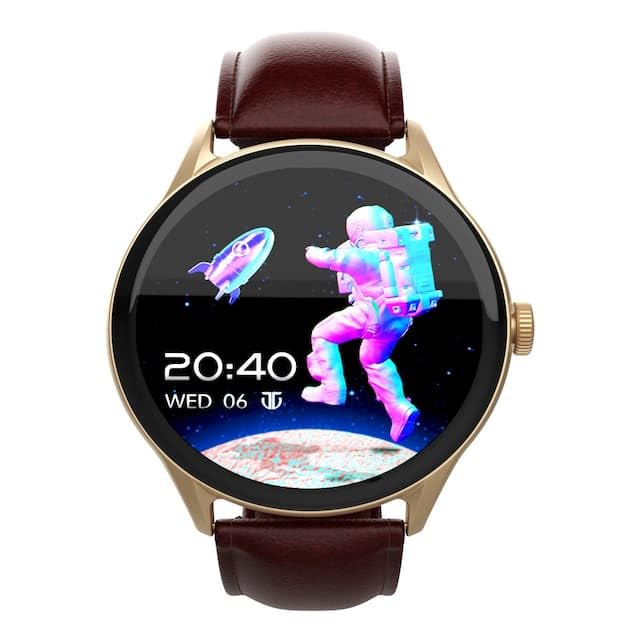
Bild: Vorderseite view of the Titan Evoke Smart Watch displaying a digital clock and an astronaut graphic.

Image: A Titan Evoke Smart Watch with a colorful watch face, accompanied by the text 'Titan Evoke: Function Meets Fashion'.
2. Lieferumfang
Bitte überprüfen Sie den Packungsinhalt, um sicherzustellen, dass alle Artikel vorhanden sind:
- Titan Evoke Smart Watch
- Magnetisches Ladekabel
- Kurzanleitung
- Garantiekarte
3. Einrichtung
3.1. Aufladen des Geräts
Before initial use, fully charge your Titan Evoke Smart Watch. Connect the magnetic charging cable to the charging points on the back of the watch and plug the USB end into a compatible power adapter (not included) or a computer's USB port. The watch display will indicate charging status.
3.2. Ein-/Ausschalten
- Einschalten: Press and hold the functional crown (side button) for a few seconds until the Titan logo appears.
- Ausschalten: From the watch face, swipe down to access quick settings, or navigate to 'Settings' > 'System' > 'Power Off'. Alternatively, press and hold the functional crown and select 'Power Off'.
3.3. Koppeln mit Ihrem Smartphone
To unlock the full functionality of your Titan Evoke Smart Watch, pair it with your smartphone via Bluetooth.
- Download and install the companion app (e.g., 'Titan Smart' app) from your smartphone's app store (Google Play Store for Android, Apple App Store for iOS).
- Stellen Sie sicher, dass Bluetooth auf Ihrem Smartphone aktiviert ist.
- Öffnen Sie die Begleit-App und folgen Sie den Anweisungen auf dem Bildschirm, um ein Konto zu erstellen oder sich anzumelden.
- Wählen Sie in der App „Gerät hinzufügen“ oder „Neues Gerät koppeln“.
- The app will search for available devices. Select 'Titan Evoke' from the list.
- Bestätigen Sie die Kopplungsanfrage sowohl auf Ihrer Smartwatch als auch auf Ihrem Smartphone.
4. Bedienung Ihrer Smartwatch
4.1. Navigation
- Touch-Screen: Wischen Sie nach links, rechts, oben oder unten, um durch Menüs, Benachrichtigungen und Widgets zu navigieren. Tippen Sie, um Elemente auszuwählen.
- Functional Crown: Rotate the crown to scroll through lists or adjust settings. Press the crown to return to the watch face or confirm selections.
4.2. SingleSync Bluetooth Calling
The Titan Evoke supports direct Bluetooth calling, allowing you to make and receive calls directly from your wrist.
- Einen Anruf tätigen: Access the 'Phone' or 'Dialer' app on your watch. You can dial numbers directly or select contacts synced from your smartphone.
- Empfangen eines Anrufs: Bei einem eingehenden Anruf zeigt die Uhr die Anrufer-ID an. Tippen Sie auf das grüne Symbol, um den Anruf anzunehmen, oder auf das rote Symbol, um ihn abzulehnen.
- Ensure your watch is connected to your smartphone via Bluetooth for calling functionality.

Image: Two Titan Evoke Smart Watches, one displaying an incoming call and the other a dial pad, illustrating the SingleSync BT Calling feature.
4.3. Zifferblätter
Personalize your watch with over 100 available watch faces. To change the watch face, press and hold the current watch face, then swipe left or right to browse and tap to select your preferred design.
4.4. Health Suite
The Titan Evoke monitors various health metrics:
- Herzfrequenzmesser: Ermöglicht kontinuierliche oder bedarfsgesteuerte Herzfrequenzmessungen.
- Aktivitätstracker: Erfasst Schritte, zurückgelegte Strecke und verbrannte Kalorien im Laufe des Tages.
- Stress-Tracking: Monitors stress levels based on heart rate variability.
- Schlafmonitor: Erfasst Schlafmuster und Schlafqualität.
Access these features by swiping on the watch face or through the main menu. For detailed analysis, refer to the companion app.
4.5. Multisport Modes
Engage in your favorite activities with dedicated multisport modes. The watch offers over 60 sports modes to accurately track your workouts.
- To start a workout, navigate to the 'Workout' or 'Sports' app on your watch.
- Select your desired activity (e.g., running, cycling, basketball).
- Tap to begin tracking. The watch will display real-time metrics such as duration, heart rate, and calories.

Image: A Titan Evoke Smart Watch with a basketball player on its screen, surrounded by icons representing various sports modes, illustrating the 'Aspire to Excel' feature.
4.6. Zusätzliche Funktionen
- Passwortschutz: Sichern Sie Ihre Uhr mit einem Passwort.
- SOS Emergency Dial: Configure emergency contacts for quick access in critical situations.
- In-Built Calculator and Games: Access these utilities from the main menu.
5. Hauptmerkmale im Überblickview
5.1. 1.43" AMOLED Display
Experience clear visuals on the 1.43-inch AMOLED display with a resolution of 466 x 466 pixels and up to 1000 Nits brightness, ensuring readability even in bright sunlight.

Image: A close-up of the Titan Evoke Smart Watch screen, highlighting its 1000 Nits Brightness and 466x466 pixel resolution, with the text 'A Screen Made For Greatness'.
5.2. Functional Crown
The integrated functional crown provides an intuitive way to navigate menus, scroll through content, and interact with your watch, complementing the touchscreen interface.

Image: A close-up of the Titan Evoke Smart Watch, emphasizing its functional crown and a vibrant watch face displaying health metrics, with the text 'Dial Up The Function & Style'.
5.3. 24x7 Health Suite
The watch continuously monitors your heart rate, tracks your activity, and assesses stress levels, providing a comprehensive overview Ihres Wohlbefindens.
6. Wartung
6.1. Reinigen Sie Ihre Uhr
Regularly clean your watch to maintain its appearance and functionality. Use a soft, lint-free cloth to wipe the screen and watch body. For stubborn dirt, slightly dampBefeuchten Sie das Tuch mit Wasser. Vermeiden Sie die Verwendung von scharfen Chemikalien oder scheuernden Materialien.
6.2. Pflege des Armbands
If your watch has a leather strap, avoid prolonged exposure to water or direct sunlight to prevent damage. Clean with a dry, soft cloth. For silicone or metal straps, a damp Stoff ist geeignet.
7. Fehlerbehebung
If you encounter issues with your Titan Evoke Smart Watch, refer to the following common solutions:
- Uhr schaltet sich nicht ein: Ensure the watch is fully charged. Connect it to the magnetic charging cable and allow it to charge for at least 30 minutes before attempting to power on again.
- Kopplung mit Smartphone nicht möglich:
- Stellen Sie sicher, dass Bluetooth sowohl auf Ihrer Uhr als auch auf Ihrem Smartphone aktiviert ist.
- Stellen Sie sicher, dass sich die Uhr in Bluetooth-Reichweite Ihres Telefons befindet.
- Starten Sie sowohl Ihre Uhr als auch Ihr Smartphone neu.
- Löschen Sie gegebenenfalls den Bluetooth-Cache Ihres Telefons und versuchen Sie es erneut mit der Kopplung.
- Ungenaue Gesundheitsdaten: Achten Sie darauf, dass die Uhr eng am Handgelenk anliegt, etwa eine Fingerbreite oberhalb des Handgelenkknochens. Reinigen Sie den Sensor auf der Rückseite der Uhr.
- Kurze Akkulaufzeit: Reduce screen brightness, disable unnecessary notifications, and limit continuous heart rate monitoring if not required. Ensure background app usage is optimized on your phone.
- Touchscreen reagiert nicht: Starten Sie die Uhr neu. Sollte das Problem weiterhin bestehen, wenden Sie sich bitte an den Kundendienst.
8. Spezifikationen
| Besonderheit | Detail |
|---|---|
| Marke | Titan |
| Modellname | Titan Evoke |
| Modellnummer | 90172AL01 |
| Anzeigetyp | AMOLED |
| Bildschirmgröße | 1.43 Zoll |
| Auflösung | 466 x 466 Pixel |
| Helligkeit | Bis zu 1000 Nits |
| Konnektivität | Bluetooth |
| Akku-Typ | Lithium Polymer |
| Batteriekapazität | 300 mAh |
| Durchschnittliche Akkulaufzeit | 5 Tage |
| Besondere Merkmale | Activity Tracker, Heart Rate Monitor, Multisport Tracker, Phone Call, Stress Tracking, Password Protection, SOS Emergency Dial |
| Kompatible Geräte | Smartphone |
| Technische Daten | 9.4 x 5.9 x 9.5 cm |
| Artikelgewicht | 48.5 g |
9. Garantie und Support
9.1. Garantieinformationen
The Titan Evoke Smart Watch comes with a 1 Jahr Garantie from the date of purchase. Please retain your purchase receipt and the warranty card for any warranty claims. The warranty covers manufacturing defects but does not cover damage caused by misuse, accidents, or unauthorized repairs.
9.2. Kundendienst
For any queries, technical assistance, or warranty claims, please contact Titan customer care:
- Telefon: 1800-266-0123
- E-Mail: customercare@titan.co.in
- Hersteller / Importeur: Titan Company Limited, 3 Sipcot Industries complex, Hosur- 635126


