1. Produktüberschreitungview
The CAMECHO WiFi 4K Mirror Dash Cam is an advanced vehicle recording system designed to enhance driving safety and provide comprehensive surveillance. It features a 9.66-inch IPS full touch screen that replaces your traditional rearview mirror, offering a wider field of view. Equipped with a 4K front camera and a 1080P IP66 waterproof rear camera, it captures clear video footage both in front of and behind your vehicle. Key functionalities include built-in Wi-Fi for smartphone connectivity, super night vision, parking assistance, loop recording, and a G-sensor for incident detection.

Bild 1.1: Überview of the CAMECHO 4K + HD Mirror Dash Camera system.
2. Packungsinhalt
Bitte überprüfen Sie, ob alle unten aufgeführten Artikel in Ihrem Paket enthalten sind:
- 1 x Mirror Dash Cam
- 1 x Hinten View Kamera
- 1 x 64GB TF Card (pre-inserted)
- 1 x Hinten View Kamerakabel
- 1 x Netzkabel
- 1 x Bandage (for securing cables)
- 1 x Parts (mounting straps/accessories)
- 1 x Benutzerhandbuch

Image 2.1: Visual representation of the CAMECHO Mirror Dash Cam and its included accessories.
3. Einrichtung und Installation
The CAMECHO Mirror Dash Cam is designed for easy installation, fitting most car models. Follow these steps for proper setup:
- Montieren Sie die Dashcam: Befestigen Sie die Spiegel-Dashcam sicher an Ihrer vorhandenen Rückfahrkamera.view mirror using the provided straps. Ensure the front camera lens is clear and adjustable.
- Installieren Sie die Frontkamera: Stellen Sie die Linse der Frontkamera so ein, dass das gewünschte Motiv aufgenommen wird. view der vor uns liegenden Straße.
- Installieren Sie die Rückkamera:
- Select an appropriate location on the rear of your vehicle, typically above the license plate, ensuring a clear view.
- Use the provided electrostatic sticker to mount the camera.
- Route the rear camera cable from the rear of the vehicle to the front dash cam. Use a trim tool to hide the cable along the gap of the front windshield, through the A-pillar, and along the ceiling on the side of the passenger seat, and between the rear seat and the ceiling.
- Connect the red wire of the rear camera cable to the positive lead of your vehicle's reversing light for parking assistance functionality.
- Strom anschließen: Plug the power cord into the dash cam and route it to your car's cigarette lighter port. Hide the cable neatly using the trim tool.
- TF-Karte einlegen: The 64GB TF card is pre-inserted. Ensure it is properly seated before use.

Image 3.1: Diagram illustrating the installation process for the CAMECHO Mirror Dash Cam and rear camera.
4. Bedienungsanleitung
The 9.66-inch IPS full touch screen provides intuitive control over the dash cam's functions.
4.1 Basic Screen Operations
- Kamera wechseln Views: Wischen Sie auf dem Bildschirm nach links oder rechts, um zwischen der Frontkamera und der Frontkamera zu wechseln. view, Rückkamera viewoder eine geteilte Bildschirmanzeige, die beides anzeigt.
- Anpassen Viewing-Winkel: Wischen Sie auf dem Bildschirm nach oben oder unten, um die Vertikale anzupassen. viewing angle of the active camera.
- Video Recording/Playback: Access video recording and playback functions directly from the touch screen interface.

Image 4.1: Demonstrates touch screen gestures for switching camera views and adjusting angles.
4.2 WLAN- und App-Verbindung
Connect your smartphone to the dash cam via built-in Wi-Fi for real-time viewing, video download, and playback.
- Power on the device and check the Wi-Fi information displayed on the screen.
- Download and install the "Viidure" APP on your Android or iOS smartphone. A relevant link for the app is: Viidure App Download.
- Connect your smartphone to the dash cam's Wi-Fi network using the provided credentials.
- Add the logger device within the Viidure APP.
- Sobald die Verbindung hergestellt ist, können Sie die Verbindung herstellenview real-time images, download videos, and take photos directly from your phone.

Image 4.2: Step-by-step guide for connecting the dash cam to the smartphone app via Wi-Fi.
5. Merkmale und Funktionen
- Dual-Kamera-Aufnahme: Simultaneously records 4K (2.5K) video from the front camera (150° wide angle) and 1080P video from the IP66 waterproof rear camera (120° wide angle).
- Super-Nachtsicht: Enhanced low-light performance ensures clear video capture of license plates and road signs in dark conditions.
- Einparkhilfe: The rear camera displays guide lines on the screen to assist with safe parking maneuvers.
- Loop-Aufnahme: Continuously records video, overwriting the oldest footage with new recordings when the memory card is full.
- G-Sensor: Automatically detects collisions or bumps, locking the current video footage to prevent it from being overwritten, ensuring critical evidence is saved.
- Belichtungsausgleich: Automatically adjusts light sensitivity to prevent overexposure and underexposure, improving overall picture quality.
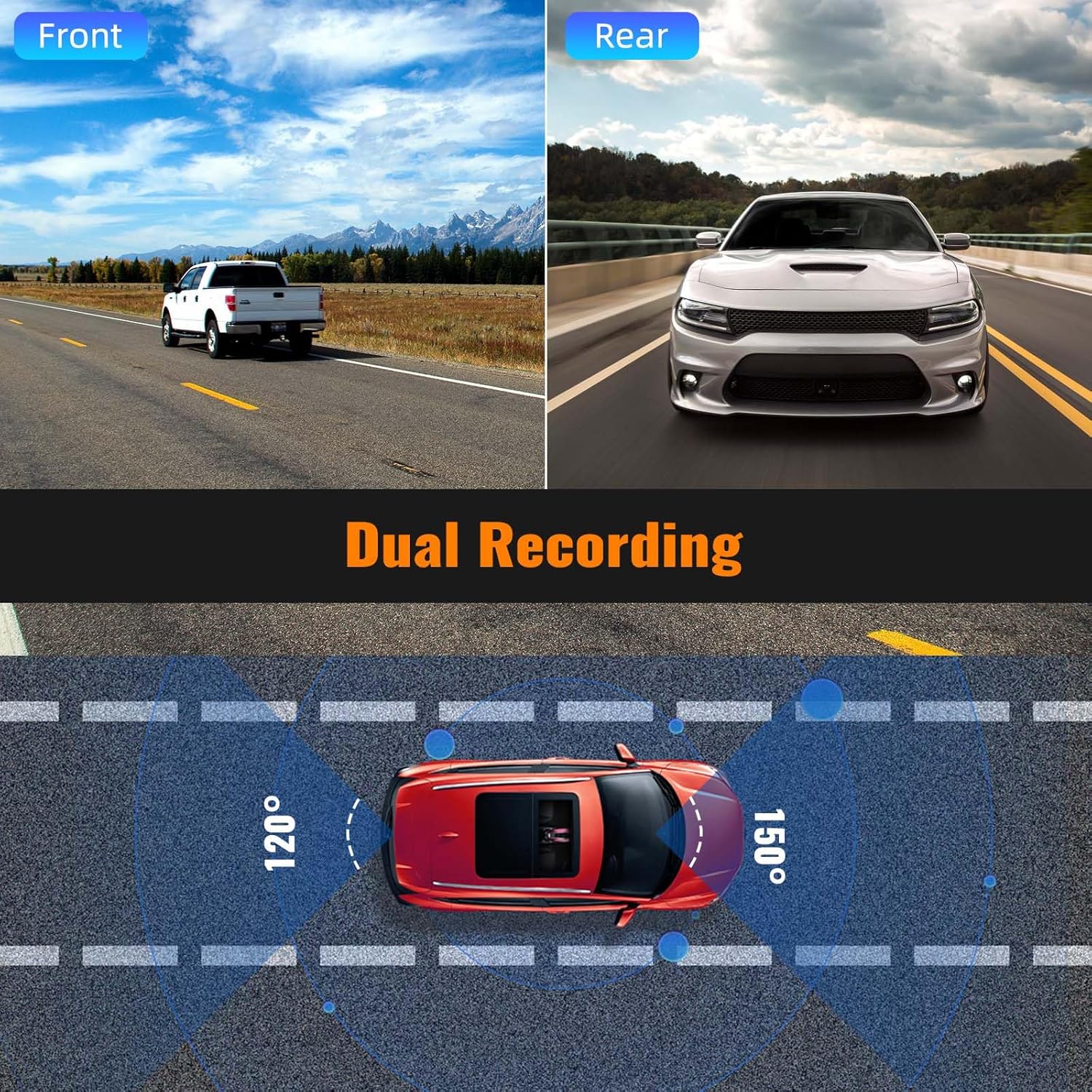
Image 5.1: Illustrates the dual recording capability of the front and rear cameras.

Image 5.2: Explains the G-Sensor and Loop Recording functions for incident protection and continuous recording.

Image 5.3: Shows the parking assistance feature with guide lines for safe maneuvering.

Image 5.4: Highlights the Super Night Vision capability for clear recordings in low light.

Image 5.5: Demonstrates the exposure compensation feature for optimized image quality.
6. Spezifikationen
| Besonderheit | Detail |
|---|---|
| Marke | KAMECHO |
| Modell | B0C65MPWTV |
| Bildschirmgröße | 9.66 Zoll |
| Anzeigetyp | IPS-LCD-Touchscreen |
| Auflösung der Frontkamera | 4K (2.5K) |
| Auflösung der Rückkamera | 1080p |
| Frontkamera Viewing-Winkel | 150 Grad |
| Rückfahrkamera Viewing-Winkel | 120 Grad |
| Flash-Speichertyp | TF, microSD |
| Größe der mitgelieferten Speicherkarte | 64 GB |
| Besondere Merkmale | Built-In WiFi, G-Sensor, Loop Recording, Super Night Vision, Parking Assistance |
| Konnektivitätstechnologie | USB |
| Kompatible Geräte | Trucks, Cars |
| Technische Daten | 2 x 25.6 x 6.9 cm; 800 g |
7. Fehlerbehebung
If you encounter any issues with your CAMECHO Mirror Dash Cam, please refer to the following common solutions:
- Gerät lässt sich nicht einschalten: Ensure the power cord is securely connected to both the dash cam and the car's cigarette lighter port. Check the vehicle's power outlet for functionality.
- Aufnahmeprobleme:
- Verify that the TF card is properly inserted.
- Format the TF card regularly to maintain optimal performance and prevent data corruption.
- Ensure the TF card has sufficient free space. Loop recording will overwrite old files, but a full card can cause issues.
- Schlechte Videoqualität:
- Clean the camera lenses regularly to remove dirt or smudges.
- Stellen Sie sicher, dass die Kamera sicher befestigt ist und nicht übermäßig vibriert.
- Check settings for resolution and exposure compensation.
- Probleme mit der WLAN-Verbindung:
- Stellen Sie sicher, dass das WLAN der Dashcam aktiviert ist.
- Starten Sie sowohl die Dashcam als auch Ihr Smartphone neu.
- Confirm you are connecting to the correct Wi-Fi network broadcasted by the dash cam.
- Rückkamera zeigt kein Bild an: Check the connection of the rear camera cable to the main dash cam unit. Ensure the cable is not damaged.
Für detailliertere Fehlerbehebung oder bei anhaltenden Problemen wenden Sie sich bitte an den Kundensupport.
8. Garantie und Support
CAMECHO is committed to providing high-quality automotive intelligent terminals and excellent customer service. For any questions, technical assistance, or warranty inquiries, please contact our customer support team.
Kundenunterstützung E-Mail: CAMECHOVIP@126.com
We offer 24-hour customer support to assist you with your product.

Image 8.1: Contact information for CAMECHO customer support.


