1. Einleitung
Thank you for choosing the Maxcom FW36 Aurum SE Smartwatch. This manual provides detailed instructions to help you set up, operate, and maintain your device, ensuring optimal performance and longevity. Please read this manual carefully before using your smartwatch.

Abbildung 1: Vorderseite view of the Maxcom FW36 Aurum SE Smartwatch, displaying time and health metrics.
2. Einrichtung
2.1 Auspacken und erste Inspektion
Upon opening the package, verify that all components are present: Maxcom FW36 Aurum SE Smartwatch, charging cable, and this user manual. Inspect the device for any visible damage.
2.2 Aufladen der Smartwatch
Before first use, fully charge your smartwatch. Connect the charging cable to the charging port on the back of the watch and to a standard USB power adapter (not included). The battery icon on the screen will indicate charging status. A full charge typically takes approximately 2 hours.
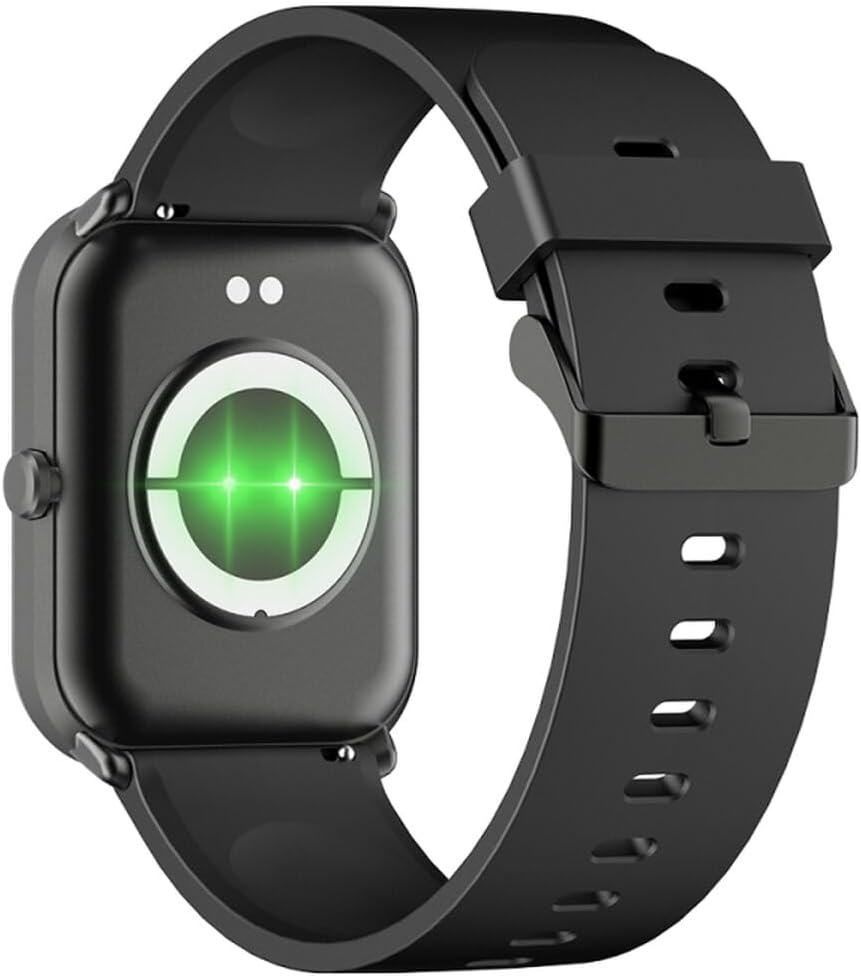
Abbildung 2: Rückseite view der Smartwatch, wobei die Ladekontakte und Gesundheitssensoren hervorgehoben werden.
2.3 Ein-/Ausschalten
- Einschalten: Halten Sie die seitliche Taste einige Sekunden lang gedrückt, bis der Bildschirm aufleuchtet.
- Ausschalten: Wischen Sie auf dem Zifferblatt nach unten, um die Schnelleinstellungen aufzurufen, und tippen Sie dann auf das Ein-/Ausschaltsymbol oder navigieren Sie zu „Einstellungen“ > „System“ > „Ausschalten“. Bestätigen Sie Ihre Auswahl.
2.4 App-Installation und -Kopplung
- Laden Sie die App herunter: Scan the QR code in the manual (if provided) or search for "GLORY FIT" in your smartphone's app store (Google Play Store for Android, Apple App Store for iOS).
- Registrieren/Anmelden: Open the GLORY FIT app and follow the on-screen instructions to create an account or log in.
- Paarung:
- Stellen Sie sicher, dass Bluetooth auf Ihrem Smartphone aktiviert ist.
- Open the GLORY FIT app, go to "Device" or "My Device", and tap "Add Device".
- The app will search for nearby devices. Select "FW36 Aurum SE" from the list.
- Bestätigen Sie die Kopplungsanfrage sowohl auf Ihrem Smartphone als auch auf der Smartwatch.
Once paired, the smartwatch will synchronize data with your phone, including time and date settings.
3. Bedienungsanleitung
3.1 Grundlegende Navigation
- Touch-Screen: Swipe left/right to navigate between main functions (e.g., activity, heart rate). Swipe up to view Benachrichtigungen. Wischen Sie nach unten, um auf die Schnelleinstellungen zuzugreifen.
- Seitentaste: Press once to return to the watch face or wake the screen. Press and hold for power options.

Abbildung 3: Seite view of the smartwatch, illustrating the physical button and strap design.
3.2 Gesundheitsüberwachung
The Maxcom FW36 Aurum SE Smartwatch features several health monitoring functions:
- Herzfrequenzmesser: Swipe to the heart rate interface and wait for the measurement to complete. Ensure the watch is snug on your wrist.
- Blutsauerstoffsensor: Similar to heart rate, navigate to the SpO2 interface for measurement.
- Blutdruckmessgerät: Access this function from the main menu or by swiping to its dedicated screen.
- Überwachung der Schlafqualität: Die Uhr zeichnet automatisch Ihre Schlafmuster auf, wenn sie während des Schlafs getragen wird. View detailed reports in the GLORY FIT app.
- Schrittzähler: Erfasst automatisch Ihre täglichen Schritte, die zurückgelegte Strecke und den Kalorienverbrauch.
Wichtig: The health data provided by this device is for reference only and should not be used for medical diagnosis or treatment.
3.3 Multi-Sport-Modus
Access the multi-sport mode from the main menu to select various activities such as running, walking, cycling, etc. The watch will track specific metrics relevant to your chosen activity.
3.4 Benachrichtigungen
Once paired with your smartphone and notification permissions are granted in the GLORY FIT app, your smartwatch will display incoming calls, messages, and app notifications. Swipe up from the watch face to view Ihr Benachrichtigungsverlauf.
4. Wartung
4.1 Reinigung
Regularly clean your smartwatch and strap with a soft, dry cloth. For stubborn dirt, use a slightly damp Mit einem Tuch abwischen und anschließend gründlich trocknen lassen. Vermeiden Sie die Verwendung von scharfen Chemikalien oder Scheuermitteln.
4.2 Wasser- und Staubbeständigkeit
The Maxcom FW36 Aurum SE Smartwatch is designed to be dust resistant and water resistant. This means it can withstand splashes, rain, and brief immersion in shallow water. However, it is not suitable for hot showers, saunas, diving, or high-speed water sports. Avoid pressing buttons underwater.
4.3 Batteriepflege
Um die Akkulaufzeit zu verlängern, vermeiden Sie häufiges vollständiges Entladen des Akkus. Laden Sie das Gerät regelmäßig auf, auch wenn es längere Zeit nicht benutzt wird. Bewahren Sie das Gerät an einem kühlen, trockenen Ort auf.
5. Fehlerbehebung
- Smartwatch lässt sich nicht einschalten: Ensure the device is fully charged. Press and hold the side button for an extended period (10-15 seconds).
- Kopplung mit Smartphone nicht möglich:
- Stellen Sie sicher, dass Bluetooth auf Ihrem Telefon aktiviert ist und sich die Smartwatch in Reichweite befindet.
- Starten Sie sowohl Ihr Smartphone als auch Ihre Smartwatch neu.
- Check if the GLORY FIT app has necessary permissions.
- Falls das Gerät zuvor gekoppelt war, versuchen Sie, die Kopplung aufzuheben und das Gerät erneut zu koppeln.
- Ungenaue Gesundheitswerte: Ensure the watch is worn snugly on your wrist, not too tight or too loose. Clean the sensors on the back of the watch. Avoid excessive movement during measurement.
- Benachrichtigungen nicht erhalten: Verify that notification permissions are enabled for the GLORY FIT app in your phone's settings. Ensure the app is running in the background.
6. Spezifikationen
| Modell | FW36 Aurum SE |
| Marke | Maxcom |
| Betriebssystem | Android |
| Anzeige | 1.69" (4.29 cm) Color Touchscreen, 240 x 280 pixels, Digital, Rounded Corners |
| Batteriekapazität | 220 mAh Lithium-Ionen- |
| Konnektivität | Bluetooth |
| Sensoren | Heart Rate Monitor, Blood Oxygen Sensor, Blood Pressure Monitor, Pedometer |
| Schutz | Dust Resistant, Water Resistant |
| Kompatible App | GLORY FIT |
| Dimensions (W x T x D) | 44.6 mm x 1.04 cm x 35 mm |
| GPS-Funktionalität | Nicht verfügbar |
7. Garantie und Support
The Maxcom FW36 Aurum SE Smartwatch comes with a Zwei Jahre Garantie against factory defects. Please retain your proof of purchase for warranty claims.
For technical support, troubleshooting assistance, or warranty inquiries, please contact Maxcom customer service through their official webWebsite oder die Kontaktinformationen, die Sie mit Ihren Kaufunterlagen erhalten haben.


