1. Wichtige Sicherheitshinweise
Bitte lesen und verstehen Sie alle Sicherheitshinweise, bevor Sie dieses Produkt verwenden. Die Nichtbeachtung dieser Hinweise kann zu Stromschlag, Brand oder schweren Verletzungen führen.
- Setzen Sie das Gerät keinen extremen Temperaturen, direkter Sonneneinstrahlung oder hoher Luftfeuchtigkeit aus.
- Keep the device away from water and other liquids. If it gets wet, turn it off immediately and allow it to dry completely before reuse.
- Versuchen Sie nicht, das Gerät zu zerlegen, zu reparieren oder zu verändern. Überlassen Sie alle Wartungsarbeiten qualifiziertem Fachpersonal.
- Use only specified charging methods (USB-C, solar, hand crank).
- Außerhalb der Reichweite von Kindern aufbewahren.
- Entsorgen Sie Batterien gemäß den örtlichen Vorschriften.
2. Produktüberschreitungview
The FosPower Emergency Weather Radio Model A6 is a versatile device designed for emergency preparedness and outdoor activities. It features multiple power sources, radio reception, lighting, and a power bank function.
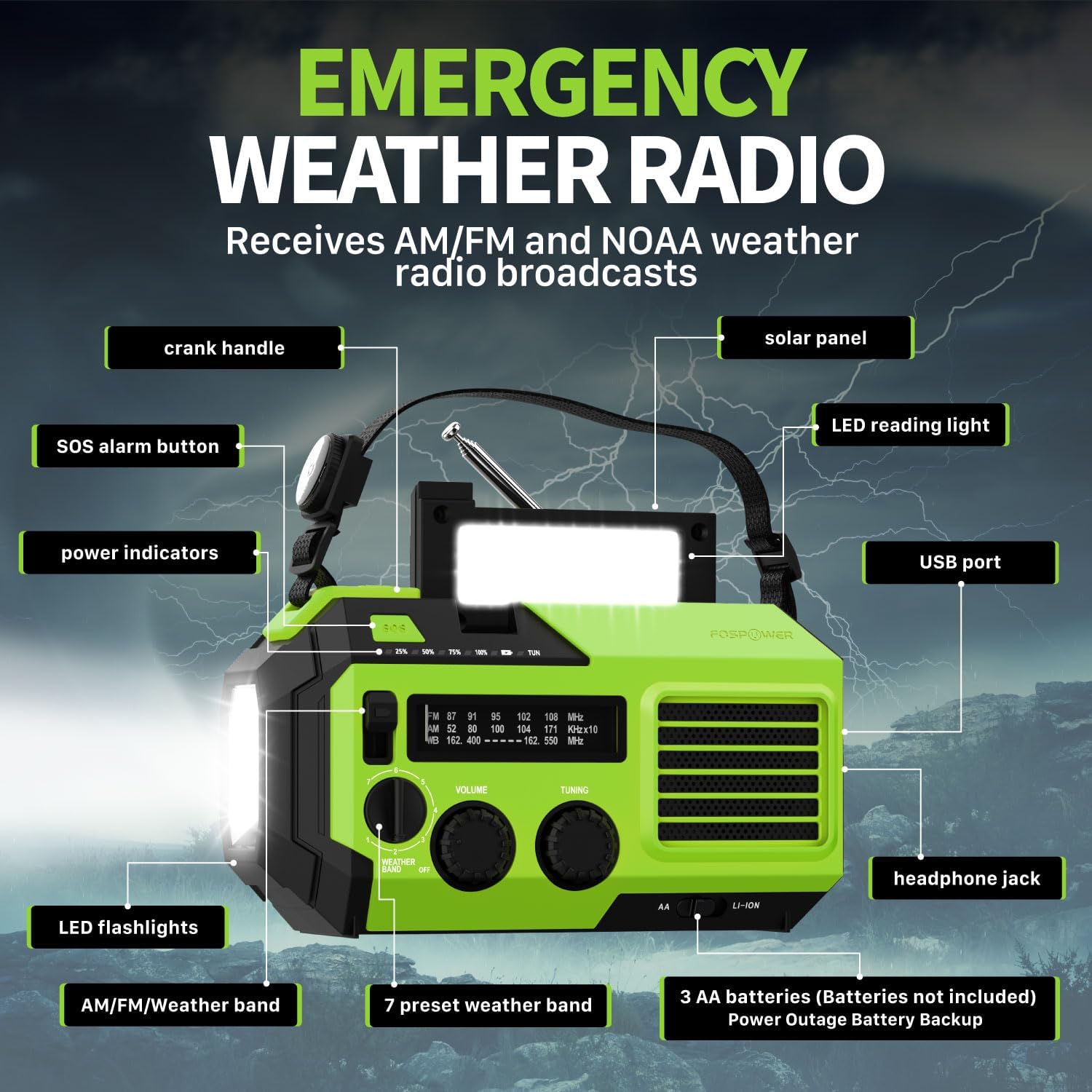
Bild 2.1: Vorderseite view of the FosPower Emergency Weather Radio with key components labeled, including the crank handle, solar panel, SOS alarm button, power indicators, LED reading light, USB port, LED flashlights, AM/FM/Weather band selector, volume and tuning knobs, and headphone jack.
Hauptmerkmale:
- NOAA/AM/FM Radio: Access local weather information and emergency hazard alerts, as well as standard AM/FM broadcasts.
- 19240mWh (5200mAh) Power Bank: Charge USB devices during power outages or in outdoor settings.
- Mehrere Stromquellen: Recharge via USB-C cable, solar panel, or hand crank. Can also be powered by AA batteries (not included).
- SOS-Alarm: Aktiviert eine laute Sirene und ein Blinklicht zur Notfallsignalisierung.
- Integrierte Beleuchtung: Features a powerful flashlight and a reading light.
- IPX3 Wasserbeständigkeit: Bietet Schutz vor Spritzwasser.
3. Einrichtung
3.1 Erstaufladung
Before first use, fully charge the internal battery using the provided USB-C cable. Connect the USB-C cable to the radio's USB-C port and the other end to a USB power adapter (not included) or a computer USB port. The power indicators will illuminate to show charging progress.
3.2 AA Battery Installation (Optional)
The radio can also operate on 3 AA batteries (not included) as a backup power source. Open the battery compartment cover on the back of the radio and insert 3 AA batteries, ensuring correct polarity. Close the cover securely.

Bild 3.1: Hinten view of the radio highlighting the solar panel, hand-crank, AA battery compartment, and USB charging port, illustrating the multiple power sources.
4. Bedienungsanleitung
4.1 Funkbetrieb
- Ein-/Ausschalten: Rotate the 'VOLUME' knob clockwise to turn the radio on and adjust the volume. Rotate counter-clockwise until it clicks to turn off.
- Band Auswahl: Use the 'WEATHER BAND' switch to select between AM, FM, or WB (Weather Band).
- Stimmung: Rotate the 'TUNING' knob to scan for radio stations. Extend the telescopic antenna for improved reception, especially for FM and WB.
- NOAA-Wetterband: When WB is selected, the radio will receive NOAA weather alerts. The radio supports 7 preset weather bands.
- Kopfhöreranschluss: Für ungestörtes Hören schließen Sie 3.5-mm-Kopfhörer an die Kopfhörerbuchse an.
4.2 Taschenlampe und Leselampe

Image 4.1: The radio demonstrating its high-power flashlight and cool-tone reading lamp Merkmale.
- Taschenlampe: Press the flashlight button located on the front of the radio to turn the flashlight on or off.
- Leselicht: Lift the solar panel to reveal the LED reading light. Press the reading light button to turn it on or off.
4.3 SOS-Alarm
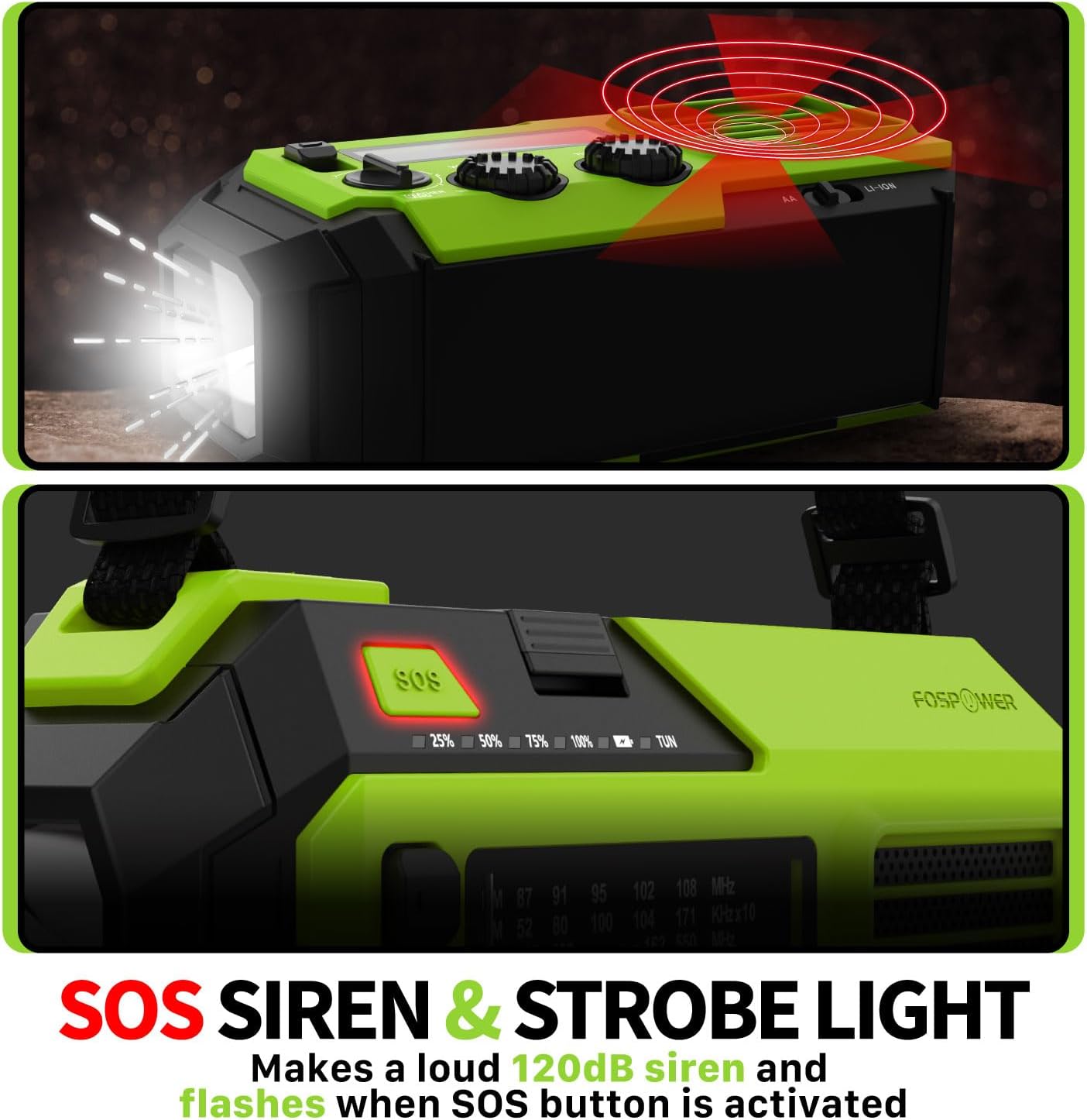
Image 4.2: Close-up of the radio's SOS button and an illustration of the siren and strobe light being activated.
In an emergency, press and hold the 'SOS' button to activate a loud 120dB siren and a flashing strobe light. Press the 'SOS' button again to deactivate.
4.4 Laden externer Geräte (Powerbank)

Image 4.3: The radio connected via USB to a smartphone, demonstrating its power bank capability for charging small electronics.
Connect your USB-powered device (e.g., smartphone, tablet) to the radio's USB-A output port using your device's charging cable. The radio's internal battery will begin charging your device.
4.5 Aufladen des Funkgeräts
- USB-C-Aufladung: Connect the provided USB-C cable to the radio's USB-C input port and a USB power source. This is the most efficient charging method.
- Solarladung: Place the radio with the solar panel facing direct sunlight. The solar panel charges the internal battery, primarily for maintaining charge or slow charging in emergencies.
- Laden per Handkurbel: Drehen Sie die Handkurbel 3-5 Minuten lang im Uhrzeigersinn oder gegen den Uhrzeigersinn (ca. 130-150 U/min), um Strom für den kurzfristigen Gebrauch zu erzeugen oder den Ladevorgang zu starten.
5. Wartung
- Reinigung: Wischen Sie das Radio mit einem weichen, trockenen Tuch ab. Verwenden Sie keine Scheuermittel oder Lösungsmittel.
- Lagerung: Store the radio in a cool, dry place away from direct sunlight when not in use for extended periods. For optimal battery health, fully charge the internal battery every 3-6 months.
- Batteriepflege: Wenn Sie AA-Batterien verwenden, entfernen Sie diese, wenn das Radio längere Zeit nicht benutzt wird, um ein Auslaufen zu verhindern.
6. Fehlerbehebung
| Problem | Mögliche Ursache | Lösung |
|---|---|---|
| Das Radio lässt sich nicht einschalten. | Internal battery is depleted; AA batteries are depleted or incorrectly installed. | Charge the internal battery via USB-C or hand crank. Check and replace AA batteries if used. |
| Schlechter Radioempfang. | Antenne nicht ausgefahren; schwaches Signal; Störungen. | Fully extend the telescopic antenna. Adjust radio position. Try tuning to a stronger station. |
| Externes Gerät wird nicht geladen. | Der interne Akku des Radios ist schwach; falsches Kabel; Gerät nicht kompatibel. | Ensure the radio's internal battery is sufficiently charged. Use a functional USB charging cable. Verify device compatibility. |
| Die Handkurbel ist schwergängig oder erzeugt keinen Strom. | Mechanism obstruction; improper cranking speed. | Ensure no obstructions. Crank at a steady, moderate pace (130-150 RPM). |
7. Spezifikationen
| Besonderheit | Detail |
|---|---|
| Modellnummer | FOSPWB-2419 |
| Technische Daten | 6.76 x 3.52 x 2.59 Zoll |
| Artikelgewicht | 1.08 Pfund |
| Interne Batterie | 19240 mWh (5200 mAh) |
| Unterstützung für externe Akkus | 3 x AA-Batterien (nicht im Lieferumfang enthalten) |
| Radiobänder | AM, FM, NOAA Weather Band (WB) |
| Lademethoden | USB-C, Solar, Hand Crank |
| Besondere Merkmale | Built-In Flashlight, Reading Light, SOS Alarm, Power Bank |
| Wasserbeständigkeit | IPX3 |
8. Garantie und Support
FosPower provides a limited lifetime warranty for this product. For warranty claims, technical assistance, or customer service inquiries, please contact FosPower's USA-based customer support team. Refer to the official FosPower webDie Kontaktdaten finden Sie auf der Website oder in Ihren Kaufunterlagen.


