Einführung
Thank you for choosing the Epson EB-L210SF projector. This manual provides essential information for the safe and efficient use of your projector. Please read it thoroughly before operating the device and keep it for future reference.
The Epson EB-L210SF is a 3LCD Full-HD projector designed for clear and vibrant image projection. It features a laser light source for long-lasting performance.
Wichtige Sicherheitsinformationen
- Lasersicherheit: Schauen Sie nicht direkt in die Projektorlinse, wenn die Laserlichtquelle aktiv ist. Vermeiden Sie direkten Augenkontakt mit dem Laserstrahl.
- Belüftung: Ensure adequate ventilation around the projector. Do not block ventilation openings. Overheating can cause damage.
- Energiequelle: Verwenden Sie ausschließlich das für diesen Projektor vorgesehene Netzteil.
- Handhabung: Behandeln Sie den Projektor vorsichtig. Vermeiden Sie es, ihn fallen zu lassen oder starken Stößen auszusetzen.
- Reinigung: Vor der Reinigung den Netzstecker ziehen. Ein weiches, trockenes Tuch verwenden. Keine flüssigen oder Aerosolreiniger verwenden.
Aufstellen
1. Auspacken und Aufstellen
Carefully remove the projector and all accessories from the packaging. Place the projector on a stable, level surface. Ensure there is sufficient space around the projector for proper ventilation.

Abbildung 1: Vorder- und Seitenansicht view of the Epson EB-L210SF projector, showing the lens and ventilation grilles.
2. Stromversorgung anschließen
- Schließen Sie das mitgelieferte Netzkabel an den Netzanschluss des Projektors an.
- Stecken Sie das andere Ende des Netzkabels in eine geerdete Steckdose.
3. Anschließen der Eingangsquellen
The projector supports various input sources. Connect your device (computer, Blu-ray player, etc.) to the appropriate port on the projector's rear panel.

Figure 2: Rear panel of the projector, displaying various input and output ports including HDMI, Computer (VGA), Video, USB, and Audio connections.
- HDMI: Connect an HDMI cable from your device to one of the HDMI ports (HDMI 1 or HDMI 2).
- Computer (VGA): Connect a VGA cable from your computer to the Computer 1 or Computer 2 port. For audio, connect a separate audio cable to Audio 1 or Audio 2.
- Video: Connect composite video and audio cables to the Video and Audio (R/L) ports.
- USB: Use the USB-A port for connecting USB storage devices or the USB-B port for display over USB.
- LAN: Schließen Sie ein Ethernet-Kabel zur Netzwerksteuerung und -überwachung an.
4. Erstes Einschalten und Bildanpassung
- Press the power button on the projector or remote control to turn on the device. The power indicator will illuminate.
- Passen Sie die Fokusring um die Linse herum, bis das Bild scharf und klar ist.
- Verwenden Sie die Zoomhebel (if available) to adjust the image size.
- Wenn das Bild trapezförmig erscheint, verwenden Sie die Trapezkorrektur feature (manual or automatic) to square the image. Refer to the Operating section for details on menu navigation.
Bedienung des Projektors
1. Systemsteuerung überview
The control panel on top of the projector allows access to various functions and settings.
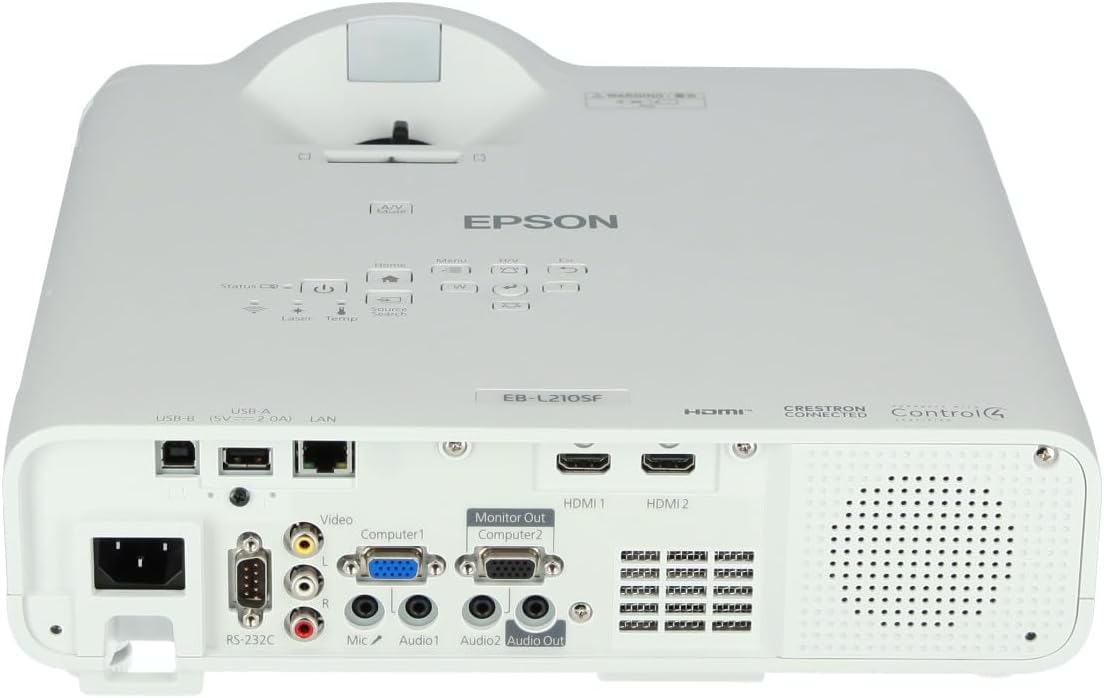
Abbildung 3: Oben view of the projector, highlighting the control panel with buttons for power, menu, source selection, and navigation.
- Netzschalter: Schaltet den Projektor ein oder aus.
- Source Search: Durchläuft die verfügbaren Eingangsquellen.
- Menü-Schaltfläche: Öffnet das On-Screen-Display-Menü (OSD-Menü).
- Navigation Buttons (Arrow keys): Dient zur Navigation durch die Menüoptionen.
- Eingabetaste: Bestätigt die Menüauswahl.
- Esc-Taste: Verlässt das aktuelle Menü oder kehrt zum vorherigen Bildschirm zurück.
- Home "Button: Accesses the home screen or quick settings.
- A/V-Stummschaltung: Temporarily mutes audio and blanks the screen.
2. Auswahl einer Eingangsquelle
Drücken Sie die Quellensuche button on the control panel or remote control to cycle through the connected input sources (e.g., HDMI 1, HDMI 2, Computer 1, Video). The projector will automatically detect and display the active source.
3. Adjusting Image and Audio Settings
Drücken Sie die Speisekarte button to access the projector's on-screen display (OSD) menu. Use the navigation buttons to browse categories such as:
- Bild: Adjust brightness, contrast, color, tint, sharpness, and color temperature.
- Signal: Configure input signal settings, aspect ratio, and overscan.
- Einstellungen: General projector settings like language, display options, and power management.
- Audio: Adjust volume, mute, and audio input selection.
Wählen Sie eine Option und drücken Sie Eingeben to modify its value. Press Esc , um das Menü zu verlassen.
Wartung
1. Reinigung des Projektors
- Exterieur: Wipe the projector's exterior with a soft, dry, lint-free cloth. For stubborn dirt, dampDas Tuch leicht anfeuchten und anschließend trocken wischen.
- Linse: Gently wipe the lens with a lens cleaning cloth or lens paper. Avoid using abrasive materials or excessive force.
- Luftfilter: Regularly check and clean the air filter to prevent dust buildup, which can affect performance and cause overheating. Refer to the projector's on-screen menu for filter maintenance reminders.
2. Laserlichtquelle
The Epson EB-L210SF uses a laser light source, which offers a long operational life and does not require lamp replacement. No user maintenance is typically required for the laser light source itself.
Fehlerbehebung
Sollten Sie Probleme mit Ihrem Projektor haben, beachten Sie bitte die folgenden häufig auftretenden Probleme und Lösungen:
| Problem | Mögliche Ursache/Lösung |
|---|---|
| Kein Bild projiziert |
|
| Das Bild ist unscharf oder unscharf. |
|
| Das Bild ist verzerrt (trapezförmig). |
|
| Kein Ton |
|
| Projector is not wireless | The Epson EB-L210SF is not inherently a wireless projector. Wireless functionality typically requires an optional external wireless adapter, which is sold separately. Please consult Epson's official website or your retailer for compatible wireless adapters. |
| Overheating warning (Temp indicator) |
|
Technische Daten
| Besonderheit | Detail |
|---|---|
| Modellnummer | V11HA75080 |
| Bildschirmauflösung | 1920 x 1080 (Full HD) |
| Konnektivitätstechnologie | HDMI, VGA, USB, LAN |
| Technische Daten | 11.81 x 11.81 x 11.81 Zoll |
| Artikelgewicht | 10.14 Pfund |
| Lichtquelle | Laser |
| Hersteller | Epson |
| Empfohlene Verwendung | Überwachung |
| Besonderheit | Leicht |
| Batterien erforderlich | 1 AAAA (for remote control, not included with projector unit) |
| Datum der ersten Verfügbarkeit | 14. November 2023 |
Garantie und Support
Detaillierte Garantieinformationen finden Sie auf der Ihrem Produkt beiliegenden Garantiekarte oder auf der offiziellen Epson-Website. webDie Garantiebedingungen können je nach Region variieren.
Für technischen Support, Produktregistrierung oder zum Herunterladen der neuesten Treiber und Software besuchen Sie bitte die offizielle Epson-Supportseite. website or contact Epson customer service in your region. Contact information can typically be found on the Epson webWebsite.


