1. Einleitung
This manual provides essential instructions for the safe and efficient operation, maintenance, and troubleshooting of your SIGMA PCC 165 Paper Shredder. Please read this manual thoroughly before using the device and retain it for future reference. Proper use ensures optimal performance and extends the lifespan of your shredder.
2. Sicherheitshinweise
To prevent injury or damage to the shredder, always follow these safety precautions:
- Halten Sie Finger, lose Kleidung, Haare und Krawatten vom Papiereinwurfschlitz fern.
- Halten Sie Kinder und Haustiere jederzeit vom Aktenvernichter fern.
- Do not shred metal objects, credit cards, or adhesive labels unless explicitly stated in the operating instructions.
- Unplug the shredder from the power outlet before cleaning, moving, or emptying the waste bin.
- Do not operate the shredder if the power cord is damaged. Contact qualified service personnel for repairs.
- Do not place the shredder near heat sources or in direct sunlight.
- Stellen Sie sicher, dass der Aktenvernichter auf einer stabilen, ebenen Fläche steht.
3. Einrichtung
Follow these steps to set up your SIGMA PCC 165 Paper Shredder:
- Carefully unpack the shredder and remove all packaging materials.
- Place the shredder on a flat, stable surface, ensuring adequate ventilation around the unit.
- Ensure the waste bin is correctly inserted into the shredder base. The shredder will not operate if the bin is not properly seated.
- Schließen Sie das Netzkabel an eine normale Steckdose an.
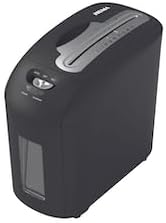
Ein abgewinkelter view of the black SIGMA PCC 165 paper shredder, showing the top control panel, paper entry slot, and the transparent window on the front for viewing the waste bin level.
4. Bedienungsanleitung
4.1. Power Switch Functions
The multi-function slide switch located on the top of the shredder controls its operation:
- AUS (O): Powers off the shredder. Always switch to OFF when not in use or during maintenance.
- AUTO (I): The shredder automatically starts when paper is inserted into the entry slot and stops once shredding is complete. This is the standard operating mode.
- REV (R): Reverses the shredding mechanism. Use this function to clear paper jams.
4.2. Shredding Paper
- Stellen Sie sicher, dass der Netzschalter auf eingestellt ist AUTO (I).
- Insert up to 10 sheets of A4 paper (70gsm) into the paper entry slot. Do not exceed the maximum capacity to prevent jams.
- The shredder will automatically start and shred the paper into 5 x 16 mm cross-cut particles.
- Once shredding is complete, the shredder will automatically stop.
4.3. Monitoring the Waste Bin
The SIGMA PCC 165 features a transparent window on the front, allowing you to monitor the fill level of the 10-liter waste bin. Empty the bin before it becomes completely full to prevent paper jams and ensure continuous operation.
5. Wartung
Regular maintenance ensures the longevity and efficient operation of your shredder.
5.1. Den Abfalleimer leeren
- Switch the shredder to AUS (O) und ziehen Sie den Stecker aus der Steckdose.
- Carefully lift the shredder head unit from the waste bin.
- Empty the shredded paper from the 10-liter waste bin into a suitable receptacle.
- Place the shredder head unit back onto the waste bin, ensuring it is securely seated.
5.2. Reinigung
- Vor der Reinigung immer den Netzstecker des Aktenvernichters ziehen.
- Wipe the exterior of the shredder with a soft, dry cloth.
- Do not use abrasive cleaners, solvents, or aerosol sprays, as these can damage the shredder's surface or internal components.
5.3. Oiling (Optional)
For optimal performance and to prolong the life of the cutting blades, it is recommended to oil the shredder periodically, especially after heavy use. Use specialized shredder oil sheets or liquid shredder oil. Follow the instructions provided with the shredder oil product.
6. Fehlerbehebung
If you encounter issues with your shredder, refer to the following troubleshooting guide:
- Shredder does not turn on:
- Stellen Sie sicher, dass das Netzkabel fest in eine funktionierende Steckdose eingesteckt ist.
- Verify that the shredder head unit is correctly seated on the waste bin.
- Check if the power switch is set to AUTO (I).
- Papierstau:
- Switch the shredder to REV (R) mode to attempt to clear the jam.
- Sollte die Störung weiterhin bestehen, wechseln Sie zu AUS (O) and unplug the shredder. Carefully remove the jammed paper from the entry slot. Use caution as blades are sharp.
- Ensure you are not exceeding the maximum sheet capacity.
- Shredder stops during operation (Overheating):
- The shredder is equipped with a thermal protection system. If it overheats from continuous use, it will automatically shut down.
- Switch the shredder to AUS (O) and unplug it. Allow it to cool down for approximately 20-30 minutes before resuming operation.
- Shredder is noisy or slow:
- The waste bin may be full. Empty the waste bin.
- The blades may require oiling. Refer to the Oiling section.
7. Spezifikationen
| Marke | SIGMA |
| Modell | PCC 165 |
| Hersteller | MCC Trading International GmbH |
| Shred-Typ | Kreuzschnitt |
| Shred-Größe | 5 x 16 mm |
| Zerkleinerungskapazität | 10 Blatt (A4, 70 g/m²) |
| Kapazität des Abfallbehälters | 10 Liter |
| Abmessungen (B x T x H) | 19.5 x 36 x 33.7 cm |
| Stromquelle | Kabelgebundene Elektrik |
| Steuerungstyp | Multi-function slide switch (On/Auto/Off/Reverse) |
8. Garantie und Support
For detailed warranty information, product registration, or customer support, please refer to the documentation included with your purchase. You may also contact your retailer or the manufacturer directly for assistance with any product-related inquiries.


