Einführung
This manual provides essential information for the safe and efficient operation of your APC Smart-UPS SMT3000C 3000VA Uninterruptible Power Supply. Please read this manual thoroughly before installation and use.
Wichtige Sicherheitshinweise
Please read and follow all safety instructions carefully to prevent injury or damage to the unit. Retain this manual for future reference.
- Elektrische Sicherheit: Connect the UPS to a grounded outlet only. Do not remove the grounding prong.
- Batteriesicherheit: Batteries can present a risk of electrical shock and high short-circuit current. Observe proper polarity when connecting batteries.
- Installation: Install the UPS indoors in a controlled environment, free from excessive dust, corrosive fumes, and conductive contaminants.
- Wartung: Refer all servicing to qualified service personnel. There are no user-serviceable parts inside the UPS.
Packungsinhalt
Verify that all items listed below are included in your package. If any items are missing or damaged, contact your dealer or APC.
- APC Smart-UPS SMT3000C Unit
- PowerChute Business Edition Software CD
- RS-232-Kabel
- USB-Kabel
- Ethernet-Kabel
- Kabelbinder
- Reinigungsset
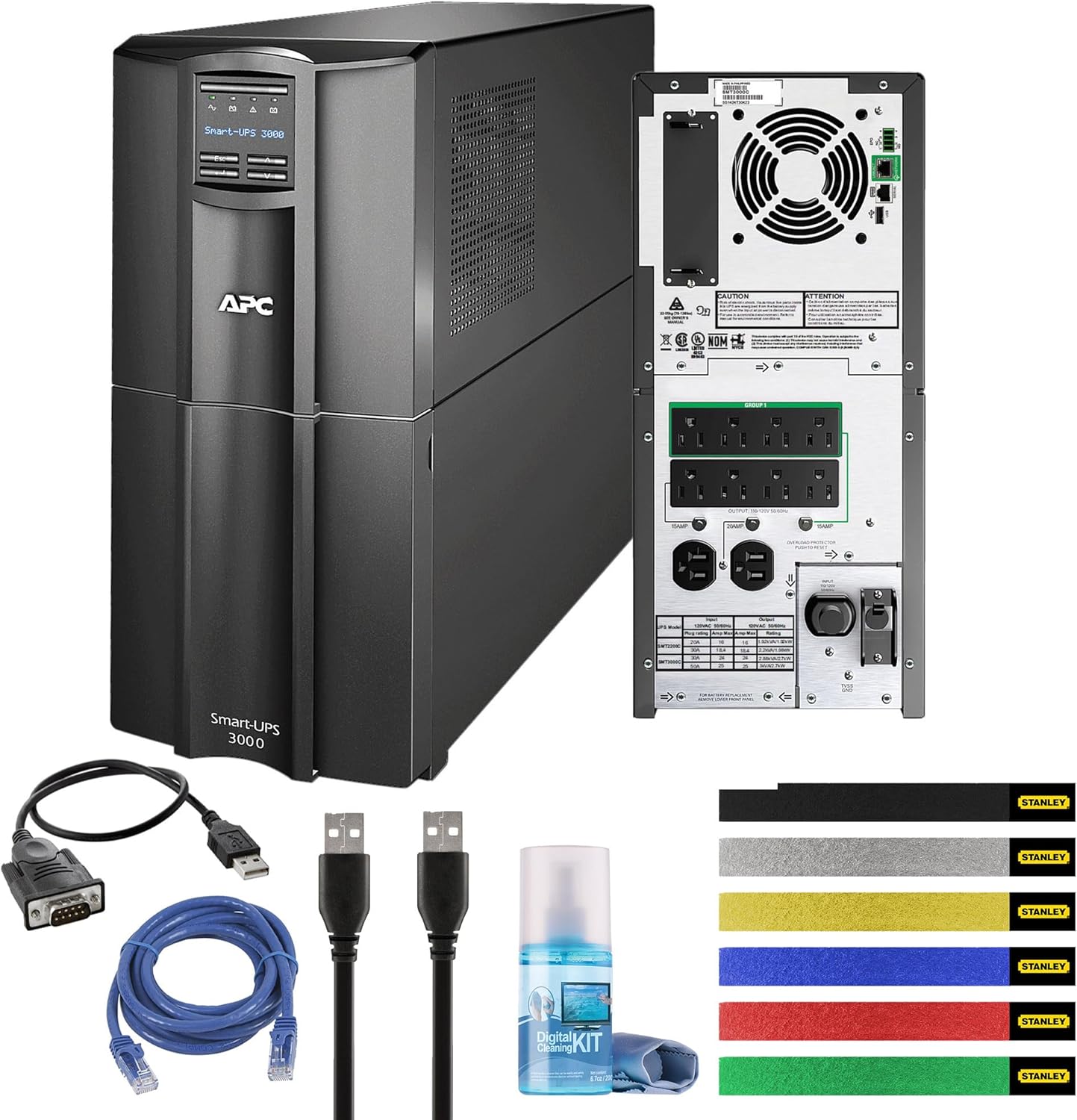
Abbildung 1: APC Smart-UPS SMT3000C unit shown with all included accessories: RS-232 cable, USB cable, Ethernet cable, wire ties, and a cleaning kit.
Produkt überview
The APC Smart-UPS SMT3000C is a Line Interactive Uninterruptible Power Supply designed to provide reliable power protection for your electronic equipment. It features Automatic Voltage Regulation (AVR) and SmartConnect for remote monitoring.
Vorderseite

Abbildung 2: Front view of the APC Smart-UPS SMT3000C, displaying the control panel and LCD screen for status monitoring.
Rückseite
The rear panel provides all necessary connections for input power, protected outlets, and communication ports.
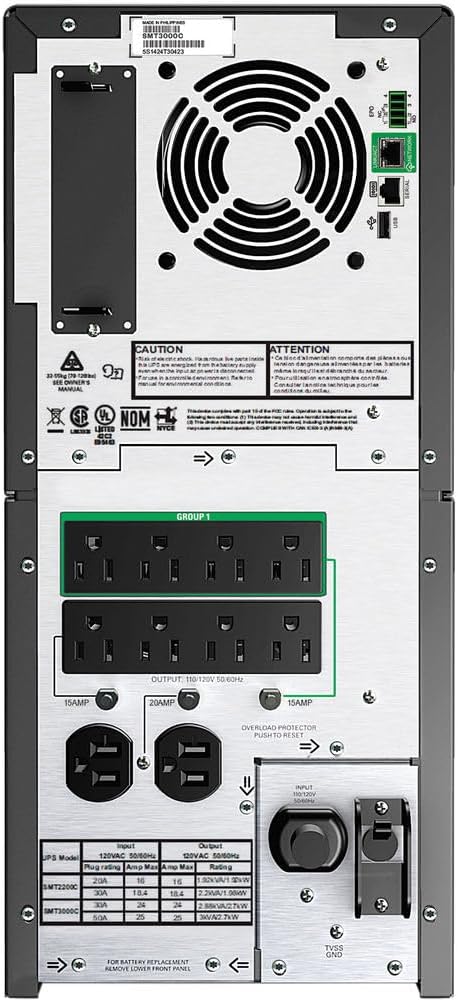
Abbildung 3: Hinteren view of the APC Smart-UPS SMT3000C, highlighting the NEMA 5-30P input, (8) NEMA 5-15R outputs, (2) NEMA 5-20R outputs, communication ports (RS-232, USB, Ethernet), and a circuit breaker.
- Eingangsleistung: NEMA 5-30P
- Ausgangsanschlüsse: (8) NEMA 5-15R, (2) NEMA 5-20R
- Kommunikationsanschlüsse: RS-232, USB, Ethernet (for SmartConnect)
- Leistungsschalter: Überlastschutz
Aufstellen
1. Platzierung
Place the UPS on a flat, stable surface in a cool, dry, and well-ventilated area. Ensure adequate clearance around the unit for proper airflow. Avoid direct sunlight, heat sources, and excessive moisture.
2. Batterieanschluss
The UPS is shipped with the internal battery disconnected for safety. Follow these steps to connect the battery:
- Remove the front bezel of the UPS.
- Locate the battery connector.
- Firmly push the battery connector together until it clicks into place.
- Bringen Sie die Frontblende wieder an.
3. Geräte anschließen
Connect your critical equipment (computers, servers, network devices) to the UPS output outlets. Ensure that the total load does not exceed the UPS capacity (2700W).
- Notstromversorgung und Überspannungsschutz für Steckdosen: These outlets provide battery power during outages and surge protection. Connect critical equipment here.
4. Connecting to Utility Power
Plug the UPS power cord (NEMA 5-30P) into a dedicated, grounded 120V wall outlet. Avoid using extension cords or surge strips with the UPS input.
5. Erste Inbetriebnahme
Press the power button on the front panel to turn on the UPS. The LCD display will illuminate, and the UPS will perform a self-test. Allow the UPS to charge for at least 24 hours before relying on it for extended battery backup.
6. SmartConnect Setup
The APC SmartConnect feature allows for remote monitoring of your UPS. Connect an Ethernet cable from the UPS SmartConnect port to your network. Follow the instructions provided with the SmartConnect service to register your device and enable remote monitoring, automatic notifications, and firmware updates.
Betrieb der USV
Ein-/Ausschalten
- So schalten Sie das Gerät ein: Press and hold the power button on the front panel until the display illuminates.
- So schalten Sie das Gerät aus: Halten Sie den Netzschalter gedrückt, bis sich das Display ausschaltet.
Automatische Lautstärketage Verordnung (AVR)
Die USV verfügt über eine automatische Lautstärkeregelung.tage Regulation (AVR), which automatically corrects minor voltage fluctuations (sags and surges) without using battery power. This helps to preserve battery life and ensures a stable power supply to connected equipment.
Laufzeitinformationen
The APC Smart-UPS SMT3000C provides varying runtimes depending on the connected load:
- 50W Load: Ungefähr 563 Minuten
- 100W Load: Ungefähr 330 Minuten
- 200W Load: Ungefähr 172 Minuten
- 300W Load: Ungefähr 112 Minuten
- 400W Load: Ungefähr 81 Minuten
- 500W Load: Ungefähr 63 Minuten
- 600W Load: Ungefähr 51 Minuten
- 700W Load: Ungefähr 42.2 Minuten
- 800W Load: Ungefähr 35.7 Minuten
- 900W Load: Ungefähr 30.6 Minuten
- 1000W Load: Ungefähr 26.7 Minuten
- 1350W (Half Load): Ungefähr 17.5 Minuten
- 1400W Load: Ungefähr 16.6 Minuten
- 1600W Load: Ungefähr 13.5 Minuten
- 1800W Load: Ungefähr 11.2 Minuten
- 2000W Load: Ungefähr 9.4 Minuten
- 2500W Load: Ungefähr 6.1 Minuten
- 2700W (Full Load): Ungefähr 5.7 Minuten
PowerChute Business Edition Software
Install the PowerChute Business Edition software on your connected computer to enable safe system shutdown during extended power outages, monitor UPS status, and configure various settings. Connect the UPS to your computer using the provided USB or RS-232 cable.
Wartung
Batteriepflege
The UPS batteries are designed for a specific lifespan. Factors such as ambient temperature, number of discharge cycles, and discharge depth affect battery life. Replace batteries when the UPS indicates a battery fault or when runtime significantly decreases.
- Perform regular self-tests (via the UPS display or PowerChute software) to assess battery health.
- Avoid operating the UPS in environments with high temperatures, as this can shorten battery life.
Reinigung
Regularly clean the exterior of the UPS with a soft, dry cloth. Use the provided cleaning kit for gentle cleaning. Ensure the UPS is powered off and disconnected from utility power before cleaning. Do not use liquid or aerosol cleaners directly on the unit.
Fehlerbehebung
This section provides solutions to common issues you may encounter with your UPS. For more complex problems, contact APC technical support.
- Die USV schaltet sich nicht ein: Ensure the battery is properly connected and the UPS is plugged into a live wall outlet. Check the input circuit breaker.
- UPS beeps continuously: This usually indicates an overload condition or a low battery. Reduce the connected load or allow the battery to charge.
- Connected equipment loses power during an outage: The UPS may be overloaded, or the battery may be depleted or faulty. Verify the load and battery status.
- SmartConnect not connecting: Ensure the Ethernet cable is securely connected and your network settings allow communication. Check the SmartConnect portal for device registration status.
Technische Daten
| Besonderheit | Detail |
|---|---|
| Modellnummer | SMT3000C |
| Kapazität | 3000 VA / 2700 W. |
| Eingangslautstärketage | 120 Volt |
| Eingangsanschluss | NEMA 5-30P |
| Ausgangsanschlüsse | (8) NEMA 5-15R, (2) NEMA 5-20R |
| Akku-Typ | Bleisäure |
| Technische Daten | 6 x 6 x 6 Zoll |
| Artikelgewicht | 124.9 Pfund |
| Farbe | Schwarz |
| Energy Star-zertifiziert | Ja |
Garantie und Support
APC provides a standard warranty for this product. For detailed warranty information, please refer to the warranty card included with your product or visit the official APC website. For technical support, product registration, or service inquiries, please contact APC customer support through their official channels.
The APC SmartConnect feature is free during the standard warranty period of the UPS, providing advanced support services and remote monitoring.


