Einführung
The Altec Lansing Kid Safe 2-in-1 Wireless Bluetooth Headphones (Model MZX4410) are designed to provide a safe and enjoyable audio experience for children. These headphones feature volume-limiting technology to protect delicate hearing, comfortable ear cushions, and versatile connectivity options. This manual provides instructions for setup, operation, and maintenance to ensure optimal performance and longevity of your headphones.
Lieferumfang
- Altec Lansing Kid Safe 2-in-1 Wireless Bluetooth Headphones
- USB-C-Ladekabel
- 3.5-mm-Audiokabel
- Schutzhülle
- Benutzerhandbuch (dieses Dokument)
Produkteigenschaften
- Kristallklarer Klang: High-quality audio with enhanced bass for an immersive listening experience.
- Safe Volume Limiting: Integrated technology limits maximum volume to 85dB to protect children's hearing.
- 2-in-1-Konnektivität: Supports both wireless Bluetooth and wired 3.5mm audio connections.
- Drahtlose Reichweite: Up to 30 feet of Bluetooth wireless range for unrestricted movement.
- Komfortables Design: Soft ear cushions and an adjustable, cushioned headband ensure a comfortable fit for extended wear.
- Faltbar und tragbar: Convenient foldable design for easy storage and transport.
- Langlebige Konstruktion: Built to withstand active use.
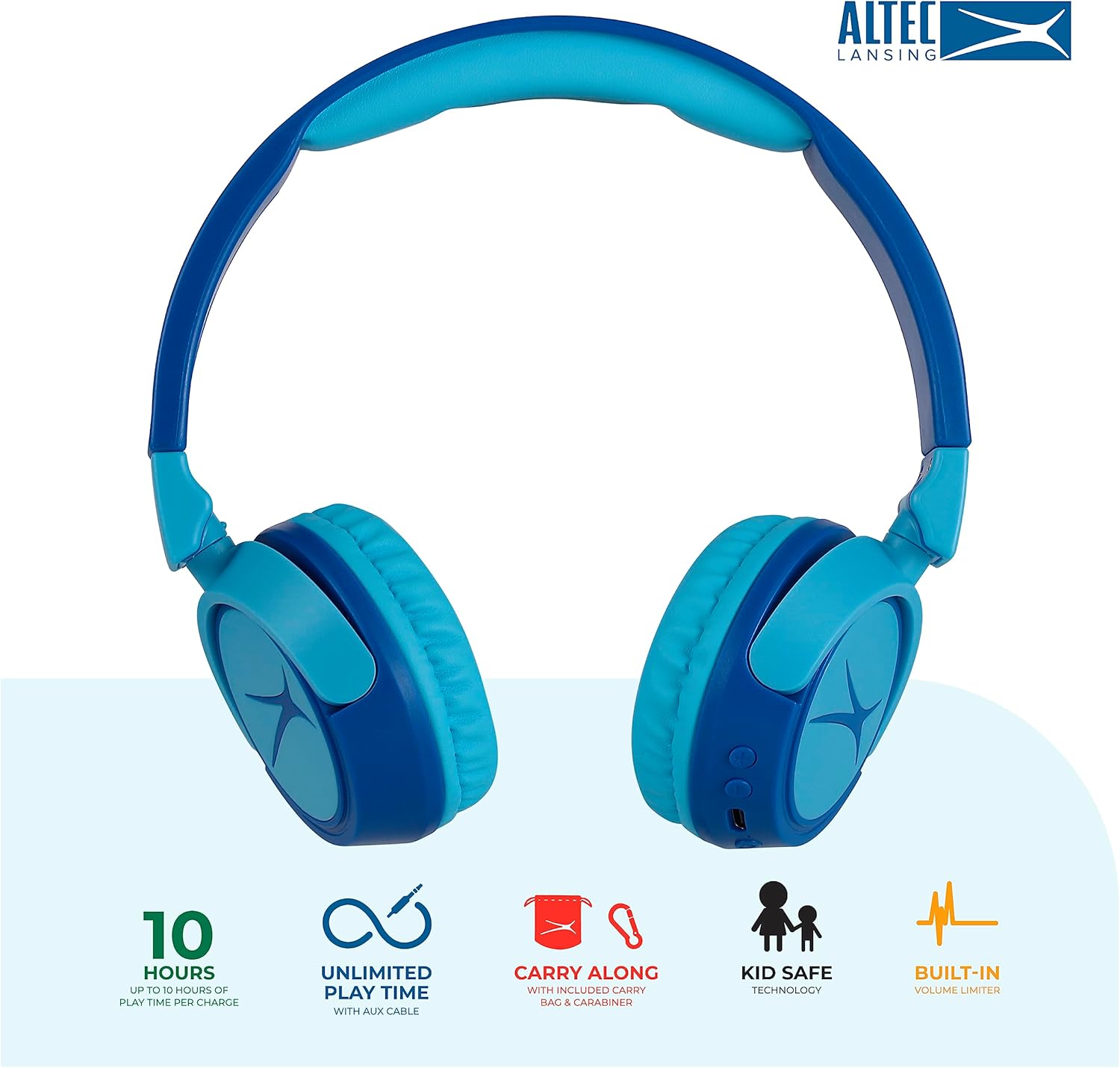
Image: Key features of the Altec Lansing Kid Safe Headphones, including battery life, wired option, portability, and safety features.

Image: Visual representation of the 85dB volume limiting technology for safe listening.
Installationsanweisungen
1. Aufladen der Kopfhörer
- Locate the USB-C charging port on the headphone earcup.
- Connect the provided USB-C charging cable to the port on the headphones.
- Plug the other end of the USB-C cable into a compatible USB power source (e.g., computer, wall adapter).
- Die LED-Anzeige leuchtet während des Ladevorgangs und ändert die Farbe oder schaltet sich aus, wenn der Akku vollständig geladen ist.
- Eine vollständige Ladung ermöglicht eine Spielzeit von etwa 10 Stunden.
2. Bluetooth-Kopplung
- Stellen Sie sicher, dass die Kopfhörer aufgeladen sind.
- Press and hold the Power button on the headphone earcup until the LED indicator flashes blue and red, indicating pairing mode.
- Gehen Sie auf Ihrem Gerät (Smartphone, Tablet, Computer) zu den Bluetooth-Einstellungen und aktivieren Sie Bluetooth.
- Select "Altec Lansing MZX4410" from the list of available devices.
- Sobald die Verbindung hergestellt ist, leuchtet die LED-Anzeige durchgehend blau.
- Die Kopfhörer verbinden sich beim Einschalten automatisch wieder mit dem zuletzt gekoppelten Gerät, sofern dieses sich in Reichweite befindet.
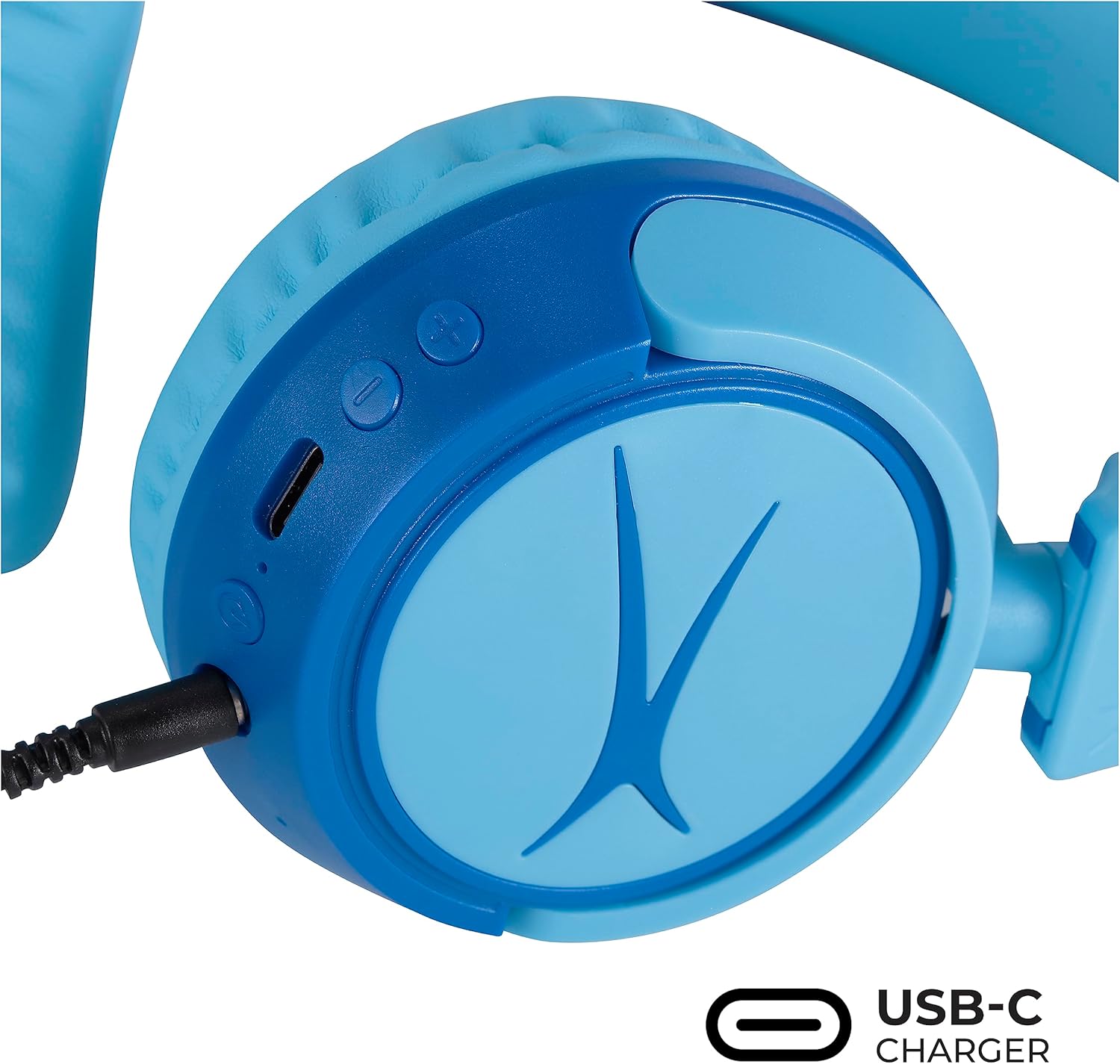
Image: Detail of the headphone controls and ports for charging and wired connection.
Bedienungsanleitung
Ein-/Ausschalten
- Zum Einschalten den Netzschalter gedrückt halten, bis die LED-Anzeige aufleuchtet.
- Zum Ausschalten die Ein-/Aus-Taste gedrückt halten, bis die LED-Anzeige erlischt.
Lautstärkeregelung
- Verwenden Sie die Taste „+“, um die Lautstärke zu erhöhen.
- Verwenden Sie die Taste „-“, um die Lautstärke zu verringern.
- Die Lautstärke ist zum Schutz des Gehörs auf 85 dB begrenzt.
Mediensteuerung
- Drücken Sie die Wiedergabe-/Pause-Taste einmal, um die Audiowiedergabe zu starten oder zu pausieren.
- Durch Drücken und Halten der Taste „+“ können Sie zum nächsten Titel springen.
- Durch Drücken und Halten der Taste „-“ gelangen Sie zum vorherigen Titel.
Kabelverbindung (optional)
For unlimited playtime or when Bluetooth is not available, use the provided 3.5mm audio cable:
- Stecken Sie ein Ende des 3.5-mm-Audiokabels in die Audiobuchse an der Ohrmuschel des Kopfhörers.
- Stecken Sie das andere Ende in den 3.5-mm-Audioausgang Ihres Geräts.
- Die Kopfhörer schalten automatisch in den kabelgebundenen Modus.

Image: The headphones are compatible with multiple devices via Bluetooth or wired connection.
Video: An official product video demonstrating the Altec Lansing Kid Safe Bluetooth Headphones.
Wartung
Reinigung
- Wischen Sie die Kopfhörer mit einem weichen, trockenen Tuch ab.
- Verwenden Sie keine aggressiven Chemikalien oder scheuernden Materialien.
- Ensure no moisture enters the ports.
Lagerung
- Fold the headphones for compact storage.
- Store them in the provided protective case when not in use to prevent damage.
- An einem kühlen, trockenen Ort aufbewahren und vor extremen Temperaturen schützen.

Image: Features highlighting the adjustable and cushioned design for comfort.
Fehlerbehebung
- Kein Strom: Stellen Sie sicher, dass die Kopfhörer vollständig aufgeladen sind. Verbinden Sie sie mit einer Stromquelle über das USB-C-Kabel.
- Kopplung via Bluetooth nicht möglich: Make sure the headphones are in pairing mode (flashing blue/red LED). Check that Bluetooth is enabled on your device and that the headphones are within the 30-foot range. Try restarting both the headphones and your device.
- Kein Ton im drahtlosen Modus: Vergewissern Sie sich, dass die Kopfhörer erfolgreich gekoppelt und mit Ihrem Gerät verbunden sind. Überprüfen Sie die Lautstärke sowohl an den Kopfhörern als auch an Ihrem Gerät.
- Kein Ton im Kabelmodus: Ensure the 3.5mm audio cable is securely plugged into both the headphones and your device. Check the volume levels on your device.
- Sound is Too Low: The headphones feature a built-in volume limiter at 85dB for safety. This is a design feature and not a malfunction.
Technische Daten
| Besonderheit | Detail |
|---|---|
| Modellname | MZX4410 |
| Konnektivitätstechnologie | Kabellos (Bluetooth), Kabelgebunden (3.5-mm-Klinkenstecker) |
| Drahtlose Kommunikationstechnologie | Bluetooth |
| Bluetooth-Reichweite | 30 Fuß |
| Akkulaufzeit | 10 Stunden |
| Volumenlimit | 85dB (Kid Safe) |
| Steuerungstyp | Mediensteuerung, Touch |
| Besondere Merkmale | Adjustable Headband, Detachable Cable, Foldable, Lightweight, Wireless |
| Material | Plastik |
| Artikelgewicht | 8.8 Unzen (0.25 Kilogramm) |
| Hersteller | Altec Lansing Technologies |
| UPC | 021331082107 |
Garantie und Support
For warranty information and customer support, please refer to the official Altec Lansing website or contact their customer service directly. Details can typically be found on the product packaging or the Altec Lansing support portal.


