1. Einleitung
The TAUROX gaming mouse is designed to provide precise and responsive control for an enhanced gaming experience. With an impressive sensor resolution of up to 7,200 DPI and customizable features, it adapts to various gaming styles.
Hauptmerkmale
- High-precision sensor with up to 7,200 DPI for accurate tracking.
- Two integrated DPI switches for on-the-fly sensitivity adjustment.
- 5 configurable buttons for personalized control and macros.
- Lightweight design (135 grams with cable) for comfortable extended use.
- Customizable RGB lighting to personalize your gaming setup.
- Durable fabric-covered cable with 1.8-meter length for flexibility.
- USB-A connection for easy and universal compatibility.

Image: The TAUROX Gaming Mouse showcasing its multi-coloured LED lighting and ergonomic design.
2. Packungsinhalt
Bitte vergewissern Sie sich, dass alle Artikel im Paket vorhanden sind:
- TAUROX Gaming Mouse
- Configuration Software (downloadable or included)

Bild: Vorderseite view of the TAUROX Gaming Mouse retail packaging, highlighting key features.
3. Installationsanleitung
3.1 Anschließen der Maus
Connect the USB-A connector of the TAUROX Gaming Mouse to an available USB port on your computer. The mouse is plug-and-play for basic functionality.
3.2 Softwareinstallation
For full utilization of all functions, including macro programming and advanced customization, the installation of the dedicated configuration software is necessary. This software is typically provided via a download link or included on a small disc. Refer to the product packaging or Speedlink's official website for the download location.
Image: Side of the product box indicating the need for configuration software.
4. Operating Your TAUROX Gaming Mouse
4.1 DPI-Anpassung
The TAUROX Gaming Mouse features two integrated DPI switches located behind the scroll wheel. Use these buttons to cycle through different sensitivity levels (up to 7,200 DPI) to match your gaming style or task requirements. The current DPI setting may be indicated by the mouse's LED lighting color, depending on software configuration.

Image: Screenshot of the Speedlink software's 'Performance' tab, showing DPI control settings.
4.2 programmierbare Tasten
The mouse is equipped with 5 configurable buttons. These buttons can be assigned various functions, including keyboard macros, multimedia controls, or specific in-game actions, using the configuration software. Launch the software and navigate to the 'Button' or 'Macro' section to customize these settings.
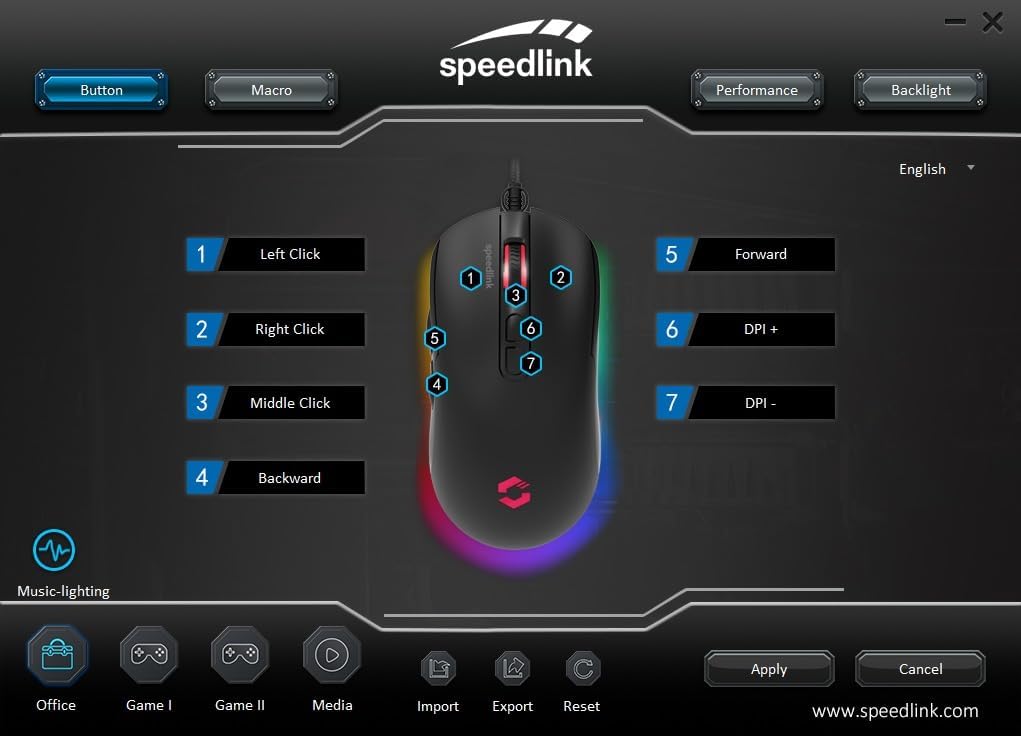
Image: Screenshot of the Speedlink software's 'Button' tab, illustrating the mapping of the mouse's 7 buttons.
4.3 RGB-Beleuchtung
The TAUROX Gaming Mouse features multi-coloured RGB lighting that can be customized through the configuration software. You can select from various lighting effects, colors, and brightness levels to match your personal preference or gaming setup. Access the 'Backlight' section in the software to adjust these settings.

Image: Screenshot of the Speedlink software's 'Backlight' tab, showing options for customizing the mouse's RGB lighting effects.
5. Wartung
To ensure the longevity and optimal performance of your TAUROX Gaming Mouse, follow these maintenance guidelines:
- Reinigung: Reinigen Sie die Mausoberfläche mit einem weichen, trockenen Tuch. Bei hartnäckigem Schmutz kann ein leicht trocknendes Tuch hilfreich sein.amp cloth can be used, but ensure no liquid enters the mouse. Avoid abrasive cleaners.
- Kabelpflege: Avoid sharp bends, kinks, or excessive pulling on the cable. Store the cable neatly when not in use to prevent damage.
- Sensorwartung: Um eine genaue Abtastung zu gewährleisten, halten Sie den optischen Sensor an der Unterseite der Maus sauber und frei von Staub und Schmutz.
6. Fehlerbehebung
If you encounter issues with your TAUROX Gaming Mouse, consider the following:
- Maus reagiert nicht: Stellen Sie sicher, dass das USB-Kabel fest mit Ihrem Computer verbunden ist. Versuchen Sie, die Maus an einen anderen USB-Anschluss anzuschließen.
- Ungenaue Nachverfolgung: Reinigen Sie den optischen Sensor an der Unterseite der Maus. Stellen Sie sicher, dass Sie die Maus auf einer geeigneten Oberfläche (z. B. einem Mauspad) verwenden.
- Softwareprobleme: If the configuration software is not functioning correctly, try reinstalling it. Ensure your operating system is up to date.
- Tasten funktionieren nicht: Check the button assignments in the configuration software to ensure they are correctly configured.
- Beleuchtung funktioniert nicht: Verify the RGB lighting settings in the configuration software.
For persistent issues, refer to the support section on the Speedlink webWebsite.
7. Technische Daten
| Besonderheit | Spezifikation |
|---|---|
| Technische Daten | 4.92 x 2.48 x 0.04 inches (125x63x40 mm LxWxH) |
| Artikelgewicht | 5.7 ounces (135 grams with cable) |
| Modellnummer | SL-680016-BK |
| Marke | Speedlink |
| Farbe | Schwarz |
| Konnektivitätstechnologie | USB-A (kabelgebunden) |
| Besondere Merkmale | Programmable Buttons, Multi-coloured LED Lighting |
| Bewegungserkennungstechnologie | Optisch |
| DPI Resolution | Bis zu 7,200 DPI (einstellbar) |
| Kabellänge | 1.8 Meter |
| Hersteller | Speedlink |
8. Safety Instructions and Compliance
8.1 Wichtige Sicherheitshinweise
Please note that the failure to observe these instructions can cause product damage, explosion, fire and/or electric shock!
- Verwenden Sie die Geräte nur wie in der Bedienungsanleitung angegeben. Öffnen oder reparieren Sie sie nicht.
- Setzen Sie die Geräte keinen Flüssigkeiten, Hitze oder Kälte aus.
- Verwenden Sie die Geräte nicht in der Werbungamp Umgebung. Reinigen Sie das Gerät mit einem trockenen Tuch.
- Halten Sie die Geräte und alle losen Teile von Kindern, Haustieren und unbefugten Personen fern.
- Only use the devices with the appropriate provided accessories.
- Disconnect cables from the devices if they will not be used for a long time. When disconnecting by cables, don't pull on the cord but on the plug.
- Don't use the cables in any way other than mentioned in the user guide. Don't bend, cut, extend, knot or step on them.
- Don't insert any foreign objects into the openings of the device.
- Wenn die Geräte in irgendeiner Weise beschädigt sind oder zu heiß werden, verwenden Sie sie sofort nicht mehr.
- Take caution when using devices that emit radio signals if you have a pacemaker or are dependent on other sensitive electronic aids.
Sicherheitshinweise in weiteren Sprachen: www.speedlink.com
8.2 Warning Symbols and Markings
Extended use of input devices may cause health problems such as discomfort or pain. As such, take regular breaks and consult a doctor if problems persist.
8.3 FCC-Erklärung
Dieses Gerät wurde getestet und entspricht den Grenzwerten für digitale Geräte der Klasse B gemäß Teil 15 der FCC-Bestimmungen. Diese Grenzwerte sollen einen angemessenen Schutz gegen schädliche Störungen bei der Installation in Wohngebieten bieten. Dieses Gerät erzeugt und verwendet Hochfrequenzenergie und kann diese ausstrahlen. Wenn es nicht gemäß den Anweisungen installiert und verwendet wird, kann es zu Störungen des Funkverkehrs kommen. Es gibt jedoch keine Garantie dafür, dass bei einer bestimmten Installation keine Störungen auftreten. Wenn dieses Gerät den Radio- oder Fernsehempfang stört (was durch Ein- und Ausschalten des Geräts festgestellt werden kann), wird dem Benutzer empfohlen, die Störungen durch eine oder mehrere der folgenden Maßnahmen zu beheben:
- Empfangsantenne neu ausrichten oder verlegen.
- Vergrößern Sie den Abstand zwischen Gerät und Empfänger.
- Schließen Sie das Gerät an eine Steckdose an, die zu einem anderen Stromkreis gehört als der Empfänger.
- Wenden Sie sich an Ihren Händler oder einen erfahrenen Radio-/Fernsehtechniker.
Dieses Gerät entspricht Teil 15 der FCC-Bestimmungen. Der Betrieb unterliegt den folgenden beiden Bedingungen: (1) Dieses Gerät darf keine schädlichen Störungen verursachen und (2) dieses Gerät muss alle empfangenen Störungen akzeptieren, einschließlich Störungen, die einen unerwünschten Betrieb verursachen können.
Notiz: Modifications to this product will void the user's authority to operate this equipment.
8.4 Conformity Notice
IMPORTEUR/HERSTELLER: Zocherl Media GmbH, Im Dorf 5, 29303 Hemslingen, GERMANY
Telefon: +49 4267 9341 0
PRODUKTDETAILS:
Typ-Nr.: SL-680016-BK
Produktbeschreibung: TAUROX Gaming-Maus, schwarz
DAS PRODUKT ENTSPRICHT DEN FOLGENDEN RICHTLINIEN:
EMV: 2014/30/EU
RoHS: 2011/65/EU
For a full declaration of conformity, the latest user guide, FAQ or further information, please visit: www.speedlink.com
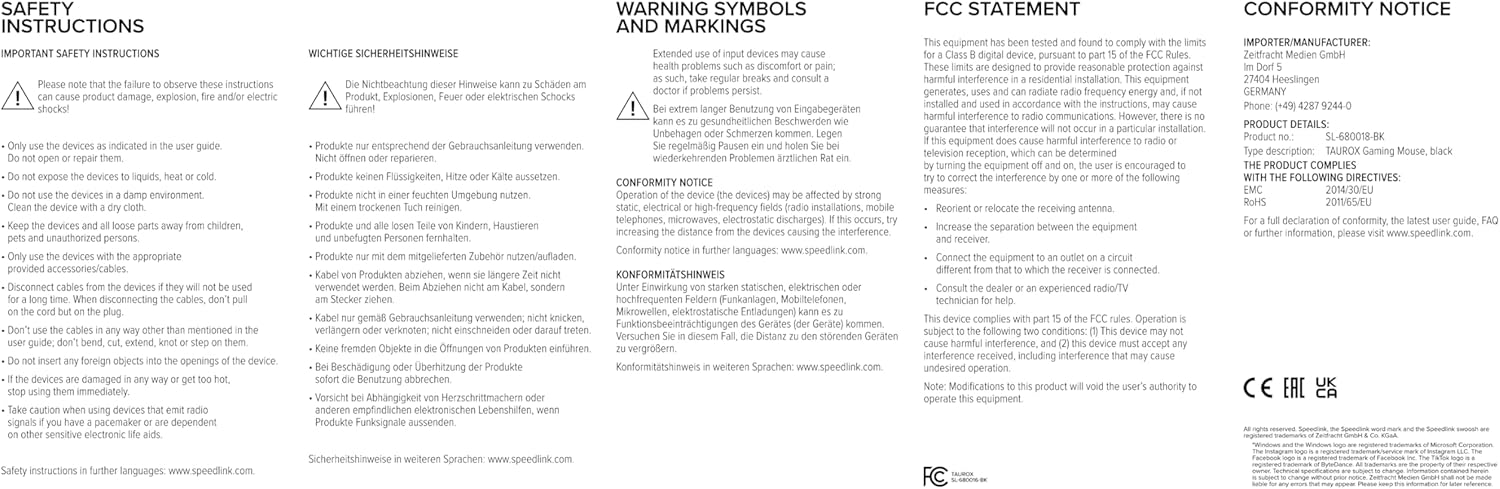
Image: Product packaging displaying various certifications and multilingual product names.
9. Garantie und Support
For warranty information, technical support, frequently asked questions (FAQs), and the latest user guides, please visit the official Speedlink webWebsite: