Einführung
Thank you for choosing the Coby Mini True Wireless Bluetooth Earbuds. These lightweight, in-ear headphones are designed for convenience and high-quality audio, perfect for work, travel, or daily use. This manual provides detailed instructions to help you get the most out of your new earbuds, ensuring optimal performance and longevity.

Image: Coby Mini True Wireless Bluetooth Earbuds in their charging case, with a US dime and quarter placed nearby to illustrate their compact size.
Lieferumfang
Bitte überprüfen Sie den Packungsinhalt, um sicherzustellen, dass alle Artikel vorhanden sind:
- Coby Mini True Wireless Earbuds (Left and Right)
- Ladeetui
- USB-Ladekabel
- S/M/L Ear Gels (pre-installed or in separate bag)
- Schlüsselband
- Benutzerhandbuch (dieses Dokument)
Aufstellen
1. Aufladen der Ohrhörer und des Ladecase
Before first use, fully charge both the earbuds and the charging case. The case provides additional charges for the earbuds on the go.
- Place the earbuds into the charging case, ensuring they are correctly seated in their respective L (Left) and R (Right) slots. The earbuds will begin charging automatically.
- Connect the provided USB charging cable to the charging port on the case and the other end to a USB power source (e.g., computer USB port, wall adapter).
- The indicator lights on the case and/or earbuds will show charging status. Refer to the specific light patterns in the troubleshooting section if issues arise.
- Eine vollständige Aufladung der Ohrhörer dauert in der Regel etwa 1-2 Stunden und des Ladecase 2-3 Stunden.

Image: The Coby Mini Earbuds are shown inside their charging case, illustrating the charging process with glowing indicators.
2. Kopplung mit einem Bluetooth-Gerät
Befolgen Sie diese Schritte, um Ihre Ohrhörer mit Ihrem Smartphone, Tablet oder einem anderen Bluetooth-fähigen Gerät zu koppeln:
- Stellen Sie sicher, dass die Ohrhörer aufgeladen sind und sich im Ladecase befinden.
- Öffnen Sie das Ladecase. Die Ohrhörer wechseln automatisch in den Kopplungsmodus, was durch eine blinkende LED-Leuchte an einem oder beiden Ohrhörern angezeigt wird.
- On your device, go to the Bluetooth settings and turn Bluetooth on.
- Suchen nach available devices. You should see "Coby Mini Earbuds" or a similar name appear in the list.
- Select the earbuds from the list to connect. Once connected, the LED indicator on the earbuds will stop flashing or change to a solid light, and you may hear an audible confirmation.
- Falls die Kopplung fehlschlägt, schalten Sie Bluetooth auf Ihrem Gerät aus, legen Sie die Ohrhörer zurück in das Ladecase, schließen Sie den Deckel, warten Sie einige Sekunden, öffnen Sie ihn dann wieder und versuchen Sie es erneut.
3. Sicherer und bequemer Sitz
The Coby Mini Earbuds are designed to be miniature and discreet, providing a comfortable fit for extended wear. Experiment with the included S/M/L ear gels to find the size that best seals your ear canal for optimal sound quality and secure placement.

Image: A Coby Mini Earbud is shown inserted into an ear, demonstrating its compact and discreet design with a measurement of 0.59 inches.
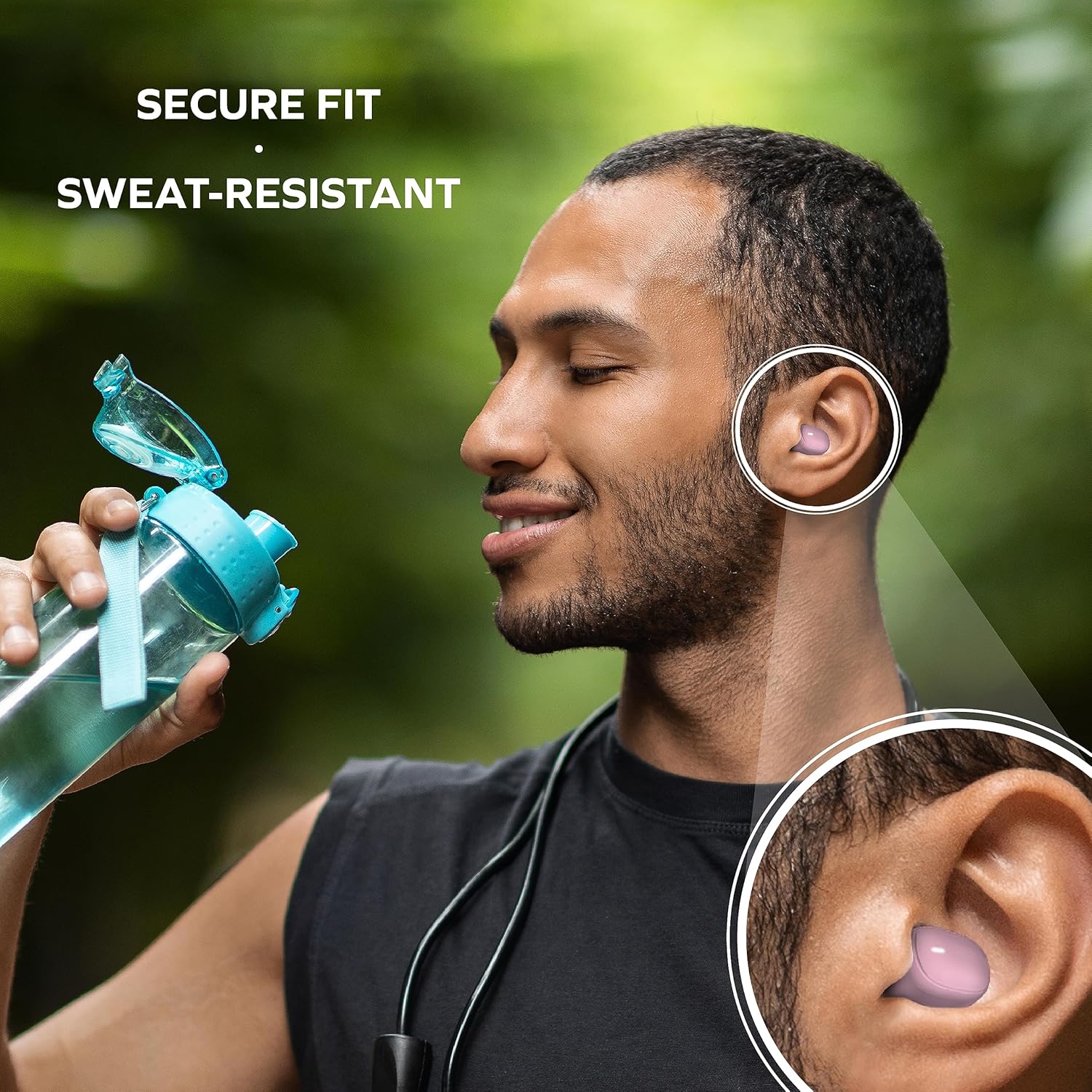
Image: A man is shown wearing the earbuds while exercising, emphasizing their secure fit and sweat-resistant design, suitable for active use.
Bedienung der Ohrhörer
Touch-Bedienelemente
The Coby Mini Earbuds feature intuitive touch controls on each earbud for easy management of your audio and calls without needing to interact with your smartphone.
| Aktion | Kontrolle |
|---|---|
| Musik abspielen/pausieren | Tippen Sie einmal auf einen der Ohrhörer |
| Nächster Titel | Doppeltippen Sie auf den rechten Ohrhörer |
| Vorheriger Titel | Doppeltippen Sie auf den linken Ohrhörer |
| Anruf annehmen/beenden | Tippen Sie einmal auf einen der Ohrhörer |
| Anruf ablehnen | Halten Sie einen der Ohrhörer 2 Sekunden lang gedrückt |
| Sprachassistent aktivieren | Dreimaliges Tippen auf einen der Ohrhörer |
Freisprechen
With the built-in microphone, you can make and receive calls directly through your earbuds. Use the touch controls as described above to manage your calls.
Kompatibilität des Sprachassistenten
The earbuds are compatible with popular voice assistants like Siri and Google Assistant. Simply triple tap an earbud to activate your device's voice assistant and issue commands.

Image: A user is shown with the earbuds while using a laptop, highlighting their compatibility with voice assistants like Siri and Google Assistant for hands-free control.
Wartung
Reinigung Ihrer Ohrhörer
Regelmäßige Reinigung trägt zur Erhaltung der Klangqualität und Hygiene bei:
- Wischen Sie die Ohrhörer und das Ladecase vorsichtig mit einem weichen, trockenen, fusselfreien Tuch ab.
- For earwax or debris, use a dry cotton swab or a small, soft brush to carefully clean the ear tips and speaker mesh.
- Do not use abrasive cleaners, alcohol, or harsh chemicals. Avoid getting moisture into any openings.
Lagerung
When not in use, always store the earbuds in their charging case to protect them from dust, damage, and to keep them charged for your next use. Store in a cool, dry place away from extreme temperatures.
Fehlerbehebung
If you encounter issues with your Coby Mini Earbuds, please refer to the following common solutions:
- Ohrhörer verbinden sich nicht/koppeln nicht:
- Stellen Sie sicher, dass beide Ohrhörer aufgeladen sind.
- Schalten Sie Bluetooth auf Ihrem Gerät aus und anschließend wieder ein.
- Forget/delete the earbuds from your device's Bluetooth list and attempt to re-pair.
- Place earbuds back in the case, close the lid for 5 seconds, then reopen to reset pairing mode.
- Kein Ton oder geringe Lautstärke:
- Überprüfen Sie die Lautstärke sowohl auf Ihrem Gerät als auch an den Ohrhörern.
- Ensure earbuds are properly seated in your ears and the correct ear gel size is used.
- Confirm the earbuds are connected to your device and not another nearby device.
- Ladeprobleme:
- Stellen Sie sicher, dass das Ladekabel sowohl mit dem Gehäuse als auch mit der Stromquelle fest verbunden ist.
- Versuchen Sie es mit einem anderen USB-Anschluss oder Netzteil.
- Reinigen Sie die Ladekontakte an den Ohrhörern und im Inneren des Ladecase mit einem trockenen Wattestäbchen.
- Häufige Verbindungsabbrüche der Ohrhörer:
- Stellen Sie sicher, dass sich Ihr Gerät innerhalb der 10-Meter-Bluetooth-Reichweite befindet.
- Vermeiden Sie physische Hindernisse zwischen den Ohrhörern und Ihrem Gerät.
- Minimieren Sie Störungen durch andere drahtlose Geräte.
Technische Daten
Detailed technical specifications for the Coby Mini True Wireless Bluetooth Earbuds:
| Besonderheit | Detail |
|---|---|
| Modellname | Mini-Ohrhörer |
| Artikelmodellnummer | CETW536BK |
| Konnektivitätstechnologie | Kabellos |
| Drahtlose Kommunikationstechnologie | Bluetooth |
| Bluetooth-Version | 5.3 |
| Bluetooth-Reichweite | 10 Meter |
| Akkulaufzeit (Ohrhörer) | Up to 12 Hours of Total Playtime |
| Tragetasche Akkukapazität | 300 Milliamp Std |
| Steuerungstyp | Touch-Steuerung |
| Wasserbeständigkeit | Wasserabweisend (schweißabweisend) |
| Lärmschutz | Aktive Geräuschunterdrückung |
| Artikelgewicht | 5.3 Unzen |
| Produktabmessungen (Gehäuse) | 0.99 x 1.85 x 2.44 Zoll |
Sicherheitshinweise
Please read and follow these safety guidelines to prevent damage to your earbuds and ensure your personal safety:
- Do not expose earbuds or case to extreme temperatures, direct sunlight, or high humidity.
- Avoid dropping, impacting, or disassembling the device. This can void the warranty and cause damage.
- Außerhalb der Reichweite von Kindern und Haustieren aufbewahren. Kleinteile können verschluckt werden und Erstickungsgefahr darstellen.
- Do not use the earbuds at excessively high volumes for prolonged periods, as this can cause hearing damage.
- Achten Sie beim Tragen von Ohrhörern auf Ihre Umgebung, insbesondere im Straßenverkehr oder in anderen potenziell gefährlichen Situationen.
Garantie und Support
Informationen zur Garantie und zum Kundendienst finden Sie in der Ihrer Bestellung beiliegenden Dokumentation oder auf der offiziellen Coby-Website. webBewahren Sie Ihren Kaufbeleg für eventuelle Garantieansprüche auf.
For further assistance, you may contact Coby customer service through their official channels. Details are typically available on the product packaging or the brand's webWebsite.


