Einführung
This manual provides comprehensive instructions for the Staples 12-Digit Solar and Battery Basic Calculator (Model ST290-CCVS). Designed for everyday calculations, this calculator features a 12-digit display, dual power source (solar and battery), and essential functions for financial and tax calculations. Please read this manual thoroughly to ensure proper use and maintenance of your device.
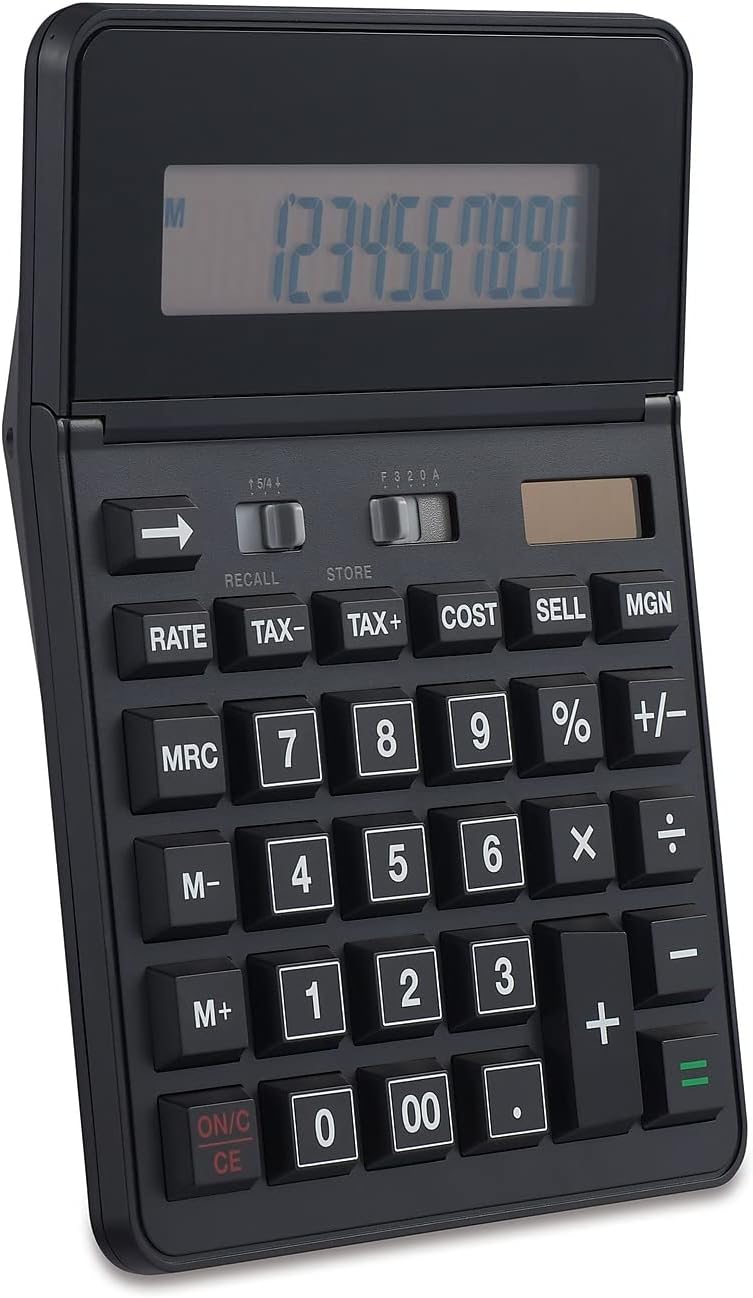
Abbildung 1: Vorderseite view of the Staples 12-Digit Solar and Battery Basic Calculator, showing the display and keypad.
Aufstellen
Stromquelle
The Staples ST290-CCVS calculator operates on a dual power system: solar and battery. This ensures reliable operation in various lighting conditions.
- Solarenergie: The calculator is equipped with a solar panel located above the display. For optimal performance, ensure the solar panel is exposed to sufficient light. This is the primary power source in well-lit environments.
- Batterieleistung: An internal battery provides power when light is insufficient or absent. The calculator automatically switches to battery power as needed. No user intervention is required for power source selection.
Erste Verwendung
Upon first use, or after prolonged storage, simply expose the calculator to light or press the ON/C CE button to activate the display. The calculator is ready for immediate use.

Figure 2: The calculator's 12-digit display, designed for clear readability of large numbers.
Bedienungsanleitung
This section details the functions and operations of your Staples calculator.
Grundlegende Operationen
- ON/C CE: Press to turn the calculator on or to clear the current entry (CE) or all entries (C) if pressed twice.
- Number Keys (0-9, 00, .): Wird zur Eingabe numerischer Werte verwendet.
- Arithmetische Operatoren (+, -, ×, ÷): Standard addition, subtraction, multiplication, and division.
- = (Gleich): Completes a calculation and displays the result.
- +/- (Vorzeichenwechsel): Ändert das Vorzeichen der angezeigten Zahl von positiv zu negativ oder umgekehrt.
- ← (Backspace): Löscht die zuletzt eingegebene Ziffer.
Erweiterte Funktionen
- % (Prozent): Wird für Prozent verwendettage Berechnungen. Zum BeispielampUm beispielsweise 10 % von 200 zu berechnen, geben Sie 200 × 10 % ein.
- TAX+, TAX-: Used for adding or subtracting tax. The tax rate must be set beforehand (refer to specific tax rate setting instructions, if available on the device, otherwise assume a default or pre-set rate).
- COST, SELL, MGN (Margin): These keys are designed for business calculations.
- KOSTEN: Enter the cost of an item.
- VERKAUFEN: Enter the selling price of an item.
- MGN: Calculates the profit margin based on cost and sell price, or determines one value if the other two are known.
- M+, M-, MRC (Memory Functions):
- M+: Fügt den angezeigten Wert dem Speicher hinzu.
- M-: Subtrahiert den angezeigten Wert vom Speicher.
- MRC: Press once to recall the memory value. Press twice to clear the memory.
- RATE: This button is typically used in conjunction with tax or currency conversion functions. Consult the calculator's specific markings for its exact application.
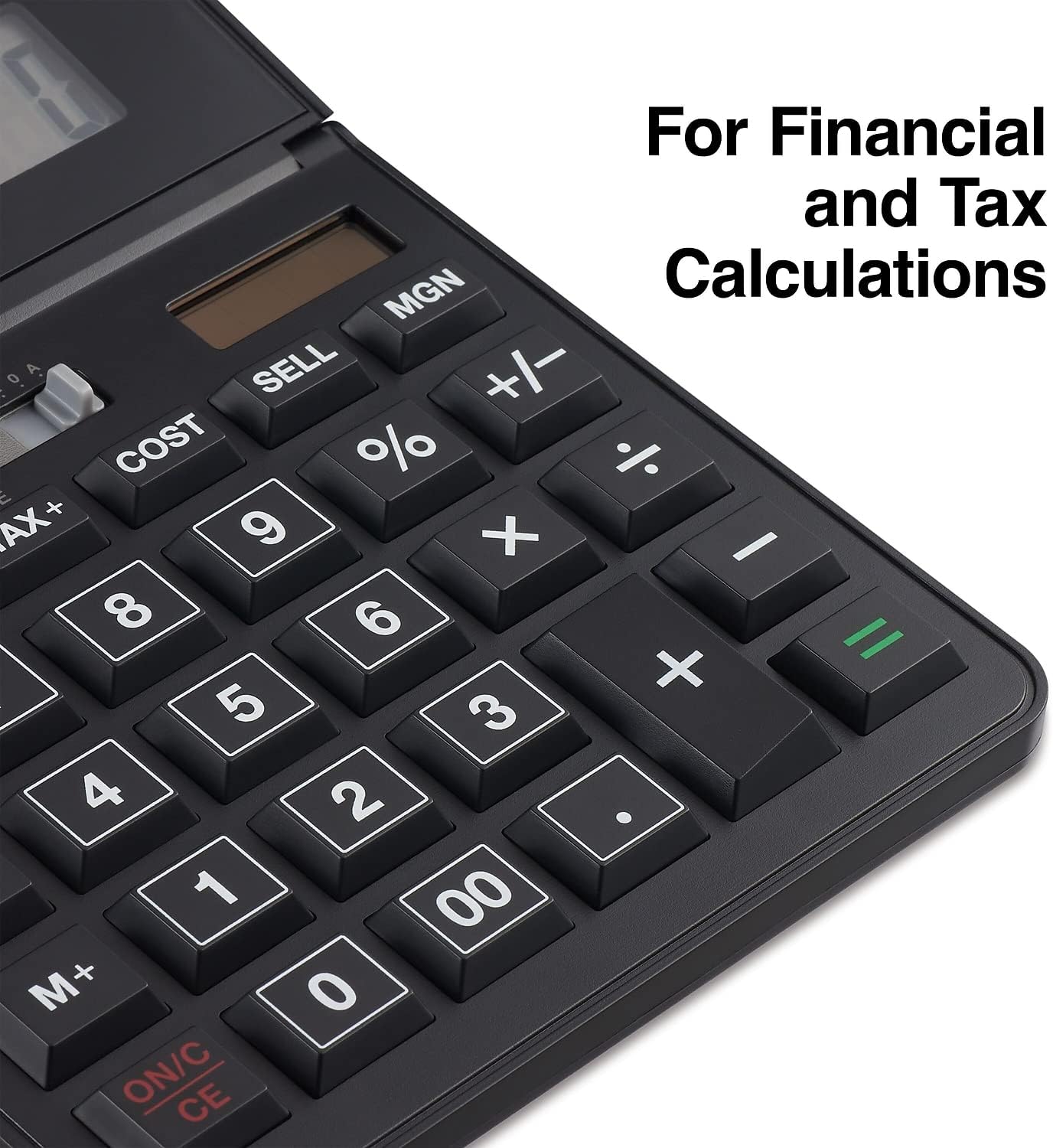
Abbildung 3: Ausführlich view of the calculator's function keys, including TAX, COST, SELL, and MGN for financial and tax calculations.
Wartung
Proper care and maintenance will extend the life of your calculator.
- Reinigung: Reinigen Sie die Oberfläche des Taschenrechners mit einem weichen, trockenen Tuch. Bei hartnäckigem Schmutz leicht andrücken.ampReinigen Sie das Tuch mit Wasser oder einem milden, nicht scheuernden Reinigungsmittel. Vermeiden Sie die Verwendung von scharfen Chemikalien, Lösungsmitteln oder Scheuermitteln, da diese das Display oder die Elektronik beschädigen können.asing.
- Lagerung: Store the calculator in a cool, dry place away from direct sunlight and extreme temperatures. Avoid placing heavy objects on top of the calculator.
- Batterie: The calculator uses an internal battery that is designed for long-term use. If the display becomes dim or unresponsive in low light conditions, ensure the solar panel is exposed to bright light. If issues persist, the battery may need professional replacement, though this is rare for solar-assisted models.
Fehlerbehebung
Sollten Sie Probleme mit Ihrem Taschenrechner haben, beachten Sie bitte die folgenden häufig auftretenden Probleme und Lösungen:
| Problem | Mögliche Ursache | Lösung |
|---|---|---|
| Das Display ist leer oder dunkel. | Unzureichendes Licht für Solarenergie; schwacher Akku. | Move the calculator to a brighter area. If the problem persists, the internal battery may be depleted. |
| Falsche Berechnungsergebnisse. | Incorrect entry; memory function active; previous calculation not cleared. | Drücken ON/C CE twice to clear all entries and memory. Re-enter the calculation carefully. Ensure no memory indicator (M) is displayed unless intended. |
| Tasten reagieren nicht. | Calculator is off; temporary malfunction. | Drücken ON/C CE. If still unresponsive, try exposing it to bright light for a few minutes. |
Sollte das Problem nach Anwendung dieser Lösungsansätze weiterhin bestehen, wenden Sie sich bitte an den Kundendienst.
Technische Daten
| Besonderheit | Detail |
|---|---|
| Modellnummer | ST290-CCVS |
| Anzeige | 12-Digit LCD, Angled |
| Stromquelle | Solar and Battery (Two-way power) |
| Abmessungen (B x T x H) | 5.55" x 7.48" x 1.65" |
| Gewicht | 15.4 Unzen |
| Farbe | Schwarz |
| Funktionen | Basic arithmetic, Percent, Backspace, Tax+, Tax-, Cost, Sell, Margin, Memory (M+, M-, MRC) |

Figure 4: Product dimensions of the Staples 12-Digit Solar and Battery Basic Calculator.
Garantie und Support
Eingeschränkte Garantie
This Staples 12-Digit Solar and Battery Basic Calculator (Model ST290-CCVS) comes with a 1 Jahr eingeschränkte Garantie Diese Garantie gilt ab Kaufdatum und deckt Material- und Verarbeitungsfehler bei normalem Gebrauch ab. Sie deckt keine Schäden ab, die durch Missbrauch, Unfälle, unbefugte Änderungen oder äußere Einflüsse verursacht wurden.
Bitte bewahren Sie Ihren Kaufbeleg für Garantieansprüche auf.

Figure 5: Product packaging indicating the 1-Year Limited Warranty.
Kundenservice
For technical assistance, warranty service, or general inquiries, please contact Staples customer support. Refer to the official Staples webDie aktuellsten Kontaktdaten finden Sie auf unserer Website oder in Ihren Kaufunterlagen.
Online-Hilfe: Visit the official Staples webWebsite mit FAQs, Produktregistrierung und Support-Ressourcen.
Telefonische Betreuung: Contact the customer service number provided on your product packaging or the Staples webWebsite.


