Einführung
This manual provides comprehensive instructions for the setup, operation, maintenance, and troubleshooting of your ENDORFY Krux Qara 60% Mechanical Keyboard. Please read this manual thoroughly before using the product to ensure proper functionality and longevity.
Produkt überview
The ENDORFY Krux Qara 60% is a compact mechanical gaming keyboard designed for performance and portability. It features Outemu Red Mechanical Switches, zone RGB backlighting, and a durable construction.
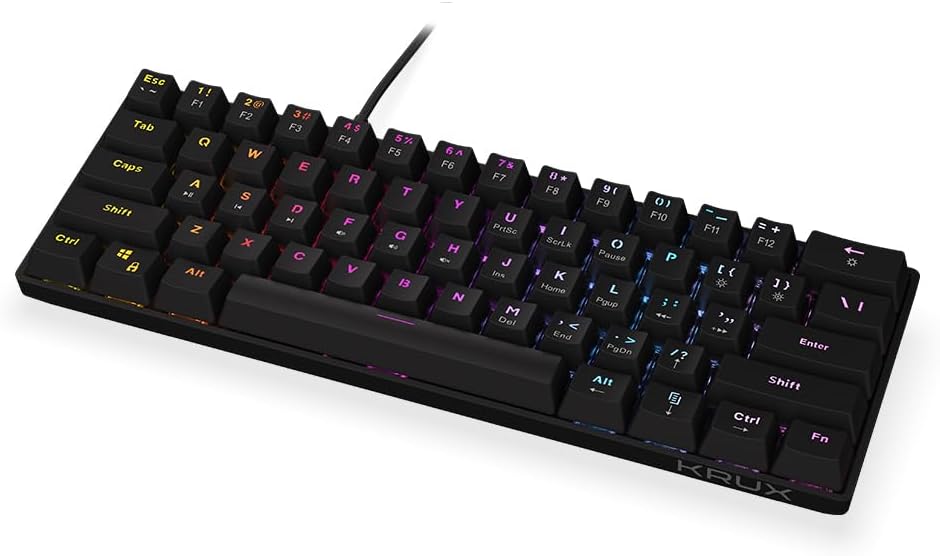
Abbildung 1: Front view of the ENDORFY Krux Qara 60% Mechanical Keyboard, showcasing its compact 60% layout and vibrant RGB zone backlighting. The keyboard features black keycaps with white legends.

Abbildung 2: Top-down perspective of the keyboard, highlighting the keycap layout and the integrated USB-A cable connection point at the top center.

Abbildung 3: Hinteren view of the keyboard, showing the product label with model information (KRX0137) and certification marks. The two adjustable feet are visible in their folded position.
Packungsinhalt
Stellen Sie sicher, dass alle Elemente vorhanden sind, bevor Sie mit der Einrichtung fortfahren:
- ENDORFY Krux Qara 60% Mechanical Keyboard
- USB cable (integrated)
- Benutzerhandbuch (dieses Dokument)
Aufstellen
- Auspacken: Nehmen Sie die Tastatur und das Zubehör vorsichtig aus der Verpackung.
- Verbindung: Connect the integrated USB-A cable from the keyboard to an available USB port on your computer (PC, Linux, Mac).
- Treiberinstallation: The keyboard is plug-and-play and typically does not require additional drivers for basic functionality. Your operating system should automatically recognize the device.
- Platzierung: Place the keyboard on a stable, flat surface. You may adjust the keyboard height using the foldable feet located on the underside for ergonomic comfort.

Abbildung 4: Seite view illustrating the keyboard's profile and the adjustable feet in their extended position, providing an elevated typing angle.
Bedienungsanleitung
Grundlegende Funktionalität
The keyboard functions as a standard QWERTY input device. All alphanumeric keys, symbols, and basic modifiers (Shift, Ctrl, Alt) operate as expected.
Function Key Combinations (Fn Layer)
Due to its 60% compact layout, many standard keyboard functions are accessed via the Fn key in combination with other keys. The secondary functions are typically printed on the front or side of the keycaps.
- Fn + Number Row (F1-F12): Accesses F1 through F12 functions. For exampich, Fn + 1 for F1.
- Fn + P, [, ]: Multimedia controls (Play/Pause, Previous Track, Next Track).
- Fn + ;, ', /: Volume controls (Mute, Volume Down, Volume Up).
- Fn + rechte Umschalttaste: Arrow keys (Up, Down, Left, Right).
- Fn + M, <, >: Home, End, PgUp, PgDn.
- Fn + I, K, L: Insert, Home, Page Up.
- Fn + U, J, H: Print Screen, Scroll Lock, Pause Break.
Steuerung der Hintergrundbeleuchtung
The keyboard features zone RGB backlighting. Use the following combinations to control the lighting:
- Fn + \|: Durchschalten der Hintergrundbeleuchtungsmodi.
- Fn + Eingabetaste: Passen Sie die Helligkeit der Hintergrundbeleuchtung an.
- Fn + Right Ctrl: Ändern Sie die Farbe der Hintergrundbeleuchtung.
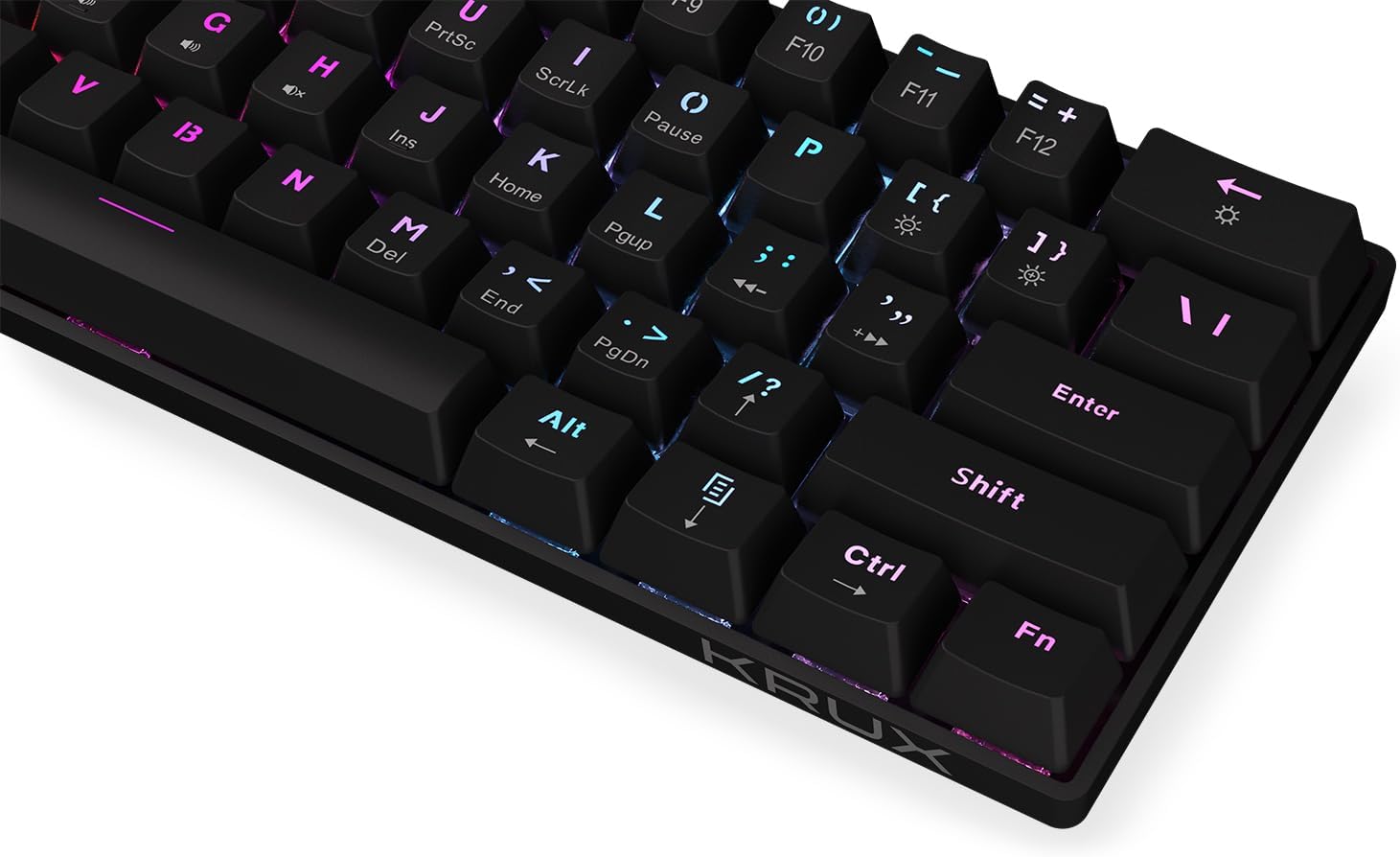
Abbildung 5: Eine Nahaufnahme view of the keycaps, demonstrating the RGB backlighting effect and the secondary functions printed on the front of some keys.
Wartung
Regular maintenance helps prolong the life of your keyboard:
- Reinigung: Use a soft, dry cloth to wipe the surface of the keyboard. For dust and debris between keycaps, use compressed air. Avoid liquid cleaners directly on the keyboard.
- Verschüttungen: In case of liquid spills, immediately disconnect the keyboard from your computer. Turn it upside down to drain liquid and allow it to dry completely before reconnecting. Do not use a hairdryer as excessive heat can damage components.
- Lagerung: Bewahren Sie die Tastatur an einem kühlen, trockenen Ort fern von direkter Sonneneinstrahlung und extremen Temperaturen auf.
Fehlerbehebung
| Problem | Mögliche Ursache | Lösung |
|---|---|---|
| Tastatur reagiert nicht | Wackelkontakt am USB-Anschluss, defekter USB-Anschluss, Systemfehler. | Stellen Sie sicher, dass das USB-Kabel fest angeschlossen ist. Versuchen Sie einen anderen USB-Anschluss. Starten Sie Ihren Computer neu. |
| Tasten werden nicht registriert oder es werden doppelte Eingaben gemacht | Staub/Schmutz unter der Tastenkappe, Schalterfunktionsstörung. | Use compressed air to clean around the affected key. If problem persists, contact support. |
| Hintergrundbeleuchtung funktioniert nicht oder ist ungleichmäßig. | Backlight setting, software glitch. | Drücken Fn + Eingabetaste to adjust brightness. Cycle through modes with Fn + \|. Restart computer. |
| Fn key combinations not working | Falsche Tastenkombination, Softwarekonflikt. | Refer to the "Operating Instructions" section for correct combinations. Ensure no conflicting software is running. |
Technische Daten
- Modell: KRX0137
- Tastaturtyp: 60% Mechanische Gaming-Tastatur
- Schalter: Outemu Red Mechanische Schalter
- Hintergrundbeleuchtung: Zone RGB
- Konnektivität: Kabelgebundenes USB-A
- Abmessungen: 29.1 x 10.1 x 3.9 cm (11.46 x 3.98 x 1.54 Zoll)
- Gewicht: 506 g (1.11 Pfund)
- Kompatible Betriebssysteme: Windows 10, Mac OS X 10.12 Sierra, Linux
- Enthaltene Komponenten: USB cable (integrated)
Garantie und Support
For warranty information and technical support, please refer to the official KRUX webBesuchen Sie unsere Website oder wenden Sie sich an Ihren Händler vor Ort. Bewahren Sie Ihren Kaufbeleg für Garantieansprüche auf.
Hersteller: Krux
WebWebsite: www.krux.tech (Note: This is a placeholder link, please refer to the official manufacturer's webWebsite für genaue Supportinformationen.)