1. Einleitung
This manual provides instructions for the safe and effective operation of your iJoy Stitch Speaker. Please read this manual thoroughly before using the device and retain it for future reference.

Image 1.1: The iJoy Stitch Speaker, showcasing the Stitch Hula Dancing design. This portable Bluetooth speaker is designed for wireless audio playback and features a silicone loop for portability.
2. Packungsinhalt
Überprüfen Sie, ob alle Artikel im Paket vorhanden sind:
- iJoy Stitch Speaker
- Benutzerhandbuch (dieses Dokument)
- Ladekabel (Micro-USB)

Image 2.1: The iJoy Stitch Speaker alongside its retail packaging, illustrating the product and its box.
3. Produktmerkmale und Komponenten
The iJoy Stitch Speaker is equipped with various features for versatile audio playback and portability.
3.1 Steuertasten
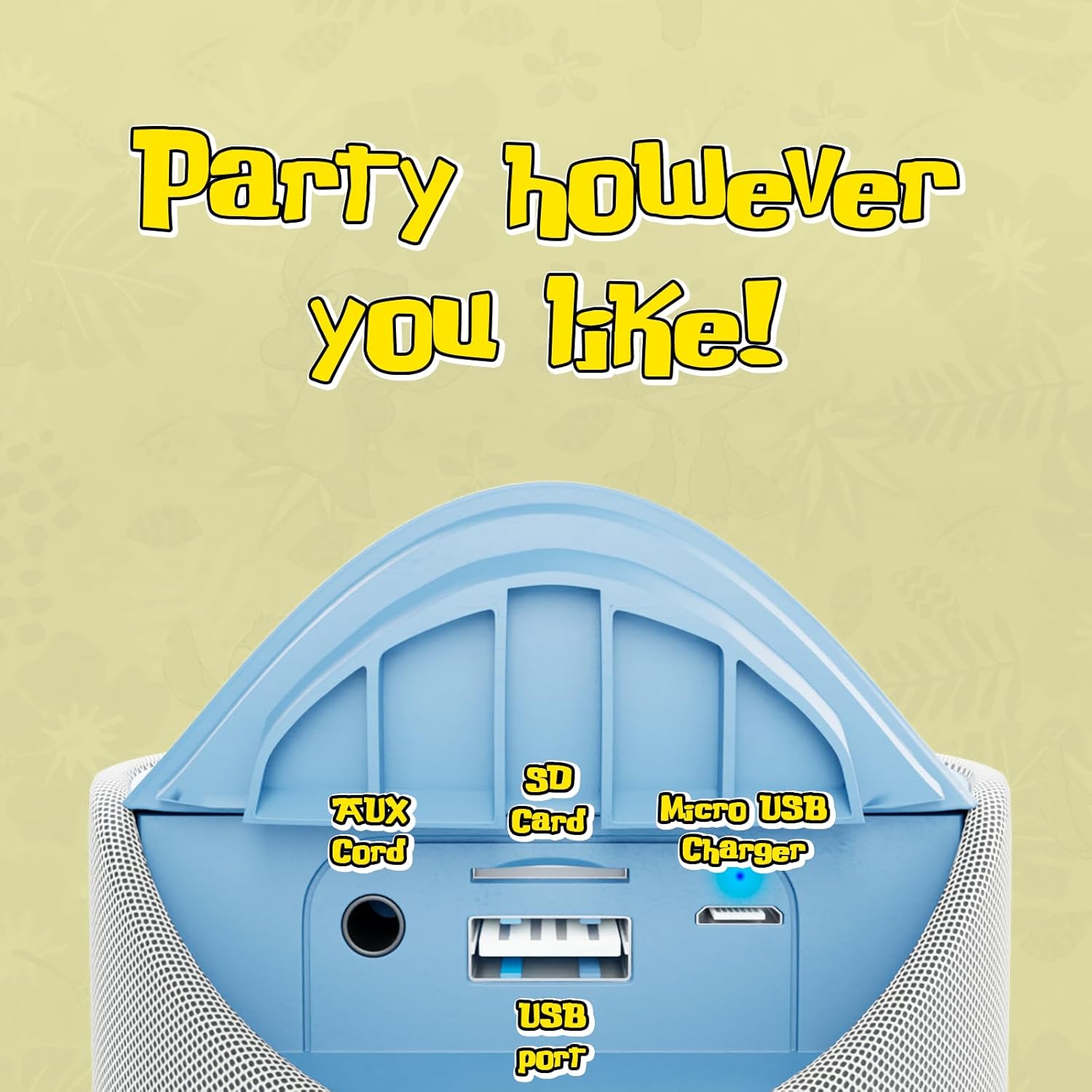
Image 3.1: Top panel of the speaker displaying the control buttons. These include Volume Down (-), Volume Up (+), Play/Pause/Call Answer, Mode Switch (M), and Power On/Off.
- Power-Taste (⏻): Zum Ein- oder Ausschalten des Lautsprechers drücken und halten.
- Play/Pause/Call Button (⏸): Drücken Sie diese Taste, um die Wiedergabe zu starten oder anzuhalten. Drücken Sie diese Taste, um einen Anruf anzunehmen oder zu beenden.
- Leiser-Taste (−): Drücken Sie , um die Lautstärke zu verringern.
- Lauter-Taste (+): Drücken Sie, um die Lautstärke zu erhöhen.
- Modus-Umschalttaste (M): Press to cycle through available modes (Bluetooth, FM Radio, SD Card, AUX).
3.2 Häfen und Anzeigen

Image 3.2: Rear panel of the speaker revealing the various input ports. These include the AUX port, SD Card slot, USB port, and Micro USB charging port.
- AUX-Port: Zum Anschluss externer Audiogeräte über ein 3.5-mm-Audiokabel.
- SD-Kartensteckplatz: Zum Abspielen von Audio files directly from an SD memory card.
- USB-Anschluss: Zum Abspielen von Audio files direkt von einem USB-Stick.
- Micro-USB-Ladeanschluss: Zum Laden des internen Akkus des Lautsprechers.
- LED-Anzeige: Indicates charging status and Bluetooth pairing status.
4. Einrichten und Laden
4.1 Aufladen des Lautsprechers
- Connect the Micro USB end of the charging cable to the speaker's Micro USB charging port.
- Verbinden Sie das USB-A-Ende des Ladekabels mit einem USB-Netzteil (nicht im Lieferumfang enthalten) oder einem USB-Anschluss Ihres Computers.
- The LED indicator will illuminate to show charging is in progress.
- Charging typically takes approximately 2 hours. The LED indicator will change or turn off once fully charged.
Eine vollständige Ladung ermöglicht bis zu 3 Stunden Spielzeit.
4.2 Ein-/Ausschalten
- Zum Einschalten: Halten Sie die Ein-/Aus-Taste gedrückt (⏻) until the speaker indicates it is on (e.g., a sound prompt or LED illumination).
- Zum Ausschalten: Halten Sie die Ein-/Aus-Taste gedrückt (⏻) again until the speaker indicates it is off.
5. Bedienungsanleitung
5.1 Bluetooth-Kopplung
- Ensure the speaker is powered on and in Bluetooth mode. If not, press the Mode Switch (M) button until the speaker enters Bluetooth pairing mode (indicated by a flashing LED).
- Aktivieren Sie auf Ihrem Gerät (z. B. Smartphone, Tablet) Bluetooth und suchen Sie nach verfügbaren Geräten.
- Select "iJoy Stitch Speaker" from the list of found devices.
- Once paired, the speaker will indicate a successful connection (e.g., a sound prompt or solid LED).
- Die Bluetooth-Reichweite beträgt ungefähr 9 Meter (30 Fuß).
5.2 SD-Karte / USB-Wiedergabe
- Insert a formatted SD card or USB flash drive containing audio files in den entsprechenden Schlitz am Lautsprecher.
- Press the Mode Switch (M) button to select SD Card mode or USB mode.
- Der Lautsprecher beginnt automatisch mit der Audiowiedergabe. files vom eingelegten Medium.
5.3 UKW-Radio
- Press the Mode Switch (M) button to select FM Radio mode.
- In FM mode, press the Play/Pause button (⏸) um verfügbare Radiosender automatisch zu scannen und zu speichern.
- Verwenden Sie die Lautstärketaste (+) und Lautstärke verringern (−) Schaltflächen zum Navigieren zwischen gespeicherten Sendern.
5.4 AUX-Eingang
- Verbinden Sie ein Ende eines 3.5-mm-Audiokabels (nicht im Lieferumfang enthalten) mit dem AUX-Anschluss des Lautsprechers.
- Verbinden Sie das andere Ende des Audiokabels mit der Kopfhörerbuchse oder dem Audioausgang Ihres externen Geräts.
- Press the Mode Switch (M) button to select AUX mode.
- Die Audioausgabe erfolgt nun über den Lautsprecher Ihres angeschlossenen Geräts.
5.5 Anruffunktionen
- When a call is incoming while connected via Bluetooth, press the Play/Pause button (⏸), um den Anruf anzunehmen.
- Drücken Sie die Play / Pause-Taste (⏸) erneut, um das Gespräch zu beenden.
- To reject an incoming call, press and hold the Play/Pause button (⏸).
6. Wartung
6.1 Reinigung
Reinigen Sie den Lautsprecher mit einem weichen, trockenen Tuch. Verwenden Sie keine Scheuermittel oder Lösungsmittel.
6.2 Wasserbeständigkeit
The speaker has an IPX4 water resistance rating, meaning it is protected against splashing water from any direction. It is not designed for submersion in water.
7. Fehlerbehebung
| Problem | Lösung |
|---|---|
| Der Lautsprecher lässt sich nicht einschalten. | Stellen Sie sicher, dass der Akku geladen ist. Verbinden Sie den Lautsprecher mit einer Stromquelle über das Micro-USB-Kabel. |
| Aus dem Lautsprecher kommt kein Ton. | Check the volume level on both the speaker and your connected device. Ensure the correct mode (Bluetooth, SD, FM, AUX) is selected. |
| Kopplung via Bluetooth nicht möglich. | Ensure the speaker is in Bluetooth pairing mode (flashing LED). Make sure your device's Bluetooth is enabled and within 30 feet of the speaker. Try restarting both devices. |
| Schlechter FM-Radioempfang. | Relocate the speaker to an area with better signal. Ensure automatic station scanning has been performed. |
8. Spezifikationen

Image 8.1: Visual representation of the speaker's dimensions, indicating it is approximately 6.3 inches tall and 2.9 inches across.
| Besonderheit | Detail |
|---|---|
| Modellname | Stitch Speaker |
| Marke | iJoy |
| Konnektivitätstechnologie | Bluetooth |
| Drahtlose Kommunikationstechnologie | Bluetooth |
| Bluetooth-Reichweite | 30 Fuß (9 Meter) |
| Lautsprechertyp | Tragbarer Bluetooth-Lautsprecher |
| Maximale Lautsprecherausgangsleistung | 5 Watt |
| Audioausgabemodus | Stereo |
| Stromquelle | Batteriebetrieben |
| Batteriekapazität | 800 Milliamp Std |
| Ladezeit | 2 Stunden |
| Spielzeit | Bis zu 3 Stunden |
| Wasserbeständigkeit | IPX4 (wasserbeständig) |
| Technische Daten | 3"T x 3"B x 6"H (ca. 7.6 cm T x 7.6 cm B x 15.2 cm H) |
| Artikelgewicht | 8 Unzen (ca. 227 Gramm) |
| Material | Silikon |
| Kontrollmethode | Touch (Button Controls) |
| UPC | 810116713943 |
9. Garantie und Support
The iJoy Stitch Speaker comes with a 90-Day Manufacturer Warranty. For warranty claims or technical support, please contact the manufacturer, Quest USA Corp, or refer to the contact information provided with your purchase documentation.
Weitere Hilfe finden Sie unter iJoy Store on Amazon.


