1. Produktüberschreitungview
The SOVMIKU Wireless Security Camera System provides comprehensive surveillance for indoor and outdoor environments. This system includes a 10-inch NVR monitor with a built-in 1TB HDD, two 3-megapixel wireless cameras, and features such as two-way audio, AI motion detection, and IP66 waterproof rating.

Abbildung 1: Überview of the SOVMIKU Wireless Security Camera System, including the NVR monitor, two cameras, and 1TB hard drive.
Hauptmerkmale:
- 10-inch NVR Monitor: Integriertes Display für Live-Anzeige viewund Wiedergabe.
- 1TB HDD Built-in: Bietet ample storage for continuous recording with overwrite function.
- 3-Megapixel Cameras: Delivers clear 1536P video resolution.
- Zweiwege-Audio: Eingebautes Mikrofon und Lautsprecher zur Kommunikation.
- KI-Bewegungserkennung: Advanced detection to minimize false alarms and optimize recording.
- IP66 Wasserdicht: Cameras are designed for reliable outdoor use in various weather conditions.
- Fernüberwachung: Zugriff auf Live- und aufgezeichnete Inhaltetage via smartphone, tablet, or PC application.
- H.265-Videokomprimierung: Efficient storage utilization, reducing capacity requirements by approximately 50% compared to H.264.
2. Packungsinhalt
Bitte überprüfen Sie, ob alle unten aufgeführten Artikel in Ihrem Paket enthalten sind:

Figure 2: Illustration of the items included in the SOVMIKU security camera system package.
- NVR Main Unit (with 1TB HDD built-in)
- 3-Megapixel IP66 Waterproof Cameras (Quantity: 2)
- Power Adapters for Cameras
- Netzteil für NVR
- USB-Maus
- LAN-Kabel
- HDMI-Kabel
- Mounting Screws and Anti-theft Stickers
- User Manual (Japanese, but this document serves as the English equivalent)
3. Installationsanleitung
3.1 Ersteinrichtung
The system is designed for simple setup. Cameras are pre-paired with the NVR. Simply power on the devices to begin surveillance.
- NVR anschließen: Schließen Sie das Netzteil des NVR an den NVR an und stecken Sie es in eine Steckdose.
- Kameras anschließen: Connect each camera's power adapter to the camera and plug it into a power outlet.
- Monitoranzeige: The NVR's integrated 10-inch monitor will display the camera feeds automatically.
- Mausanschluss: Connect the included USB mouse to the NVR for navigation and configuration.

Figure 3: Diagram illustrating the simple power-on setup for the NVR and cameras, showing automatic wireless connection.
3.2 Kamerainstallation
The cameras are IP66 waterproof, suitable for both indoor and outdoor installation. Ensure a stable power source is available at the installation location.
- Montage: Use the provided screws to securely mount the cameras to a wall or ceiling.
- Winkeleinstellung: The camera features 180° horizontal and 360° vertical adjustment for optimal viewing angles. Secure the angle after adjustment.
- Waterproofing Connections: For outdoor installations, ensure all cable connections are properly sealed and protected from moisture.
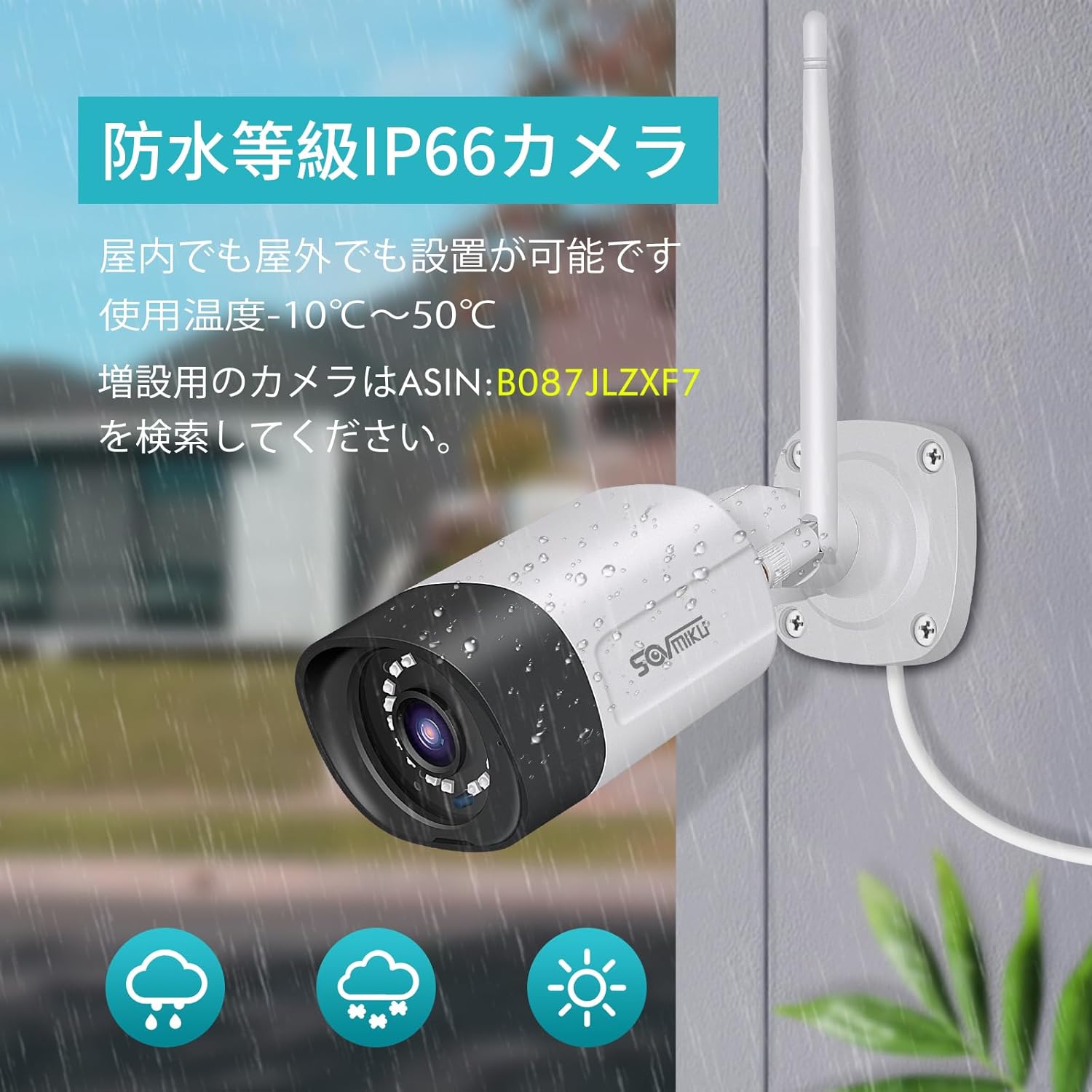
Figure 4: A SOVMIKU camera installed outdoors, demonstrating its IP66 waterproof rating against rain and snow.

Figure 5: Detailed diagram showing the camera components (wireless antenna, LED, lens, microphone, sensor light, speaker, adjustable bracket) and NVR ports (power, USB, HDMI, Ethernet, reset, TF card slot).
4. Bedienungsanleitung
4.1 ViewLive-Feed und Wiedergabe
- Auf dem NVR-Monitor: The 10-inch NVR monitor displays live feeds from connected cameras. Use the USB mouse to navigate the NVR interface for playback, system settings, and other functions.
- Remote Monitoring (EseeCloud App):
- Connect the NVR to your internet router using the provided LAN cable.
- Download the "EseeCloud" app on your smartphone or tablet (available for iOS).
- Folgen Sie den Anweisungen in der App, um Ihr NVR-Gerät hinzuzufügen.
- Einmal verbunden, können Sie view Live-Feeds, Zugriff auf aufgezeichnete Inhaltetage, and receive notifications from anywhere.
- PC-Software: For PC monitoring, download the "EseeCloud" software.
4.2 Aufnahmemodi
The system supports various recording modes to suit your needs:
- Kontinuierliche Aufnahme: Records 24/7. The 1TB HDD with H.265 compression allows for extended recording periods (e.g., over 2 months for 2 cameras). Older data is automatically overwritten when the HDD is full.
- Geplante Aufnahme: Legen Sie feste Aufnahmezeiten fest.
- Aufnahme mit Bewegungserkennung: Records only when motion is detected, saving storage space and making event review effizienter.

Figure 6: Visual representation of continuous, scheduled, and motion detection recording modes, along with notification options via app or email.
4.3 Zwei-Wege-Audio
Jede Kamera ist mit einem eingebauten Mikrofon und Lautsprecher ausgestattet, was eine Zwei-Wege-Kommunikation ermöglicht.
- Initiierung der Kommunikation: Use the EseeCloud app on your mobile device to speak through the camera's speaker and listen through its microphone.
- Klarer Klang: The omnidirectional microphone and optimized algorithms ensure clear sound quality.

Figure 7: Demonstration of the two-way audio function, showing a user communicating with someone at their door via the camera and smartphone app.
4.4 AI Motion Detection and Notifications
The system utilizes AI human detection to accurately identify human movement, reducing false alarms from pets or environmental factors.
- Event Notification: When motion is detected, the system can send instant notifications to your mobile app or email.
- Efficient Search: Recorded events triggered by motion detection can be quickly searched and reviewHrsg.

Figure 8: Illustration of H.265 video compression efficiency (1TB H.265 equals 2TB H.264) and AI human detection identifying a person in a scene.

Figure 9: A visual comparison demonstrating the superior clarity and detail of 5-megapixel resolution compared to 1.3-megapixel resolution, highlighting the system's high-definition capabilities.
5. Wartung
Regelmäßige Wartung gewährleistet optimale Leistung und Langlebigkeit Ihres Sicherheitssystems.
- Reinigung des Kameraobjektivs: Reinigen Sie die Kameralinsen regelmäßig mit einem weichen Tuch.amp Tuch zum Entfernen von Staub, Schmutz oder Wasserflecken, die die Sicht beeinträchtigen könnten viewVermeiden Sie scheuernde Reinigungsmittel.
- Verbindungen prüfen: Stellen Sie sicher, dass alle Strom- und Netzwerkkabel fest angeschlossen und unbeschädigt sind.
- Firmware-Updates: Check the EseeCloud app or SOVMIKU website for any available firmware updates for the NVR and cameras to ensure the latest features and security patches.
- Festplattenzustand: While the 1TB HDD is built-in, it's good practice to periodically check its status through the NVR settings to ensure it's functioning correctly.
6. Fehlerbehebung
If you encounter issues with your SOVMIKU security camera system, refer to the following common troubleshooting steps:
- Kein Bild auf dem Monitor:
- Ensure the NVR and cameras are powered on and their power adapters are securely connected.
- Check if the NVR's internal monitor is functioning. If using an external monitor, ensure the HDMI cable is connected correctly.
- Cameras Not Connecting to NVR:
- Verify that cameras are within range of the NVR's wireless signal. Walls and obstacles can reduce signal strength.
- Starten Sie sowohl den NVR als auch die Kameras neu.
- If adding new cameras or re-pairing, refer to the NVR's on-screen menu for camera pairing instructions.
- Kein Fernzugriff per App:
- Ensure the NVR is connected to your internet router via the LAN cable.
- Überprüfen Sie Ihre Internetverbindung.
- Verify that the NVR is correctly added to the EseeCloud app and has an active network status.
- Schlechte Bildqualität:
- Reinigen Sie das Kameraobjektiv.
- Stellen Sie sicher, dass sich keine Hindernisse im Sichtfeld der Kamera befinden. view.
- Check the camera's resolution settings in the NVR interface.
- Probleme mit der Zwei-Wege-Audioübertragung:
- Ensure the microphone and speaker settings are enabled in the NVR or app.
- Prüfen Sie, ob Mikrofon oder Lautsprecher der Kamera durch physische Hindernisse blockiert werden.
- Überprüfen Sie die Netzwerkstabilität für eine klare Audioübertragung.
7. Spezifikationen
| Besonderheit | Detail |
|---|---|
| Marke | SOWMIKU |
| Modellnummer | SFWK-10V-2HB312-1T |
| Auflösung der Videoaufnahme | 1536p (3 Megapixel) |
| Besonderheit | Wasserdicht (IP66) |
| Anzahl der Kanäle | 8 (Supports up to 8 cameras) |
| Speicherkapazität | 1 TB HDD (eingebaut) |
| Stromquelle | Kabelgebundene Elektrik |
| Betriebssystem (App) | iOS (and Android compatible via EseeCloud app) |
| Kompatible Geräte | Smartphone, Tablet, PC |
| Weitere Kamerafunktionen | Front-facing, Night color (low light technology) |
| Aufnahmemodus | Continuous, Scheduled, Motion Detection |
| Hardware-Schnittstelle | 802.11 ac/b/g/n (Wireless), Ethernet, HDMI, USB |
| Objektivtyp | Wide Angle (3.6 mm) |
| Produktabmessungen (NVR) | 29 x 17 x 24 cm |
| Artikelgewicht | 2.88 kg |
| UPC | 616612550644 |
8. Garantie und Support
SOVMIKU provides comprehensive support for its products.
- 1 Jahre Qualitätsgarantie: Für das Produkt gilt eine Garantie von 12 Monaten ab Kaufdatum.
- Technische Unterstützung: Professional technical support is available to assist with setup, operation, and troubleshooting.
- Kontaktinformationen: For any questions or issues, please contact SOVMIKU customer support via email or phone. (Specific contact details are usually provided in the physical manual or on the product's official webSeite? ˅.)
- PSE-Zertifizierung: Our products have passed PSE certification in accordance with Japanese electrical safety standards, ensuring safe usage.


