1. Einleitung
The UNI-T UT383S is a compact and precise digital light meter designed for measuring illuminance in Lux (lx) or Foot-Candles (FC). It features a split probe for flexible measurements, auto-ranging capabilities, and data hold functions, making it suitable for various applications including public settings, light manufacturing, photo studios, interior renovation, construction, and greenhouses.
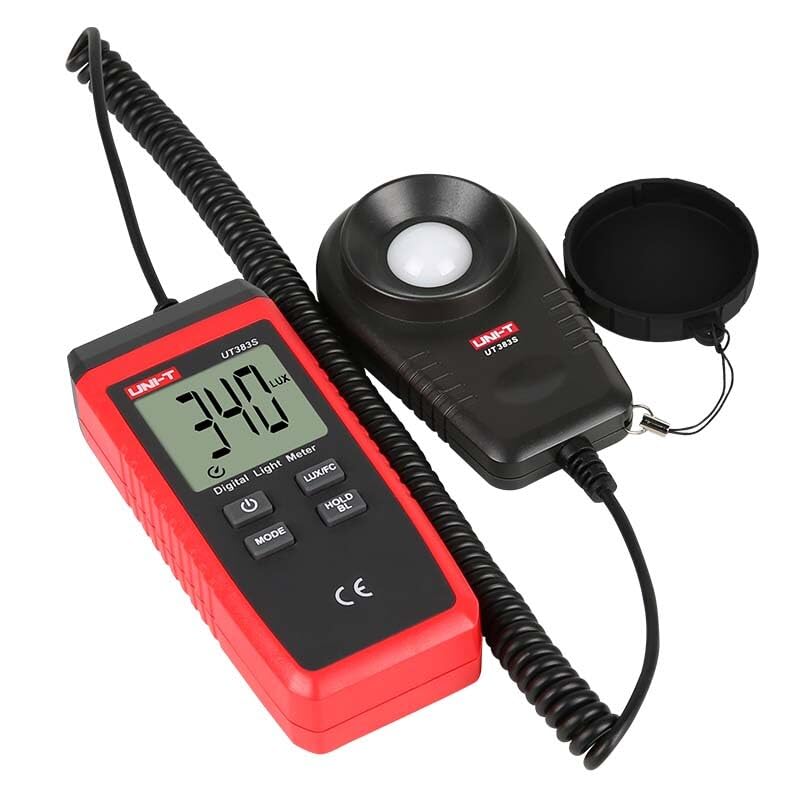
Image 1: The UNI-T UT383S Digital Light Meter, showing the main unit with LCD display and the separate light sensor probe connected by a coiled cable.
2. Sicherheitshinweise
Please read and understand all safety warnings and operating instructions before using this device. Failure to do so may result in injury or damage to the meter.
- Do not operate the meter in environments with high temperature or humidity.
- Vermeiden Sie starke Vibrationen oder Stöße auf das Gerät.
- Um genaue Messwerte zu gewährleisten, muss der Lichtsensor sauber und frei von Verunreinigungen sein.
- Tauschen Sie die Batterien umgehend aus, sobald die Anzeige für niedrigen Batteriestand erscheint.
3. Packungsinhalt
The standard package for the UT383S Digital Light Meter includes:
- 1 x UNI-T UT383S Digital Light Meter
- 1 x 1.5 V AAA-Batterie (im Lieferumfang enthalten)
- 1 x englisches Benutzerhandbuch
4. Gerätelayout
The UT383S consists of a main display unit and a separate light sensor probe connected by a coiled cable. The main unit features an LCD display and several control buttons.
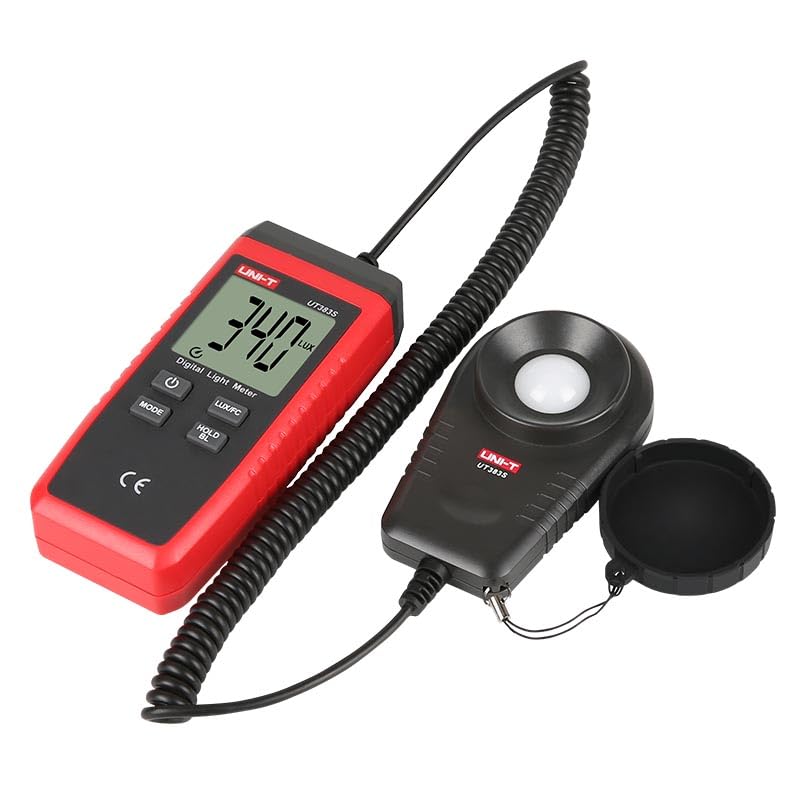
Abbildung 2: Eine detaillierte view of the UT383S main unit, highlighting the LCD screen and the arrangement of its function buttons.
4.1. Bedientasten:
- Power-Taste (⏻): Turns the device On/Off.
- MODE-Taste: Cycles through measurement modes or settings.
- LUX/FC-Taste: Toggles between Lux and Foot-Candle units.
- HOLD/BL-Taste: Freezes the current reading on the display. Long press activates/deactivates backlight.
- MAX/MIN-Taste: Displays maximum or minimum recorded values.
5. Einlegen der Batterie
The UT383S requires 1 Lithium Metal battery (included). To install or replace the battery:
- Stellen Sie sicher, dass das Gerät ausgeschaltet ist.
- Suchen Sie das Batteriefach auf der Rückseite des Messgeräts.
- Öffnen Sie die Abdeckung des Batteriefachs.
- Setzen Sie die Batterie unter Beachtung der richtigen Polarität (+/-) ein.
- Schließen Sie den Batteriefachdeckel fest.
6. Bedienungsanleitung
6.1. Ein-/Ausschalten
- Um das Messgerät einzuschalten, drücken Sie die ⏻ Netzschalter.
- Um das Messgerät auszuschalten, halten Sie die Taste ⏻ Power button until the display turns off.
6.2. Unit Selection (Lux/FC)
The UT383S can display readings in either Lux (lx) or Foot-Candles (FC).
- Drücken Sie die LUX/FC button to toggle between Lux and Foot-Candle units. The selected unit will be indicated on the LCD display.
6.3. Datenhaltefunktion
Um den aktuellen Messwert auf dem Display einzufrieren:
- Drücken Sie die HALTEN/BL button once. The "HOLD" indicator will appear on the screen.
- Drücken Sie die HALTEN/BL Drücken Sie erneut die Taste, um die Haltefunktion zu lösen und die Live-Messungen fortzusetzen.
6.4. Maximum/Minimum Measurement
The meter can record and display the maximum and minimum illuminance values measured during a session.
- Drücken Sie die MAX/MIN button once to display the maximum recorded value ("MAX" indicator).
- Drücken Sie die MAX/MIN button a second time to display the minimum recorded value ("MIN" indicator).
- Drücken Sie die MAX/MIN Drücken Sie die Taste ein drittes Mal, um den MAX/MIN-Modus zu verlassen und zur Live-Messung zurückzukehren.
6.5. Hintergrundbeleuchtung
For measurements in low-light conditions, the display backlight can be activated.
- Halten Sie die HALTEN/BL Taste, um die Hintergrundbeleuchtung ein- oder auszuschalten.
6.6. Automatisches Ausschalten
The meter features an auto power-off function to conserve battery life. It will automatically shut down after a period of inactivity.
- To disable auto power-off, refer to the full user manual for advanced settings.
6.7. Bspample Anwendung

Image 3: The UT383S in use, demonstrating its application in measuring light intensity within a specialized setup.
7. Videodemonstration
Watch this video for a visual guide on operating a similar UNI-T digital light meter. While the model shown is UT381, the basic functions and button operations are largely similar to the UT383S.
Video 1: A demonstration of the UNI-T UT381 Digital Lux Meter, showcasing its power-on, auto-ranging, manual range selection, data hold, maximum/minimum value display, and unit switching (Lux/FC) features. This video is provided by the seller and illustrates functions similar to the UT383S.
8. Spezifikationen
| Besonderheit | Detail |
|---|---|
| Marke | EINHEIT |
| Modell | UT383S (HY-UT383S) |
| Stromquelle | Batteriebetrieben (1 Lithium-Metall-Batterie im Lieferumfang enthalten) |
| Material | Acrylnitril-Butadien-Styrol (ABS) |
| Sensor Technology | Photodiode/Photoresistor |
| Anzeigetyp | LCD |
| Artikelgewicht | 0.6 Kilogramm (1.32 Pfund) |
| Technische Daten | 6.5 x 4.33 x 4.72 Zoll |
| Zertifikate | CE, UKCA |
| Sampling Zeit | 0.5er Jahre |
| Besondere Merkmale | Split probe, Auto range, Lux/Fc selectable, Max/Min, Overload indication (LO/HI), Data hold, Backlight, Auto power off, Low battery indication |
9. Wartung
To ensure the longevity and accuracy of your UNI-T UT383S Digital Light Meter, follow these maintenance guidelines:
- Reinigung: Wipe the device and sensor with a soft, dry cloth. Do not use abrasive cleaners or solvents.
- Lagerung: Store the meter in a cool, dry place away from direct sunlight and extreme temperatures. If storing for extended periods, remove the battery to prevent leakage.
- Sensorpflege: Keep the light sensor dome clean and free from dust or fingerprints, as this can affect measurement accuracy.
10. Fehlerbehebung
If you encounter issues with your UT383S, refer to the following common problems and solutions:
- Kein Display/Gerät schaltet sich nicht ein:
- Check if the battery is correctly installed with proper polarity.
- Ersetzen Sie die Batterie durch eine neue, wenn sie leer ist.
- "OL" (Overload) Display:
- The measured illuminance exceeds the meter's maximum range. Move the sensor to an area with lower light intensity.
- Ungenaue Messwerte:
- Stellen Sie sicher, dass der Lichtsensor sauber und frei von Verunreinigungen ist.
- Verify that the correct unit (Lux or FC) is selected for your application.
- Allow the meter to stabilize in the measurement environment for a few moments.
- Anzeige für niedrigen Batteriestand:
- The battery icon on the display indicates low battery. Replace the battery immediately to ensure accurate operation.
11. Garantie und Support
UNI-T products are designed for reliability and performance. For specific warranty information and technical support, please refer to the warranty card included with your product or visit the official UNI-T webBewahren Sie Ihren Kaufbeleg als Kaufnachweis für eventuelle Garantieansprüche auf.
For further assistance, you may contact the seller or UNI-T customer service directly.


