1. Einleitung
Thank you for choosing the MOFII Wired Retro Typewriter Keyboard. This manual provides essential information for the proper setup, operation, and maintenance of your new keyboard. Please read these instructions carefully before use and retain them for future reference.
2. Sicherheitshinweise
- Setzen Sie die Tastatur keinen Flüssigkeiten oder übermäßiger Feuchtigkeit aus.
- Vermeiden Sie extreme Temperaturen.
- Versuchen Sie nicht, die Tastatur selbst zu zerlegen oder zu reparieren. Wenden Sie sich gegebenenfalls an qualifiziertes Servicepersonal.
- Außerhalb der Reichweite von Kindern aufbewahren.
3. Packungsinhalt
Bitte prüfen Sie, ob alle Artikel in Ihrem Paket enthalten sind:
- MOFII Wired Retro Typewriter Keyboard
- Reinigungsbürste
4. Einrichtung
4.1 Anschließen der Tastatur
The MOFII Wired Keyboard features a simple plug-and-play design, requiring no additional drivers for most operating systems.
- Locate an available USB-A port on your computer (PC, Laptop, Desktop, Chromebook).
- Plug the USB-A cable from the keyboard into the USB-A port on your computer.
- The keyboard should be automatically recognized and ready for use within a few seconds.

Image: The keyboard connected to a laptop via its USB cable, demonstrating the plug-and-play functionality.
4.2 Einstellen des Tastaturwinkels
For enhanced typing comfort, the keyboard includes foldable feet to adjust its tilt angle.
- To raise the keyboard, gently pull out the two foldable feet located on the underside of the keyboard.
- To return the keyboard to a flat position, fold the feet back into their recessed slots.

Abbildung: Seite A view of the keyboard demonstrating the adjustable tilt angle provided by its foldable feet.
4.3 Kompatibilität
The MOFII Wired Keyboard is compatible with a wide range of operating systems:
- Windows XP/Vista/7/8/10/11
- Mac OS (Note: Some multimedia functions may not be available with Mac OS)
5. Bedienungsanleitung
5.1 Grundlegendes Tippen
The keyboard features a standard 104-key full-size layout with round, retro-style keycaps. Simply begin typing after connecting the keyboard to your computer.
5.2 Multimediafunktionen
The keyboard includes 11 multimedia shortcut combinations accessible via the Fn Taste gedrückt halten. Fn Drücken Sie die Taste und anschließend die entsprechende F-Taste (F1-F12), um die gewünschte Funktion zu aktivieren.
| Kombination | Funktion |
|---|---|
| Fn + F1 | Media Player |
| Fn + F2 | Lautstärke verringern |
| Fn + F3 | Lautstärke erhöhen |
| Fn + F4 | Stumm |
| Fn + F5 | Play / Suspend |
| Fn + F6 | Vorheriger Titel |
| Fn + F7 | Abspielen / Pause |
| Fn + F8 | Nächster Titel |
| Fn + F9 | |
| Fn + F10 | Web Heim |
| Fn + F11 | Bildschirmsperre |
| Fn + W | WASD and Arrow Key Swapping |
| Fn + Gewinnen | Lock/Unlock Windows Key and APP Key |

Image: Visual representation of the multimedia function keys and their corresponding actions.
5.3 Kontrollleuchten
Die Tastatur verfügt über Kontrollleuchten für verschiedene Statusanzeigen:
- Keypad Lock Indicator: Illuminates when the numeric keypad is active.
- Feststellanzeige: Leuchtet auf, wenn die Feststelltaste aktiviert ist.
- Win Lock-Anzeige: Illuminates when the Windows key is locked.

Bild: Eine detaillierte view highlighting the three indicator lights on the keyboard.
6. Wartung
6.1 Reinigung der Tastatur
Um optimale Leistung und ein ansprechendes Aussehen zu erhalten, reinigen Sie Ihre Tastatur regelmäßig.
- Use the included cleaning brush to remove dust, crumbs, and other debris from between the keycaps.
- Zur Oberflächenreinigung wischen Sie die Tastenkappen und das Tastaturgehäuse vorsichtig mit einem weichen, feuchten Tuch ab.amp Tuch. Vermeiden Sie aggressive Chemikalien.

Image: The keyboard with a few keycaps detached, illustrating the removable keycap design and the cleaning brush for maintenance.
7. Fehlerbehebung
7.1 Tastatur reagiert nicht
- Stellen Sie sicher, dass das USB-Kabel sowohl an die Tastatur als auch an den USB-Anschluss des Computers fest angeschlossen ist.
- Versuchen Sie, die Tastatur an einen anderen USB-Anschluss Ihres Computers anzuschließen.
- Starten Sie Ihren Computer neu.
7.2 Multimedia-Tasten funktionieren nicht unter Mac OS
As noted in the compatibility section, some multimedia functions may not be fully supported on Mac OS due to system differences. This is expected behavior.
7.3 Erratic Key Input
If you experience incorrect key input or keys getting stuck internally, especially after reconnecting the cable:
- Disconnect the keyboard's USB cable from the computer.
- Wait a few seconds, then reconnect the USB cable firmly. This often resolves temporary communication issues.
8. Spezifikationen
| Besonderheit | Detail |
|---|---|
| Marke | MOFII |
| Modell | Wired Keyboard (B0CDWQCVGG) |
| Konnektivitätstechnologie | USB-A |
| Tastaturbeschreibung | Multimedia, Full-Size with Numeric Keypad |
| Besonderheit | Round Key, Retro Style |
| Farbe | Pink Colorful |
| Material | Silikon |
| Kompatible Geräte | PC, Laptop, Desktop, Chromebook |
| Artikelgewicht | 1.85 Pfund |
| Verpackungsabmessungen | 17.95 x 6.38 x 1.81 Zoll |
| USB-Kabellänge | 65 Zoll (ca. 5.4 Fuß) |
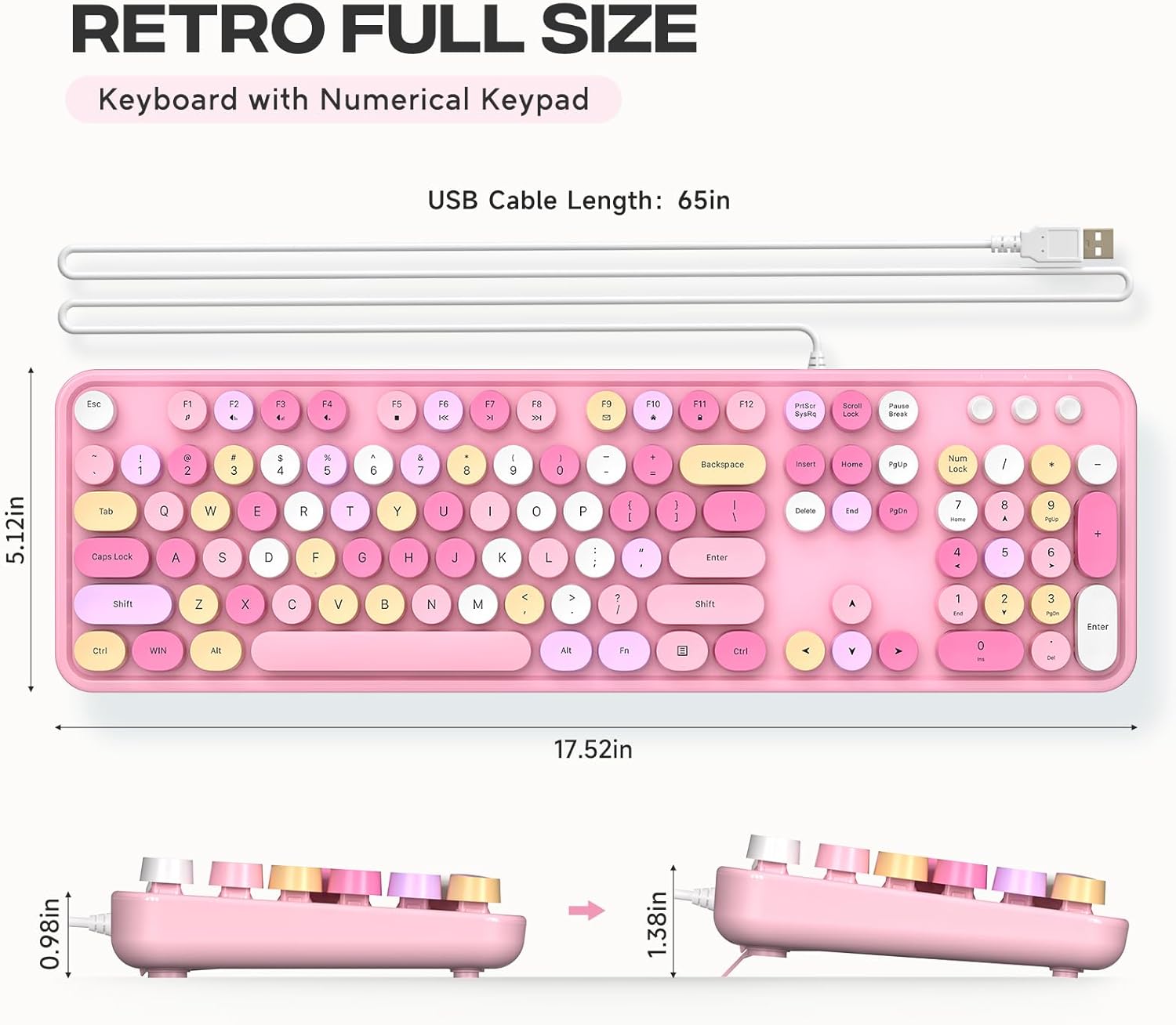
Image: Detailed measurements of the keyboard, including its length, width, and height in both flat and tilted positions.
9. Garantie und Support
MOFII products are designed for reliability and performance. For specific warranty details and support inquiries, please refer to the product packaging or contact MOFII customer service directly through their official webWebsite oder den Händler, bei dem das Produkt gekauft wurde.
Please have your product model (B0CDWQCVGG) and purchase information ready when contacting support.


