1. Einleitung
The CALEX Smart Home Indoor Ambiance Aroma Diffuser 590100500 is designed to enhance your indoor environment by improving air quality, diffusing pleasant aromas, and providing ambient lighting. This smart device integrates seamlessly into your smart home ecosystem, offering control through the Calex app, voice commands, and programmable features.
Zu den Hauptmerkmalen gehören:
- Aroma diffusion with essential oils.
- Realistic flame effect for ambiance.
- Adjustable ambient lighting with 16 million color options.
- Smart control via Calex app (timers, programmable scenarios).
- Voice control compatibility with Google Assistant, Siri, and Amazon Alexa.
- 300ml water tank capacity with automatic shut-off.
2. Sicherheitshinweise
Bitte lesen Sie vor der Benutzung des Geräts alle Sicherheitshinweise, um Verletzungen oder Schäden zu vermeiden.
- Always place the diffuser on a stable, flat surface away from direct sunlight, heat sources, and electronic devices.
- Do not exceed the maximum water fill line (300ml) to prevent overflow.
- Verwenden Sie ausschließlich sauberes Leitungswasser oder destilliertes Wasser. Verwenden Sie kein heißes Wasser.
- Only use 100% pure, water-soluble essential oils. Other oils or corrosive liquids may damage the device.
- Bewahren Sie das Gerät außerhalb der Reichweite von Kindern und Haustieren auf.
- Die Nebeldüse darf während des Betriebs nicht abgedeckt werden.
- Vor der Reinigung oder dem Nachfüllen das Gerät vom Stromnetz trennen.
- The device features an automatic shut-off function when the water tank is empty, and sends a notification to your phone.
- A built-in safety configuration will cause the diffuser to flash if the remaining water in the tank needs to cool down after a maximum of 72 hours of continuous operation.
- Versuchen Sie nicht, das Gerät selbst zu reparieren oder zu modifizieren. Wenden Sie sich an den Kundendienst, um Unterstützung zu erhalten.
3. Packungsinhalt
Überprüfen Sie, ob alle Artikel im Paket vorhanden sind:
- CALEX Smart Home Indoor Ambiance Aroma Diffuser (Model 5901000500)
- Netzteil
- Bedienungsanleitung
4. Produktüberschreitungview
Machen Sie sich mit den Komponenten Ihres Aromadiffusors vertraut.
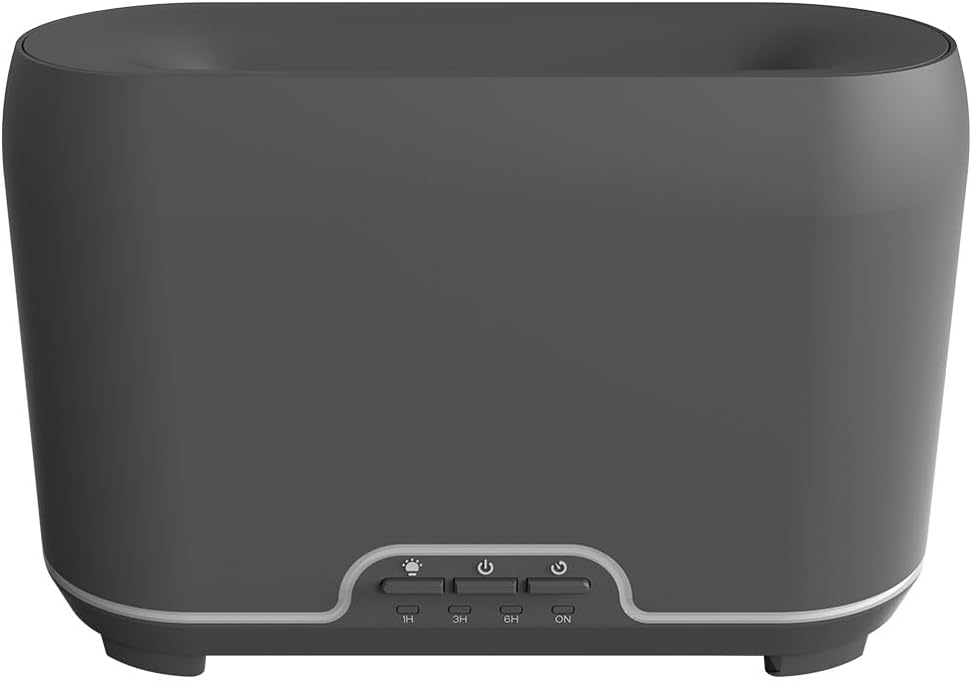
Bild: Vorderseite view of the CALEX Smart Home Aroma Diffuser, showing the control panel with buttons for light, power, and timer settings (1H, 3H, 6H, ON).

Image: The CALEX Smart Home Aroma Diffuser operating on a wooden table, displaying its ambient flame effect and mist output.
The diffuser typically consists of a water tank, an ultrasonic plate, a mist outlet, and a control panel with buttons for power, light, and timer functions. The power input port is usually located at the back or bottom of the device.
5. Einrichtung
Befolgen Sie diese Schritte für die Ersteinrichtung:
- Platzierung: Stellen Sie den Diffusor auf eine flache, stabile Oberfläche.
- Deckel öffnen: Entfernen Sie vorsichtig die obere Abdeckung des Diffusors.
- Wassertank auffüllen: Fill the water tank with clean water up to the 300ml maximum fill line. Do not overfill.
- Ätherisches Öl hinzufügen: Geben Sie ein paar Tropfen Ihres bevorzugten ätherischen Öls direkt in den Wassertank.
- Deckel schließen: Bringen Sie die obere Abdeckung wieder fest an.
- Strom anschließen: Plug the power adapter into the diffuser's power input port, then plug the adapter into a wall outlet.
- Calex-App herunterladen: Download the free Calex Smart app from your smartphone's app store (available for iOS and Android).
- Mit WLAN verbinden: Follow the in-app instructions to connect your diffuser to your home WiFi network. Ensure your WiFi is 2.4GHz.
6. Bedienungsanleitung
The CALEX Smart Home Aroma Diffuser can be operated via the Calex app or its integrated control buttons.
6.1 Using the Calex Smart App
The Calex app provides full control over your diffuser's functions:
- Ein-/Ausschalten: Turn the diffuser on or off remotely.
- Nebelkontrolle: Adjust the mist output level.
- Lichtsteuerung: Change the ambient light color from over 16 million options, adjust brightness, and select lighting modes.
- Flammeneffekt: Activate or deactivate the flame effect.
- Timer: Set schedules for the diffuser to turn on or off automatically.
- Programmierbare Szenarien: Create custom scenarios based on time, weather, or other smart home triggers.
- Benachrichtigungen: Receive alerts when the water tank is empty.
6.2 Sprachsteuerung
Integrate your diffuser with voice assistants for hands-free control:
- Google Assistant: Link your Calex account in the Google Home app. Use commands like "Hey Google, turn on the diffuser."
- Siri: Create custom shortcuts in the Apple Home app or through the Calex app for Siri commands.
- Amazon Alexa: Enable the Calex skill in the Alexa app. Use commands like "Alexa, set diffuser light to blue."
6.3 Manuelle Bedientasten
The control panel on the diffuser allows for basic operation:
- Netzschalter: Press once to turn on/off the mist and flame effect.
- Lichttaste: Press to cycle through light colors or turn the light on/off.
- Timer Buttons (1H, 3H, 6H, ON): Select a desired operating duration. The diffuser will automatically shut off after the selected time. 'ON' typically means continuous operation until water runs out or manually turned off.
7. Wartung
Regelmäßige Reinigung gewährleistet optimale Leistung und verlängert die Lebensdauer Ihres Diffusors.
- Tägliche Reinigung: Leeren Sie nach jedem Gebrauch das restliche Wasser aus dem Tank. Wischen Sie das Innere des Tanks mit einem sauberen, weichen Tuch aus.
- Wöchentliche Reinigung: For a more thorough clean, unplug the device. Add a small amount of white vinegar (about 10ml) to the water tank and let it sit for 10-15 minutes to dissolve mineral buildup. Gently wipe the ultrasonic plate with a cotton swab or soft brush. Rinse the tank thoroughly with clean water, avoiding the air outlet.
- Außenreinigung: Wischen Sie die Außenseite des Diffusors mit einem weichen, fusselfreien Tuch ab.amp Tuch. Keine Scheuer- oder Lösungsmittel verwenden.
- Ensure the device is completely dry before refilling or storing.
8. Fehlerbehebung
Sollten Sie auf Probleme stoßen, konsultieren Sie bitte die folgenden häufigen Probleme und Lösungen:
| Problem | Mögliche Ursache | Lösung |
|---|---|---|
| Kein oder schwacher Nebel | Niedriger Wasserstand Ultraschallplatte verschmutzt Nebelauslass verstopft | Füllen Sie Wasser bis zum entsprechenden Füllstand nach. Reinigen Sie die Ultraschallplatte gemäß den Wartungsanweisungen. Stellen Sie sicher, dass die Nebeldüse frei ist. |
| Gerät lässt sich nicht einschalten | Kein Strom Wassertank leer Gerätestörung | Überprüfen Sie den Stromanschluss und die Steckdose. Füllen Sie den Wassertank auf. Wenden Sie sich an den Kundendienst, wenn das Problem weiterhin besteht. |
| App-Verbindungsprobleme | Falsches WLAN-Passwort Router zu weit entfernt 2.4GHz vs 5GHz WiFi | Überprüfen Sie das WLAN-Passwort. Move diffuser closer to the router. Ensure your router is broadcasting a 2.4GHz network and connect to it. |
| Flammeneffekt funktioniert nicht | Feature deactivated in app Gerätestörung | Check app settings to ensure flame effect is enabled. Kontaktieren Sie den Kundendienst. |
9. Spezifikationen
| Besonderheit | Spezifikation |
|---|---|
| Modellnummer | 5901000500 |
| Marke | CALEX |
| Kapazität | 300 Milliliter |
| Material | Plastik |
| Automatische Abschaltung | Ja |
| Konnektivität | WLAN (2.4 GHz) |
| Kontrollmethoden | Calex Smart App, Voice Control (Google Assistant, Siri, Amazon Alexa), Manual Buttons |
| Lichtoptionen | 16 Millionen Farben |
| Empfohlener Nutzungsbereich | Medium space |
| Internationaler Artikelcode (EAN/UPC) | 08712879157090 |
10. Garantie und Support
Informationen zur Garantie und technische Unterstützung finden Sie in der mitgelieferten Dokumentation oder wenden Sie sich direkt an den Händler/Hersteller. Bewahren Sie Ihren Kaufbeleg für Garantieansprüche auf.


