1. Einleitung
Thank you for choosing the Havit PA304 Projector Ceiling and Wall Mount. This mount is designed to securely hold your projector, offering flexible positioning with 360-degree rotation and adjustable height. Please read this manual carefully before installation and use to ensure proper setup and safe operation.
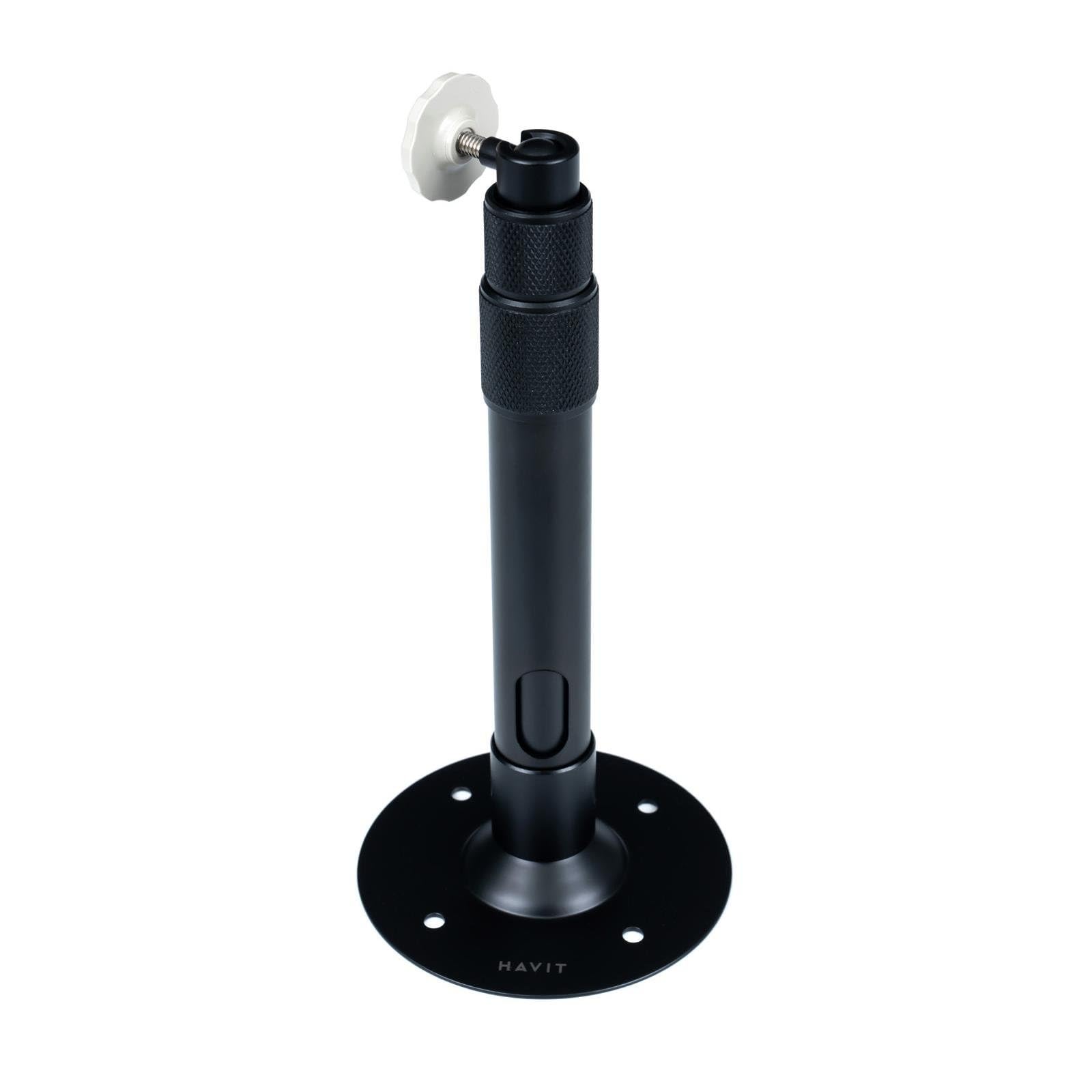
Abbildung 1: Havit PA304 Projector Mount. This image displays the main components of the Havit PA304 mount, including the mounting plate, adjustable arm, and projector attachment head.
2. Sicherheitshinweise
- Ensure the mounting surface (ceiling or wall) can support the combined weight of the mount and your projector. The maximum load capacity for this mount is 3 kg.
- Überschreiten Sie nicht die maximale Gewichtskapazität von 3 kg.
- Use appropriate tools and follow all installation steps carefully to prevent injury or damage to the product or property.
- Wenn Sie sich bei irgendeinem Teil des Installationsprozesses unsicher sind, konsultieren Sie einen qualifizierten Fachmann.
- Halten Sie Kleinteile und Verpackungsmaterialien von Kindern fern.
- Regularly check all screws and connections to ensure they remain secure.
3. Packungsinhalt
Bitte vergewissern Sie sich vor Beginn der Installation, dass alle Komponenten vorhanden sind.
- Havit PA304 Projector Mount Assembly
- Screw Mounting Kit (includes screws and wall anchors)
Notiz: Projector and installation tools (drill, screwdriver, pencil, measuring tape) are not included.
4. Installationsanweisungen
The Havit PA304 mount can be installed on either a ceiling or a wall. Follow the steps below for your desired mounting location.
4.1. Benötigtes Werkzeug (nicht im Lieferumfang enthalten)
- Bohren
- Schraubendreher (Kreuzschlitz empfohlen)
- Bleistift
- Maßband
4.2. Mounting the Bracket to the Ceiling or Wall
- Ort auswählen: Choose a suitable location on your ceiling or wall that is structurally sound and can support the weight. Ensure there are no electrical wires or pipes behind the drilling area.
- Bohrlöcher markieren: Hold the mounting plate of the Havit PA304 mount against the desired surface. Use a pencil to mark the positions for the drill holes.
- Bohrlöcher: Using an appropriate drill bit for your wall/ceiling material, drill pilot holes at the marked positions. Insert the wall anchors (if required for your surface type) into the drilled holes.
- Sichere Montageplatte: Align the mounting plate with the drilled holes and secure it firmly using the provided screws and a screwdriver. Ensure the plate is level and tightly fastened.
Image for this step (e.g., "PA304_MountingPlate_Installation.jpg") is not available in the provided data.
4.3. Anbringen des Projektors an der Halterung
- Identify Projector Mounting Point: Locate the universal mounting screw hole on the bottom of your projector.
- Projektor anschließen: Carefully align the projector's mounting hole with the screw on the projector attachment head of the Havit PA304 mount. Screw the projector onto the mount until it is secure. Do not overtighten.
- Stabilität prüfen: Gently test the projector's stability on the mount. It should feel firm and not wobble.
Image for this step (e.g., "PA304_Projector_Attachment.jpg") is not available in the provided data.
5. Bedienung und Einstellung
The Havit PA304 mount offers flexibility for optimal projector positioning.
- 360-Grad-Drehung: The projector attachment head can rotate 360 degrees. Loosen the adjustment knob/screw on the head, position your projector to the desired angle, and then tighten the knob/screw to secure it.
- Höhenverstellung: The mount allows for height adjustment between 27.5 cm and 39 cm. Loosen the height adjustment mechanism (usually a collar or screw on the main pole), extend or retract the pole to the desired height, and then firmly tighten the mechanism to lock it in place.
- Winkeleinstellung: Some projectors may require slight tilting. The mount's head allows for minor tilt adjustments. Loosen the relevant screw, adjust the projector's vertical angle, and then retighten.
Image illustrating adjustment points (e.g., "PA304_Adjustment_Points.jpg") is not available in the provided data.
6. Wartung
- Reinigung: Reinigen Sie die Halterung mit einem weichen, trockenen Tuch. Verwenden Sie keine Scheuermittel oder Lösungsmittel, da diese die Oberfläche beschädigen können.
- Regelmäßige Kontrollen: Periodically inspect all screws and connections to ensure they are tight and secure. Over time, vibrations or adjustments can cause screws to loosen.
- Gewichtsbeschränkung: Always ensure that the total weight of your projector does not exceed the 3 kg maximum load capacity.
7. Fehlerbehebung
| Problem | Mögliche Ursache | Lösung |
|---|---|---|
| Die Halterung wirkt instabil oder wackelig. | Screws are loose; mounting surface is not strong enough; projector weight exceeds limit. | Tighten all mounting screws. Ensure the mounting surface is solid. Verify projector weight is within 3 kg. |
| Cannot adjust height or rotation. | Die Einstellmechanismen sind zu eng. | Loosen the relevant adjustment knob/screw before attempting to adjust. Retighten after positioning. |
| Projector does not fit the mount. | Projector lacks a universal mounting screw hole or has an unusual design. | Ensure your projector has a standard 1/4-inch screw hole for mounting. This mount is designed for projectors with a single mounting point. |
8. Spezifikationen
| Modellname | Havit PA304 |
| Modellnummer | PA304 |
| Marke | Gewohnheit |
| Material | Metall |
| Montagetyp | Deckenhalterung, Wandhalterung |
| Maximale Gewichtskapazität | 3 kg |
| Einstellbarer Höhenbereich | 27.5 cm - 39 cm (10.8 Zoll - 15.3 Zoll) |
| Drehung | 360 Grad |
| Im Lieferumfang enthaltene Komponenten | Mount assembly, screw mounting kit |
9. Garantie und Support
The Havit PA304 Projector Mount comes with a 2 Jahr Garantie Diese Garantie gilt ab Kaufdatum und deckt Herstellungsfehler bei normalem Gebrauch ab. Sie deckt keine Schäden ab, die durch unsachgemäße Installation, Missbrauch, Unfälle oder unbefugte Änderungen verursacht wurden.
For technical support, warranty claims, or further inquiries, please contact your local Havit dealer or visit the official Havit website for contact information. Please retain your proof of purchase for warranty service.


