1. Einleitung
Vielen Dank für Ihren Einkauf.asing the BLOW 4625FHD DVB-T2 H.265 Digital Terrestrial TV Tuner. This device allows you to receive digital terrestrial television broadcasts (DVB-T2) with H.265 (HEVC) compression, offering high-definition video quality. This manual provides essential information for the safe and efficient setup, operation, and maintenance of your new tuner. Please read it thoroughly before use and retain it for future reference.
2. Sicherheitshinweise
- Elektrische Sicherheit: Um einen Stromschlag zu vermeiden, öffnen Sie nicht das Kabel.asing. Alle Wartungsarbeiten sind qualifiziertem Personal zu überlassen.
- Energiequelle: Verwenden Sie ausschließlich das angegebene Netzteil. Stellen Sie sicher, dass die LautstärketagEs entspricht den Anforderungen des Gerätes.
- Belüftung: Die Lüftungsöffnungen dürfen nicht blockiert werden. Sorgen Sie für ausreichende Luftzirkulation um das Gerät herum, um eine Überhitzung zu vermeiden.
- Feuchtigkeit: Keep the device away from water, rain, and excessive humidity.
- Reinigung: Vor der Reinigung den Netzstecker ziehen. Ein weiches, trockenes Tuch verwenden. Keine flüssigen Reiniger oder Sprays verwenden.
- Platzierung: Stellen Sie das Gerät auf eine stabile, ebene Fläche. Vermeiden Sie es, es in der Nähe von Wärmequellen oder in direktem Sonnenlicht aufzustellen.
3. Packungsinhalt
Bitte überprüfen Sie nach dem Öffnen der Verpackung, ob alle Komponenten vorhanden und in einwandfreiem Zustand sind:
- BLOW 4625FHD DVB-T2 Tuner Unit
- Fernbedienung
- Power Adapter (integrated cable)
- Benutzerhandbuch (dieses Dokument)

Image 3.1: Retail packaging of the BLOW 4625FHD DVB-T2 Tuner, showing the tuner unit and remote control.
4. Produktüberschreitungview
4.1. Vorderseite
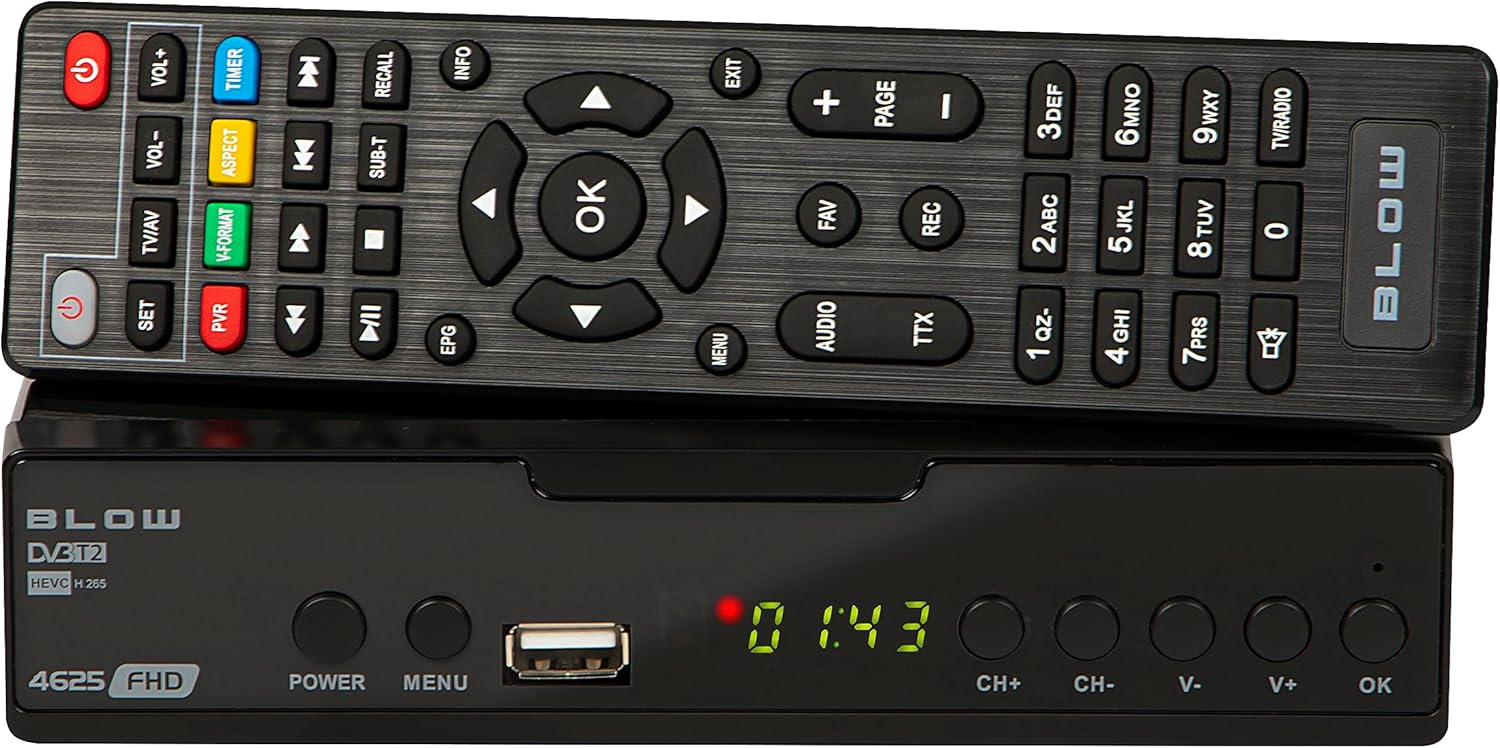
Bild 4.1: Vorderseite view of the BLOW 4625FHD DVB-T2 Tuner with its remote control.
The front panel features a digital display, a USB port for media playback and PVR functions, and essential control buttons:
- Anzeige: Shows channel number, time, or menu information.
- LEISTUNG: Schaltet das Gerät ein oder aus (Standby).
- SPEISEKARTE: Greift auf das Hauptmenü zu.
- USB-Anschluss: Zum Anschließen von USB-Speichergeräten.
- CH+/CH-: Schaltet die Kanäle nach oben oder unten.
- V+/V-: Stellt die Lautstärke nach oben oder unten ein.
- OK: Bestätigt die Menüauswahl.
4.2. Rückseite

Image 4.2: Rear panel of the BLOW 4625FHD DVB-T2 Tuner, showing various input and output ports.
Die Rückseite bietet alle notwendigen Anschlüsse:
- HF-EINGANG: Verbindet sich mit Ihrer terrestrischen Antenne.
- HF-Ausgang: For looping the antenna signal to another device (e.g., another TV or tuner).
- KOAXIAL: Digitaler Audioausgang.
- HDMI: High-Definition Multimedia Interface output for connecting to modern TVs.
- SCART: Analog video and audio output for connecting to older TVs.
- AC-EINGANG: Stromversorgung für das Gerät.
4.3. Fernbedienung
The remote control provides full functionality for operating the tuner. Familiarize yourself with its buttons for easy navigation and control.
- LEISTUNG: Schaltet den Tuner ein/aus.
- VOL+/VOL-: Passt die Lautstärke an.
- CH+/CH-: Wechselt die Kanäle.
- OK: Bestätigt die Auswahl.
- Navigationstasten (Auf/Ab/Links/Rechts): Navigiert durch Menüs.
- SPEISEKARTE: Öffnet das Hauptmenü.
- EXIT: Verlässt das aktuelle Menü oder den aktuellen Bildschirm.
- EPG: Zeigt den elektronischen Programmführer an.
- PVR: Greift auf Funktionen des persönlichen Videorekorders zu.
- REC: Starts recording the current program.
- Favorit: Greift auf die Favoritenliste zu.
- TV/AV: Switches between TV and AV input modes on the tuner.
- V-FORMAT: Changes video output format.
- AUDIO: Selects audio track (if available).
- TTX: Teletext-Funktion.
- Zifferntasten (0-9): Direkte Kanalauswahl.
5. Einrichtung
5.1. Connecting the Tuner
- Antennenanschluss: Schließen Sie Ihr terrestrisches Antennenkabel an die HF-EINGANG port on the rear panel of the tuner.
- TV-Anschluss (HDMI): For best picture quality, connect an HDMI cable from the HDMI port on the tuner to an available HDMI input on your television.
- TV-Anschluss (SCART): Wenn Ihr Fernseher keinen HDMI-Eingang hat, schließen Sie ein SCART-Kabel an den SCART port on the tuner to the SCART input on your television.
- Stromanschluss: Schließen Sie das Netzteil an das an AC-EINGANG port on the tuner, then plug the adapter into a wall outlet.
5.2. First Time Installation and Channel Scan
- Turn on your television and select the correct input source (HDMI or SCART) corresponding to where you connected the tuner.
- Drücken Sie die LEISTUNG button on the tuner or remote control to turn on the device.
- The first time you power on the tuner, a "First Time Installation" wizard will appear. Follow the on-screen prompts.
- Select your preferred language, country, and other initial settings.
- Initiate the "Auto Scan" or "Channel Search" function. The tuner will automatically search for available DVB-T2 channels in your area. This process may take several minutes.
- Once the scan is complete, the tuner will save the channels and display the first available channel.
6. Betrieb
6.1. Grundlegendes Fernsehen Viewing
- Kanäle wechseln: Verwenden Sie die CH+/CH- buttons on the remote or front panel, or enter the channel number directly using the number buttons.
- Lautstärke anpassen: Verwenden Sie die VOL+/VOL- Tasten auf der Fernbedienung.
- Stumm: Drücken Sie die Stumm button on the remote to mute/unmute audio.
- Informationsleiste: Drücken Sie die INFO button on the remote to display current program information.
6.2. Elektronischer Programmführer (EPG)
Drücken Sie die EPG button on the remote control to access the Electronic Program Guide. This displays program schedules for all available channels. Use the navigation buttons to browse through channels and programs. Press OK Zu view details or set a reminder/recording.
6.3. Medienwiedergabe (USB)
The BLOW 4625FHD supports media playback from a USB storage device. Insert a USB drive into the front USB port. Navigate to the "Multimedia" or "USB" section in the main menu to browse and play supported audio (MP3, WMA) and video files.
6.4. Personal Video Recorder (PVR)
To use the PVR function, connect a USB storage device (e.g., USB flash drive or external hard drive) to the USB port. The device must be formatted correctly (usually FAT32 or NTFS). You can record live TV programs by pressing the AUFNAHME button on the remote. Scheduled recordings can be set via the EPG or the PVR menu.
- Sofortaufnahme: Während Sie eine Sendung ansehen, drücken Sie AUFNAHME , um die Aufnahme zu starten. Drücken Sie STOPPEN zu Ende.
- Geplante Aufnahme: In the EPG, select a program and press OK, then choose the option to schedule a recording.
- Wiedergabeaufnahmen: Access recorded content through the PVR or Multimedia menu.
7. Wartung
- Reinigung: Ensure the device is unplugged before cleaning. Use a soft, dry, lint-free cloth to wipe the exterior. Do not use abrasive cleaners, waxes, or solvents.
- Belüftung: Regularly check that the ventilation slots are not obstructed by dust or debris.
- Software-Updates: Überprüfen Sie regelmäßig die Herstellerangaben. website for any available software updates. Follow the instructions provided with the update carefully.
8. Fehlerbehebung
| Problem | Mögliche Ursache/Lösung |
|---|---|
| Kein Bild oder Ton |
|
| Meldung „Kein Signal“ |
|
| Fernbedienung funktioniert nicht |
|
| Picture freezes or pixelates |
|
9. Spezifikationen
| Modell | BLOW 4625FHD (77-048) |
| Abmessungen (L x B x H) | 9 cm (T) x 9 cm (B) x 2.5 cm (H) |
| Gewicht | 428 Gramm |
| Konnektivität | HDMI, USB, SCART, Coaxial, RF IN/OUT |
| Videoausgabeauflösung | 1080p |
| Unterstützte Standards | DVB-T2, H.265 (HEVC), H.264 |
| Frequenzbereich | VHF: 170–230 MHz, UHF: 470–860 MHz |
| Audioformate | MP3, WMA |
| Audioausgabemodus | Stereo, Surround |
| Stromversorgung | 12 Volt, 43 Milliampere (Operating) |
| Standby-Stromverbrauch | <0.5 W |
| Empfohlene Verwendung | Digital terrestrial TV viewing und Aufnahme |
| Hersteller | Schlag |
10. Gewährleistung
The BLOW 4625FHD DVB-T2 H.265 Digital Terrestrial TV Tuner comes with a 2 Jahr Herstellergarantie from the date of purchase. This warranty covers defects in materials and workmanship under normal use. It does not cover damage caused by misuse, accident, unauthorized modification, or external causes. Please retain your proof of purchase for warranty claims.
11. Unterstützung
If you encounter any issues that cannot be resolved using the troubleshooting guide, or if you require further assistance, please contact your retailer or the manufacturer's customer support. Refer to the product packaging or the manufacturer's official webWebsite für Kontaktdaten.