1. Einleitung
Carbon monoxide (CO) is a highly poisonous gas that is colorless, odorless, and tasteless, making it undetectable by human senses. The CPVAN JKD-C621 Carbon Monoxide Detector is designed to continuously monitor CO levels in the air, providing accurate and sensitive detection with a fast response time to ensure your safety. This device offers continuous monitoring and alerts you to dangerous CO concentrations, minimizing false alarms.

Image 1: The CPVAN Carbon Monoxide Detector shown in different household environments, including a living room, bedroom, garage, and kitchen, highlighting its versatility for placement.
2. Sicherheitshinweise
This CPVAN Carbon Monoxide Detector complies with the Norm EN 50291 und ist CE-Kennzeichnung, ensuring it meets European safety, health, and environmental protection requirements. It is crucial to understand that this device is intended to detect carbon monoxide gas. It is not designed to detect smoke, fire, or other gases.
- Wichtig: Carbon monoxide alarms are not a substitute for smoke alarms.
- Regularly test the alarm as per the instructions in this manual.
- Do not paint the alarm or block its ventilation openings.
- Ensure the device is installed in an appropriate location as described in the installation section.

Image 2: Certification logos for TÜV Rheinland and CE, indicating compliance with safety standards EN 50291-1:2018.
3. Produktmerkmale
- Digitaler Bildschirm: Shows CO levels from 20 ppm.
- Hohe Empfindlichkeit: Alarms are triggered from 50 ppm, with alarm time dependent on concentration.
- 7 Jahre Lebensdauer des Sensors: Provides continuous 24/7 protection.
- Batteriebetrieben: Operates on three replaceable AA batteries (supplied), ensuring function during power outages.
- Warnung bei niedrigem Batteriestand: Audible alert when batteries are low.
- Lauter Alarm: An 85-decibel alarm combined with a flashing red LED for immediate alerts.
- Einfache Installation: Wireless design, no wiring required. Comes with screws and wall plugs.

Image 3: The CPVAN Carbon Monoxide Detector highlighting its 7-year sensor life, ensuring long-term, uninterrupted 24/7 detection of CO.

Image 4: A close-up of the CPVAN Carbon Monoxide Detector's easy-to-read LCD display, which activates automatically upon installation. Dimensions are shown as 106mm (4.17in) width and 37.5mm (1.47in) depth.
4. Produktüberschreitungview
Familiarize yourself with the components of your CPVAN Carbon Monoxide Detector:
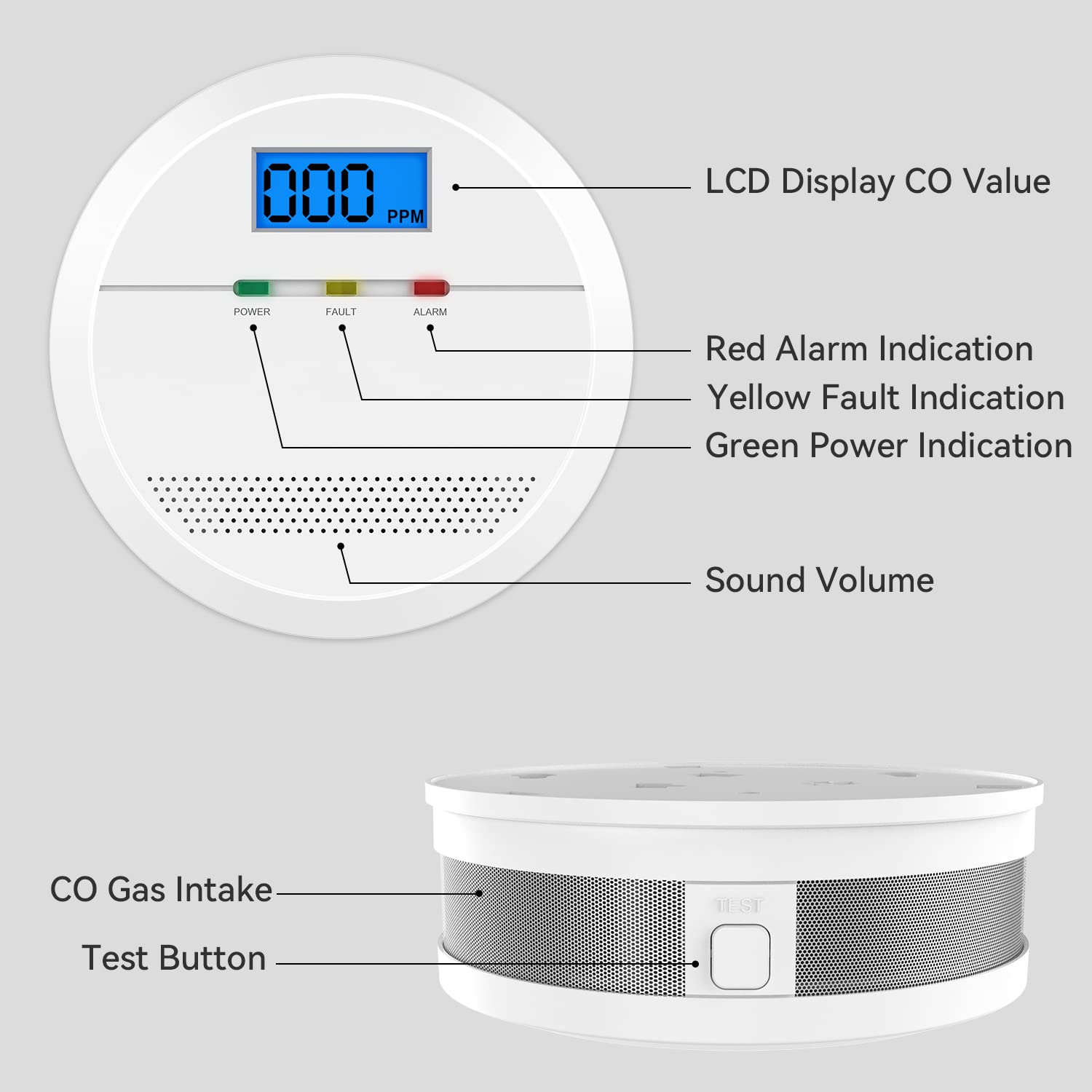
Image 5: A detailed diagram illustrating the components of the CPVAN Carbon Monoxide Detector, including the LCD Display (CO Value), Red Alarm Indication, Yellow Fault Indication, Green Power Indication, Sound Volume, CO Gas Intake, and Test Button.
- LCD Anzeige: Shows the current CO concentration in parts per million (ppm).
- Betriebsanzeige (grüne LED): Flashes to confirm normal operation.
- Fault Indicator (Yellow LED): Illuminates to indicate a malfunction or low battery.
- Alarmanzeige (rote LED): Blinkt während eines Kohlenmonoxid-Alarms.
- Test-Taste: Used to test the alarm's functionality.
- CO Gas Intake: Sensor area for detecting carbon monoxide.
- Lautstärke: Integrated speaker for audible alerts.
5. Einrichtung und Installation
5.1. Einlegen der Batterie
- Öffnen Sie die Batteriefachabdeckung auf der Rückseite des Detektors.
- Insert three AA batteries (supplied) into the compartment, ensuring correct polarity (+/-).
- Schließen Sie den Batteriefachdeckel fest.
- Upon battery installation, the LCD screen will activate and count down for approximately 30 seconds before displaying "000 ppm", indicating it is ready for use.

Image 6: An illustration showing the battery compartment of the CPVAN Carbon Monoxide Detector with replaceable AA batteries, alongside icons for replaceable batteries and a low battery/malfunction warning.
5.2. Montageort
For optimal detection, place the carbon monoxide detector near potential sources of CO, such as boilers, gas fires, and in rooms where people sleep. It can be wall-mounted, ceiling-mounted, or placed on a flat surface.
- Install at least 1.5 meters (5 feet) away from fuel-burning appliances to avoid false alarms from their normal operation.
- Avoid placing in direct sunlight, near ventilation openings, or in areas with high humidity.
- Do not install in areas where the temperature may drop below 0°C (32°F) or exceed 40°C (104°F).
5.3. Wall/Ceiling Mounting
- Choose a suitable location on a wall or ceiling.
- Verwenden Sie die mitgelieferten Schrauben und Dübel, um die Montagehalterung zu befestigen.
- Attach the detector to the mounting bracket by twisting it clockwise until it locks into place.
6. Bedienungsanleitung
6.1. Normalbetrieb
Once installed with batteries, the detector will begin continuous monitoring. The green POWER indicator will flash periodically (e.g., every 30 seconds) to confirm normal operation. The LCD display will show "000 ppm" if no CO is detected.
6.2. CO Detection and Alarm Levels
The detector will display CO levels from 20 ppm. An alarm will be triggered based on the following concentrations and exposure times:
- 50 Seiten pro Minute: Alarm within 60-90 minutes.
- 100 Seiten pro Minute: Alarm within 10-40 minutes.
- 300 Seiten pro Minute: Alarm within 0-3 minutes.
When an alarm is triggered, the red ALARM indicator will flash, and a loud 85-decibel siren will sound. The LCD will display the detected CO concentration.
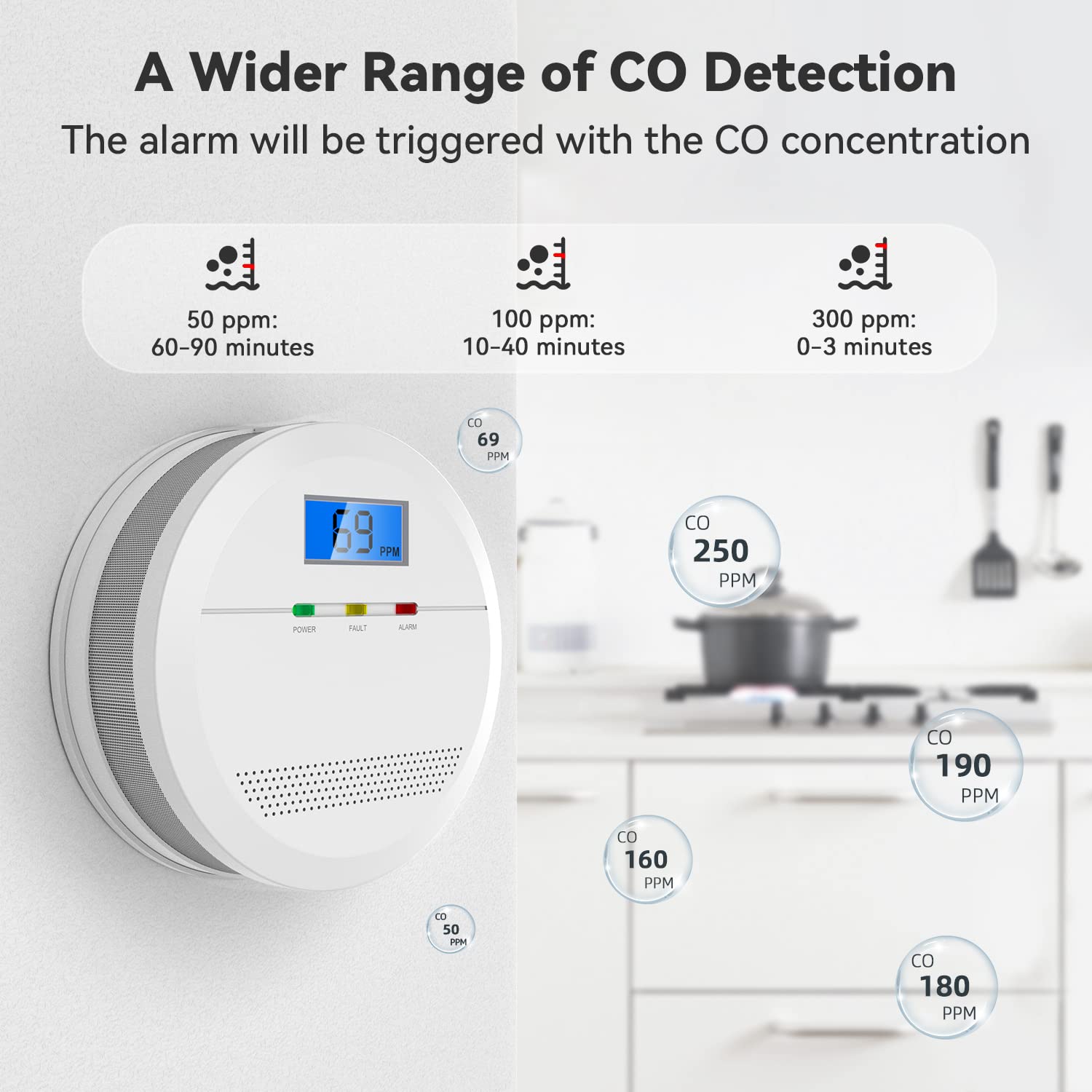
Image 7: A graphic illustrating the CO detection ranges and corresponding alarm trigger times for the CPVAN Carbon Monoxide Detector: 50 ppm (60-90 minutes), 100 ppm (10-40 minutes), and 300 ppm (0-3 minutes). The detector's display shows "69 ppm".
6.3. What to do if the Alarm Sounds
- Begeben Sie sich unverzüglich an die frische Luft im Freien oder öffnen Sie alle Türen und Fenster, um den Bereich zu lüften.
- Betreten Sie die Räumlichkeiten erst wieder, wenn der Alarm aufgehört hat und der Bereich gründlich gelüftet wurde.
- Call your emergency services or gas supplier to report the incident.
- Do not use fuel-burning appliances until they have been checked by a qualified technician.
6.4. Testen des Alarms
Press and hold the "TEST" button on the detector. The alarm will sound, and the red ALARM LED will flash, confirming the unit is functioning correctly. Release the button to stop the test. Test the alarm weekly.
7. Wartung
7.1. Batteriewechsel
When the batteries are low, the yellow FAULT indicator will illuminate, and an audible warning will sound. Replace all three AA batteries promptly. Refer to section 5.1 for battery installation instructions.
7.2. Reinigung
Clean the detector regularly (e.g., monthly) using a soft, damp cloth. Do not use cleaning agents or solvents, as these can damage the sensor. Do not paint the detector.
7.3. End of Life
The sensor has a life expectancy of 7 years. After this period, the detector should be replaced to ensure continued protection. The device may indicate an end-of-life warning.
8. Fehlerbehebung
| Problem | Mögliche Ursache | Lösung |
|---|---|---|
| Alarm sounds intermittently or continuously without visible CO source. | Actual CO presence, false alarm due to interference, or detector malfunction. | Evacuate and ventilate immediately. Contact emergency services. If no CO is detected by professionals, check for strong fumes or aerosols near the detector. If problem persists, replace the unit. |
| Yellow FAULT LED illuminates and audible warning sounds. | Niedriger Batteriestand oder interner Defekt. | Replace all three AA batteries. If the fault indication persists after battery replacement, the unit may be faulty and needs replacement. |
| Der Detektor reagiert nicht auf die Testtaste. | No batteries, dead batteries, or unit malfunction. | Ensure batteries are correctly installed and charged. Replace batteries if necessary. If still unresponsive, the unit is faulty and requires replacement. |
| Das LCD-Display ist leer. | Keine Strom- oder Gerätestörung. | Check battery installation and charge. The LCD only lights up when CO is detected or during a test. If the green POWER LED is not flashing, replace batteries or the unit. |
9. Spezifikationen
| Besonderheit | Detail |
|---|---|
| Modellnummer | JKD-C621 |
| Marke | CPVAN |
| Sensortyp | Elektrochemisch |
| Stromquelle | 3 x AA Batteries (replaceable) |
| Lebensdauer des Sensors | 7 Jahre |
| Alarmlautstärke | 85 dB auf 1 Meter |
| CO-Erkennungsbereich | 20 ppm - 999 ppm |
| Betriebstemperatur | 0 °C bis 40 °C (32 °F bis 104 °F) |
| Luftfeuchtigkeit bei Betrieb | 30 % - 95 % relative Luftfeuchtigkeit (nicht kondensierend) |
| Maße | Approximately 106mm (Diameter) x 37.5mm (Depth) |
| Gewicht | 200 Grams (excluding batteries) |
| Zertifizierungen | EN 50291, CE Marked |
| UPC | 703145053619 |
10. Garantie und Support
CPVAN products are covered by a warranty. For specific warranty details, please refer to the documentation included with your purchase or contact CPVAN customer support. The CPVAN SECURITY team is dedicated to providing high-quality security products and offers technical support for their products.
For technical assistance or warranty claims, please visit the official CPVAN webSie können die Website besuchen oder sich über die mit Ihrem Produkt gelieferten Kontaktdaten an den Kundendienst wenden.


