Einführung
The Coby Ultimate Wireless Speaker is designed to deliver a powerful and immersive audio experience, complemented by dynamic light-up modes. This portable speaker is engineered for high-fidelity sound, ensuring crisp highs, rich mids, and deep bass. With its travel-friendly design and extended battery life, it is suitable for various environments, from personal listening to social gatherings.

Image: The Coby Ultimate Wireless Speaker, showcasing its vibrant, multi-color light display on the front grille. The speaker is black with a robust, portable design.
Produkt überview und Kontrollen
Machen Sie sich mit dem Layout und den Bedienelementen des Lautsprechers vertraut, um ihn optimal nutzen zu können.
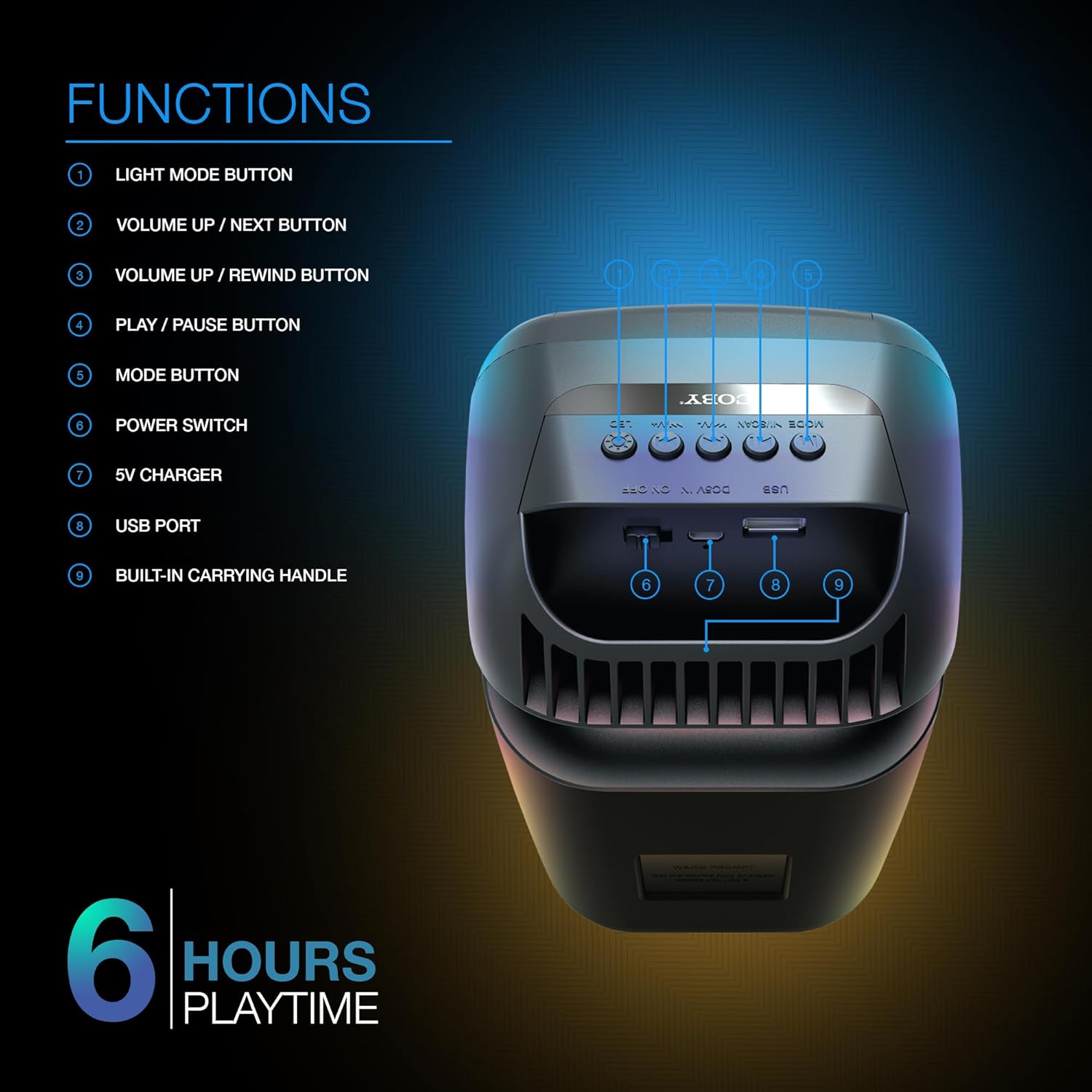
Image: A detailed diagram illustrating the top and rear controls of the Coby Ultimate Wireless Speaker. Numbered labels point to each function: Light Mode Button, Volume Up/Next, Volume Up/Rewind, Play/Pause, Mode Button, Power Switch, 5V Charger Port, USB Port, and Built-in Carrying Handle.
Steuerfunktionen:
- Lichtmodustaste: Cycles through the 5 dazzling light-up modes.
- Volume Up / Next Button: Erhöht die Lautstärke oder springt zum nächsten Titel.
- Volume Up / Rewind Button: Decreases volume or rewinds the current track.
- Wiedergabe-/Pause-Taste: Startet oder pausiert die Audiowiedergabe.
- Modus-Taste: Switches between different input modes (e.g., Bluetooth, FM Radio).
- Stromschalter: Schaltet den Lautsprecher ein oder aus.
- 5V Ladegerät: Port for connecting the charging cable.
- USB-Anschluss: For USB media playback or charging external devices (if supported).
- Built-in Carrying Handle: Für einfache Portabilität.
Aufstellen
1. Laden Sie den Lautsprecher auf
Before first use, fully charge the speaker. Connect the provided 5V charging cable to the 5V Charger port on the speaker and plug the other end into a compatible USB power adapter (not included). The charging indicator light will show the charging status. A full charge provides up to 6 hours of playtime.
2. Ein-/Ausschalten
Locate the Power Switch on the speaker. Slide the switch to the 'ON' position to power on the device. Slide it to the 'OFF' position to power off.
3. Bluetooth-Kopplung
- Ensure the speaker is powered on and in Bluetooth mode (indicated by the Mode button).
- Aktivieren Sie auf Ihrem Mobilgerät (Smartphone, Tablet usw.) Bluetooth und suchen Sie nach verfügbaren Geräten.
- Select "Coby CPA9000" or a similar name from the list of found devices.
- Once connected, the speaker will emit an audible confirmation, and you can begin streaming audio.
The speaker features Bluetooth version 5.3 for fast pairing and stable audio streaming.
Betrieb
1. Audiowiedergabe
- Abspielen/Pause: Press the Play/Pause button to start or pause the current track.
- Lautstärkeregelung: Use the Volume Up / Next and Volume Up / Rewind buttons to adjust the playback volume.
- Track-Navigation: Briefly press the Volume Up / Next button to skip to the next track. Briefly press the Volume Up / Rewind button to go to the previous track.
2. Light-Up Modes
The speaker features 5 dazzling light-up modes that synchronize with your music. Press the Light Mode Button to cycle through the available light patterns and effects. Choose the mode that best suits your mood or environment.
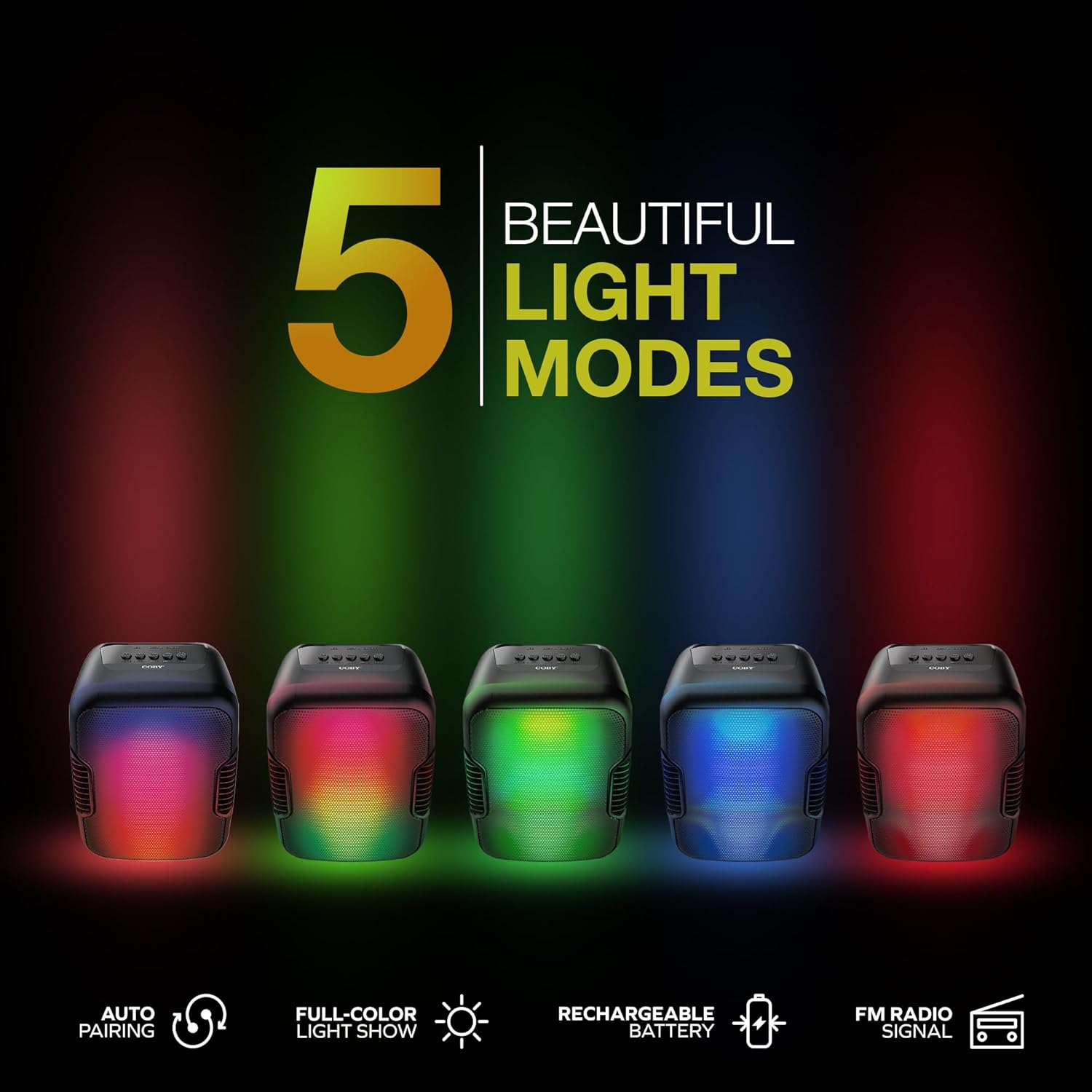
Image: Five Coby Ultimate Wireless Speakers arranged in a row, each displaying a different vibrant light mode, illustrating the variety of visual effects available.
3. FM-Radiofunktion
To use the FM Radio, press the Mode button until you hear the FM radio signal. The speaker will automatically scan and tune into available stations. Use the Volume Up / Next and Volume Up / Rewind buttons to navigate between stations.
Wartung
- Reinigung: Reinigen Sie die Außenseite des Lautsprechers mit einem weichen, trockenen Tuch. Verwenden Sie keine Scheuermittel oder Lösungsmittel.
- Lagerung: Bewahren Sie den Lautsprecher bei längerer Nichtbenutzung an einem kühlen, trockenen Ort fern von direkter Sonneneinstrahlung und extremen Temperaturen auf.
- Batteriepflege: Um die Akkulaufzeit zu verlängern, vermeiden Sie häufiges vollständiges Entladen des Akkus. Laden Sie den Lautsprecher regelmäßig auf, auch wenn er nicht ständig in Gebrauch ist.
Fehlerbehebung
| Problem | Mögliche Ursache | Lösung |
|---|---|---|
| Der Lautsprecher lässt sich nicht einschalten. | Batterie ist leer. | Laden Sie den Lautsprecher mit dem mitgelieferten Ladekabel vollständig auf. |
| Aus dem Lautsprecher kommt kein Ton. | Volume is too low or muted; Device not paired correctly; Incorrect mode selected. | Erhöhen Sie die Lautstärke sowohl am Lautsprecher als auch am verbundenen Gerät. Koppeln Sie Bluetooth erneut. Drücken Sie die Modus-Taste, um den richtigen Eingang auszuwählen. |
| Die Bluetooth-Verbindung ist instabil. | Device is out of range; Interference from other devices. | Move the connected device closer to the speaker. Avoid placing speaker near other wireless devices. |
| Light modes are not working. | Light mode feature is off. | Press the Light Mode Button to activate and cycle through modes. |
Technische Daten

Image: The Coby Ultimate Wireless Speaker shown with its dimensions: 9.46 inches height, 4.92 inches width, and 4.33 inches depth.
| Besonderheit | Detail |
|---|---|
| Modellname | CPA9000 FLAME |
| Lautsprechertyp | Subwoofer |
| Konnektivitätstechnologie | Bluetooth |
| Drahtlose Kommunikationstechnologie | Bluetooth 5.3 |
| Audioausgabemodus | Stereo |
| Akkulaufzeit | Bis zu 6 Stunden |
| Stromquelle | Batteriebetrieben (1 Lithium-Ionen-Akku im Lieferumfang enthalten) |
| Produktabmessungen (T x B x H) | 4.33" x 4.92" x 9.46" |
| Artikelgewicht | 14.1 Unzen |
| Besonderheit | USB Port, Light-Up Modes, Built-in Handle, FM Radio |
| Kompatible Geräte | Smartphone, Tablet |
| Kontrollmethode | Tasten am Gerät |
| Ist wasserdicht | FALSCH |
| UPC | 810071493751 |
Garantie und Support
The Coby Ultimate Wireless Speaker comes with a limited warranty. For specific warranty terms and conditions, please refer to the documentation included with your purchase or visit the official Coby website. For technical support or further assistance, please contact Coby customer service.


