Einführung
This manual provides essential information for the setup, operation, maintenance, and troubleshooting of your Star Micronics mC-Label3 MCL32CBI Direct Thermal Printer. Please read this manual thoroughly before using the printer to ensure proper and safe operation.
Packungsinhalt
Bitte überprüfen Sie, ob alle unten aufgeführten Artikel in Ihrem Paket enthalten sind:
- mC-Label3 Multifunctional Printer
- Netzteil
- Stromkabel
- USB Cables (C-C 1.0m and C-A 1.8m)
- LAN-Kabel (1 m)
- Simple Setup Sheet Safety Guide

Bild: Vorderseite view of the Star Micronics mC-Label3 printer, showcasing its compact design and label output slot.
Aufstellen
1. Anschließen des Druckers
The mC-Label3 MCL32CBI printer offers multiple connectivity options:
- USB-C: Connect the printer directly to your PC, Android, or iOS device using the provided USB-C to USB-C or USB-C to USB-A cables.
- Ethernet (LAN): For network connectivity, connect the printer to your router or network switch using the supplied LAN cable.
- Bluetooth: The MCL32CBI model supports Bluetooth connectivity for iOS and Android devices. Ensure Bluetooth is enabled on your device and pair with the printer.

Bild: Rückseite view of the mC-Label3 printer, highlighting the LAN, USB, and power ports for various connection types.
2. Medien laden
The printer supports various media types, including linerless labels, die-cut labels, continuous labels, and thermal receipt paper.
- Open the top cover of the printer by lifting the latch.
- Place the media roll into the media compartment, ensuring the leading edge feeds out from the top.
- Pull a small amount of media past the print head and close the top cover securely.
- Ensure the media is properly aligned within the guides.

Bild: Draufsicht view of the mC-Label3 printer with its cover open, illustrating the internal mechanism for loading thermal paper or label rolls.
Bedienungsanleitung
1. Ein-/Ausschalten
Connect the power cable to the printer and a power outlet. Press the power button located on the front of the printer to turn it on. The status indicator light will illuminate.
2. Drucken von Etiketten und Belegen
The mC-Label3 MCL32CBI printer is designed for efficient label and receipt printing. It supports various applications and cloud services.
- Software-Kompatibilität: Works seamlessly with PC, Android, and iOS applications.
- Cloud-Services: Utilize Star Micronics Cloud Services to design and manage labels.
- One Touch Label: This feature allows storing pre-made receipts and labels for quick and easy printing directly from the printer.
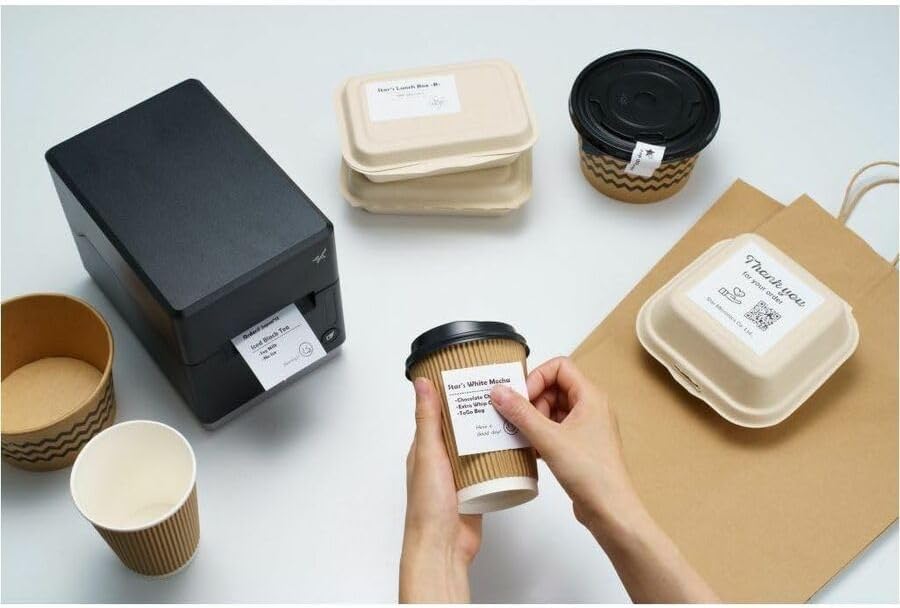
Image: A hand pressing the feed button on the mC-Label3 printer, demonstrating the printing of a 'Thank you' label.

Image: The mC-Label3 printer shown in a practical setting, printing labels for food containers and coffee cups, illustrating its versatility.
Wartung
1. Reinigen des Druckers
Regular cleaning ensures optimal performance and extends the life of your printer.
- Verwenden Sie ein weiches, fusselfreies Tuch dampened with isopropyl alcohol to clean the print head.
- Wischen Sie die Außenseite des Druckers mit einem weichen, trockenen Tuch ab.
- Vermeiden Sie die Verwendung von Scheuermitteln oder Lösungsmitteln.
2. Medien austauschen
When the media roll is depleted, follow the media loading instructions in the Setup section to replace it.
3. Effortless Repairs
The mC-Label3 is designed for effortless, no-tools-required repairs with minimal upkeep, simplifying any necessary component replacements.
Fehlerbehebung
Dieser Abschnitt bietet Lösungen für häufig auftretende Probleme.
| Problem | Mögliche Ursache | Lösung |
|---|---|---|
| Drucker lässt sich nicht einschalten | Stromkabel nicht angeschlossen; Problem mit der Steckdose | Vergewissern Sie sich, dass das Netzkabel fest angeschlossen ist; versuchen Sie es mit einer anderen Steckdose. |
| Keine Druckausgabe | Out of media; Media loaded incorrectly; Driver issue | Load new media; Re-load media correctly; Reinstall printer drivers. |
| Schlechte Druckqualität | Dirty print head; Low quality media | Clean the print head; Use recommended thermal media. |
| Konnektivitätsprobleme | Incorrect cable connection; Bluetooth not paired; Network configuration | Check USB/Ethernet cables; Re-pair Bluetooth; Verify network settings. |
Technische Daten
| Besonderheit | Detail |
|---|---|
| Modellname | mC-Label3 |
| Artikelmodellnummer | MCL32CBI |
| Drucktechnologie | Thermodirekt |
| Druckerausgabe | Einfarbig |
| Maximale Druckgeschwindigkeit Monochrom | 23 ppm |
| Maximale Schwarzweiß-Druckauflösung | 203 DPI (203 x 203 DPI) |
| Printmedien | Labels (Linerless, Die-Cut, Continuous), Thermal Receipt |
| Konnektivitätstechnologie | Bluetooth, Wired (USB, Ethernet) |
| Hardware-Schnittstelle | USB, Ethernet |
| Kompatible Geräte | PC, Android, iOS |
| Controllertyp | iOS, Android |
| Technische Daten | 6.7"T x 5.6"B x 8.3"H (17.0 x 14.2 x 21.1 cm) |
| Artikelgewicht | 7.2 Pfund (3.27 kg) |
| Speicherkapazität | 64 MB |
| Farbe | Schwarz |
| Hersteller | STAR MICRONICS |
| Ursprungsland | China |
Garantieinformationen
The Star Micronics mC-Label3 MCL32CBI printer comes with a manufacturer's warranty. For specific terms and conditions, please refer to the warranty card included in your package or visit the official Star Micronics webWebsite.
Garantieart: Hersteller
Unterstützung
For further assistance, technical support, or to download the latest drivers and firmware, please visit the official Star Micronics support webWebsite oder wenden Sie sich an den Kundendienst.
Star Micronics Official WebWebsite: www.starmicronics.com
Support-Link: www.starmicronics.com/support