Einführung
Thank you for choosing the ciciglow Air AR Glasses. These augmented reality glasses are designed to provide a portable, immersive 4K viewing experience for various media, including movies, games, and live streams. This manual will guide you through the setup, operation, maintenance, and troubleshooting of your device to ensure optimal performance and enjoyment.
The ciciglow Air AR Glasses feature a 4K HD 3D display, a 4000mAh battery, 4K 60Hz resolution, 1000+ PPI, and a 70-degree field of view. They are lightweight, designed for comfort, and include a built-in myopia correction function (0 to 700 degrees). The glasses have undergone low blue light, flicker-free, and eye comfort testing to minimize eye strain during extended use.
Packungsinhalt
Bevor Sie beginnen, überprüfen Sie bitte, ob alle Artikel in Ihrem Paket vorhanden sind:
- ciciglow Air AR Glasses
- Cable (for connectivity and charging)
- Power Bank / Control Unit
- Reinigungstuch
- Benutzerhandbuch (dieses Dokument)

Image: All components included in the ciciglow Air AR Glasses package, including the glasses, cables, power bank, and cleaning cloth.
Aufstellen
- Laden Sie das Gerät auf: Connect the provided cable to the AR Glasses and a power source (e.g., the included power bank or a compatible USB charger). Ensure the device is fully charged before first use.
- Connect to a Source Device: Use the appropriate cable to connect the AR Glasses to your smartphone, tablet, PC, or game console. The glasses are designed to project content from a wide range of devices.
- Passen Sie den Komfort an: Place the glasses on your head. The lightweight design and adjustable nose pad ensure a comfortable fit. Adjust the position until the display is clear and comfortable for your eyes.
- Myopiekorrektur: If you have myopia, rotate the adjustment dials on the glasses to correct your vision from 0 to 700 degrees. This allows for clear viewing without needing to wear prescription glasses underneath.
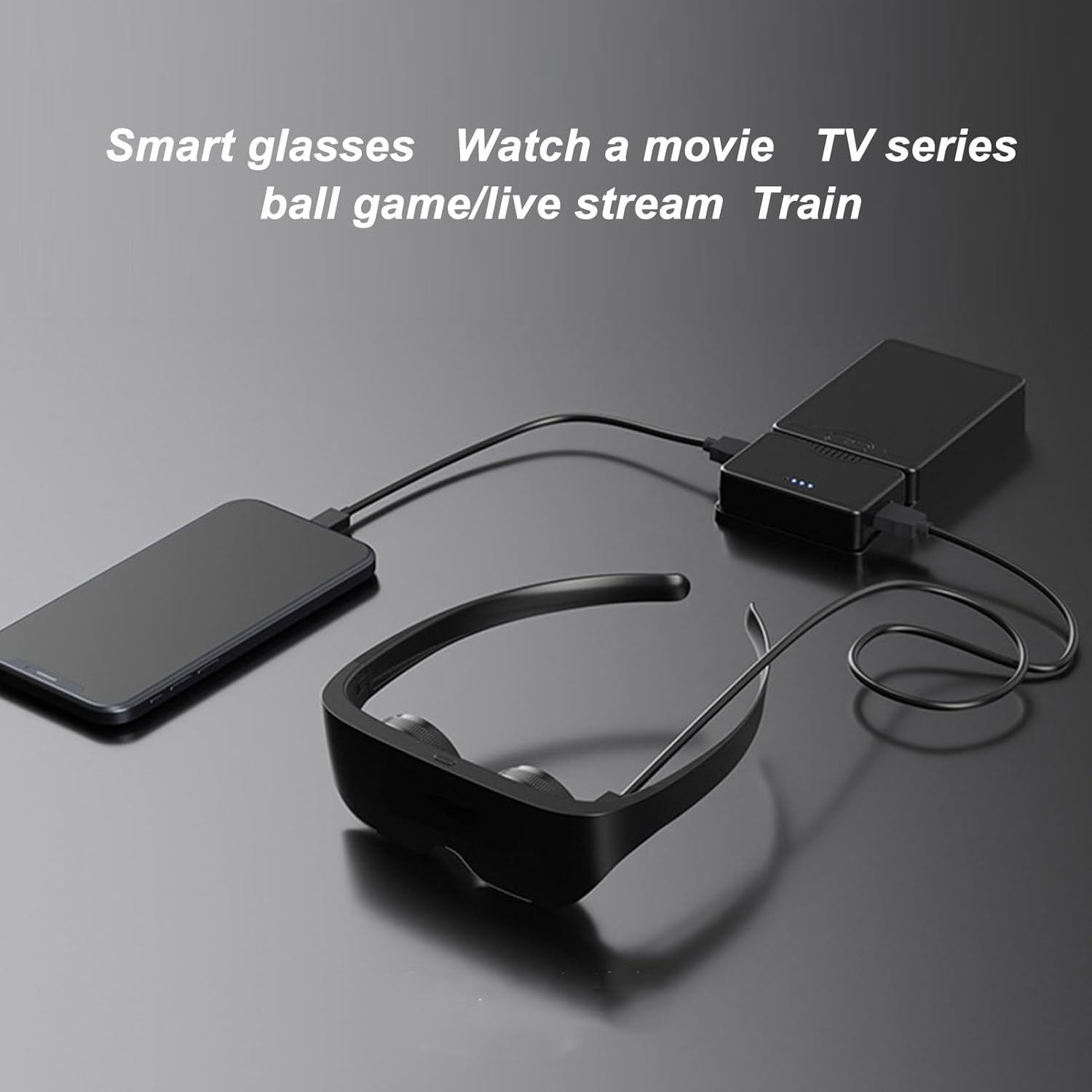
Image: The ciciglow Air AR Glasses connected via cable to a smartphone and a portable power bank, illustrating a typical setup for mobile use.
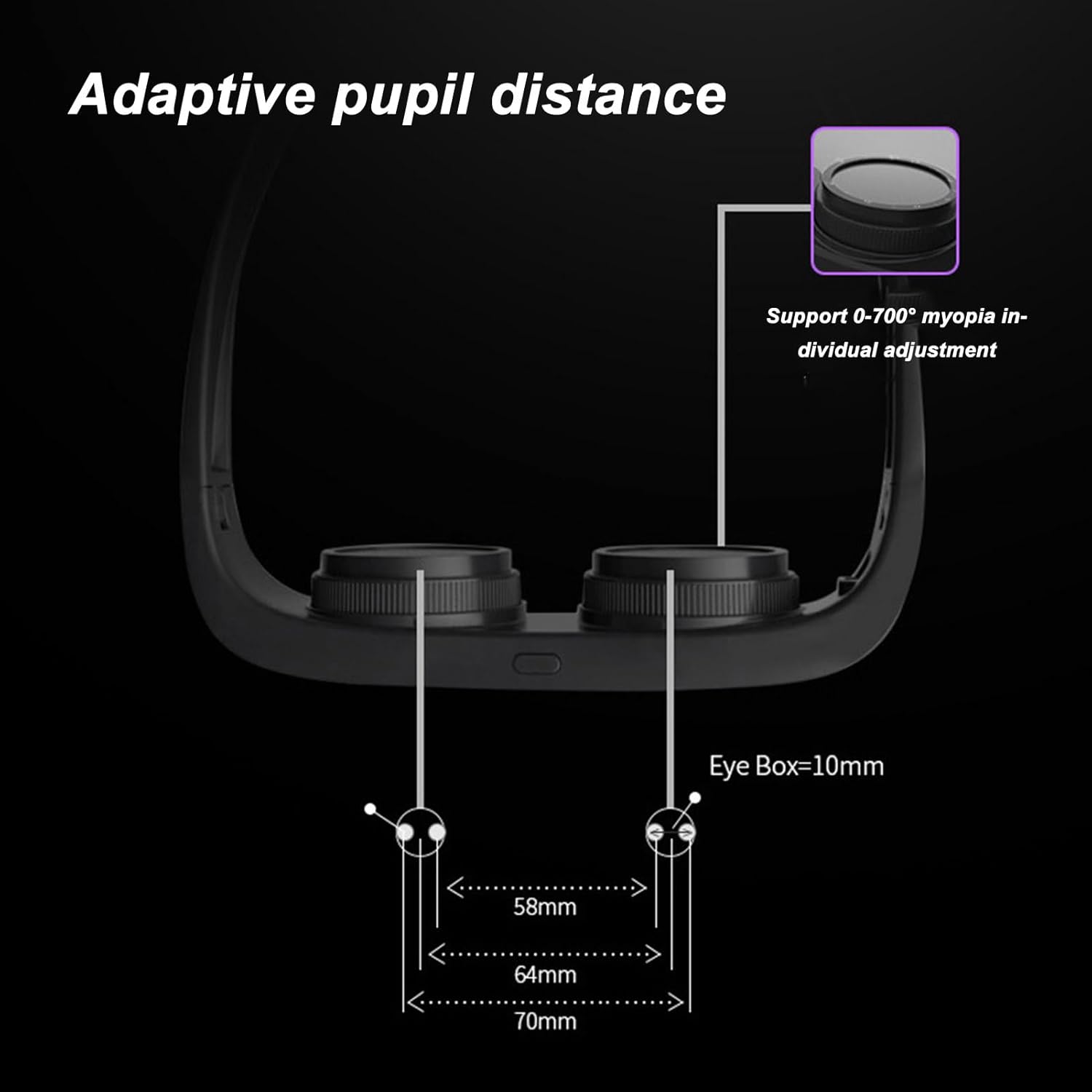
Image: A detailed diagram illustrating the adaptive pupil distance feature and how to adjust it for individual comfort and clarity, supporting 0-700 degree myopia correction.
Bedienungsanleitung
Once connected and adjusted, your ciciglow Air AR Glasses are ready for use. The glasses function as a display for your connected device.
- Ein-/Ausschalten: Use the power button on the glasses or the connected power bank/control unit to turn the device on or off.
- Content Display: The glasses will mirror or extend the display of your connected device. Navigate content directly from your phone, tablet, or PC.
- Immersiv Viewing: Enjoy a large, virtual 4K screen experience. The 70-degree field of view and 1000+ PPI provide a clear and vivid display for movies, games, and other media.
- Audio: Audio output will typically come from your connected source device. Ensure your source device's audio is set to a comfortable level.

Image: A man relaxing on a couch while wearing the ciciglow Air AR Glasses, demonstrating the hands-free and comfortable viewErfahrung.

Image: The ciciglow Air AR Glasses are shown floating above a hand, emphasizing their lightweight design (125g) for extended comfortable wear.

Image: A visual summary of key features: optical lenses, a 20-meter 1000-inch virtual screen, 1058ppi 4K HD viewing, 0-700 degrees myopia regulation, compatibility with unlimited phone models, and a large capacity battery.
Video: An official product video demonstrating the ciciglow Air AR Glasses in use, highlighting their features and portability.
Wartung
Proper care will extend the life and performance of your AR Glasses:
- Reinigung: Use the provided cleaning cloth to gently wipe the lenses and exterior surfaces. Avoid abrasive materials or harsh chemicals.
- Lagerung: Store the glasses in a cool, dry place away from direct sunlight and extreme temperatures. Use a protective case if available to prevent scratches.
- Batteriepflege: Um die Lebensdauer des Akkus zu verlängern, vermeiden Sie häufiges vollständiges Entladen. Laden Sie das Gerät regelmäßig auf, auch wenn es längere Zeit nicht benutzt wird.
- Auswirkungen vermeiden: Handle the glasses with care to prevent drops or impacts, which can damage internal components or the display.
Fehlerbehebung
If you encounter issues with your ciciglow Air AR Glasses, please refer to the following common solutions:
| Problem | Mögliche Lösung |
|---|---|
| Kein Bild/Schwarzer Bildschirm | Ensure the glasses are powered on and fully charged. Verify the cable connection to your source device is secure. Check if the source device is outputting video. |
| Verschwommenes Bild | Adjust the myopia correction dials on the glasses. Ensure the glasses are positioned correctly on your face. Clean the lenses with the provided cloth. |
| Kein Ton | The glasses use the audio from your connected source device. Check the audio settings and volume on your phone, tablet, or PC. Ensure external speakers or headphones are properly connected to your source device if desired. |
| Gerät wird von der Quelle nicht erkannt | Try a different cable. Restart both the AR Glasses and the source device. Ensure your source device supports video output via the connected port (e.g., USB-C video output). |
| Battery pack detaches easily | Ensure the magnetic snap connection for the battery pack is clean and free of debris. Handle the device carefully to avoid accidental detachment. |
Sollte das Problem nach Anwendung dieser Lösungsansätze weiterhin bestehen, wenden Sie sich bitte an den Kundendienst.
Technische Daten
| Besonderheit | Detail |
|---|---|
| Modellnummer | ciciglowz7kbida1uy |
| Bildschirmauflösung | 4K HD (3D viewfähig) |
| Bildwiederholrate | 60 Hz |
| Pixel pro Zoll (PPI) | 1000+ |
| Fachgebiet View (Sichtfeld) | Bis zu 70 Grad |
| Batteriekapazität | 4000 mAh |
| Myopiekorrektur | 0 to 700 degrees (adjustable) |
| Augenkomfortfunktionen | Low blue light, flicker-free, AR tested |
| Artikelgewicht | 1.56 Pfund |
| Verpackungsabmessungen | 8.66 x 7.09 x 3.15 Zoll |
| Hersteller | ciciglow |
| Datum der ersten Verfügbarkeit | 31. August 2023 |
Garantie und Support
For warranty information and customer support, please refer to the documentation included with your purchase or visit the official ciciglow website. If you require assistance with setup, operation, or troubleshooting beyond the scope of this manual, please contact ciciglow customer service directly.
Kontaktinformationen:
- Manufacturer: ciciglow
- Für Unterstützung besuchen Sie bitte die ciciglow Store on Amazon oder ihr Beamter webWebsite.