1. Einleitung
This manual provides detailed instructions for the setup, operation, and maintenance of your boAt Aavante Bar 490 Bluetooth Soundbar. Please read this manual thoroughly before using the product to ensure proper functionality and to maximize your audio experience.

Image 1.1: The boAt Aavante Bar 490 Bluetooth Soundbar in Classic Black.
2. Packungsinhalt
Bitte überprüfen Sie, ob alle unten aufgeführten Artikel in Ihrem Paket enthalten sind:
- boAt Aavante Bar 490 Soundbar
- Ladekabel
- Benutzerhandbuch (dieses Dokument)
- Garantiekarte
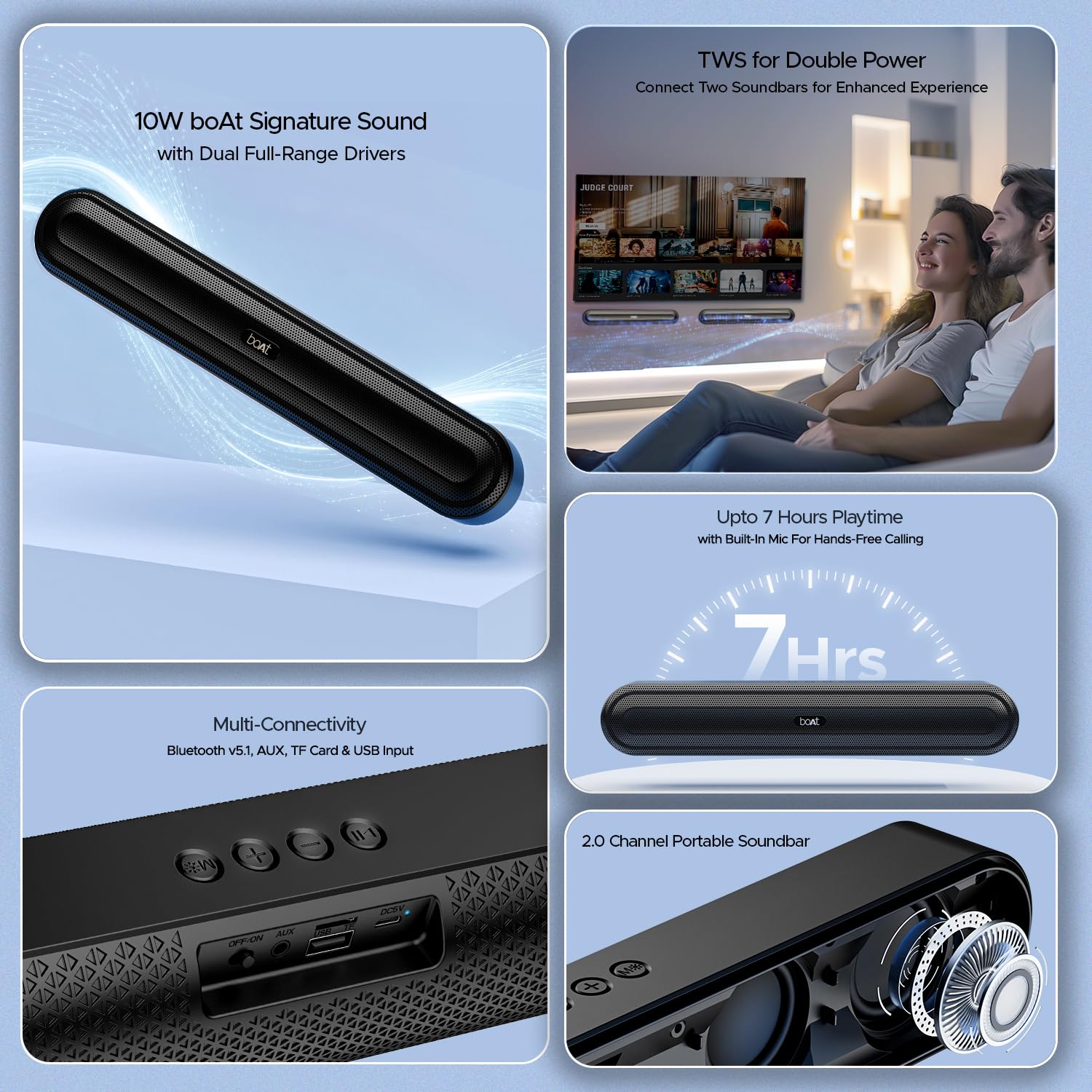
Bild 2.1: Überview of the boAt Aavante Bar 490 and its key features, including package contents.
3. Produktüberschreitungview
3.1. Bedienelemente und Anschlüsse
Familiarize yourself with the control buttons and connectivity ports on your Aavante Bar 490.

Bild 3.1: Nahaufnahme view of the control buttons and multi-connectivity ports (Bluetooth v5.1, AUX, TF Card, USB Input) on the soundbar.
- Netzschalter: Zum Ein-/Ausschalten gedrückt halten. Kurz drücken, um die Modi zu wechseln.
- Lautstärke runter (-): Lautstärke verringern.
- Lauter (+): Lautstärke erhöhen.
- Wiedergabe-/Pause-Taste: Musik abspielen oder pausieren. Anrufe annehmen/beenden.
- Modus-Taste (M): Zwischen den Eingangsmodi wechseln (Bluetooth, AUX, USB, TF-Karte).
- AUS/EIN-Schalter: Hauptschalter.
- AUX-Port: Für kabelgebundene Audioverbindungen.
- USB-Anschluss: Zur Wiedergabe von USB-Laufwerken.
- TF-Karten-Slot: Für die Wiedergabe von TF-Karten.
- DC5V-Anschluss: Zum Aufladen des Gerätes.
4. Einrichtung
4.1. Aufladen der Soundbar
Before first use, fully charge the soundbar. Connect the provided charging cable to the DC5V port on the soundbar and the other end to a compatible USB power adapter (not included). The LED indicator will show charging status and turn off when fully charged. A full charge provides up to 7 hours of playback.

Image 4.1: The boAt Aavante Bar 490 highlighting its up to 7 hours of playtime on a single charge.
4.2. Ein-/Ausschalten
- Ensure the OFF/ON switch at the back is in the "ON" position.
- Press and hold the Power button on the top panel for 3 seconds to power on the soundbar.
- To power off, press and hold the Power button again for 3 seconds.
4.3. Bluetooth-Kopplung
- Power on the soundbar. It will automatically enter Bluetooth pairing mode (indicated by a flashing LED).
- Aktivieren Sie auf Ihrem Gerät (Smartphone, Tablet usw.) Bluetooth und suchen Sie nach verfügbaren Geräten.
- Select "Aavante Bar 490" from the list.
- Nach erfolgreicher Kopplung leuchtet die LED-Anzeige durchgehend blau und Sie hören einen Bestätigungston.
The soundbar supports Bluetooth v5.1 for stable and efficient wireless connection up to 10 meters.
4.4. TWS (True Wireless Stereo) Kopplung
For an enhanced stereo experience, you can pair two Aavante Bar 490 soundbars together.
- Ensure both Aavante Bar 490 units are powered on and in Bluetooth pairing mode (not yet connected to any device).
- On one of the soundbars, double-press the Mode button (M). It will search for the other unit.
- Once successfully paired, you will hear a confirmation tone, and the LED indicators on both units will synchronize.
- Now, connect your device to one of the paired soundbars via Bluetooth as described in Section 4.3. Both soundbars will play audio in stereo.

Image 4.2: Illustration of two boAt Aavante Bar 490 soundbars connected via TWS for an enhanced audio experience.
4.5. Other Connectivity Modes
Press the Mode button (M) to cycle through the following input options:
- AUX-Modus: Schließen Sie ein Audiogerät mit einem 3.5-mm-AUX-Kabel an den AUX-Anschluss an.
- USB-Modus: Insert a USB flash drive into the USB port. The soundbar will automatically play audio files.
- TF-Kartenmodus: Insert a TF (microSD) card into the TF card slot. The soundbar will automatically play audio files.
5. Bedienungsanleitung
5.1. Musikwiedergabe
- Abspielen/Pause: Drücken Sie kurz die Play/Pause-Taste.
- Lautstärkeregelung: Drücken Sie kurz die Lautstärketaste + (+) oder die Lautstärketaste - (-).
- Nächster Titel: Die Lauter-Taste (+) lange drücken.
- Vorheriges Lied: Die Leiser-Taste (-) lange gedrückt halten.
5.2. Freisprechen
Bei Verbindung über Bluetooth ermöglicht das eingebaute Mikrofon freihändiges Telefonieren.
- Anruf annehmen: Drücken Sie kurz die Play/Pause-Taste.
- Anruf beenden: Drücken Sie während eines Anrufs kurz die Wiedergabe-/Pause-Taste.
- Anruf ablehnen: Drücken Sie lange auf die Wiedergabe-/Pause-Taste.
6. Wartung
- Die Soundbar sollte vor Wasser, Feuchtigkeit und extremen Temperaturen geschützt werden.
- Reinigen Sie das Gerät mit einem weichen, trockenen Tuch. Verwenden Sie keine Scheuermittel oder Lösungsmittel.
- Vermeiden Sie es, die Soundbar fallen zu lassen oder starken Stößen auszusetzen.
- Bei längerer Nichtverwendung an einem kühlen, trockenen Ort aufbewahren.
7. Fehlerbehebung
| Problem | Mögliche Ursache | Lösung |
|---|---|---|
| Die Soundbar lässt sich nicht einschalten. | Low battery; OFF/ON switch is off. | Charge the soundbar; ensure OFF/ON switch is in the "ON" position. |
| Kopplung via Bluetooth nicht möglich. | Soundbar not in pairing mode; device Bluetooth is off; too far from device. | Ensure soundbar is in pairing mode; enable Bluetooth on your device; move closer to the soundbar (within 10m). |
| Kein Ton. | Lautstärke zu niedrig; falscher Eingangsmodus; Kabel nicht richtig angeschlossen. | Increase volume; switch to correct input mode (Bluetooth, AUX, USB, TF); check cable connections. |
| TWS-Kopplung fehlgeschlagen. | One or both units already connected to a device; units too far apart. | Disconnect both units from any Bluetooth devices; ensure they are close to each other during TWS pairing. |
8. Spezifikationen
- Modellname: Avante Bar 490
- Lautsprechertyp: Soundbar
- Audioausgang: 2.0 Kanäle
- Ausgangsleistung: 10 W RMS
- Treiber: Dual Full-Range Drivers
- Bluetooth-Version: Version 5.1
- Bluetooth-Reichweite: Bis zu 10 Meter
- Konnektivität: Bluetooth, AUX, USB, TF-Karte
- Akkulaufzeit: Bis zu 7 Stunden
- Akku-Typ: Lithium-Polymer (1 x 12 V enthalten)
- Eingebautes Mikrofon: Ja (für Freisprechanrufe)
- Kontrollmethode: Touch-Tasten
- Produktabmessungen: 38.7 cm (T) x 6.5 cm (B) x 5.5 cm (H)
- Artikelgewicht: 650 Gramm

Image 8.1: Dimensions of the boAt Aavante Bar 490 soundbar.
9. Garantie und Support
The boAt Aavante Bar 490 comes with a standard 1 Jahr eingeschränkte Garantie Ab Kaufdatum. Die detaillierten Garantiebedingungen entnehmen Sie bitte der beiliegenden Garantiekarte.
For technical support, service, or warranty claims, please contact boAt customer service:
- E-Mail: info@imaginemarketingindia.com
- Hersteller: Imagine Marketing Limited
- Adresse: Unit no. 204 & 205, 2nd floor, D-wing & E-wing, Corporate Avenue, Andheri Ghatkopar Link Road, Mumbai, Maharashtra-400093, India
You can also download the boAt Hearables App for additional features and user guides. Scan the QR code below:

Image 9.1: QR code to download the boAt Hearables App for additional features and support.
10. Produktvideos
Video 10.1: Eine kurze Vorbemerkungview showcasing the boAt Aavante Bar 490 Bluetooth Soundbar's features, including 10W RMS sound, dual full-range drivers, 7 hours playback, multi-connectivity, and hands-free calling. This video is provided by the seller.
Video 10.2: Ein kurzer Überblickview of the boAt Aavante Bar 490, highlighting its 10W RMS Signature Sound, dual drivers, and Bluetooth 5.1 connectivity. This video is provided by the seller.


