1. Einleitung
Vielen Dank für Ihren Einkauf.asing the ULTIMEA Nova S50 Dolby Atmos Soundbar. This 2.1 channel sound system, featuring a powerful 190W output and a dedicated subwoofer, is designed to deliver an immersive audio experience for your home theater, PC, or TV. This manual provides detailed instructions for setting up, operating, maintaining, and troubleshooting your device to ensure optimal performance.

Figure 1.1: ULTIMEA Nova S50 Soundbar delivering immersive Dolby Atmos sound.
2. Einrichtung
2.1 Packungsinhalt
Bevor Sie beginnen, überprüfen Sie bitte, ob alle Artikel im Paket vorhanden sind:
- Soundbar (x1)
- Wired Subwoofer (x1)
- Netzteil (x1)
- HDMI-Kabel (x1)
- HDMI Adapter (x1)
- Remote Control (x1, batteries not included)
- Optical Cable (x1)
- 3.5-mm-Audiokabel (x1)
- Wall Mounting Kit (x1)
- Benutzerhandbuch (x1)

Abbildung 2.1: Mitgeliefertes Zubehör und Komponenten.
2.2 Physische Platzierung
The Nova S50 soundbar features a compact and slim design, allowing for flexible placement options. It can be placed on a TV stand, a tabletop, or wall-mounted. Ensure the soundbar is positioned centrally in front of your TV for the best audio experience. The subwoofer can be placed on the floor near the soundbar.

Figure 2.2: Compact design allows for placement under a TV without obstructing the view.
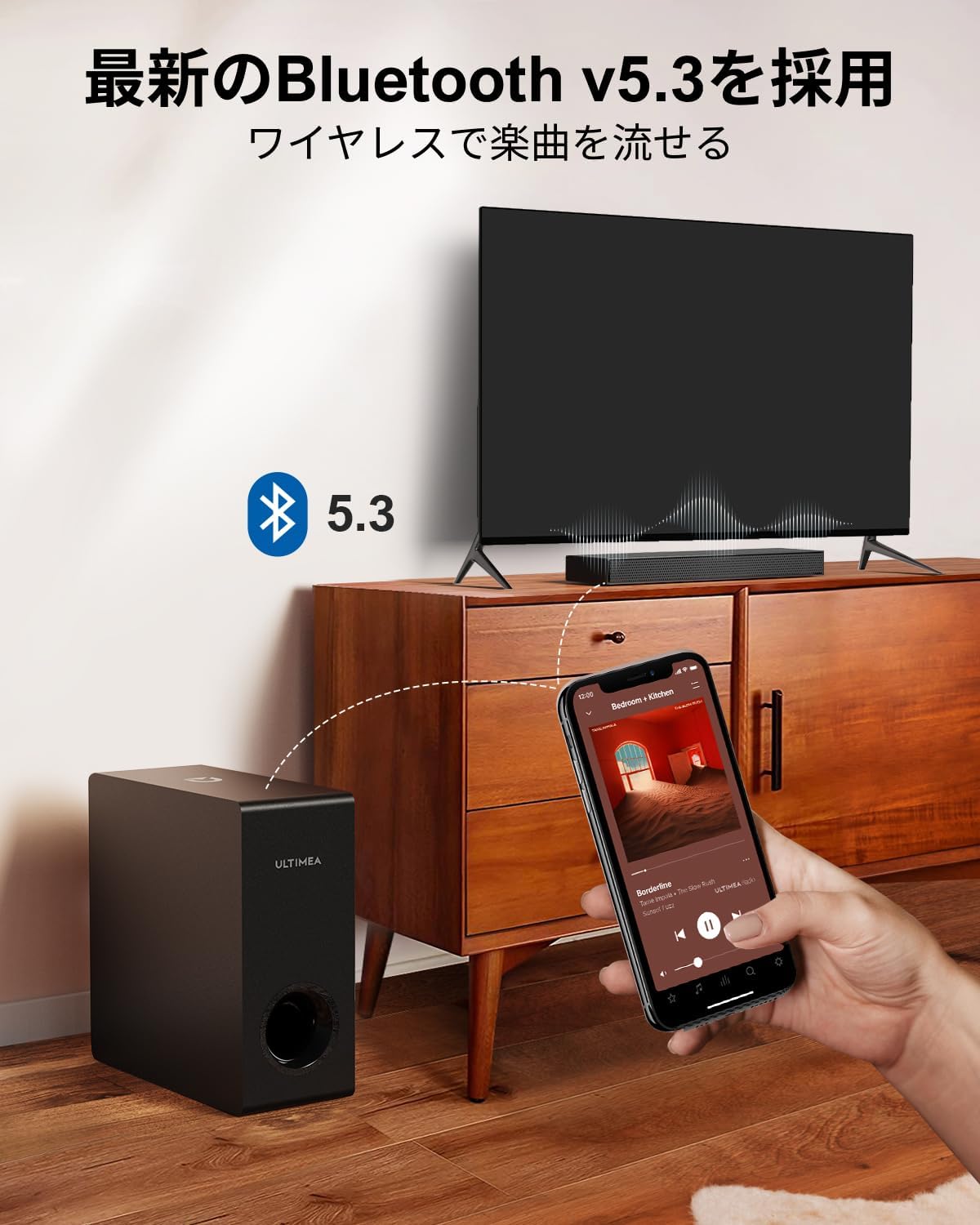
Figure 2.3: Dimensions of the soundbar and subwoofer.
2.3 Anschlüsse
The Nova S50 offers multiple connectivity options. Choose the method that best suits your device.

Abbildung 2.4: Anschlüsse auf der Rückseite.
2.3.1 HDMI eARC-Anschluss
For the highest quality audio transmission, connect your TV to the soundbar using the HDMI eARC port.
- Verbinden Sie ein Ende des mitgelieferten HDMI-Kabels mit dem HDMI eARC-Anschluss Ihres Fernsehers.
- Connect the other end of the HDMI cable to the HDMI eARC port on the soundbar.
- On the soundbar's remote control, press the 'eARC' button to select the HDMI eARC input mode.
- Ensure your TV's audio output settings are configured for HDMI eARC (usually found under TV Settings > Sound > Digital Audio Output > Auto).

Figure 2.5: HDMI eARC connection steps.
2.3.2 Optische Verbindung
Use the optical cable for digital audio connection if your TV does not support HDMI eARC.
- Verbinden Sie ein Ende des optischen Kabels mit dem optischen Ausgang Ihres Fernsehers.
- Connect the other end of the optical cable to the optical input port on the soundbar.
- Select the 'OPT' input mode on the soundbar using the remote control.
2.3.3 AUX-Verbindung
For analog audio devices, use the 3.5mm AUX cable.
- Connect one end of the 3.5mm audio cable to the audio output of your device (e.g., PC, smartphone).
- Connect the other end to the AUX input port on the soundbar.
- Select the 'AUX' input mode on the soundbar using the remote control.
2.3.4 Bluetooth-Verbindung
Connect your mobile devices wirelessly via Bluetooth 5.3.
- Turn on the soundbar and select 'BT' input mode using the remote control. The soundbar will enter pairing mode.
- On your mobile device, enable Bluetooth and search for 'Nova S50'.
- Select 'Nova S50' from the list of available devices to pair. Once connected, you will hear an audible confirmation.

Figure 2.6: Wireless audio streaming via Bluetooth 5.3.
3. Bedienungsanleitung
3.1 Ein-/Ausschalten
Drücken Sie den Netzschalter an der Soundbar oder an der Fernbedienung, um das Gerät ein- oder auszuschalten.
3.2 Eingangsauswahl
Use the dedicated input buttons (HDMI eARC, OPT, AUX, BT, USB) on the remote control to switch between audio sources.
3.3 Lautstärkeregelung
Adjust the volume using the Volume Up (+) and Volume Down (-) buttons on the remote control or the soundbar. The soundbar also supports HDMI-CEC, allowing you to control its volume with your TV remote if your TV supports this feature.

Figure 3.1: Remote control with HDMI-CEC support.
3.4 Soundmodi
The Nova S50 features audio algorithms and machine learning technology to optimize sound based on content. Use the remote control to select from the following sound modes:
- FILM: Enhances cinematic sound for movies and TV shows, emphasizing vocals and dynamic scenes.
- SPIEL: Optimized for gaming, providing clear sound effects and immersive spatial audio.
3.5 BassMX Adjustment
The dedicated subwoofer and ULTIMEA's proprietary BassMX technology provide powerful and adjustable bass. Use the BassMX button on the remote to cycle through different bass levels (Weak, Medium, Strong) to suit your preference.

Figure 3.2: BassMX technology for enhanced bass.
4. Wartung
4.1 Reinigung
To maintain the appearance and performance of your soundbar, regularly clean it with a soft, dry cloth. Do not use liquid cleaners or abrasive materials, as these can damage the finish or internal components.
4.2 Speicherung
If storing the soundbar for an extended period, disconnect it from the power source and store it in a cool, dry place, away from direct sunlight and extreme temperatures.
5. Fehlerbehebung
If you encounter issues with your ULTIMEA Nova S50 soundbar, refer to the following common problems and solutions:
- Kein Ton:
- Stellen Sie sicher, dass die Soundbar eingeschaltet ist und die richtige Eingangsquelle ausgewählt ist.
- Prüfen Sie, ob alle Kabelverbindungen (HDMI, Optisch, AUX) fest sitzen.
- Verify the TV's audio output settings are correctly configured for the chosen connection type (e.g., HDMI eARC, PCM for Optical).
- Increase the volume on both the soundbar and your connected device.
- If using HDMI eARC, ensure HDMI-CEC is enabled on your TV.
- Probleme mit der Bluetooth-Verbindung:
- Stellen Sie sicher, dass sich die Soundbar im Bluetooth-Kopplungsmodus befindet.
- Deaktivieren und aktivieren Sie Bluetooth auf Ihrem Mobilgerät erneut.
- Move your device closer to the soundbar to ensure it is within the 10-meter range.
- Löschen Sie die vorherigen Bluetooth-Kopplungen auf Ihrem Gerät und versuchen Sie es erneut.
- Verzerrter Klang:
- Reduzieren Sie die Lautstärke sowohl an der Soundbar als auch am angeschlossenen Gerät.
- Check for any physical obstructions or interference near the soundbar or subwoofer.
- Stellen Sie sicher, dass die Kabel nicht beschädigt oder lose angeschlossen sind.
- Fernbedienung funktioniert nicht:
- Ersetzen Sie die Batterien in der Fernbedienung.
- Stellen Sie sicher, dass sich keine Hindernisse zwischen der Fernbedienung und dem Sensor der Soundbar befinden.
- Richten Sie die Fernbedienung direkt auf die Soundbar.
6. Spezifikationen
| Besonderheit | Detail |
|---|---|
| Modellname | Nova S50 |
| Lautsprechertyp | Dolby Atmos Soundbar 2.1ch (with Subwoofer) |
| Konnektivitätstechnologie | AUX, Bluetooth, HDMI-eARC, Optical |
| Drahtlose Kommunikationstechnologie | Bluetooth 5.3 |
| Maximale Ausgangsleistung | 190 Watt |
| Frequenzgang | 45 Hz - 18 kHz |
| Abmessungen der Soundbar (L x B x H) | 40 cm x 7.9 cm x 3.8 cm |
| Subwoofer-Abmessungen (L x B x H) | 27 cm x 11.4 cm x 27 cm |
| Produktgewicht | 4.52 kg |
| Kontrollmethode | Fernbedienung |
| Empfohlene Raumfläche | ≤ 25 m² |

Figure 6.1: Ultra-thin driver technology for high-fidelity sound.
7. Garantie und Support
7.1 Eingeschränkte Garantie
ULTIMEA products come with a limited warranty. Please refer to the warranty card included in your package or visit the official ULTIMEA webAuf der Webseite finden Sie die detaillierten Garantiebedingungen.
7.2 Kundendienst
For any questions, technical assistance, or support needs, please contact ULTIMEA customer service. We offer 365-day support and a 30-day free return policy. You can find contact information on our official webWebsite oder über Ihre Einkaufsplattform.


