
Einführung
This manual provides comprehensive instructions for the operation and maintenance of your ATTOP X-PACK 18 Drone with Camera. Please read this manual thoroughly before operating the drone to ensure safe and optimal performance. The ATTOP X-PACK 18 is a foldable drone equipped with a 1080P 120° wide-angle FPV Wi-Fi camera, offering features like one-key take-off/landing, headless mode, 3-speed modes, 360° flip, emergency stop, one-key return, and various APP-controlled functions including gesture, voice, and gravity control, as well as flight path mode.

Image: ATTOP Drone with remote control, batteries, and carrying case.
Lieferumfang
Überprüfen Sie, ob alle Komponenten im Paket vorhanden sind:
- ATTOP X-PACK 18 Drone
- Fernbedienung
- 2 x 3.7V / 1100mAh Rechargeable Batteries
- Tragetasche
- Ersatzklingen
- USB-Ladekabel
- Schraubendreher
- Telefonhalter

Image: Visual representation of the drone, remote, batteries, and accessories included in the package.
Installationshandbuch
Entfaltung der Drohne
Carefully unfold the drone arms until they are fully extended. Ensure all arms click into place securely.

Image: Illustration of the drone's foldable design and dimensions.
Einlegen der Batterie
Insert the fully charged battery into the designated compartment on the drone. Ensure it is securely latched.
Telefon Clamp Installation (for Remote Control)
Bringen Sie den Telefonhalter anamp to the remote control. Secure your smartphone into the clamp for FPV viewing and APP control.
Image: Close-up of the remote control with a smartphone mounted in the clamp.
Einschalten
Press and hold the power button on the drone until the indicator lights illuminate. Power on the remote control.
Paarung
After powering on both the drone and remote, push the left control stick on the remote fully up and then fully down to pair the devices. The drone lights will stop flashing once paired.
Kalibrierung
If playing for the first time, press the calibration button on the remote control. This ensures stable flight.
APP-Download und Verbindung
Download the "ATTOP CLUB" APP from your device's app store. Connect your phone to the drone's Wi-Fi network (e.g., "X-PACK 18-XXXXXX"). Open the APP and select "X-PACK 18" to connect and access advanced features and FPV view.
Video: Demonstrates the ATTOP CLUB APP download, Wi-Fi connection, and interface display for the X-PACK 18 drone.
Bedienungsanleitung
Familiarize yourself with the drone's controls and features for an optimal flight experience.
Video: Comprehensive guide demonstrating drone setup, basic flight controls, and advanced features like 360° stunts and headless mode.
Grundlegende Flugsteuerung:
- Starten/Landen mit einer Taste: Press the dedicated button on the remote or APP for automatic take-off or landing.
- Ascend & Descend: Use the left control stick to adjust the drone's altitude.
- Höhenhaltung: The drone maintains a stable hover at a set altitude, ideal for capturing steady photos and videos.
- Beschneiden: Adjust the drone's flight path to correct any drifting.
- Flying Forward/Backward: Use the right control stick to move the drone in the desired direction.
- Links-/Rechtsabbiegen: Rotate the drone left or right using the left control stick.
- Links-/Rechtsflug: Move the drone sideways using the right control stick.
Erweiterte Funktionen:
- 360° Stunt (Flip): Execute impressive aerial flips with a single button press.
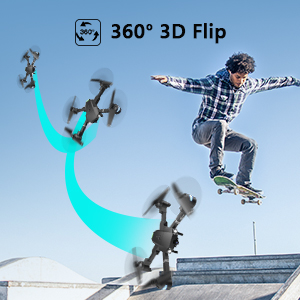
Image: Sequence showing the drone executing a 360-degree flip.
- Geschwindigkeitsmodi: Switch between 3 different speeds (30%, 60%, 100%) to match your skill level and environment.
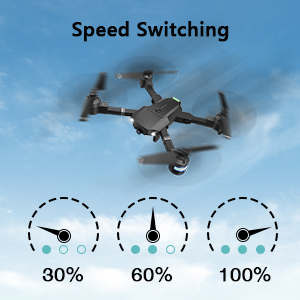
Image: Visual representation of the three-speed modes (30%, 60%, 100%).
- Headless-Modus: Simplifies flight by orienting the drone relative to the pilot, regardless of the drone's actual front direction.
- Kreisflug: The drone can perform circular flight patterns.
- Taking Pictures & Videos: Use the dedicated buttons on the remote or APP to capture 1080P HD photos and videos.
Image: Close-up of the drone's 1080P HD camera.
- Not-Halt: Instantly stop the drone in case of an emergency to prevent damage or injury.
- Rückgabe mit einer Taste: Die Drohne kehrt automatisch zu ihrem Startpunkt zurück.
APP-Controlled Functions:
- Gestensteuerung: Führen Sie bestimmte Handgesten aus, um eine Foto- oder Videoaufnahme auszulösen.
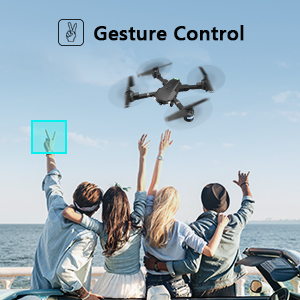
Image: People making a "V" gesture to activate the drone camera.
- Sprachsteuerung: Command the drone using voice commands for various flight actions (e.g., "Take off", "Landing", "Forward").

Bild: Examples of voice commands like "Take off" and "Right side" for drone control.
- Schwerkraftkontrolle: Control the drone's movement by tilting your smartphone, utilizing its built-in G-sensor.
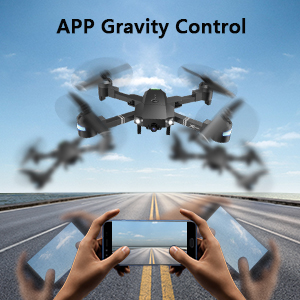
Image: Hands holding a smartphone, demonstrating how tilting controls the drone's direction.
- Flight Path Mode: Zeichnen Sie die gewünschte Flugroute auf Ihrem Smartphone-Bildschirm, und die Drohne wird ihr automatisch folgen.
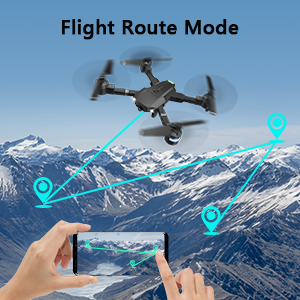
Image: A smartphone screen displaying a drawn flight path for the drone to follow.
- VR-Modus: Compatible with VR glasses for an immersive first-person view Flugerfahrung.
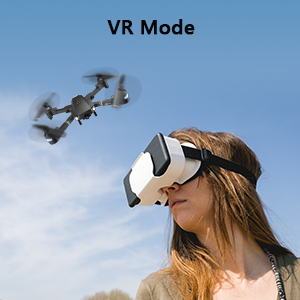
Image: A person wearing VR glasses, experiencing the drone's first-person view.
Wartung
Regelmäßige Wartung gewährleistet die Langlebigkeit und optimale Leistung Ihrer Drohne.
- Reinigung: Reinigen Sie das Drohnengehäuse und das Kameraobjektiv mit einem weichen, trockenen Tuch. Vermeiden Sie die Verwendung aggressiver Chemikalien.
- Propellerinspektion: Überprüfen Sie die Propeller regelmäßig auf Beschädigungen (Risse, Verbiegungen). Ersetzen Sie beschädigte Propeller umgehend mit den mitgelieferten Ersatzblättern und dem Schraubendreher.
- Batteriepflege: Batterien kühl und trocken lagern. Nicht überladen oder tiefentladen. Bei längerer Lagerung auf etwa 50 % ihrer Kapazität aufladen.
- Motorpflege: Motoren frei von Staub und Schmutz halten. Betrieb in sandigen oder staubigen Umgebungen vermeiden.
- Lagerung: Wenn die Drohne nicht benutzt wird, klappen Sie sie zusammen und bewahren Sie sie in der Tragetasche auf, um sie vor Staub und Beschädigungen zu schützen.
Fehlerbehebung
| Problem | Mögliche Ursache | Lösung |
|---|---|---|
| Die Drohne reagiert nicht auf die Fernbedienung. | Nicht gekoppelt, schwacher Akku, Störungen. | Ensure drone and remote are powered on and paired correctly. Recharge batteries. Move away from sources of interference. |
| Die Drohne driftet während des Fluges ab. | Not calibrated, uneven surface for take-off, wind. | Perform calibration on a flat surface. Use trimming functions to correct drift. Avoid flying in strong winds. |
| Camera not working or FPV feed is unstable. | Wi-Fi not connected, APP issue, low drone battery. | Ensure phone is connected to drone's Wi-Fi. Restart APP and drone. Charge drone battery. |
| Kurze Flugzeit. | Batterie nicht vollständig geladen, alte Batterie. | Laden Sie die Akkus vor jedem Flug vollständig auf. Erwägen Sie, alte Akkus auszutauschen. |
| Drohnen stürzen häufig ab. | Lack of experience, environmental factors, damaged propellers. | Practice in open areas. Avoid obstacles. Check and replace damaged propellers. |
Technische Daten
| Besonderheit | Detail |
|---|---|
| Marke | AN DER SPITZE |
| Modellname | X-PAKET 18 |
| Besondere Merkmale | 360 Degree Flip, Speed Adjustment, Foldable, First Person View (FPV), Long Battery Life |
| Altersspanne (Beschreibung) | Ab 96 Monaten |
| Farbe | Tiefschwarz |
| Auflösung der Videoaufnahme | 1080p |
| Konnektivitätstechnologie | W-lan |
| Fähigkeitsstufe | Alle |
| Batteriekapazität | 1100 mAh (pro Akku) |
| Flugdauer | Bis zu 20 Minuten (mit 2 Batterien)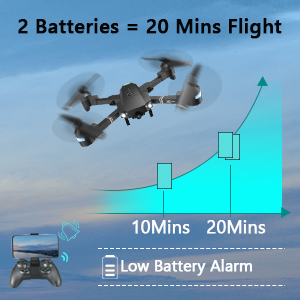 Image: Graph showing flight time with two batteries. |
| Videoaufnahmeformat | MP4 |
| Fernsteuerungstechnologie | W-lan |
| Steuerungstyp | Fernbedienung |
| Maximale Reichweite | 80 Meter |
| Material | Plastic or Reinforced Plastic |
| Technische Daten | 13.8 Zoll L x 12.6 Zoll B x 2.76 Zoll H |
| Artikelgewicht | 1.76 Pfund |
| Veröffentlichungsdatum | 12. November 2023 |
Garantie und Support
ATTOP provides customer support and assistance for your drone. For any questions or to inquire about extended warranty, please refer to the following:
- E-Mail-Support: support@attoptoys.com
- Online-Hilfe: Scannen Sie den QR-Code unten oder besuchen Sie attop.afterservice.vip für Unterstützung und Garantieinformationen.

Image: QR code for quick access to ATTOP customer service and extended warranty information.