1. Einleitung
Thank you for choosing the MASINGO Cantando C2 Portable Karaoke Machine. This manual provides essential information for setting up, operating, and maintaining your device to ensure optimal performance and enjoyment. Please read this manual thoroughly before use and retain it for future reference.

Image 1.1: The MASINGO Cantando C2 Portable Karaoke Machine, showcasing its compact design, integrated LED ring light, and two wireless microphones.
2. Lieferumfang
Prüfen Sie beim Auspacken, ob alle Komponenten vorhanden sind:
- 1xMASINGO Cantando C2 Karaoke Machine
- 2x drahtlose Mikrofone
- 1x 3.5 mm AUX-Kabel
- 1x 3.5 mm AUX-RCA TV Cable
- 1x USB-C auf USB-A Ladekabel
- 1x Benutzerhandbuch

Image 2.1: All items included in the MASINGO Cantando C2 package, laid out for inspection.
3. Einrichtung
3.1 Erstaufladung
Before first use, fully charge the karaoke machine using the provided USB-C to USB-A charging cable. The charging port is located on the rear panel. A full charge typically takes 3-4 hours.
3.2 Installation der Mikrofonbatterie
Each wireless microphone requires 2x AA batteries (not included). Unscrew the bottom part of each microphone to insert the batteries, ensuring correct polarity. The microphones will automatically connect to the karaoke machine when powered on.
3.3 Attaching Microphone Holders
Insert the two plastic microphone holders into the designated slots on the sides of the karaoke machine for convenient storage.
4. Bedienungsanleitung
4.1 Ein-/Ausschalten
Locate the power switch on the rear panel of the karaoke machine. Slide it to the 'ON' position to power on the device. To power off, slide the switch to the 'OFF' position.
4.2 Bluetooth-Konnektivität
Upon powering on, the machine will automatically enter Bluetooth pairing mode. Activate Bluetooth on your smartphone or other device and select 'MASINGO C2' from the list of available devices. A voice prompt will confirm successful pairing.
4.3 Mikrofonnutzung
Press and hold the power button on each wireless microphone to turn it on. The microphones will automatically connect to the karaoke machine. Use the '+' and '-' buttons on the microphone to adjust its individual volume. To turn off a microphone, press and hold its power button until the indicator light turns off.

Image 4.1: Close-up of the two wireless microphones, highlighting their power and volume adjustment buttons.
4.4 LED-Lichtshow
The Cantando C2 features a mesmerizing ring light LED. Press the 'LED' button on the control panel to cycle through five pre-installed light patterns or turn them off.
4.5 Versatile Connectivity Options
The karaoke machine supports multiple input sources:
- Bluetooth: Connect wirelessly to your smartphone or tablet.
- AUX: Use the provided 3.5mm AUX cable to connect external audio devices.
- USB: Stecken Sie ein USB-Laufwerk mit Musik ein files in den USB-Port.
- MicroSD (TF Card): Insert a MicroSD card with music files in den TF-Kartensteckplatz.
- FM Radio: Switch to FM Radio mode to tune into local radio stations.
- TV-Anschluss: Use the included Aux to RCA cable to connect to your TV for audio output.

Image 4.2: The top control panel of the Cantando C2, illustrating the various ports (USB, AUX, TF Card) and control buttons for mode selection, volume, and LED lights.
4.6 Voice Changer and Echo Effects
The karaoke machine offers voice distortion and echo effects. Experiment with the 'Voice' and 'ECH' (Echo) buttons on the control panel to modify your vocal output. The 'EQ' button allows for equalization adjustments.
4.7 Tragbares Design
The Cantando C2 is designed for portability with a removable handle and lightweight build. This allows for easy transport to various locations.

Image 4.3: The portable design of the Cantando C2, featuring a convenient carrying handle.
4.8 Dynamic Sound Output
The Cantando C2 delivers 25W of powerful sound through a 4-inch front speaker and dual 2-inch side speakers, ensuring clear audio for all performances.
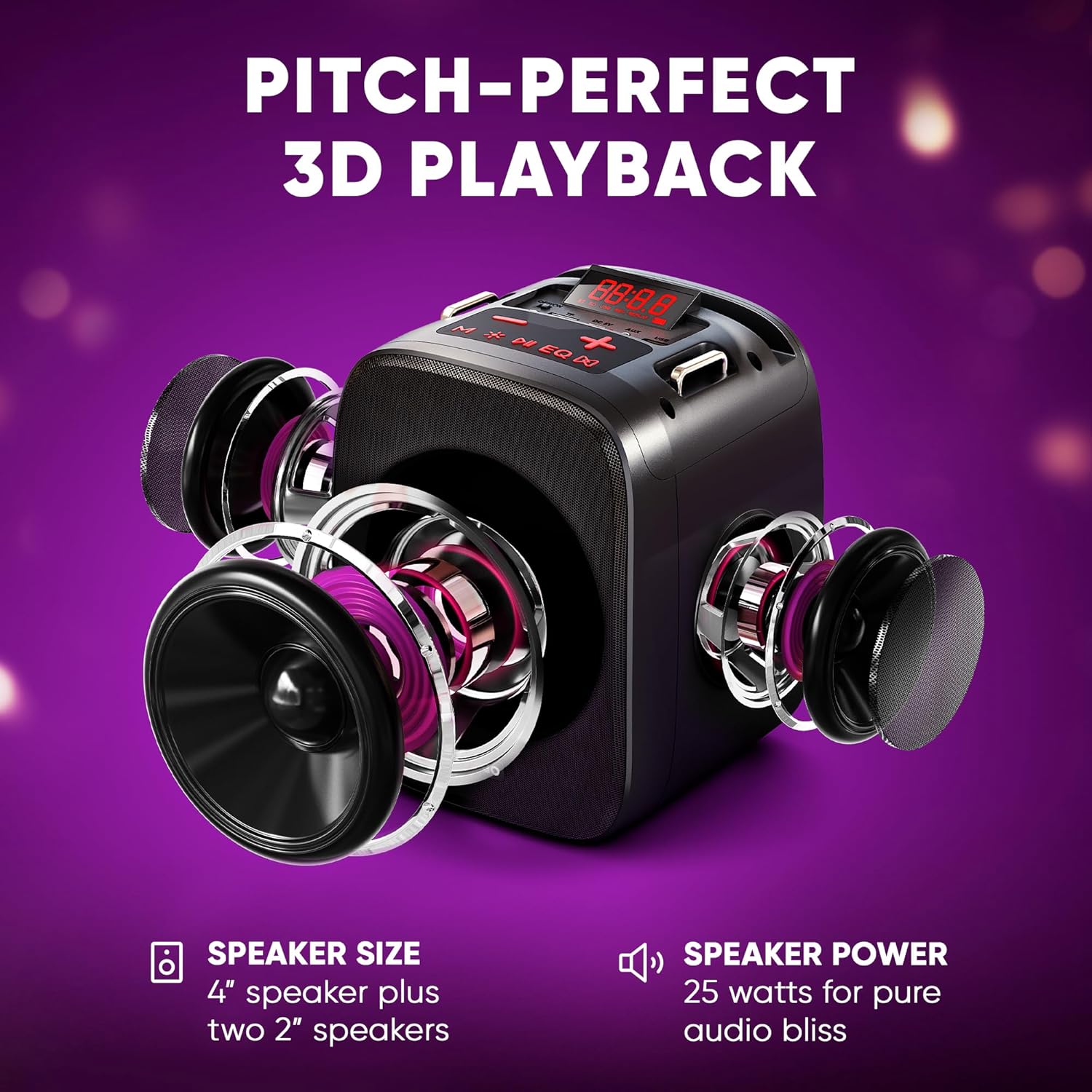
Abbildung 4.4: Eine explodierte view illustrating the three-speaker system (one 4-inch, two 2-inch) for dynamic sound output.
4.9 Anschluss an das Fernsehgerät
The Cantando C2 can be connected to a TV via Bluetooth or the provided Aux to RCA cable. This allows for displaying lyrics on the TV screen while using the karaoke machine for enhanced audio.

Image 4.5: The Cantando C2 connected to a TV, demonstrating how lyrics can be displayed for a full karaoke experience.
4.10 Produktüberschussview Video
Video 4.6: An official product video from MASINGO, introducing the Cantando C2 karaoke machine and its key features.
5. Wartung
- Halten Sie das Gerät sauber, indem Sie es mit einem weichen, trockenen Tuch abwischen.
- Das Gerät darf nicht mit Wasser oder übermäßiger Feuchtigkeit in Berührung kommen.
- Bewahren Sie die Karaoke-Maschine und die Mikrofone an einem kühlen, trockenen Ort auf, wenn sie nicht benutzt werden.
- Um ein Auslaufen zu verhindern, sollten die Batterien aus den Mikrofonen entfernt werden, wenn diese über längere Zeiträume gelagert werden.
6. Fehlerbehebung
| Problem | Mögliche Ursache | Lösung |
|---|---|---|
| Kein Strom | Schwache Batterie; Netzschalter ausgeschaltet | Laden Sie das Gerät auf; Schalten Sie den Netzschalter ein |
| Mikrofon funktioniert nicht | Low microphone batteries; Microphone not paired | Replace AA batteries; Power on microphone and ensure it pairs automatically |
| Kein Ton vom Lautsprecher | Lautstärke zu niedrig; Falscher Eingangsmodus; Gerät nicht angeschlossen | Increase volume; Select correct input mode (Bluetooth, AUX, USB, TF); Ensure device is properly connected |
| Bluetooth-Kopplung fehlgeschlagen | Device too far; Bluetooth not enabled on source device | Move device closer; Enable Bluetooth on source device and re-scan |
7. Spezifikationen
- Artikelgewicht: 4.74 Pfund
- Produktabmessungen: 10.24 x 6.93 x 10.63 Zoll
- Artikelmodellnummer: C2
- Batterien: 1 Lithium Ion battery required (included for machine), 2 AA batteries per microphone (not included)
- Farbe: Ebenholz
- Kompatible Geräte: Smartphone
- Steckertyp: 3.5 mm Klinke
- Anzahl der Sprecher: 1 (main) + 2 (side)
- Akku-Typ: Lithium-Ionen
- Medienformat: WAV
- Energiequelle: Batteriebetrieben
- Bandtage: 3.7 Volt (DC)
- Wastage: 15 watts (total 25W dynamic output)
8. Garantie und Support
For warranty information or technical support, please refer to the contact details provided in the packaging or visit the official MASINGO webBewahren Sie Ihren Kaufbeleg als Kaufnachweis auf.


