Einführung
Welcome to the user manual for your Infinity Smartwatch, Model NX 10. This device is designed to enhance your daily life with advanced fitness tracking, communication features, and smart notifications. Featuring a vibrant 1.43" AMOLED screen and robust IP68 water resistance, your smartwatch is built for both everyday use and active lifestyles. Please read this manual carefully to ensure proper operation and maintenance of your device.

Figure 1: Infinity Smartwatch NX 10. This image shows the smartwatch from an angled perspective, highlighting its round AMOLED display, black silicone strap, and two side buttons.
Aufstellen
1. Auspacken und erste Aufladung
Upon unboxing, ensure all components are present: the Infinity Smartwatch NX 10 and the charging cable.
- Verbinden Sie das magnetische Ladekabel mit den Ladekontakten auf der Rückseite der Smartwatch.
- Stecken Sie das USB-Ende des Kabels in ein Standard-USB-Netzteil (nicht im Lieferumfang enthalten) oder in einen USB-Anschluss Ihres Computers.
- The watch display will show a charging indicator. Fully charge the device before first use, which typically takes approximately 2 hours.

Figure 2: Smartwatch charging. The image illustrates the smartwatch being charged magnetically, with a green lightning bolt icon on the screen indicating charging status and a "400mAh Battery Capacity" label.
2. App-Installation und -Kopplung
To unlock the full potential of your Infinity Smartwatch, download and install the companion application, Fit Cloud Pro, auf Ihrem Smartphone.
- Scan the QR code provided in the quick start guide (if available) or search for "Fit Cloud Pro" in your smartphone's app store (Google Play Store for Android, Apple App Store for iOS).
- Installieren Sie die Anwendung.
- Open the Fit Cloud Pro app and follow the on-screen instructions to create an account or log in.
- Stellen Sie sicher, dass Bluetooth auf Ihrem Smartphone aktiviert ist.
- In the app, navigate to the device pairing section and search for your smartwatch (e.g., "NX 10" or similar Bluetooth name).
- Select your smartwatch from the list to initiate pairing. Confirm the pairing request on both your phone and the smartwatch if prompted.
- Once paired, the app will synchronize data with your smartwatch, and you can customize settings.
Bedienungsanleitung
1. Grundlegende Navigation
- Touch-Screen: Swipe left/right to navigate between main screens (e.g., activity, heart rate, weather). Swipe up/down to access quick settings or notifications. Tap to select an option.
- Seitentasten: The top button typically acts as a power button (long press) or a back/home button (short press). The bottom button may be customizable or provide quick access to sports modes.

Figure 3: 1.43" AMOLED Screen. This image highlights the vibrant display of the smartwatch, showing a detailed watch face with various data points like time, date, steps, and heart rate.
2. Anrufe tätigen und entgegennehmen
Your Infinity Smartwatch supports Bluetooth calling, allowing you to make and receive calls directly from your wrist when connected to your smartphone.
- Anrufen: Access the dialer or contacts list on your smartwatch. You can dial a number directly or select a contact to call.
- So beantworten Sie einen Anruf: When a call comes in, the smartwatch will display the caller ID. Tap the green answer icon to accept the call or the red icon to decline.

Figure 4: Stay Connected On The Go. This image shows a user interacting with the smartwatch to make a call, illustrating the microphone, dialing, call records, and contacts features.
3. Fitness- und Gesundheits-Tracking
The smartwatch is equipped with multiple sensors to monitor your health and fitness activities.
- Schrittzähler: Erfasst automatisch Ihre Schritte, die zurückgelegte Strecke und den Kalorienverbrauch im Laufe des Tages.
- Herzfrequenz-Überwachung: Provides real-time heart rate data. Access this feature from the main menu or set up continuous monitoring in the app.
- Blutdrucküberwachung: Offers blood pressure readings. For accurate results, ensure the watch is worn correctly and remain still during measurement. Hinweis: Diese Funktion dient nur zu Referenzzwecken und sollte nicht für medizinische Diagnosen verwendet werden.
- Schlafüberwachung: Erfasst Ihre Schlafmuster, einschließlich Tiefschlaf, Leichtschlaf und Wachphasen. View detailed analysis in the Fit Cloud Pro app.
- Sportmodi: Supports over 100 sports modes, including running, cycling, swimming, and more. Select your desired activity to track specific metrics.

Figure 5: Track Every Move. This image displays the smartwatch tracking a swimming activity, with additional visuals of rock climbing and cycling, indicating its multi-sport tracking capabilities.

Figure 6: More than 110 sports modes. This image shows a variety of colorful icons representing different sports activities supported by the smartwatch, overlaid on a background of a person cycling.
4. Anpassung
Personalize your smartwatch experience through the Fit Cloud Pro app.
- Gesichter ansehen: Choose from a wide range of pre-installed watch faces or download new ones via the app. You can also create custom watch faces using your own photos.
- Benachrichtigungen: Configure which app notifications you wish to receive on your smartwatch (e.g., calls, SMS, social media alerts).
- Alarme und Erinnerungen: Set alarms, sedentary reminders, and hydration reminders through the app.
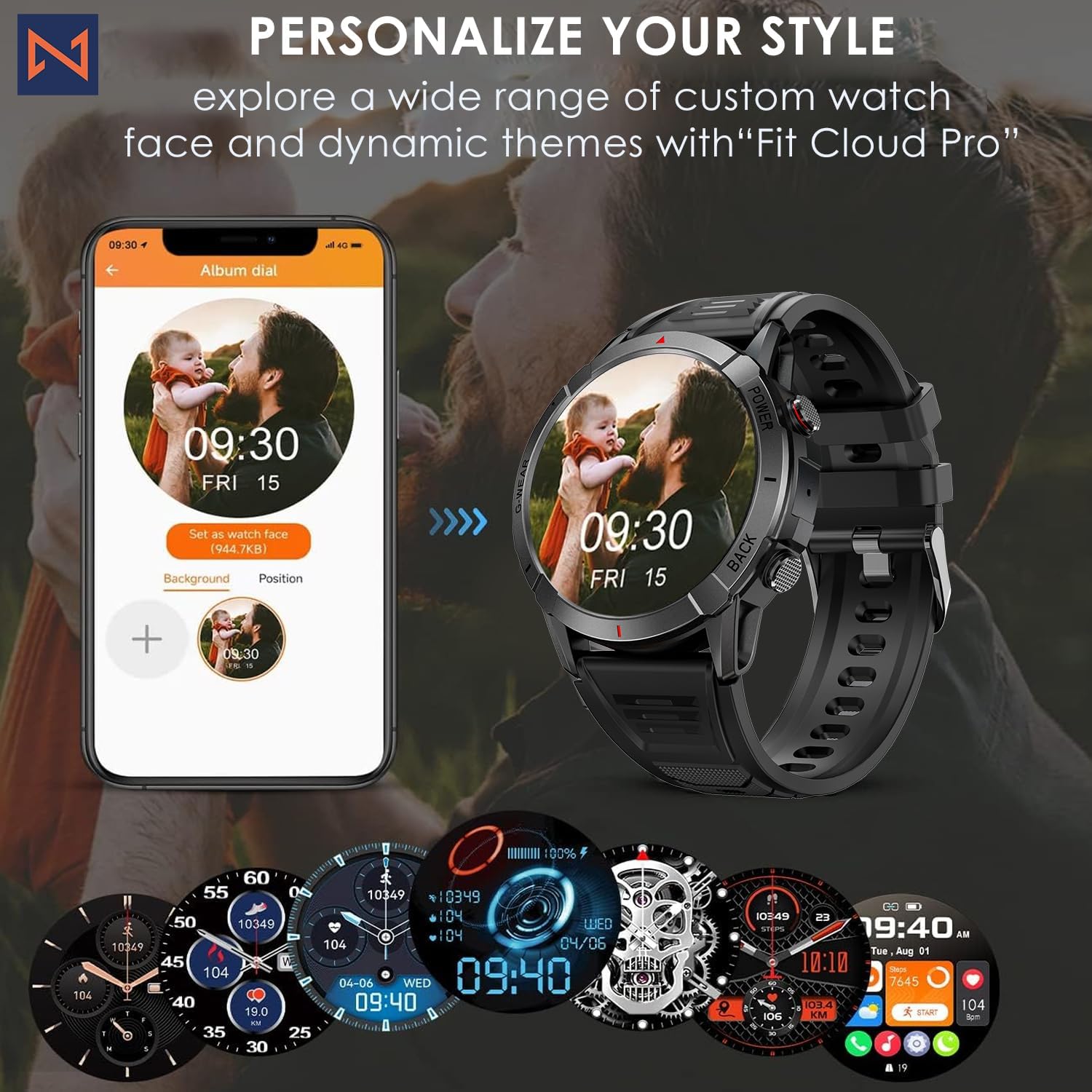
Figure 7: Personalize Your Style. This image demonstrates how to customize watch faces using the "Fit Cloud Pro" app, showing various digital and analog watch face options.
Wartung
1. Reinigung Ihrer Smartwatch
Regelmäßige Reinigung trägt dazu bei, das Aussehen und die Funktionalität Ihres Geräts zu erhalten.
- Wischen Sie Bildschirm und Gehäuse mit einem weichen, fusselfreien Tuch ab.
- Bei hartnäckigen Flecken, dampBefeuchten Sie das Tuch leicht mit Wasser. Vermeiden Sie die Verwendung von scharfen Chemikalien oder scheuernden Materialien.
- Reinigen Sie die Ladekontakte regelmäßig, um eine einwandfreie Verbindung zu gewährleisten.
2. Wasserdichtigkeit (IP68)
Your Infinity Smartwatch is rated IP68, meaning it is resistant to dust and can withstand immersion in water up to 1.5 meters for up to 30 minutes.
- Es eignet sich für den täglichen Gebrauch, zum Händewaschen und für leichten Regen.
- Avoid prolonged immersion, hot water, steam, or high-pressure water jets (e.g., showering, sauna, diving).
- Sollte die Uhr nass werden, trocknen Sie sie gründlich ab, bevor Sie sie aufladen oder die Tasten betätigen.

Figure 8: Engineered for Adventure. This image highlights the smartwatch's durability features, including waterproof, dustproof, anti-magnetic, and shockproof capabilities, with corresponding icons.
3. Batteriepflege
- Um die Batterielebensdauer zu verlängern, sollten extreme Temperaturen vermieden werden.
- Laden Sie die Uhr regelmäßig auf; vermeiden Sie es, den Akku über längere Zeiträume vollständig zu entladen.
- Verwenden Sie ausschließlich das mitgelieferte Ladekabel.
Fehlerbehebung
| Problem | Mögliche Lösung |
|---|---|
| Die Uhr lässt sich nicht einschalten | Stellen Sie sicher, dass die Uhr vollständig aufgeladen ist. Schließen Sie sie an das Ladegerät an und warten Sie einige Minuten, bevor Sie versuchen, sie einzuschalten. |
| Kopplung mit Smartphone nicht möglich |
|
| Ungenaue Gesundheitsdaten |
|
| Nicht erhaltene Benachrichtigungen |
|
| Kurze Akkulaufzeit |
|
Technische Daten
| Besonderheit | Detail |
|---|---|
| Modellnummer | NX 10 |
| Anzeige | 1.43" AMOLED Screen |
| Bildschirmauflösung | 466 x 466 HD |
| Batteriekapazität | 400 mAh Lithium-Polymer |
| Wasserbeständigkeit | IP68 |
| Konnektivität | Bluetooth |
| Betriebssystem | Android (kompatibel mit iOS) |
| Armbandmaterial | 22mm Silicon Belt |
| Material anzeigen | Zinklegierung |
| Artikelgewicht | 1.76 Unzen |
| Speicherkapazität | 128 MB |
Garantie und Support
For warranty information and technical support, please refer to the documentation included with your purchase or visit the official Infinity webWebsite.
Manufacturer: Infiniity
For further assistance, you may contact Infiniity customer service through the contact information provided on their official website or within the Fit Cloud Pro application.


