1. Einleitung
This instruction manual provides detailed information on the safe operation, maintenance, and troubleshooting of your PHALANX 3.7V Mini Cordless Rotary Tool Kit (Model: PRT-R3). Please read this manual thoroughly before using the tool to ensure proper function and to prevent injury or damage. This tool is designed for light-duty applications such as sanding, carving, polishing, engraving, and pet grooming.
2. Wichtige Sicherheitshinweise
Beachten Sie beim Umgang mit Elektrowerkzeugen stets die grundlegenden Sicherheitsvorkehrungen, um das Risiko von Bränden, Stromschlägen und Verletzungen zu verringern.
- Lies alle Anweisungen: Machen Sie sich mit der Bedienung und den Sicherheitsrichtlinien des Werkzeugs vertraut.
- Tragen Sie einen Augenschutz: Tragen Sie immer eine Schutzbrille oder eine Schutzbrille mit Seitenschutz.
- Werkstück sichern: Immer clamp oder das Werkstück auf andere Weise so zu sichern, dass es sich während des Betriebs nicht bewegen kann.
- Halten Sie Ihren Arbeitsbereich sauber: Überladene Bereiche laden zu Unfällen ein.
- Vermeiden Sie gefährliche Umgebungen: Benutzen Sie keine Elektrowerkzeuge in damp oder nassen Orten oder Regen aussetzen. Halten Sie den Arbeitsbereich gut beleuchtet.
- Halten Sie Kinder fern: Alle Besucher sollten in sicherem Abstand zum Arbeitsbereich gehalten werden.
- Ziehe dich richtig an: Tragen Sie keine weite Kleidung oder Schmuck. Enthalten Sie lange Haare.
- Use proper accessories: Verwenden Sie nur vom Hersteller empfohlenes Zubehör.
- Disconnect tool: Trennen Sie das Werkzeug von der Stromquelle, bevor Sie Einstellungen vornehmen, Zubehör wechseln oder das Werkzeug weglegen.
- Vermeiden Sie versehentliches Starten: Stellen Sie sicher, dass sich der Schalter in der AUS-Position befindet, bevor Sie den Akku einlegen.
- Nicht übertreiben: Sorgen Sie jederzeit für einen guten Stand und das Gleichgewicht.
- Behandeln Sie Werkzeuge sorgfältig: Für eine bessere und sicherere Leistung sollten Schneidwerkzeuge scharf und sauber gehalten werden. Beachten Sie die Anweisungen zum Schmieren und Wechseln von Zubehörteilen.
- Auf beschädigte Teile prüfen: Vor der weiteren Verwendung des Werkzeugs sollte eine beschädigte Schutzvorrichtung oder ein anderes Teil sorgfältig überprüft werden, um sicherzustellen, dass es ordnungsgemäß funktioniert und seine beabsichtigte Funktion erfüllt.
- Batteriesicherheit: Use only the specified charging cable. Do not expose batteries to extreme temperatures or fire.
3. Packungsinhalt
Prüfen Sie nach dem Öffnen der Verpackung, ob alle unten aufgeführten Artikel vorhanden und unbeschädigt sind:
- PHALANX Mini Cordless Rotary Tool (x1)
- 70 PCS Accessories (various types for grinding, carving, polishing, cutting, sanding, drilling)
- Accessory Storage Bag (x1)
- Type-C Fast Charging Cable (x1)

Image: The PHALANX Mini Cordless Rotary Tool Kit, displaying the main tool, a Type-C charging cable, a wrench, and a wide assortment of 70 accessories including grinding stones, diamond bits, cutting wheels, sanding drums, polishing felts, and drill bits.
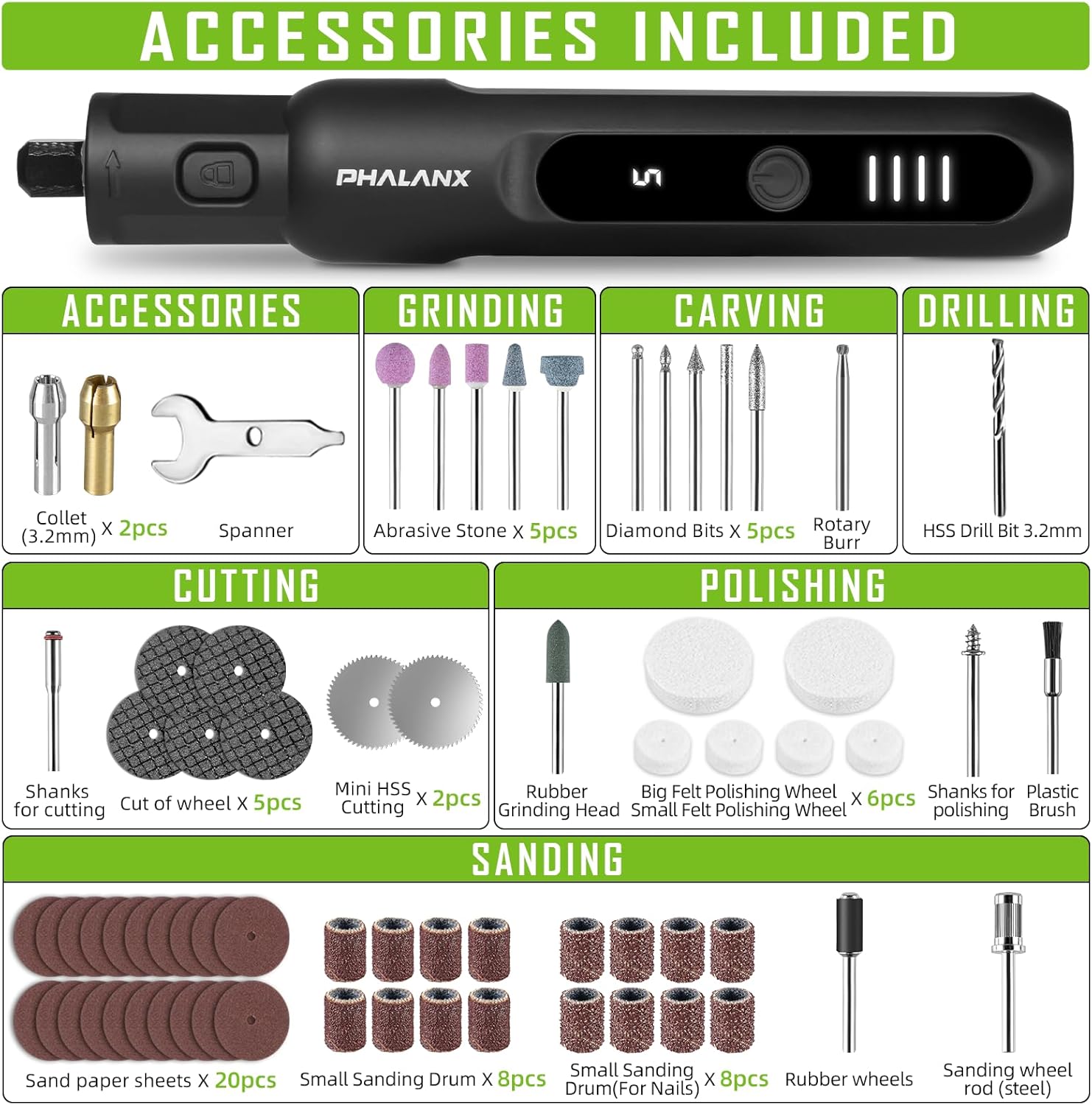
Image: A comprehensive visual guide to the 70 accessories included with the rotary tool. Categories shown are Collet (3.2mm) x2, Spanner x1, Abrasive Stone x5, Diamond Bits x5, Rotary Burr x1, HSS Drill Bit 3.2mm x1, Shanks for cutting x1, Cut of wheel x5, Mini HSS Cutting x2, Rubber Grinding Head x1, Small Felt Polishing Wheel x4, Big Felt Polishing Wheel x2, Shanks for polishing x1, Plastic Brush x1, Sand paper sheets x20, Small Sanding Drum x8, Small Sanding Drum (For Nails) x8, Rubber wheels x1, Sanding wheel rod (steel) x1, and USB Type-C Charging Cable.
4. Produktüberschreitungview
The PHALANX Mini Cordless Rotary Tool is designed for precision work with its pen-like form factor and variable speed control. Key features include:
- Kompaktes und leichtes Design: Ergonomisch gestaltet für komfortable Einhandbedienung.
- Digitaler Bildschirm: Shows current speed setting and battery level.
- 5 variable Geschwindigkeiten: Adjustable from 5000 RPM to 20000 RPM for various tasks.
- Einschaltspeicherfunktion: Remembers the last used speed setting.
- 360° Full Coverage Working Light: Illuminates the workpiece for improved visibility.
- Non-slip Rubber Grip: Enhances comfort and control during use.
- Typ-C-Aufladung: Bequemes und schnelles Laden.

Bild: Eine detaillierte view of the rotary tool's control panel. It highlights the ON/OFF button (1), which requires a 1.5-second long press to activate or deactivate. The LED Digital Display (2) shows the current speed setting (e.g., '5') and includes a memory function. The Power Indicator (3) consists of four LED bars, providing a soft light for eye protection and indicating the remaining battery charge.

Image: This image illustrates the core functionalities of the PHALANX 3.7V Cordless Rotary Tool, including its 5-speed regulation, a speed range of 5000-20000 RPM, a power-on memory function that recalls the last speed setting, an LED digital display for speed and battery, and 360-degree full coverage lighting for enhanced visibility during operation.
5. Einrichtung
5.1 Erstaufladung
Before first use, fully charge the rotary tool. The battery is partially charged from the factory but a full charge is recommended for optimal performance.
- Connect the provided Type-C charging cable to the charging port at the bottom of the rotary tool.
- Verbinden Sie das andere Ende des USB-Kabels mit einem kompatiblen USB-Netzteil (nicht im Lieferumfang enthalten) oder einem USB-Anschluss Ihres Computers.
- The power indicator lights will illuminate and show charging progress. All four bars will be solid when fully charged.
5.2 Einbau/Austausch von Zubehör
Always ensure the tool is turned OFF before installing or changing accessories.
- Locate the spindle lock button near the chuck. Press and hold this button to lock the spindle.
- Using the provided spanner wrench, loosen the collet nut by turning it counter-clockwise.
- Setzen Sie den gewünschten Zubehörschaft in die Spannzange ein. Stellen Sie sicher, dass der Schaft vollständig eingerastet ist.
- While still holding the spindle lock button, tighten the collet nut clockwise with the spanner wrench until the accessory is securely held. Do not overtighten.
- Lassen Sie den Spindelsperrknopf los.
6. Bedienung
6.1 Ein-/Ausschalten
- To turn the tool ON, long press the ON/OFF button for approximately 1.5 seconds. The LED digital display will light up, showing the last used speed setting.
- To turn the tool OFF, long press the ON/OFF button for approximately 1.5 seconds again.
6.2 Geschwindigkeit anpassen
The tool features 5 variable speed settings, ranging from 5000 RPM to 20000 RPM.
- Once the tool is ON, short press the ON/OFF button to cycle through the 5 speed settings. The digital display will show the current speed level (1-5).
- Select the appropriate speed for your application. Lower speeds are suitable for polishing and delicate work, while higher speeds are for cutting and grinding.

Image: This graphic illustrates the core functionalities of the PHALANX rotary tool, including its 5-speed regulation, a speed range of 5000-20000 RPM, a power-on memory function that recalls the last speed setting, an LED digital display for speed and battery, and 360-degree full coverage lighting for enhanced visibility during operation.

Image: This visual demonstrates the power-on memory function of the PHALANX rotary tool, which automatically remembers the last used speed setting. It also highlights the real-time speed and battery display, providing immediate feedback on the tool's operational status and remaining charge.
6.3 Anwendungen
The PHALANX Mini Cordless Rotary Tool is versatile and can be used for a variety of tasks with the appropriate accessories:
- Schleifen: Use sanding drums or sandpaper sheets for smoothing surfaces.
- Carving: Utilize diamond bits or rotary burrs for intricate designs on wood, plastic, or soft metals.
- Polieren: Apply felt polishing wheels with polishing compound for a high-gloss finish.
- Gravur: Employ fine diamond bits for detailed engraving on various materials.
- Schneiden: Use mini HSS cutting wheels or cut-off wheels for light cutting tasks.
- Bohren: Use HSS drill bits for small holes.
- Pet Grooming: Specifically, for pet nail sanding using appropriate sanding drums.

Image: A collage demonstrating the wide range of applications for the PHALANX rotary tool, including drilling into wood, grinding metal, cutting thin materials, sanding pet nails, carving intricate details, and sanding wood surfaces.
7. Wartung
Regelmäßige Wartung gewährleistet die Langlebigkeit und optimale Leistung Ihres Rotationswerkzeugs.
- Reinigung: After each use, wipe down the tool with a clean, dry cloth. Use a soft brush to remove dust and debris from vents and the chuck area. Do not use harsh chemicals or abrasive cleaners.
- Zubehöraufbewahrung: Store all accessories in the provided storage bag or a suitable container to prevent loss and damage.
- Werkzeugaufbewahrung: Store the rotary tool in a dry, cool place, away from direct sunlight and out of reach of children.
- Batteriepflege: For long-term storage, charge the battery to about 50% capacity. Recharge every 3-6 months if not in use to maintain battery health.
8. Fehlerbehebung
If you encounter issues with your PHALANX Mini Cordless Rotary Tool, refer to the table below for common problems and solutions.
| Problem | Mögliche Ursache | Lösung |
|---|---|---|
| Das Gerät lässt sich nicht einschalten. | Batterie ist leer. Einschalttaste nicht richtig gedrückt. | Laden Sie das Gerät vollständig auf. Halten Sie die EIN/AUS-Taste 1.5 Sekunden lang gedrückt. |
| Das Zubehör wackelt oder fällt heraus. | Collet nut is loose. Accessory shank is not fully inserted. Incorrect collet size. | Die Spannmutter fest anziehen. Ensure accessory shank is fully seated. Use the correct collet for the accessory shank size. |
| Tool slows down or stops under light pressure. | Die Batterie ist schwach. Speed setting is too low for the task. Überlastschutz aktiviert. | Laden Sie den Akku auf. Erhöhen Sie die Geschwindigkeitseinstellung. Reduce pressure on the tool. Allow tool to cool if it overheats. |
| LED-Anzeige funktioniert nicht. | Tool is off. Fehlfunktion. | Schalten Sie das Werkzeug ein. Wenden Sie sich an den Kundendienst, wenn das Problem nach dem Aufladen weiterhin besteht. |
If the problem persists after attempting these solutions, please contact PHALANX customer support.
9. Spezifikationen
| Besonderheit | Detail |
|---|---|
| Marke | PHALANX |
| Modellnummer | PRT-R3 |
| Bandtage | 3.7 Volt (DC) |
| Stromquelle | Batteriebetrieben (1 Lithium-Ionen-Akku im Lieferumfang enthalten) |
| Maximale Drehzahl | 20000 U/min |
| Minimale Drehzahl | 5000 U/min |
| Geschwindigkeitseinstellungen | 5 variable Geschwindigkeiten |
| Besondere Merkmale | Cordless, Digital Display, Pen-like design, 360° Working Light, Power-on Memory Function |
| Artikelgewicht | 13.4 Unzen |
| Produktabmessungen (L x B x H) | 6.02 x 0.78 x 0.78 Zoll |
| Im Lieferumfang enthaltene Komponenten | Mini Rotary tool x1, 70 PCS accessories, Type-C Fast Charging Cable |
10. Garantie und Kundendienst
PHALANX is committed to providing quality products and customer satisfaction. While specific warranty details are not provided in this manual, most PHALANX products come with a standard manufacturer's warranty covering defects in materials and workmanship.
For warranty claims, technical assistance, or any questions regarding your PHALANX 3.7V Mini Cordless Rotary Tool Kit, please contact PHALANX customer service through the retailer where the product was purchased or visit the official PHALANX webWebsite für Support-Kontaktinformationen.
You are welcome to reach out to PHALANX anytime, a quality after sales team will be at your service.
PHALANX Official Store: Visit PHALANX Store on Amazon


