1. Einleitung
Thank you for choosing the FOREVER MATB-100 Wireless Power Bank. This device is designed to provide convenient and efficient charging for your mobile devices, featuring both wired and wireless charging capabilities. Please read this manual carefully before using the product to ensure safe and optimal performance.
2. Hauptmerkmale
- Vielseitiges Laden: Supports simultaneous charging of three devices via wireless induction, USB-A, and USB-C ports.
- LED-Anzeige: A practical LED display accurately shows the current battery level of the power bank.
- Smart Magnetic Grip: Features a special magnetic grip to stabilize your phone with the power bank, allowing hands-free use during charging.
- Hohe Kapazität: Equipped with a 10,000 mAh battery, providing multiple recharges for your devices.
- Schnelles Laden: Supports Power Delivery (PD) and Quick Charge (QC) technologies for rapid charging.
- Integrierter Ständer: Allows the power bank to function as a stand for your phone while charging.
3. Produktüberschreitungview
Familiarize yourself with the components of your FOREVER MATB-100 Wireless Power Bank.

Bild 3.1: Vorder- und Rückseite view of the FOREVER MATB-100 Wireless Power Bank, highlighting the wireless charging pad and the integrated kickstand.

Bild 3.2: Seite view of the power bank, illustrating the USB-A output port, USB-C input/output port, and the LED battery level indicators.

Bild 3.3: The power bank magnetically attached to the back of a smartphone, demonstrating the secure magnetic grip feature.

Bild 3.4: Diagram showing the dimensions of the power bank: approximately 10.8 cm in length and 6.8 cm in width.
Komponenten:
- Wireless Charging Pad (with magnetic alignment)
- LED-Batteriestandsanzeige
- Netzschalter
- USB-A-Ausgangsanschluss
- USB-C-Eingangs-/Ausgangsanschluss
- Integrierter Ständer
4. Einrichtung und Erstladung
4.1 Aufladen der Powerbank
Before first use, fully charge your FOREVER MATB-100 Power Bank.
- Verbinden Sie das mitgelieferte USB-C-Kabel mit dem USB-C-Anschluss der Powerbank.
- Connect the other end of the USB-C cable to a compatible USB wall adapter (not included). For optimal charging speed, use a Power Delivery (PD) compatible adapter.
- The LED indicators will illuminate to show the charging progress. When all LEDs are solid, the power bank is fully charged.
Notiz: The power bank can be charged using the USB-C port. It is recommended to fully charge the power bank every three months if not in regular use to maintain battery health.
5. Bedienungsanleitung
5.1 Batteriestand prüfen
Press the power button once to check the remaining battery level. The LED indicators will light up, with each LED representing approximately 25% of the battery capacity.
5.2 Kabelloses Laden
The MATB-100 supports wireless charging for compatible devices, including MagSafe-enabled iPhones and other Qi-compatible smartphones.
- Stellen Sie sicher, dass die Powerbank ausreichend geladen ist.
- Place your wireless charging compatible device onto the wireless charging pad of the power bank. For MagSafe-enabled devices, the power bank will magnetically align.
- The device should begin charging automatically. If not, press the power button on the power bank to activate wireless charging.
- The LED indicators on the power bank may show charging status.
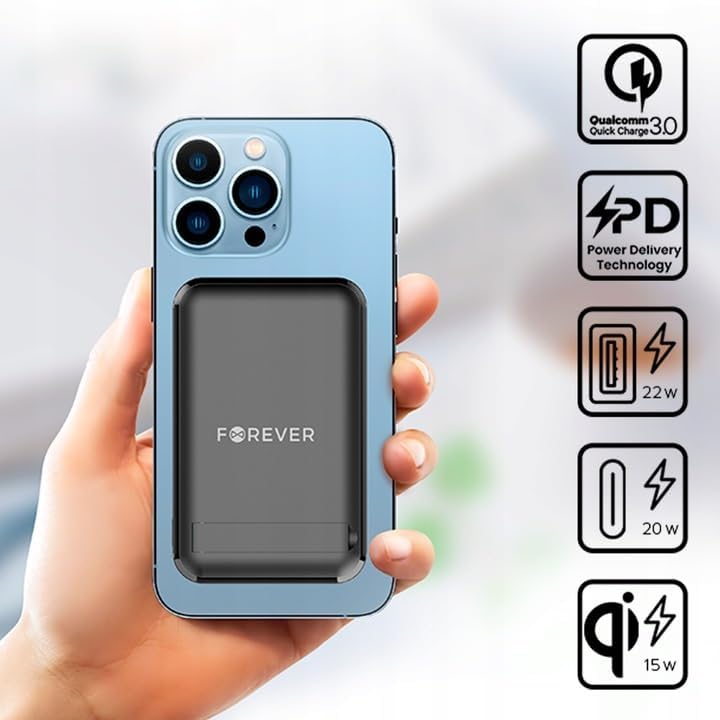
Bild 5.1: A smartphone attached to the power bank, illustrating wireless charging in progress and icons representing Quick Charge, Power Delivery, and various wattage Ausgänge.
Tipp: Use the integrated kickstand to prop up your phone while it charges wirelessly, allowing for comfortable viewing.
5.3 Wired Charging (USB-A and USB-C)
The power bank can charge devices via its USB-A and USB-C ports.
- Stellen Sie sicher, dass die Powerbank ausreichend geladen ist.
- Connect one end of a compatible charging cable to your device and the other end to either the USB-A or USB-C output port on the power bank.
- The device should begin charging automatically. If not, press the power button on the power bank.

Bild 5.2: A smartphone connected to the power bank via a USB-C cable, demonstrating wired charging.
Notiz: The USB-C port functions as both an input for charging the power bank and an output for charging other devices. The USB-A port is an output only.
5.4 Gleichzeitiges Laden
The FOREVER MATB-100 can charge up to three devices simultaneously (one wirelessly, one via USB-A, and one via USB-C). The total output power will be distributed among the connected devices.
6. Pflege und Wartung
- Keep the power bank dry. Moisture can damage the internal circuitry.
- Nicht extremen Temperaturen (heiß oder kalt) aussetzen.
- Vermeiden Sie das Fallenlassen oder starke Stöße auf die Powerbank.
- Reinigen Sie die Oberfläche mit einem weichen, trockenen Tuch. Verwenden Sie keine scharfen Chemikalien oder Scheuermittel.
- An einem kühlen, trockenen Ort aufbewahren und direkte Sonneneinstrahlung vermeiden.
- If not used for extended periods, charge the power bank at least once every three months to prolong battery life.
7. Fehlerbehebung
7.1 Powerbank lädt nicht
- Stellen Sie sicher, dass das USB-C-Kabel sowohl mit der Powerbank als auch mit dem Netzteil fest verbunden ist.
- Vergewissern Sie sich, dass der Wandadapter ordnungsgemäß funktioniert und an eine funktionierende Steckdose angeschlossen ist.
- Try using a different USB-C cable and/or wall adapter.
7.2 Gerät lädt nicht über Powerbank
- Check the power bank's battery level. If it's low, recharge the power bank.
- Drücken Sie den Ein-/Ausschalter an der Powerbank, um den Ladevorgang zu aktivieren.
- For wired charging, ensure the cable is securely connected to both the power bank and your device. Try a different cable or port.
- For wireless charging, ensure your device is properly aligned on the charging pad and is wireless charging compatible. Remove any thick cases that might interfere.
- Ensure there are no metallic objects between the power bank and your device during wireless charging.
7.3 Langsames Laden
- Verwenden Sie unbedingt ein hochwertiges, kompatibles Ladekabel.
- For wired charging, ensure your device supports Quick Charge (QC) or Power Delivery (PD) if you expect fast charging speeds.
- For wireless charging, ensure your device supports fast wireless charging and is correctly aligned.
- Das gleichzeitige Laden mehrerer Geräte kann die Ladegeschwindigkeit jedes einzelnen Geräts verringern.
8. Spezifikationen
| Modellname | MATB-100 |
| Marke | FÜR IMMER |
| Batteriekapazität | 10000 mAh (Milliampvor Stunde) |
| Batteriezusammensetzung | Lithium-Ionen |
| Steckertyp | USB Typ A, USB Typ C |
| Besonderheit | Wireless Charging, Magnetic Grip, Integrated Kickstand |
| Bandtage | 5 Volts (Output) |
| Anzahl der Ports | 2 (USB-A, USB-C) + Wireless Charging |
| Kompatible Geräte | Smartphones (including MagSafe compatible), Tablets, Headphones, Smartwatches |
| Abmessungen (L x B x H) | 10.8 cm x 6.8 cm x 2 cm (ungefähr) |
| Maximale drahtlose Ausgangsleistung | 15 W |
| Maximaler USB-A-Ausgang | 22.5W (Quick Charge) |
| Maximale USB-C-Ausgangsleistung | 20 W (Leistungsabgabe) |
9. Sicherheitshinweise
- Das Batteriefach darf nicht auseinandergenommen, geöffnet oder zerkleinert werden.
- Setzen Sie die Powerbank keiner Hitze oder Feuer aus. Vermeiden Sie die Lagerung in direktem Sonnenlicht.
- Do not short-circuit the power bank. Do not store battery packs haphazardly in a box or drawer where they may short-circuit each other or be short-circuited by conductive materials.
- Setzen Sie die Powerbank keinen mechanischen Erschütterungen aus.
- Bei einem Batterieaustritt darf die Flüssigkeit nicht mit Haut oder Augen in Berührung kommen. Sollte es dennoch zu Kontakt gekommen sein, spülen Sie die betroffene Stelle gründlich mit Wasser ab und suchen Sie einen Arzt auf.
- Bewahren Sie die Powerbank außerhalb der Reichweite von Kindern auf.
- Kinder sollten bei der Benutzung der Powerbank beaufsichtigt werden.
- Verwenden Sie ausschließlich das Ladegerät, das speziell für das Gerät vorgesehen ist.
- Entsorgen Sie die Powerbank gemäß den örtlichen Vorschriften. Werfen Sie sie nicht in den Hausmüll.
10. Garantie und Support
For warranty information and technical support, please refer to the documentation provided with your purchase or contact the FOREVER customer service department. Keep your proof of purchase for warranty claims.
For further assistance, you may visit the official FOREVER webWebsite oder wenden Sie sich an Ihren Händler.


