1. Einleitung
This manual provides detailed instructions for the installation, operation, and maintenance of your Diamond Audio DMD600.4D 4-Channel Digital Amplifier. Please read this manual thoroughly before attempting installation or operation to ensure proper use and to prevent damage to the unit or connected components. Keep this manual for future reference.
2. Sicherheitshinweise
Beachten Sie die folgenden Sicherheitsvorkehrungen, um Verletzungen oder Schäden zu vermeiden:
- Energiequelle: Verbinden Sie ampVerstärker nur an ein 12V DC-Stromsystem mit negativer Masse anschließen.
- Verdrahtung: Ensure all wiring is correctly connected and insulated to prevent short circuits. Use appropriate gauge wires for power and ground connections.
- Montage: Montieren Sie die ampDer Verstärker sollte sicher an einem Ort aufgestellt werden, der für ausreichende Belüftung sorgt und vor Feuchtigkeit und übermäßiger Hitze geschützt ist.
- Lautstärkepegel: Längerer Kontakt mit hohen Lautstärken kann zu Gehörschäden führen. Passen Sie die Lautstärke verantwortungsvoll an.
- Professionelle Installation: Wenn Sie sich bezüglich irgendeines Aspekts der Installation unsicher sind, konsultieren Sie einen qualifizierten Fachmann.
3. Packungsinhalt
Überprüfen Sie, ob alle Artikel im Paket vorhanden sind:
- Diamond Audio DMD600.4D Ampschwerer
- Befestigungsmaterial (Schrauben, Unterlegscheiben)
- Benutzerhandbuch (dieses Dokument)
4. Produktmerkmale
The Diamond Audio DMD600.4D ampDer Verstärker bietet folgende Hauptmerkmale:
- 800W RMS power output.
- 4-channel configuration, suitable for various audio setups.
- Waterproof design for marine and motorsport applications.
- Kompakte Größe für flexible Installation.
- Robuste Konstruktion für lang anhaltende Leistung.
5. Einrichtung und Installation
Eine fachgerechte Installation ist für optimale Leistung und Sicherheit unerlässlich. Befolgen Sie diese Schritte sorgfältig.
5.1 Montage der Ampschwerer
- Choose a mounting location that is dry, well-ventilated, and secure. Avoid areas exposed to direct sunlight or excessive heat.
- Verwenden Sie die amplifier as a template to mark the mounting screw locations.
- Bohren Sie gegebenenfalls Pilotlöcher und achten Sie darauf, dass keine Fahrzeugkomponenten hinter der Montagefläche beschädigt werden.
- Sichern Sie die ampVerstärker unter Verwendung des mitgelieferten Montagezubehörs.
5.2 Kabelverbindungen
Refer to the diagrams below for proper wiring connections. Ensure the vehicle's battery is disconnected before making any power connections.
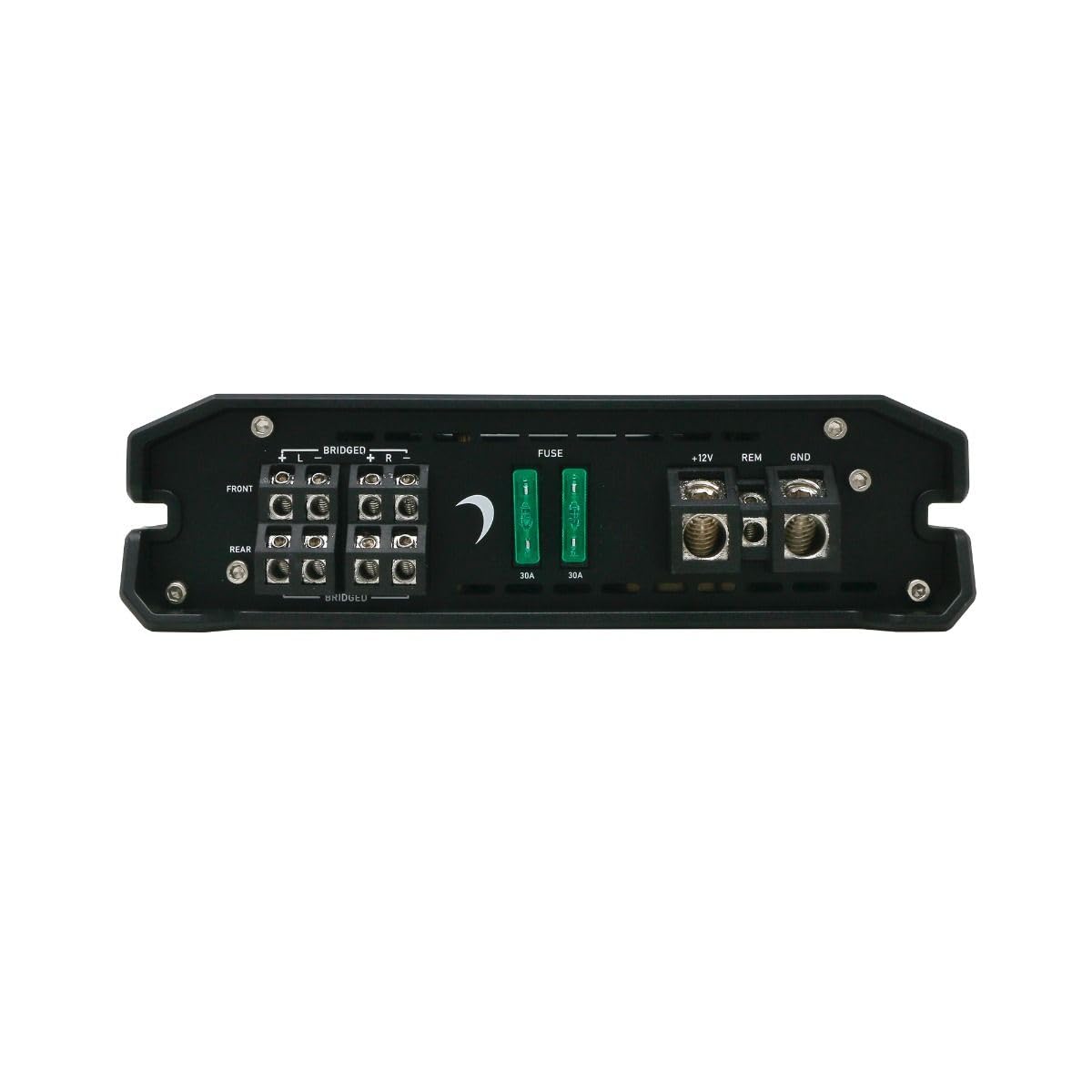
Abbildung 1: Rear panel connections for power, ground, remote, and speaker outputs.
- Power (B+ / +12V): Connect a suitable gauge power cable directly from the positive terminal of the vehicle's battery to the +12V terminal on the amplifier. Install an in-line fuse (not supplied) within 18 inches of the battery.
- Masse (GND): Connect a suitable gauge ground cable from the GND terminal on the amplifier to a clean, unpainted metal surface of the vehicle chassis. Ensure a solid, low-resistance connection.
- Fernbedienung (REM): Verbinden Sie ein Remote-Einschaltkabel vom Remote-Ausgang Ihres Autoradios mit dem REM-Anschluss des ampVerstärker. Dieser Draht schaltet den ampVerstärker mit dem Autoradio ein- und ausschalten.
- Lautsprecherausgänge: Connect your speakers to the designated speaker terminals (FRONT L/R, REAR L/R). Observe correct polarity (+ to + and - to -). For bridged mode, refer to the specific bridging instructions on the amplifier or in the specifications section.
- Cinch-Eingänge: Schließen Sie RCA-Kabel von den Vor-/Unterbuchsen Ihres Autoradios an.amp outputs to the FRONT and REAR RCA input jacks on the ampschwerer.

Abbildung 2: Front panel with RCA inputs and audio control adjustments.
6. Bedienungsanleitung
Nach der Installation einstellen ampVerstärkereinstellungen für optimale Audioleistung.
6.1 Erste Einrichtung und Anpassungen
The DMD600.4D features various controls for fine-tuning your audio system:
- Kontrolle erlangen: Passt die Eingangsempfindlichkeit des an ampStellen Sie den Verstärker so ein, dass er zum Ausgangssignal Ihres Autoradios passt. Beginnen Sie mit der minimalen Verstärkung und erhöhen Sie diese langsam, bis die gewünschte Lautstärke ohne Verzerrungen erreicht ist.
- X-OVER (Crossover) Control: Allows you to set the frequency range that the amplifier sends to your speakers.
- HPF (Hochpassfilter): Allows frequencies above the set point to pass through. Useful for full-range speakers to prevent low-frequency distortion.
- LPF (Tiefpassfilter): Allows frequencies below the set point to pass through. Typically used for subwoofers.
- MODE-Schalter: Selects the operating mode (e.g., 2-channel, 4-channel, bridged). Refer to the specific markings on the amplifier for available modes.
Wichtig: Make adjustments incrementally and listen for clarity. Over-driving the amplifier or speakers can cause damage.
7. Wartung
The Diamond Audio DMD600.4D ampDer Verstärker benötigt nur minimalen Wartungsaufwand, um eine langfristige Leistungsfähigkeit zu gewährleisten.
- Reinigung: Wischen Sie regelmäßig ab ampReinigen Sie die Außenseite des Verstärkers mit einem weichen, trockenen Tuch. Verwenden Sie keine scharfen Chemikalien oder Scheuermittel.
- Belüftung: Stellen Sie sicher, dass die ampDie Kühlrippen des Verstärkers sind frei von Staub und Schmutz, um eine ordnungsgemäße Wärmeableitung zu gewährleisten.
- Verbindungen: Überprüfen Sie regelmäßig alle Kabelverbindungen auf festen Sitz und Korrosion. Lose Verbindungen können zu Funktionsstörungen oder Schäden führen.
8. Fehlerbehebung
Wenn Sie Probleme mit Ihrem ampVerstärker, konsultieren Sie die folgende Tabelle, bevor Sie professionelle Hilfe in Anspruch nehmen.
| Problem | Mögliche Ursache | Lösung |
|---|---|---|
| Kein Strom / AmpVerstärker schaltet sich nicht ein | Sicherung durchgebrannt; Lose Strom-/Masse-/Fernbedienungsleitung; Fehlerhaftes Ferneinschaltsignal. | Prüfen Sie die Inline-Sicherung und amplifier fuses; Verify all power, ground, and remote connections are secure; Test remote wire for 12V signal. |
| Keine Audioausgabe | Lose Cinch-Kabel; Falsche Verstärkungseinstellung; Lautsprecherkabel nicht angeschlossen; Amplifier im Schutzmodus. | Check RCA connections; Adjust gain; Verify speaker wiring; Check for short circuits in speaker wiring. |
| Verzerrter Klang | Gain set too high; Incorrect crossover settings; Damaged speakers. | Reduce gain; Adjust crossover settings; Inspect speakers for damage. |
| AmpVerstärkerüberhitzung | Insufficient ventilation; Impedance too low; Prolonged high volume. | Sorgen Sie für ausreichende Luftzirkulation um ampVerstärker; Überprüfen Sie die Impedanzanpassung der Lautsprecher. amplifier specifications; Reduce volume. |
9. Spezifikationen
Technical specifications for the Diamond Audio DMD600.4D AmpReiniger:
| Besonderheit | Detail |
|---|---|
| Modellnummer | DMD600.4D |
| Marke | Diamant Audio |
| Anzahl der Kanäle | 4 |
| Ausgangsleistung | 800 Watt (RMS) |
| Montagetyp | Oberflächenmontage |
| Verpackungsabmessungen | 9 x 9 x 4 Zoll |
| Gewicht | 4 Pfund |
10. Garantie und Support
Diamond Audio products are designed and manufactured to the highest quality standards. This product is covered by a limited warranty against defects in materials and workmanship. For specific warranty terms, duration, and claim procedures, please refer to the warranty card included with your product or visit the official Diamond Audio webWebsite.
For technical support or service inquiries, please contact Diamond Audio customer service through their official channels. Do not attempt to repair the amplifier yourself, as this may void your warranty.


